Page 11 of 15
1+3 monitor setup with 34" ultrawides
Posted: 22 Dec 2016, 01:09
by bizzy11
Hey everyone,
Hoping to get some clarification on a monitor setup I'm planning to do with the WSGF Ultimate Desk Stand v2 before purchasing.
I have 2x 34" ultrawides and 2x regular 24" widescreen monitors (all Dell if that matters). I wanted to stack the two ultrawide monitors on top of one another in the center, and have the two 24" monitors on either side of the bottom monitor.
I read the description and know the first row is possible with my monitors, but do I need additional hardware in order to fit the top ultrawide? I read I also need the HD adjustable pivot to use with the ultrawides, and I assume I'd need two for this setup. Also, these pivots will mount to the poles and not the wall correct? The description said it needs to be mounted to a wall stud so I was a little confused.
Finally, I'm a little concerned about putting this many monitors on one stand, so wanted to hear if anyone else has done a similar setup without any issues.
Thanks for any help, glad to join this community!
Re: 1+3 monitor setup with 34" ultrawides
Posted: 22 Dec 2016, 22:44
by bizzy11
Anyone?
Re: 1+3 monitor setup with 34" ultrawides
Posted: 23 Dec 2016, 05:12
by skipclarke
Sorry that it took me just over 24 hours to respond...
The WSGF Ultimate v2 will work for your setup. I've done a 34" flanked by 25" panels, with another 25" above. Others have done triple 27" with a 27" above. A 34" ultrawide is the same height as a 27" 16:9, so a 34" ultrawide will also work in the +1 position.
You will need 2x of the HD pivots. I corrected the issue with the HD Pivot page referencing wall mounting. I had used an old page template when I created the HD Pivot page in the Store.
The weight won't be an issue. The base used with the Ultimate is the same one that Ergotech uses for their Hex stand, which supports 6x 24" panels. This same stand is used for 5x1-Portrait configs, and I've had some folks do Hex and other odd configurations. You shouldn't see any issues.
Re: 1+3 monitor setup with 34" ultrawides
Posted: 24 Dec 2016, 00:42
by bizzy11
Thanks for the clarification. Do you know if there are any tilt kits for a 34" like the one mentioned in this thread for the 27"? I tried searching around for one but it seems like most of the tilt kits for the larger monitors/TV's are for wall mounts only.
http://www.wsgf.org/forums/viewtopic.php?f=93&t=31447http://www.newegg.com/Product/Product.a ... 6824992039
Re: 1+3 monitor setup with 34" ultrawides
Posted: 24 Dec 2016, 00:55
by skipclarke
That Rosewill kit should work for the 34" panels. They are the same height as the 27" 16:9 and well under the 33 pound spec on the Rosewill piece.
Re: 1+3 monitor setup with 34" ultrawides
Posted: 27 Dec 2016, 18:33
by bizzy11
Order placed, thanks for your help!
WSGF Stands in the UK
Posted: 13 Jan 2017, 13:56
by ombadboy
I am dying to purchase on the special edition WSGF Ergotech stands (5 segment bar one), however, the cost of shipping + customs, etc will put them out of my price range.
I was wondering if there's a way to purchase them from a UK/EU store?
Thanks
Re: WSGF Stands in the UK
Posted: 13 Jan 2017, 14:14
by skipclarke
Unfortunately there is not. The WSGF is the sole global seller for our stands. I don't have any agreements with any local resellers to stock the stand.
3, 27" & 1 up top 34"
Posted: 11 Feb 2017, 05:45
by DHW
Hey internet,
I am about to purchase from WSGF and just wanted to ask about the right stand for my monitors.
I have 3, 27" Asus PG279Q's and 1, 34" Asus PG348Q
Which stand setup would let me be able to set this up with 3, 27' down the bottom in landscape and the 34' up top also in landscape?
If you could post back with a 'dot point' list of everything I would need that would be perfect

Thanks in advanced, appreciate the help and feed back
Re: 3, 27" & 1 up top 34"
Posted: 11 Feb 2017, 18:14
by Cinnabuns
I did this:
https://goo.gl/photos/wuSjyzb1mUddjaQA9This is a Dell monitor stand which you may or may not be able to find anymore. It slides nearly perfectly in to the top of the triple monitor stand if you remove the plastic top plug.
Then you can drill a single hole through the side of both tubes and screw in a metal screw.
I also removed the flat stand from the bottom (4 screws) and drilled 4 holes in the desk. Placed a metal plate under the desk and put screws up through the desk in to the stand so there is no base. Much sturdier this way as it would be pretty top heavy otherwise.
https://goo.gl/photos/UCSYRvnNJhoQr9kS8YMMV
Re: 3, 27" & 1 up top 34"
Posted: 11 Feb 2017, 20:21
by DHW
@Cinnabuns;
Thank you for replying, you've helped a lot, screwing into the bottom of the desk and attaching a metal plate via 4 screws is something I was planning on doing for sure.
As for the dell monitor stand I'm still currently looking though I think this will end to no avail, if anyone else has any idea on what I could purchase to achieve my dream stand setup just hit that 'reply to post' button.
Again I'll note that I will need you to specifically for point it and link me to the items.
I really thought I could do this with the WSGF V2 stand :/
Re: WSGF Ultimate Desk Stand v2
Posted: 26 Feb 2017, 23:20
by tittyballz
Finally got my stand installed yesterday, loving it well worth the money.
I did notice though the left monitor doesn't seem to be straight, it's angled down to the the left more, I did try to get the arm as straight as I could but when I tightened the clamp it was raising it slightly to the right. From the outter edge the left monitor is 2cm lower than the right, could it be because the arm is slightly higher on the right side and with the monitor weight it's amplified it?
Re: WSGF Ultimate Desk Stand v2
Posted: 02 Mar 2017, 02:41
by tittyballz
Fixed my problem. Noticed the plate for the tube clamp was off by a couple of mm which was throwing the whole arm off, fixed that than after some tweaking I got it setup good enough.
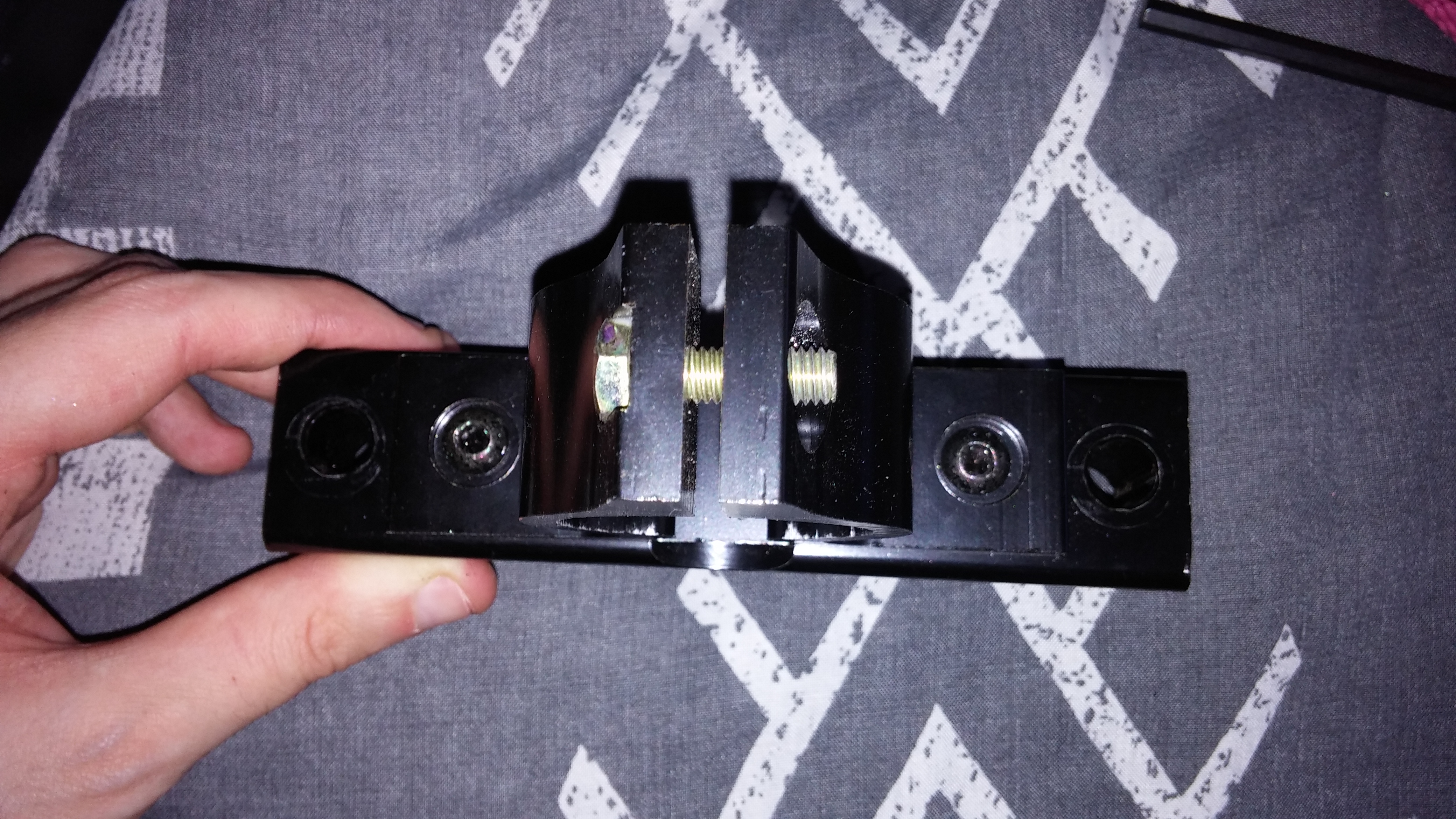
- 20170302_101858.jpg (3.7 MiB) Viewed 5327 times
It is hard getting it perfect because of the middle monitor being different but I think I got it as good as it gets till I replace them.
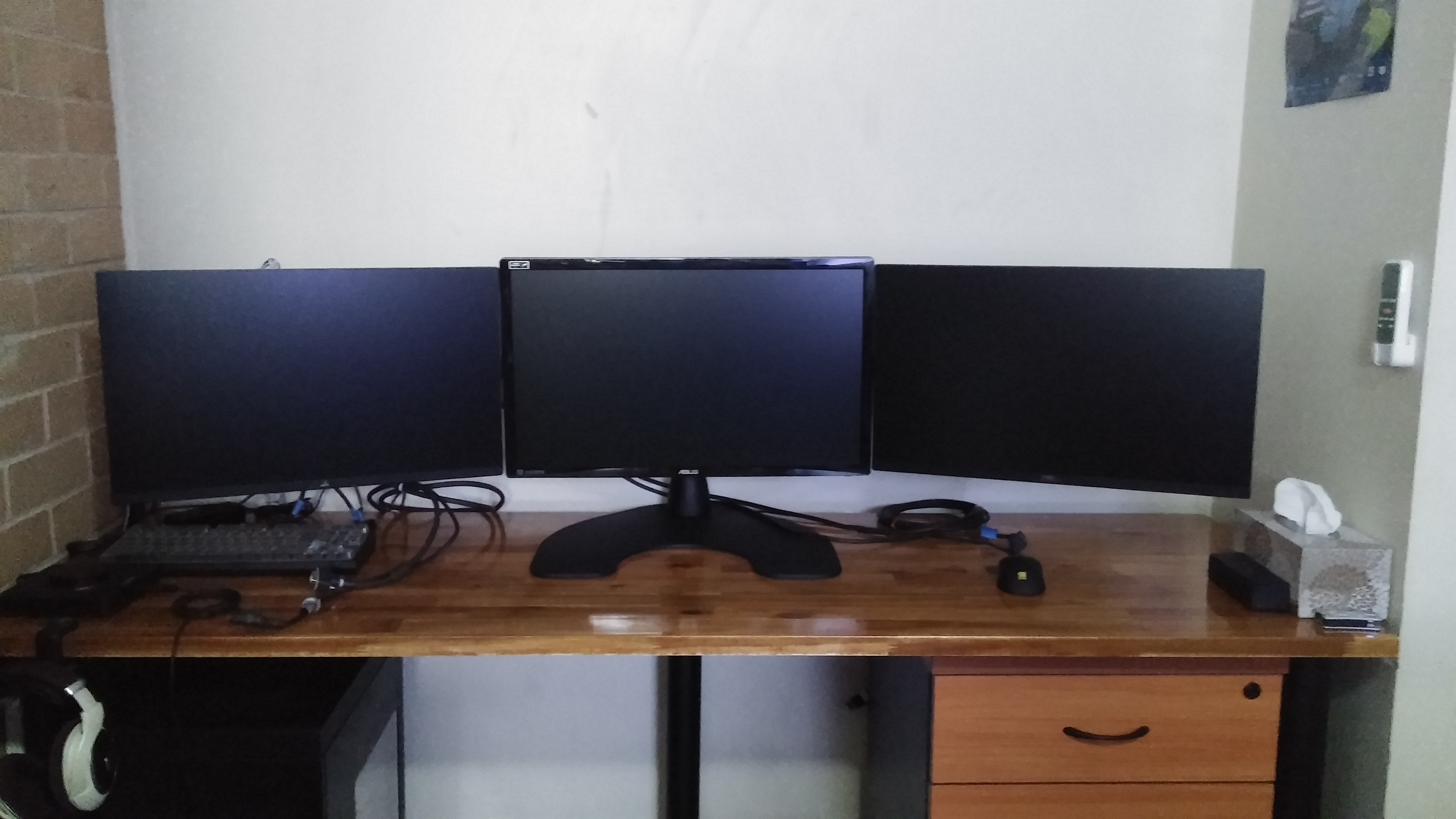
- 20170302_105115.jpg (2.03 MiB) Viewed 5328 times
Re: WSGF Ultimate Desk Stand v2
Posted: 02 Mar 2017, 02:45
by skipclarke
Sorry I didn't see your post this weekend. Glad you got it sorted. We've seen this issue a few times now with the current batch of stands. I ended up creating a document to show how the arm can be tweaked and adjusted.
Re: 3, 27" & 1 up top 34"
Posted: 02 Mar 2017, 02:57
by skipclarke
DHW wrote:@Cinnabuns;
Thank you for replying, you've helped a lot, screwing into the bottom of the desk and attaching a metal plate via 4 screws is something I was planning on doing for sure.
As for the dell monitor stand I'm still currently looking though I think this will end to no avail, if anyone else has any idea on what I could purchase to achieve my dream stand setup just hit that 'reply to post' button.
Again I'll note that I will need you to specifically for point it and link me to the items.
I really thought I could do this with the WSGF V2 stand :/
The WSGF v2 will do 3x1-L with 27" and a 34" (above or below). You'll need the HD Pivot for the 34". You can also drill through your desk for a cleaner look with the Thru-Desk Mount.
Stand:
http://www.wsgf.org/products/wsgf-ultim ... k-stand-v2HD Pivot:
http://www.wsgf.org/products/hd-adjustable-pivotThru-Desk:
http://www.wsgf.org/products/thru-desk-mount-option
Pre-Purchase Questions - WSGF Ultimate Desk Stand v2
Posted: 06 Mar 2017, 21:30
by Knives911
Hello!
I am getting ready to purchase new monitors and I am looking for a desk stand that will fit what I want to do. Lucky enough I watched JayzTwoCents video on the UDS v2 and it seems like it will do what I want.
First, Can I fit two 38" LG ultrawide's on the top and bottom in a 3+1 setting?
Second, how comfortable is it to look up at the +1 or top monitor 8+ hours a day? I started a new job, working from home, with a company supplied iMac and I would like to add a "work" monitor to the top of the stand but have concerns about fatigue after a few hours.
Thank you for your responses in advance! I hope this stand is the one for me!

Re: Pre-Purchase Questions - WSGF Ultimate Desk Stand v2
Posted: 06 Mar 2017, 21:38
by skipclarke
Thanks for the inquiry. I've not tried the 38" panels yet. LG lists them as 15.5" tall. This is just within the 16" heigh limit. Depending on how high you want to set the monitors, you may want to pick up the 48" pole from Ergotech. They used to offer a 36", but I only see the 48" in the store. You could call to see if they still offer the 36".
http://shop.ergotechgroup.com/48-pole-black/I found that my neck hurt when looking up at my triples (I run "3 over 1"), when using a "regular" office chair. I switched out to a DX Racer chair that offers head and neck support, and it's been MUCH better.
Re: Pre-Purchase Questions - WSGF Ultimate Desk Stand v2
Posted: 06 Mar 2017, 21:45
by Knives911
Hello, Skip!
Thank you for your very quick response. I made an error, it should have been two 34" inch LG ultrawide. After reading your response, it should be okay unless you have had issues with that setup before. I already have a DXracer so that is taken care of. Again, I appreciate your response.
Re: Pre-Purchase Questions - WSGF Ultimate Desk Stand v2
Posted: 06 Mar 2017, 21:56
by skipclarke
Two 34" is fine. We've had plenty of people do those. You'll need an HD pivot for each 34" panel. I'm out of stock on those at the moment, but have more on the way from Ergotech.
Re: Pre-Purchase Questions - WSGF Ultimate Desk Stand v2
Posted: 06 Mar 2017, 21:59
by Knives911
Good deal! Thank you again!