Page 11 of 19
Re: Patched: Age of Empires 2 Conquerers
Posted: 07 Jul 2010, 14:03
by ilood
Hi,
Awesome work boekabart !
great patch. Thk so much.
Hello
Thank you very much for your hard work. I discovered it thanks to the french blogger Korben, and made it work on Windows XP 1680x1050. I had a lot of problems making it work probably due to the fact that my version of the game is in french, but your explanation with de bill helped me a lot. I am now going to give french explanations for non english users.
Merci pour tes explications Aldian, et a Korben pour nous avoir mené ici.
Re: Patched: Age of Empires 2 Conquerers
Posted: 12 Jul 2010, 07:22
by _xFantaSx_
ohh really man u did a good job ;) ;)
i installed the patch, but when the new .exe is created this not create the 1.0e version, only the 1.0c, i dunno how can install the patch in 1.0e version :(...
I cant play in voobly, this show a bug, i dunno how fix it, plz help me!!
pd: plz answer this reply :)
Re: Patched: Age of Empires 2 Conquerers
Posted: 12 Jul 2010, 16:36
by TheWiz
Just wanted to let you all know that after a leave of absence I decided to pick up this project again coming back with a lot more programming experience and I am hoping to make a working SWGB patch. Wish me luck :D
TheWiz
Re: Patched: Age of Empires 2 Conquerers
Posted: 12 Jul 2010, 20:03
by ThaL
Good luck wiz. I am counting on you to deliver that patch. Do not let us down.
Re: Patched: Age of Empires 2 Conquerers
Posted: 14 Jul 2010, 15:04
by TheWiz
_xFantaSx_,
Are you sure that you are using a NoCD version for 1.0e? I am rather confused as to whether you are implying the 1.0e patches as 1.0c or if you have 1.0c working and not 1.0e. In any event any warning messages etc. would be helpful.
TheWiz
Don't working on Win7 x64 1366x768
Posted: 16 Jul 2010, 16:33
by hernia
First, congrats for you, this patch is amazing, i was waiting for it since 3 years!!
Y tried it on WinXP (1920x1080) and on a VirtualBox with WinXP, too (1360x768), in two different computers of course, and it worked great! But when I want execute it on Win7 x64 (1366x768), I get a crash. I'm doing the same steps that in the other OS, installing 1.0e patch and then applying your patch, but I get a similar crash than Mr. DOS. I tried changing my resolution to 1360x768 (I read that 1366 could have some trouble, and I tried 1360 in WinXP succesfully), but I get the same error. I don't know what I can do, working on Win7 is really important for me!! :(. And I have read also that it's necessary to apply a color fixer in Win7, I tried to apply a patch provided by de Bill but it didn't fix anything, but I don't know if I used it correctly (I tried it with TC in the original resolution, of course).
Can you help me? Thanks a lot!!
Re: Patched: Age of Empires 2 Conquerers
Posted: 17 Jul 2010, 11:15
by profosor_54
Hey,
First of all... Thanks for this, I thoroughly enjoy this game.
Currently, I have 3 x 22" screens in portrait (3150x1680) resolution [eyefinity].
- I ran the fix, ran the game, D3D error.
- I changed resolutions (went down to lowest), still same error.
- I turned off eyefinity, created new exe through your program (so the resolution is now 1050x1680), still same error.
- Put it in landscape (1680x1050) and it worked! But it's landscape, and I don't want to go back to that.
Any help is appreciated.
Thanks.
Re: Patched: Age of Empires 2 Conquerers
Posted: 17 Jul 2010, 15:15
by TheWiz
profosor_54,
Obviously in regards to the Direct 3D error something has not patched correctly. Please try the following for me.
1. Try it on one screen and see if it works, then add the second screen etc. Record the best resolution you get it working on, and post any errors that show in the patcher or in the game launch.
herenia,
You didn't really tell us any errors etc., you just state it "doesn't work". The color fix has nothing to do with the errors you are experiencing, they just fix palette issues in the game by suspending Windows Explorer.
Finally, the good news. The patch for Star Wars Galactic Battlegrounds has made a LOT of progress, and hopefully we will have a solution soon.
Re: Patched: Age of Empires 2 Conquerers
Posted: 18 Jul 2010, 15:38
by hernia
I execute "AoC1.0e 1366x768" from my desktop, and the game begins. It's setted as 1024x768 into the game, all ok. But when I start a scenario, while the game is loading, it breaks, and display the next error:
Signature problems:
Problem Event Name: APPCRASH
Application Name: age2_x1_1.0e_1366x768.exe
Application Version: 0.7.26.809
Time stamp of the application: 3b7433ec
Name of the module with errors: age2_x1_1.0e_1366x768.exe
Error Module Version: 0.7.26.809
Timestamp of the module with errors: 3b7433ec
Exception Code: c0000005
Exception Offset: 000db01a
OS Version: 6.1.7600.2.0.0.256.1
Locale ID: 3082
Additional Information 1: c767
Additional Information 2: c76799fa9c121b0ecd6238a3eb146cf3
Additional Information 3: b04f
Additional Information 4: b04f336bd72ac5c1421a2e01484e8faf
I didn't say two things: 1) My graphic card is a nVidia 103M. 2) that I'was needing to start the AoE2 TC under a compatibility mode with XP SP3, else the program crashes too. I don't know if Mr. DOS (for example) is in the same case.
Thanks and sorry for my english, i'm doing that I can! xD
[This message was posted previously in a new topic by mistake]
SWGBWide Released!
Posted: 22 Jul 2010, 05:34
by TheWiz
We are proud to announce that the Star Wars galactic Battlegrounds: Clone Campaigns has been sucessfully ported from AoE2Wide with a new GUI and patches the game to support any resolution. See thread for details. We will add this link to the main post shortly.
Thread:
http://www.widescreengamingforum.com/forum/viewtopic.php?f=31&t=19881
Thanks,
TheWiz
Re: Patched: Age of Empires 2 Conquerers
Posted: 24 Jul 2010, 20:22
by Kreeger
Pff
I have tried for 2 hours, it does not work with me!!
I have installed AOC, patched 1.0c (official), remplaced age2_x1.exe by the age2_x1.exe no-cd (BSK, 2.699.309 octets) and installed AoEWide.
When I start AoEWide.exe from the desktop, I get this:
http://img33.imageshack.us/img33/8550/sanstitre2bpg.jpg
But the AoE2Wide_1.0c.patch ask 2.699.309 octets and my age2_x1.exe has 2.699.309 octets!!
So WTF..???
Re: Patched: Age of Empires 2 Conquerers
Posted: 26 Jul 2010, 20:20
by lbrito
Hey boekabart,
I registered just to thank you for the great patch. I didn't expect to find a widescreen hack for such an old game and was quite surprised when I ended up here and saw the screenshots. Great job, congrats! :D
Re: Patched: Age of Empires 2 Conquerers
Posted: 27 Jul 2010, 16:04
by Deathwind
Great work boekabart!
Thanks for what you have done.
Re: Patched: Age of Empires 2 Conquerers
Posted: 28 Jul 2010, 22:16
by Kreeger
Pff
I have tried for 2 hours, it does not work with me!!
I have installed AOC, patched 1.0c (official), remplaced age2_x1.exe by the age2_x1.exe no-cd (BSK, 2.699.309 octets) and installed AoEWide.
When I start AoEWide.exe from the desktop, I get this:
http://img33.imageshack.us/img33/8550/sanstitre2bpg.jpg
But the AoE2Wide_1.0c.patch ask 2.699.309 octets and my age2_x1.exe has 2.699.309 octets!!
So WTF..???
It's okay, my BSK file was corrupted.
It works fine :)
But, there is a little problem, if we click on ALT+TAB or ALT+ESC when AOC is started, we can not use Windows or go back on AOC. We have to shutdown the pc, it's really boring! Can you do anything?
Re: Patched: Age of Empires 2 Conquerers
Posted: 31 Jul 2010, 14:49
by TheWiz
Just use Ctrl + Shift + esc to launch task manager while in the game. It will switch to task manager where you can en the game and restart explorer.
TheWiz
Re: Patched: Age of Empires 2 Conquerers
Posted: 04 Aug 2010, 15:37
by DiViDeZeRo
Not sure whether this is still an active topic, but I just wanted to let you know I tried and succeeded.
I'm on tripple 1600x1200 monitors, so effectively, I could run on 4800x1200. The AoE2Wide.exe however, creates age2_x1_1.0c_1600x1200.exe - which works - but not on 4800x1200.
Is there some way to send parameters manually?
Re: Patched: Age of Empires 2 Conquerers
Posted: 06 Aug 2010, 05:19
by TheWiz
Yeah you could run aoe2patch.exe xres yres and it would patch whatever values you spepcified but in order for it to actually work on tripple head you need to get your three monitors detected as one huge one in Wwindows (there's software that does it)
TheWiz
Re: Patched: Age of Empires 2 Conquerers
Posted: 06 Aug 2010, 08:42
by DiViDeZeRo
Yeah you could run aoe2patch.exe xres yres and it would patch whatever values you spepcified but in order for it to actually work on tripple head you need to get your three monitors detected as one huge one in Wwindows (there's software that does it)
TheWiz
My guess it you mean "AoE2Wide.exe 4800 1200" from command line? There is no aoe2patch.exe ? Tried this, and the game loads, but as soon as the map should open up, the game crashes. I'm using a Nvidia GeForce GTX 260 + Nvidia GeForce 7100GS combination, under W7 64bit, using Ultramon as multimonitor management software.
What software are you refering too? I dont think my current setup is recognized as one big monitor...
Re: Patched: Age of Empires 2 Conquerers
Posted: 16 Aug 2010, 20:09
by archeRRR
Hi, could you help me?
I've the following problem, after copying widescreen files to my directory, I click the AoE2Wide and there is such a picture:
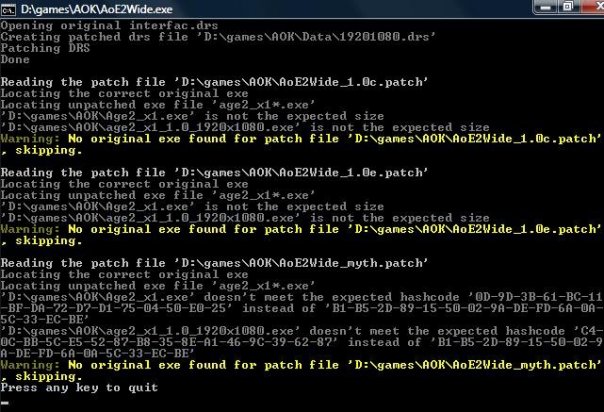
and after this my game does't start at all, even in 800*600 :(.
Where is the problem?
Thank's.
Re: Patched: Age of Empires 2 Conquerers
Posted: 16 Aug 2010, 20:10
by archeRRR
Hi, could you help me?
I've the following problem, after copying widescreen files to my directory, I click the AoE2Wide and there is such a picture:
and after this my game does't start at all, even in 800*600 :(.
Where is the problem?
Thank's.