3 people that have the tried the Accell. (Deke) (Mixelplix) and (scooby) each of these Individuals report no problems scooby did a Bios flash. but was the fix from the flash. or the adapter?
For me it was the new bios that I flashed the card to, the Accell adaptor I have before the flash still was blinking and now after the flash (now tested 48hrs straight) no more blinking or blackouts. I must add thou that when switching between Eyefinity and extended mode the DP monitor will blink but a quick "Disable/Enable" fixes that after which the monitors are issue free.
[quote]3 people that have the tried the Accell. (Deke) (Mixelplix) and (scooby) each of these Individuals report no problems scooby did a Bios flash. but was the fix from the flash. or the adapter?
For me it was the new bios that I flashed the card to, the Accell adaptor I have before the flash still was blinking and now after the flash (now tested 48hrs straight) no more blinking or blackouts. I must add thou that when switching between Eyefinity and extended mode the DP monitor will blink but a quick "Disable/Enable" fixes that after which the monitors are issue free.
Well, either way I will be testing the Accell sometime late tomorrow. and returning the Dell adapter. In the mean time I'm disabling Eyefinity. forgetting about it tonight. enabling my other card that's just been sitting there doing nothing except looking good. and enjoy some dirt 2 in crossfire bliss.
Just curious has anyone tried this yet?
Acoustic Research AR-489 Pro II Series DVI Repeater
After a full day and my voltage @ 1200 the monitor went black. :(
Also just to verify the Dell Monitor that comes with DisplayPort *has anyone had blinking issues on them* ????
MODEL= Dell UltraSharp 2408WFP 24 http://cgi.ebay.com/1-NEW-Dell-UltraSharp-2408WFP-24-LCD-Monitor-A02-2408_W0QQitemZ140366800357QQcmdZViewItemQQptZComputer_Monitors?hash=item20ae8365e5
Well I was going to try to flash my bios to get my version of this problem to go away but alas when i made a bootable usb and used atiflash and followed the instructions to the letter is simply told me that "no such file could be found". Dejectedly i tried ATIWinflash and it simply will not run on windows 7 32 bit, i click the .exe, it runs for about half a second and exits so i cant do it that way either. Fortunately for me, this problem only prevents me from playing modern warfare 2 triplewide, but it still would have been nice to give it a shot.
Flashing your BIOS and adding more voltage wont do anything (as I have tried this already)
Well I was going to try to flash my bios to get my version of this problem to go away but alas when i made a bootable usb and used atiflash and followed the instructions to the letter is simply told me that "no such file could be found". Dejectedly i tried ATIWinflash and it simply will not run on windows 7 32 bit, i click the .exe, it runs for about half a second and exits so i cant do it that way either. Fortunately for me, this problem only prevents me from playing modern warfare 2 triplewide, but it still would have been nice to give it a shot.
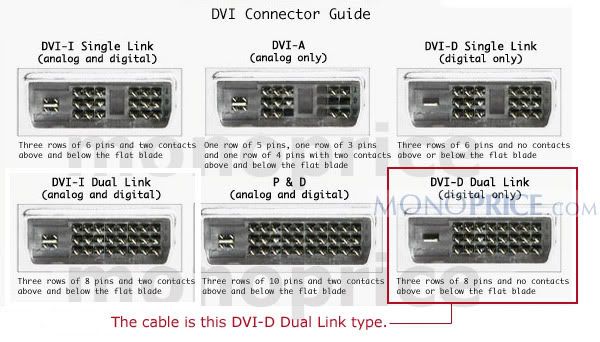
I'm wondering if I should try dual link DVI-d . I just noticed all mine are single link. not sure if it's needed. as single will work up to 1920 x 1200. but I don't know. it wouldn't hurt right?
The Digital formats are available in DVI-D Single-Link and Dual-Link as well as DVI-I Single-Link and Dual-Link format connectors. These DVI cables send information using a digital information format called TMDS (transition minimized differential signaling). Single link cables use one TMDS 165Mhz transmitter, while dual links use two. The dual link DVI pins effectively double the power of transmission and provide an increase of speed and signal quality; i.e. a DVI single link 60-Hz LCD can display a resolution of 1920 x 1200, while a DVI dual link can display a resolution of 2560 x 1600.
ATIflash is 100% command based homey. Did you try BIN or ROM for the file name? Running atiflash in windows will not work
Well I was going to try to flash my bios to get my version of this problem to go away but alas when i made a bootable usb and used atiflash and followed the instructions to the letter is simply told me that "no such file could be found". Dejectedly i tried ATIWinflash and it simply will not run on windows 7 32 bit, i click the .exe, it runs for about half a second and exits so i cant do it that way either. Fortunately for me, this problem only prevents me from playing modern warfare 2 triplewide, but it still would have been nice to give it a shot.
Guys - I think we're drifting just a bit. I'm in a somewhat unique situation since I now have 7 different monitor types I can use to test, as well as both the Accell and Bizlink adapters.
Based on everything I've tried, I strongly feel that this is an issue related to signal strength being passed through the DVI adapter. This results in some monitors working, and others working only intermittently. Additionally, the Accell adapter restored 100% compatability with all my different monitors. The Bizlink only worked with 1 (an LCD TV).
You must therefore ensure that whatever monitor you are using with the DVI adapter is compatible. The good news is that you only need one to work - the rest will be using DVI or HDMI. If you are using the Bizlink adapter and having problems, then I would strongly recommend at least trying the Accell adapter that is available on Amazon.
I would agree with that, But I strongly believe there is a underling CCC/Driver Issue as well. In fact I think It's a combination of both. The adapter and CCC/Driver. I am just going to monitor this thread and ATI/AMD. and wait for a Updated Driver. and then will use the Accell adapter that I should Have soon.
1 1/2 Hour past and so far, so good. knock on wood!.
There is one thing I notice though. I don't remember noticing this before with the other adapter.
The monitor connected to the DP adapter has a slight color variance than the other two. Despite the fact they all have the same default settings. The color is not as vibrant on the DP adapter monitor. I got it close though. using the monitors OSD. And increasing the brightness a little. but it is still off some.
And the strange flicker I was getting in extended mode. After disabling Overdrive in CCC, it helped. I no longer get the flicker when moving around windows and scrolling during regular use. But I do see it still right before shut down . and right after start up. and I see it when I mess around with the catalyst software settings or window. I believe this to be a unrelated issue to this thread though. as I had this problem before even while running dual monitors.
Edit update : Now 5 hours up time with no problems.
Edit update : Now 5 hours up time with no problems.
Nice, seems to be fixed or at least reduced to usable levels. There isn't a colour difference with the Apple adapter, I wouldn't be able to identify which is displayport if I didnt know. Are all monitors using the same quality cables? All dual link?