Page 2 of 15
Re: Ace Combat 7 no Ultrawide Support Help !
Posted: 02 Feb 2019, 19:32
by susahamat
48x9 try use this value
70 7B 8B 3C or calibrate using this
cheat engine table i've made
Re: Ace Combat 7 no Ultrawide Support Help !
Posted: 02 Feb 2019, 19:46
by slakolov
the screen fix worked however now my missiles and guns fly straight into the ground... any idea what is causing this?
Re: Ace Combat 7 no Ultrawide Support Help !
Posted: 02 Feb 2019, 19:51
by susahamat
idk, i dont have problem with that maybe your type missile is different ?
Re: Ace Combat 7 no Ultrawide Support Help !
Posted: 02 Feb 2019, 19:54
by slakolov
well i verified the game and repatched and now its working. false alarm i guess haha
Re: Ace Combat 7 no Ultrawide Support Help !
Posted: 02 Feb 2019, 20:21
by susahamat
Re: Ace Combat 7 no Ultrawide Support Help !
Posted: 02 Feb 2019, 21:20
by grk100
Hey I used your fix for 16:10 and it works well except that the HUD seems to be a bit offset ingame. Any ideas on how to fix?
You can see on the bottom right
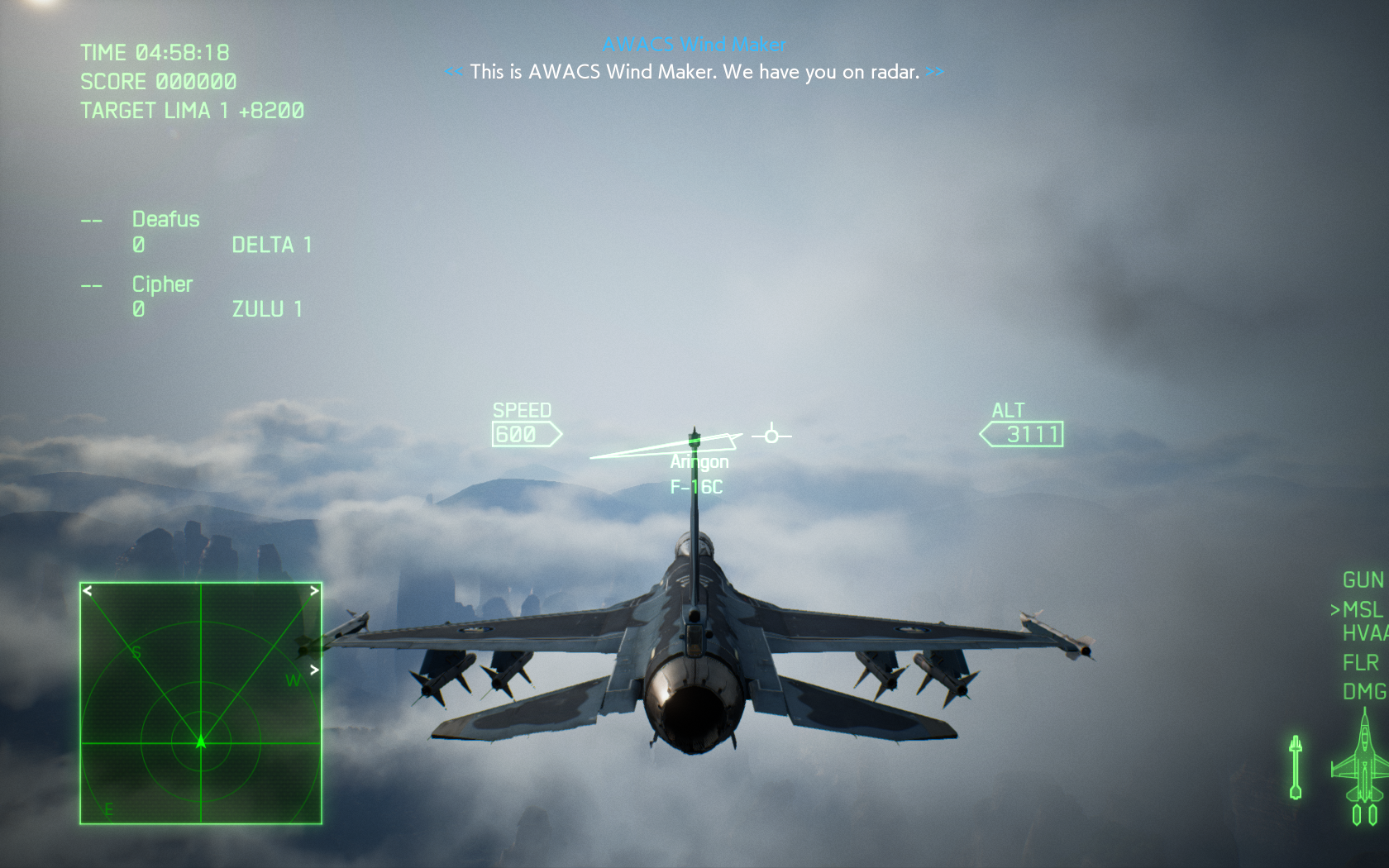
- 502500_20190202140535_1.png (2.11 MiB) Viewed 10797 times
Re: Ace Combat 7 no Ultrawide Support Help !
Posted: 02 Feb 2019, 22:28
by Winkelmann
grk100 wrote:Hey I used your fix for 16:10 and it works well except that the HUD seems to be a bit offset ingame. Any ideas on how to fix?
You can see on the bottom right
502500_20190202140535_1.png
HUD is pinned to the left side of the screen instead of centered, we have the same issue with ultrawide at the moment. Yours is a bit more difficult as it will require us to scale the HUD down a bit instead of just adjusting the anchor point but I think we'll get it solved eventually.
Edit: Although it may be possible to use the empty space on the side to avoid scaling it, at least for aspect ratios close to 16:9<.
Re: Ace Combat 7 no Ultrawide Support Help !
Posted: 02 Feb 2019, 23:26
by susahamat
its possible to increase
Draw Distance to reduce pop-in via
engine.ini,
- Go to C:\Users\<YourUserName>\AppData\Local\BANDAI NAMCO Entertainment\ACE COMBAT 7\Config
- Open Engine.ini
- Add this at the bottom
[/script/engine.renderersettings]
r.ViewDistanceScale=5
r.SkeletalMeshLODBias=-2
r.StaticMeshLODDistanceScale=0.25
or
Copy and replace engine.ini, download here
can be lowered or increased. A value around 3-5 is recommended to minimize visible pop-in. r.ViewDistanceScale=1 is the default. May have a substantial performance impact depending on your hardware.
Re: Ace Combat 7 no Ultrawide Support Help !
Posted: 03 Feb 2019, 00:58
by CRTFTW
What Hex value do I need for 4:3?
Re: Ace Combat 7 no Ultrawide Support Help !
Posted: 03 Feb 2019, 01:20
by susahamat
no need fov change , but you'll lose hud on right side
Re: Ace Combat 7 no Ultrawide Support Help !
Posted: 03 Feb 2019, 02:27
by CRTFTW
susahamat wrote:no need fov change , but you'll lose hud on right side
What about black bars, won't it be letterboxed? I haven't purchased the game yet so I don't know
Re: Ace Combat 7 no Ultrawide Support Help !
Posted: 03 Feb 2019, 02:31
by Winkelmann
CRTFTW wrote:susahamat wrote:no need fov change , but you'll lose hud on right side
What about black bars, won't it be letterboxed? I haven't purchased the game yet so I don't know
The 16:10 discussion got carried over here from a different thread so I'll quote my response here as well:
http://www.wsgf.org/forums/viewtopic.ph ... 01#p174401Winkelmann wrote:You can try to adapt @susahamat 's solution (
http://www.wsgf.org/forums/viewtopic.ph ... 97#p174397):
Use HxD to edit "steamapps\common\ACE COMBAT 7\Ace7Game.exe", find "41 2C 01 4C 89 CB 0F 29" and replace "01" with "00". This will force remove the black bars, 16:10 isn't too different to 16:9 so you shouldn't notice too much issues with FOV or zoomed in menus but it is theoretically possible to correct the FOV to it as well, however I am not sure how he calculates the FOV in his solution.
Edit: Also regarding FOV fix, susahamat replied saying it's not necessary.
Re: Ace Combat 7 no Ultrawide (Fix !!)
Posted: 03 Feb 2019, 03:51
by Blu Soldier
Has anyone figured out how to disable the ugly chromatic aberration effect yet? I have tried using the same ini edits that worked for Tekken 7, but so far no luck.
Re: Ace Combat 7 no Ultrawide (Fix !!)
Posted: 03 Feb 2019, 04:59
by susahamat
==Chromatic Abberation Removal==
same as this method
http://www.wsgf.org/forums/viewtopic.ph ... 17#p174417, just add this line
r.SceneColorFringeQuality=0
r.SceneColorFringe.Max=0
Re: Ace Combat 7 no Ultrawide (Fix !!)
Posted: 03 Feb 2019, 05:15
by Blu Soldier
Susahamat, you are a saint!
Re: Ace Combat 7 no Ultrawide (Fix !!)
Posted: 03 Feb 2019, 05:48
by neyshinoda15
Re: Ace Combat 7 no Ultrawide (Fix !!)
Posted: 03 Feb 2019, 10:29
by neyshinoda15
How can i increase fov for 3440x1440 ?
Re: Ace Combat 7 no Ultrawide Support Help !
Posted: 03 Feb 2019, 15:22
by Mike1304
susahamat wrote:48x9 try use this value
70 7B 8B 3C or calibrate using this
cheat engine table i've made
Thank you for helping me.
Unfortunately your files didn't help:
The first file "Cheat Engine Table" contained in the zipfile only a file with the extension ".CT" which I couldn't open. (What is this?)
The second file "Trainer" contained an exe-file but when I tried to start it, my windows 10 said it contained a virus and deleted it automatically (!?)
Am I doing something wrong?
So I tried the hex-value you mentioned as a second workaround. But when I start the game the main-menu is so tiny that I can't read anything, so it makes it unplayable for me. I then started the game without the widescreenfix just to learn which options I would have to choose, restarted the "tiny menu"-version and clicked on the options I couldn't read (because they are too tiny) but I've already learned them by heart. This way I could start a mission and saw that the FOV was much better in game. Still not perfect but much better! Maybe the hex-values don't exactly match my resolution of 5980x1080 which is without bezels. Could this be? Is your hex-value for the normal resolution of 5760x1080 with bezels?
But unfortunately I can't continue playing the game campaign with these settings, because even the briefing of a mission (which is important I think) is only shown in that tiny little window, where I can't read anything...
Do you all have this problem with triple screens or do I make something wrong?
Re: Ace Combat 7 no Ultrawide (Fix !!)
Posted: 03 Feb 2019, 16:15
by susahamat
@neyshinoda15 : use fov trainer
http://www.wsgf.org/forums/viewtopic.php?f=63&t=32997@mike1304 : did you installed
cheat engine before using cheat engine table ? yeah this is memory manipulation some AV has always being detected virus . Just add to the ignore list btw it's a false positive
Then Calibrate by yourself using cheat engine table as i mentioned before , increase FOV with hotkey ] until its fit in your screen when in-gameplay then write the value if you make permanent in HxD. Tiny Menu is Issue right now in higher AR than >21:9, you can decrease view with hotkey [ using fov changer or cheat engine table
http://www.wsgf.org/forums/viewtopic.php?f=63&t=32997
Re: Ace Combat 7 no Ultrawide (Fix !!)
Posted: 03 Feb 2019, 18:37
by BraveTitan
Got the 48:9 FOV working but game is still displaying on only one monitor. I've tried running in windowed mode and changing UserSettings but with no luck unfortunately.
