Page 2 of 4
Re: Dauntless
Posted: 01 Apr 2019, 00:02
by susahamat
Kennocha wrote:Does it save the FoV we set when we reload the game, etc?
it doesn't because too risk get banned if forcing fov to permanent
Re: Dauntless
Posted: 24 Apr 2019, 22:33
by Kennocha
New update today.
Any chance we can get an update? Also it would be nice if we could see what the FoV is set to, so I don't have to kind of eyeball it every time I load the game trying to set it right?
Edit: Looks like the game now has an FoV slider.. checking that out to see if it works.
Re: Dauntless
Posted: 22 May 2019, 20:28
by sentinel_pj
Kennocha wrote:New update today.
Any chance we can get an update? Also it would be nice if we could see what the FoV is set to, so I don't have to kind of eyeball it every time I load the game trying to set it right?
Edit: Looks like the game now has an FoV slider.. checking that out to see if it works.
Any luck with the in-game slider? It doesn't do anything for me, nor does this hacktool ( assumed due to update and public release ).
Any update would be great for the community!
Re: Dauntless
Posted: 28 May 2019, 01:40
by domomunk
in-built fov slider is useless. currently on a 32:9 ratio. any chance on an update for this? @susahamut
Re: Dauntless
Posted: 28 May 2019, 04:09
by Rose
For 2560x1080, you can hex edit \Archon\Binaries\Win64\Dauntless-Win64-Shipping.exe and search for 35 FA 0E 3C BA and replace it with D7 CB 2C 3C BA to get the FOV to match that of 1920x1080.
You can also edit the config as instructed
here to be able to see the character at the creation screen.
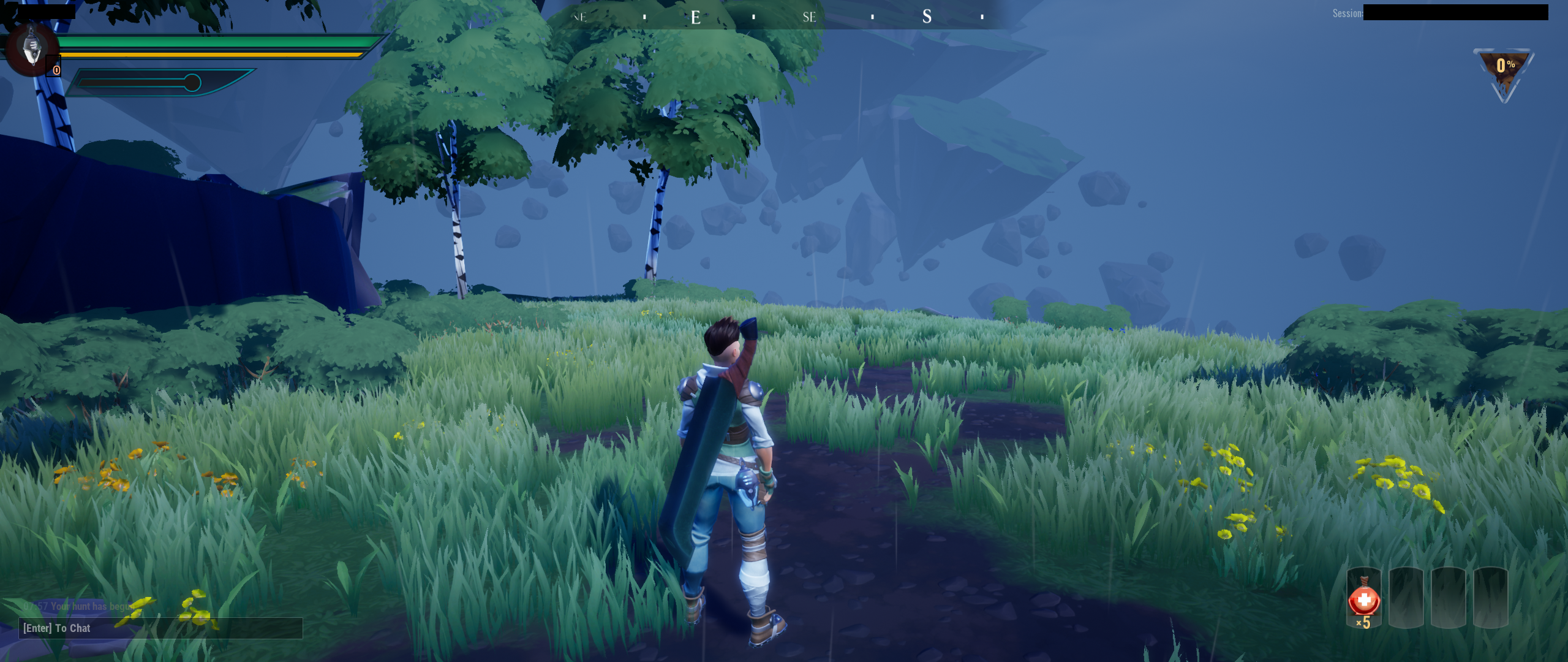
- dauntless.png (3.68 MiB) Viewed 8515 times
Re: Dauntless
Posted: 28 May 2019, 08:21
by domomunk
i'm currently using a 3840x1080 32:9 monitor. would this work the same or would it be just slightly more zoomed out?
Re: Dauntless
Posted: 28 May 2019, 13:39
by domomunk
Rose wrote:For 2560x1080, you can hex edit \Archon\Binaries\Win64\Dauntless-Win64-Shipping.exe and search for 35 FA 0E 3C BA and replace it with D7 CB 2C 3C BA to get the FOV to match that of 1920x1080.
You can also edit the config as instructed
here to be able to see the character at the creation screen.
dauntless.png
just tried this with hexedit. doesn't even come up with 35 FA 0E 3C BA. could there be new code possibly?
Re: Dauntless
Posted: 28 May 2019, 14:02
by Cirez
Rose wrote:For 2560x1080, you can hex edit \Archon\Binaries\Win64\Dauntless-Win64-Shipping.exe and search for 35 FA 0E 3C BA and replace it with D7 CB 2C 3C BA to get the FOV to match that of 1920x1080.
You can also edit the config as instructed
here to be able to see the character at the creation screen.
dauntless.png
what would be the Hex for 3440x1440? I changed it, but for that res, it doesnt change anything.. Thanks
Re: Dauntless
Posted: 28 May 2019, 14:24
by Cirez
Ok. It works for 3440x1440 aswell. Thank you
Re: Dauntless
Posted: 29 May 2019, 04:44
by domomunk
Cirez wrote:Ok. It works for 3440x1440 aswell. Thank you
did you edit the config or hex edit for your resolution?
Re: Dauntless
Posted: 29 May 2019, 10:01
by Cirez
I edited the .exe with Hex-Editor MX
Re: Dauntless
Posted: 30 May 2019, 09:24
by domomunk
Cirez wrote:I edited the .exe with Hex-Editor MX
great. was able to get it working. thanks a lot! 21:9 better than 16:9.
32:9 would be good if i was able to find the code to change, but not complaining.
totally unplayable before. lol
Re: Dauntless
Posted: 30 May 2019, 15:39
by Nguyenquanavi
Anyone can show me how to hexedit for 32:9 monitor please, thanks so much
Re: Dauntless
Posted: 30 May 2019, 15:44
by domomunk
Nguyenquanavi wrote:Anyone can show me how to hexedit for 32:9 monitor please, thanks so much
there's no code for 32:9 otherwise i would use it. 21:9 ratio still good. check previous comment and just follow the code replacement.
Re: Dauntless
Posted: 30 May 2019, 16:16
by qq308169172
21:9 ratio is not suitable for 32:9
Need new hexadecimal code
Re: Dauntless
Posted: 30 May 2019, 16:29
by Nguyenquanavi
qq308169172 wrote:21:9 ratio is not suitable for 32:9
Need new hexadecimal code
2nd this, appreciate
Re: Dauntless
Posted: 30 May 2019, 16:45
by qq308169172
Nguyenquanavi wrote:qq308169172 wrote:21:9 ratio is not suitable for 32:9
Need new hexadecimal code
2nd this, appreciate
4FE538
But it seems to be 3440X1440
Re: Dauntless
Posted: 30 May 2019, 17:43
by qq308169172
Nguyenquanavi wrote:qq308169172 wrote:21:9 ratio is not suitable for 32:9
Need new hexadecimal code
2nd this, appreciate
32:9
35 FA 0E 3C BA and replace it with D7 CB 6E 3C BA
FOV=110
6E=110
Re: Dauntless
Posted: 30 May 2019, 17:51
by qq308169172
32:9
110 FOV
Re: Dauntless
Posted: 30 May 2019, 18:12
by qq308169172