
Dota 2 Reborn - Working 21:9 HUD Fix (UPDATED)

Gaming on 21:9 and ultra-wide single screen monitors
a82320
Posts: 5
Joined: 04 Dec 2015, 20:22

Re: Dota 2 Reborn - Working 21:9 HUD Fix (UPDATED)

Post by a82320 »

imusrt wrote:Cygus, you don't need to download & run fresh OvPatch with every game update. Only need to when game patch breaks OvPatch's patch. Which is not as often.

If anyone is interested in a severely minimalist HUD, read step #1 in below blog post. Makes HUD skin disappear, enlarging game-world view. It's for those of us with wide aspects & chunky HUD issue. It will look good for 21:9 or PLP (but will not fix LLL, their HUD is just too damn huge).
http://www.wsgf.org/blog/imusrt/2015/12/03/dota-2-2013-manual-plp-instructions
Image

Blog post uses basically same method as OP, just different images.
Thanks Razed, great info.
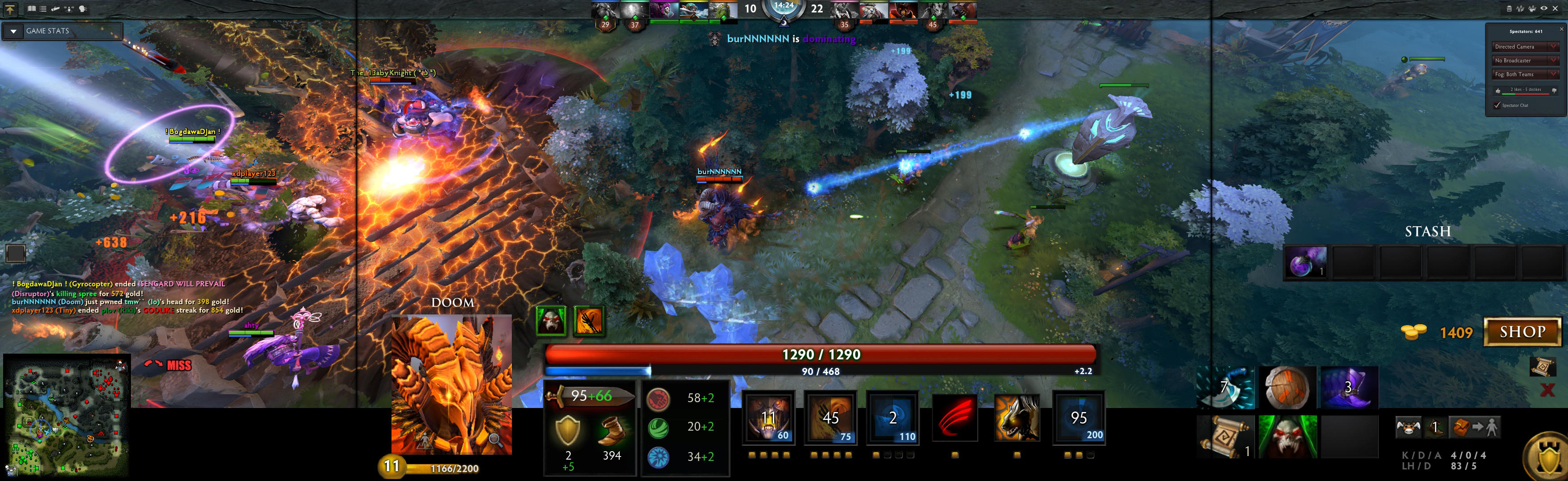

OVpatch just never worked for me...

Everytime I use the OVpatch, my dota2 won't launch. it just Launcher Error, Failed to load the engine2 dll.

Either yours method or OP's method. I know how to fix it, but it breaks the OVpatch.
imusrt
Insiders
Insiders
Posts: 291
Joined: 21 Oct 2014, 23:33

Re: Dota 2 Reborn - Working 21:9 HUD Fix (UPDATED)

Post by imusrt »

a82320, do you use x64 system? Do you run x64 Dota 2? Do you OvPatch x64 Dota 2?

If yes, you should try switching things up with these choices:
- Try x86 instead on all above. And in launcher: -32bit -addon mods (this still runs DX11, assuming your PC supports it).
- If that doesn't work, try x86 while enforcing DX9. In launcher: -32bit -dx9 -addon mods. That is what I used, & OvPatch worked. Didn't test the other scenarios.

If none of those work, could it be that your files or folder structure is different somehow? I had a fresh game install.

Curious of your results
a82320
Posts: 5
Joined: 04 Dec 2015, 20:22

Re: Dota 2 Reborn - Working 21:9 HUD Fix (UPDATED)

Post by a82320 »

imusrt wrote:a82320, do you use x64 system? Do you run x64 Dota 2? Do you OvPatch x64 Dota 2?

If yes, you should try switching things up with these choices:
- Try x86 instead on all above. And in launcher: -32bit -addon mods (this still runs DX11, assuming your PC supports it).
- If that doesn't work, try x86 while enforcing DX9. In launcher: -32bit -dx9 -addon mods. That is what I used, & OvPatch worked. Didn't test the other scenarios.

If none of those work, could it be that your files or folder structure is different somehow? I had a fresh game install.

Curious of your results


Yes, I am using a X64 Win10.

and Here is my result,
-Tried x86 OvPatch, launcher with -32bit -addon mods, same error,
-Verified game files, Tried x86 OvPatch again, and forcing DX9 as you suggested, same error.
-Just did an fresh install of Dota2 through steam, applied OvPatch, and still same error.


Guess I have to wait forever for Valve to update that then.
Error screenshot in the attachment:

:doh: :doh: :doh: :doh: :crazy: :crazy: :crazy: :crazy: :cry: :cry: :cry: :cry: :cry:
Attachments
Error
Error
1.jpg (11.84 KiB) Viewed 10478 times
imusrt
Insiders
Insiders
Posts: 291
Joined: 21 Oct 2014, 23:33

Re: Dota 2 Reborn - Working 21:9 HUD Fix (UPDATED)

Post by imusrt »

I wonder... this error may be implying that you're using a mix of x64 & x86 files. This could be the problem, not sure.
Did you receive this error when running x64 test? I am curious what error looks like for x86 test.
zipeldiablo
Posts: 6
Joined: 14 Nov 2015, 19:55

Re: Dota 2 Reborn - Working 21:9 HUD Fix (UPDATED)

Post by zipeldiablo »

what do you mean with plp and lll ?
| i7 4790k | DDR3 16GB @2300Mhz| KFA 980Ti 6GB hof | Msi Z87 G45 | LG 34UC97 @ 3440*1440 | ocz agility 3 128gb (for fedora main os) | Crucial m4 512gb (for win10 gaming vm) | 4TB WD Black SATA III |
imusrt
Insiders
Insiders
Posts: 291
Joined: 21 Oct 2014, 23:33

Re: Dota 2 Reborn - Working 21:9 HUD Fix (UPDATED)

Post by imusrt »

zipeldiablo, I mean that stripping HUD skin fixes layouts with wide aspect, but the fix will not be sufficient to fix a layout with SUPER-wide aspect. This is because game's bottom HUD area grows in height the wider you spread the game.

- PLP (Portrait-Landscape-Portrait layout) has a total aspect that is considerably wider than 21:9, but they are somewhat similar. In these cases, the bottom-HUD is large, but still small enough to remain fixable.
- LLL (Landscape-Landscape-Landscape layout) has very wide total aspect. So it's bottom-HUD is grown so tall you can't see around it to play the game. Stripping HUD skin will not make their game playable.
a82320
Posts: 5
Joined: 04 Dec 2015, 20:22

Re: Dota 2 Reborn - Working 21:9 HUD Fix (UPDATED)

Post by a82320 »

imusrt wrote:I wonder... this error may be implying that you're using a mix of x64 & x86 files. This could be the problem, not sure.
Did you receive this error when running x64 test? I am curious what error looks like for x86 test.


no ideas, seems everything is good.

When I partch x86, which I used -32bit line later, the dota2 shows the same error, but in different folder(it uses 32bit version of exe, of course) , as seen in attachment. while 32bit got erros, without -32bit line, 64bit version is running normal.

When I patch x64, it's kinda different, both 32bit and 64bit version got errors, and same dll error from win64 folder, even when using -32bit line.

my conclusion, IM OUT OF LUCK... :( :( :( :( :( :( :( :( :(

and fortunately, I guess I have to get used to that weird HUD . LOL, just try drag item to quickbuy then..
Attachments
1.jpg
1.jpg (12.47 KiB) Viewed 9521 times
imusrt
Insiders
Insiders
Posts: 291
Joined: 21 Oct 2014, 23:33

Re: Dota 2 Reborn - Working 21:9 HUD Fix (UPDATED)

Post by imusrt »

a82320, sorry to hear this.
Maybe OvPatch used on Win7 x64 won't work with latest game-patched engine2.dll? Do you use Win7? There are couple other possibilities too, found in web search...

Win7 guess is from searching web for "dota 2" "engine2.dll". It brings up other people suffering from same error. They are not using OvPatch, but many use Win7 x64. Some say engine2.dll doesn't even exist when they go look for it.
E.g. some guy says "at the bin location there doesn't exist either a win 32 or a win 64 folder ".
Another variant, user fixed it: "to fix it i deleted my 'bin' folder, then verify system cache: go to game library -> r click dota 2 -> properties -> local files tab -> verify system cache."

Sounds like Dota 2 is not very stable, all these people complaining. Some suggest maybe firewall or anti-virus or corruption.
I used OvPatch successfully on Win 8.1 x64 (though only tested x86 game. Now running Win10, & game is uninstalled)

Search hit examples:
https://www.reddit.com/r/DotA2/comments ... _leads_to/
http://dev.dota2.com/showthread.php?t=144664
a82320
Posts: 5
Joined: 04 Dec 2015, 20:22

Re: Dota 2 Reborn - Working 21:9 HUD Fix (UPDATED)

Post by a82320 »

imusrt wrote:a82320, sorry to hear this.
Maybe OvPatch used on Win7 x64 won't work with latest game-patched engine2.dll? Do you use Win7? There are couple other possibilities too, found in web search...

Win7 guess is from searching web for "dota 2" "engine2.dll". It brings up other people suffering from same error. They are not using OvPatch, but many use Win7 x64. Some say engine2.dll doesn't even exist when they go look for it.
E.g. some guy says "at the bin location there doesn't exist either a win 32 or a win 64 folder ".
Another variant, user fixed it: "to fix it i deleted my 'bin' folder, then verify system cache: go to game library -> r click dota 2 -> properties -> local files tab -> verify system cache."

Sounds like Dota 2 is not very stable, all these people complaining. Some suggest maybe firewall or anti-virus or corruption.
I used OvPatch successfully on Win 8.1 x64 (though only tested x86 game. Now running Win10, & game is uninstalled)

Search hit examples:
https://www.reddit.com/r/DotA2/comments ... _leads_to/
http://dev.dota2.com/showthread.php?t=144664


I read them before, just have no idea what happen to the game. Just thank you so much for the help and explanation ,

If it is something I can't change yet, I have to accept it. lol, until then..wait for Valve..
Cygnus A
Posts: 2
Joined: 20 Nov 2015, 02:25

Re: Dota 2 Reborn - Working 21:9 HUD Fix (UPDATED)

Post by Cygnus A »

OK.. So for whatever reason, when I use OVPatch, I cannot use alternative terrain maps (winter snow map). I did extensive testing (reinstalling DOTA, doing 1 thing at a time, etc..), and as soon as I use OVPatch.exe the winter map stop functioning. How can I get this to play nice with the winter map ?
kanuuna
Posts: 13
Joined: 19 Jan 2015, 23:28

Re: Dota 2 Reborn - Working 21:9 HUD Fix (UPDATED)

Post by kanuuna »

Image

Via r/DotA2

Looks like we may be getting on an official fix for the issue in the future.
User avatar
Razed
I Donated
I Donated
Posts: 58
Joined: 28 Feb 2014, 21:02

Re: Dota 2 Reborn - Working 21:9 HUD Fix (UPDATED)

Post by Razed »

Hey guys, the newest Dota2 update broke OVPatch, resulting in an error that says 'Client.dll is damaged"...but there is a workaround!

You need to patch it by selecting "Dota 2 - Reborn Beta" instead of the x64 option. Next, you need to right-click Dota2 in the Steam library, go to Properties and then add -win32 to the command line. You will now be able to use the HUD fix once again.

Images:
Image

Image
Solid1196
Posts: 7
Joined: 04 Nov 2015, 15:02

Re: Dota 2 Reborn - Working 21:9 HUD Fix (UPDATED)

Post by Solid1196 »

Hi latest update broke the fix any tips ?
yhc1994
Posts: 2
Joined: 23 May 2016, 12:57

Re: Dota 2 Reborn - Working 21:9 HUD Fix (UPDATED)

Post by yhc1994 »

Hi my dota2 cannot be running with your HUD fix file even I tried your workround of the latest version of dota2
In my case, the error is 'failed to load the engine2 DLL' instead of 'Client.dll'
Is there any way to fix it?
User avatar
Razed
I Donated
I Donated
Posts: 58
Joined: 28 Feb 2014, 21:02

Re: Dota 2 Reborn - Working 21:9 HUD Fix (UPDATED)

Post by Razed »

Solid1196 wrote:Hi latest update broke the fix any tips ?


The new compendium update removed the -addon command, so this does not work anymore. There is currently no workaround that I know of. Perhaps someone else wants to look into a solution?

It's really odd that three years later, the game still doesn't support ultrawide resolutions properly due to HUD not scaling.
yhc1994
Posts: 2
Joined: 23 May 2016, 12:57

Re: Dota 2 Reborn - Working 21:9 HUD Fix (UPDATED)

Post by yhc1994 »

Here is my solution:
1:Download the mod file 'Reborn_Mods.rar' which in this link https://drive.google.com/open?id=0B4z_-cgFrS03SzJhWDNUYWpSQ28 or the attachment below.
2.Extract it and put the folder 'Reborn_Mods' to \Steam\steamapps\common\dota 2 beta\game
3.Open gameinfo.gi on \steamapps\common\dota 2 beta\game\dota by Notepad
add 'Game Reborn_Mods '
between
'Game_LowViolence dota_lv'
and
'Game dota'
4.Open DotA2 and enjoy it, remember to select the default HUD

It's working fine, no need -addon command

KNOWN ISSUE: CANNOT DOWNLOAD ANY REPLAYS WITH THIS MOD, BUT THE DOWNLOADED REPLAYS PLAYS FINE.
Attachments
Reborn_Mods.rar
(2.96 MiB) Downloaded 609 times
Last edited by yhc1994 on 04 Jun 2016, 17:48, edited 1 time in total.
Ratu_dunia
Posts: 2
Joined: 29 May 2016, 16:44

Re: Dota 2 Reborn - Working 21:9 HUD Fix (UPDATED)

Post by Ratu_dunia »

yhc1994 wrote:Here is my solution:
1:Download the mod file 'Reborn_Mods.rar' which in this link https://drive.google.com/open?id=0B4z_-cgFrS03SzJhWDNUYWpSQ28
2.Extract it and put the folder 'Reborn_Mods' to \Steam\steamapps\common\dota 2 beta\game
3.Open gameinfo.gi on \steamapps\common\dota 2 beta\game\dota by Notepad
add 'Game Reborn_Mods '
between
'Game_LowViolence dota_lv'
and
'Game dota'
4.Open DotA2 and enjoy it, remember to select the default HUD

It's working fine, no need -addon command
tested ur method few time for the compedium update, but the hud still not fixed for 21:9.. Any solution??
chagasaki
Posts: 1
Joined: 04 Jun 2016, 13:36

Re: Dota 2 Reborn - Working 21:9 HUD Fix (UPDATED)

Post by chagasaki »

yhc1994 wrote:Here is my solution:
1:Download the mod file 'Reborn_Mods.rar' which in this link https://drive.google.com/open?id=0B4z_-cgFrS03SzJhWDNUYWpSQ28
2.Extract it and put the folder 'Reborn_Mods' to \Steam\steamapps\common\dota 2 beta\game
3.Open gameinfo.gi on \steamapps\common\dota 2 beta\game\dota by Notepad
add 'Game Reborn_Mods '
between
'Game_LowViolence dota_lv'
and
'Game dota'
4.Open DotA2 and enjoy it, remember to select the default HUD

It's working fine, no need -addon command


It works!!! TKS

:TrueWS:


Image
Ratu_dunia
Posts: 2
Joined: 29 May 2016, 16:44

Re: Dota 2 Reborn - Working 21:9 HUD Fix (UPDATED)

Post by Ratu_dunia »

chagasaki wrote:
yhc1994 wrote:Here is my solution:
1:Download the mod file 'Reborn_Mods.rar' which in this link https://drive.google.com/open?id=0B4z_-cgFrS03SzJhWDNUYWpSQ28
2.Extract it and put the folder 'Reborn_Mods' to \Steam\steamapps\common\dota 2 beta\game
3.Open gameinfo.gi on \steamapps\common\dota 2 beta\game\dota by Notepad
add 'Game Reborn_Mods '
between
'Game_LowViolence dota_lv'
and
'Game dota'
4.Open DotA2 and enjoy it, remember to select the default HUD

It's working fine, no need -addon command


It works!!! TKS

:TrueWS:


Image

how bout inventory shop? the above method only solve my minimap issues.
fadecaps
Posts: 1
Joined: 12 Sep 2016, 18:20

Re: Dota 2 Reborn - Working 21:9 HUD Fix (UPDATED)

Post by fadecaps »

yhc1994 wrote:Here is my solution:
1:Download the mod file 'Reborn_Mods.rar' which in this link https://drive.google.com/open?id=0B4z_-cgFrS03SzJhWDNUYWpSQ28 or the attachment below.
2.Extract it and put the folder 'Reborn_Mods' to \Steam\steamapps\common\dota 2 beta\game
3.Open gameinfo.gi on \steamapps\common\dota 2 beta\game\dota by Notepad
add 'Game Reborn_Mods '
between
'Game_LowViolence dota_lv'
and
'Game dota'
4.Open DotA2 and enjoy it, remember to select the default HUD

It's working fine, no need -addon command

KNOWN ISSUE: CANNOT DOWNLOAD ANY REPLAYS WITH THIS MOD, BUT THE DOWNLOADED REPLAYS PLAYS FINE.


I have been using yhc1994's fix successfully for a while. Thanks so much!

However, I have also been having unexplained client crashes in the same period. Wondering if anyone else using this fix has experienced crashing. It could be something specific about my setup, but I'm not sure.

Here's my specs:
i7-4790K Devil's Canyon (not OC, stock cooler)
8GB AMD Radeon R9 390 man. XFX
ASUS Z97-A LGA 1150 Intel
LG 29UM67 21:9 main monitor (DP) with ASUS VS247 secondary (HDMI)
2x8GB Corsair Vengeance Pro DDR3 2400MHz
2x256GB Samsung 850 EVO SSD (OS and Game installs)
EVGA SuperNOVA 220-P2-0650-X1 650W 80 PLUS PLATINUM
Rosewill BLACKHAWK Gaming ATX Mid Tower
Post Reply

Who is online

Users browsing this forum: Bing [Bot] and 6 guests


