Page 2 of 7
Re: Assassin Creed 4 Black Flag
Posted: 26 Nov 2013, 22:16
by Alexious
Someone is claiming that they have fixed the black borders for those with 16:10 resolution....
http://forums.ubi.com/showthread.php/81 ... d-AC3-Yeah!
1.Start AC:4 Black Flag , enter any sequence , just to be in game
2. ALT TAB and get back to dekstop without quitting the game
3. Click Right Mouse Button on the desktop and choose Nvidia Control Panel
4. There go to the DISPLAY section and choose "Match size and desktop position" (position 6 from the top of DISPLAY section)
5. In first Tab choose Scaling , then FULLSCREEN then set desired resolution at "preview" below to 1920x1080
6. Now switch to the second Tab named " Size" and choose "Enable dekstop size changer" (or something like that i don't have english drivers right now)
7. You will see BIG green arrows in the corner of the screen, press both slider to the max to reach 1920x1200 settings (or more if you are using higher res) , then choose OK,
8. Click Use or OK or Apply in main Nvidia Settings Window, close it and back into game.
Is this true?
Re: Assassin Creed 4 Black Flag
Posted: 27 Nov 2013, 02:27
by Amon Amarth
Alexious wrote:Someone is claiming that they have fixed the black borders for those with 16:10 resolution....
http://forums.ubi.com/showthread.php/81 ... d-AC3-Yeah!
1.Start AC:4 Black Flag , enter any sequence , just to be in game
2. ALT TAB and get back to dekstop without quitting the game
3. Click Right Mouse Button on the desktop and choose Nvidia Control Panel
4. There go to the DISPLAY section and choose "Match size and desktop position" (position 6 from the top of DISPLAY section)
5. In first Tab choose Scaling , then FULLSCREEN then set desired resolution at "preview" below to 1920x1080
6. Now switch to the second Tab named " Size" and choose "Enable dekstop size changer" (or something like that i don't have english drivers right now)
7. You will see BIG green arrows in the corner of the screen, press both slider to the max to reach 1920x1200 settings (or more if you are using higher res) , then choose OK,
8. Click Use or OK or Apply in main Nvidia Settings Window, close it and back into game.
Is this true?
Doesn't work for surround.
Re: Assassin Creed 4 Black Flag
Posted: 03 Dec 2013, 17:56
by zorranco
Any 21:9 testing?
Does it benefit of some extra FoV, or something?
Re: Assassin Creed 4 Black Flag
Posted: 07 Dec 2013, 04:14
by Axel
Im very very happy about can play AC4 Black Flag in 21:9 with my nec multysinc

But i would liek to know how can i let all the menus, cross and hud in the original 1920x1080 position?
Because when im going to shoot the cross doesnt match with the target...
Re: Assassin Creed 4 Black Flag
Posted: 07 Dec 2013, 05:57
by NeoG
21:9 support is pretty much f***ed
It looks like the eyefinity/surround support is really just a hack and not true resolution independence. If the resolution is anything but a standard one, it seems to force a 16:3 (3x 1920x1080 eyefinity/surround) aspect.
That means at 2560x1080 the game is completely unplayable since the active game area is a tiny square in the middle of the screen and half or more of the screen is blacked out. Screenshot attached.
I hope they patch it, it's disgusting

Re: Assassin Creed 4 Black Flag
Posted: 07 Dec 2013, 07:43
by NeoG
Alexious wrote:Someone is claiming that they have fixed the black borders for those with 16:10 resolution....
http://forums.ubi.com/showthread.php/81 ... d-AC3-Yeah!
1.Start AC:4 Black Flag , enter any sequence , just to be in game
2. ALT TAB and get back to dekstop without quitting the game
3. Click Right Mouse Button on the desktop and choose Nvidia Control Panel
4. There go to the DISPLAY section and choose "Match size and desktop position" (position 6 from the top of DISPLAY section)
5. In first Tab choose Scaling , then FULLSCREEN then set desired resolution at "preview" below to 1920x1080
6. Now switch to the second Tab named " Size" and choose "Enable dekstop size changer" (or something like that i don't have english drivers right now)
7. You will see BIG green arrows in the corner of the screen, press both slider to the max to reach 1920x1200 settings (or more if you are using higher res) , then choose OK,
8. Click Use or OK or Apply in main Nvidia Settings Window, close it and back into game.
Is this true?
That just stretches the 1080 image vertically to take the entire 1200 space. It's a silly solution and most monitors can do it using the OSD
Re: Assassin Creed 4 Black Flag
Posted: 07 Dec 2013, 16:25
by jackfuste
NeoG wrote:21:9 support is pretty much f***ed
It looks like the eyefinity/surround support is really just a hack and not true resolution independence. If the resolution is anything but a standard one, it seems to force a 16:3 (3x 1920x1080 eyefinity/surround) aspect.
That means at 2560x1080 the game is completely unplayable since the active game area is a tiny square in the middle of the screen and half or more of the screen is blacked out. Screenshot attached.
I hope they patch it, it's disgusting
Can try this one - Files available from https://community.pcgamingwiki.com/files (search there)

Re: Assassin Creed 4 Black Flag
Posted: 07 Dec 2013, 20:17
by Axel
I overwrote the original .exe by this one but it gives me an error when im going to launch the game....
Re: Assassin Creed 4 Black Flag
Posted: 07 Dec 2013, 23:44
by NeoG
Amazing stuff.. I have my peripheral vision again!
What sort of tools do you use to find where they've fixed the aspect? Using a binary compare doesn't seem to say anything noteworthy in ASCII (maybe it's compressed)
Re: Assassin Creed 4 Black Flag
Posted: 08 Dec 2013, 17:55
by Killer344
Any chance AC III gets patched as well? IIRC they use the same engine...
Re: Assassin Creed 4 Black Flag
Posted: 21 Dec 2013, 08:12
by bajs1988
First of all I would like to give my extreme thanks for the person responsible for this patched EXE, it worked wondering with my 21:9 setup. However with the recent Assassins Creed 4 patch that includes the new PhysX addition, using the patched EXE does not allow you to use PhysX. I assume its because the patch was applied on an OLDER EXE file which does not include the additions for PhysX. So would it be possible to apply the same patch of a more recent EXE?
Re: Assassin Creed 4 Black Flag
Posted: 25 Dec 2013, 12:43
by jackfuste
bajs1988 wrote:So would it be possible to apply the same patch of a more recent EXE?
21:9 and 16:10 fixes for v.1.04 - Files available from https://community.pcgamingwiki.com/files (search there)
Re: Assassin Creed 4 Black Flag
Posted: 25 Dec 2013, 13:08
by Shinascus
First I must say awesome the fix works for some people.
Unfortunately my computer comes up with an error after applying the fix.
[img]
[IMG]http://i1108.photobucket.com/albums/h406/Shinascus/Error_zps01d7effe.jpg[/img][/img]
Would that have something to do with Windows 8.1 if anyone knows?
Well I hope there is a solution to this considering I really want to play the game.
Re: Assassin Creed 4 Black Flag
Posted: 25 Dec 2013, 13:10
by Shinascus
First of all I am happy to see for some people this fix appears to work.
Unfortunately for me it comes up with an error.
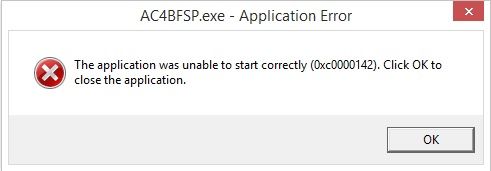
Hope there is a fix for this.
OS: W8.1pro x64
VGA: XFX 7970 DD black
Re: Assassin Creed 4 Black Flag
Posted: 25 Dec 2013, 18:58
by jackfuste
Shinascus Can you upload your AC4BFSP.exe?
Re: Assassin Creed 4 Black Flag
Posted: 30 Dec 2013, 12:44
by Shinascus
It's the one you provided above my post

The game does start with the skidrow cracks except the screen is all messy then ofc.
Re: Assassin Creed 4 Black Flag
Posted: 01 Jan 2014, 00:33
by zesker
Can you please make a fix for 5760x2160,7680x1600 and 7680x3200? I have blackbars on left and right side of screen and this 21:9 fix really helps but there are still an area of blackbars.
Thanks in advance
Re: Assassin Creed 4 Black Flag
Posted: 01 Jan 2014, 12:20
by zorranco

Chinascus its obvious that you cant use the fix is the game is cracked
Thanks for awesome work jackfuste
Re: Assassin Creed 4 Black Flag
Posted: 01 Jan 2014, 19:12
by jackfuste
zesker wrote:Can you please make a fix for 5760x2160,7680x1600 and 7680x3200? I have blackbars on left and right side of screen and this 21:9 fix really helps but there are still an area of blackbars.
Thanks in advance
5760x2160 - Files available from https://community.pcgamingwiki.com/files (search there)
7680x3200 - Files available from https://community.pcgamingwiki.com/files (search there)
For 7680x1600 try 16:10 fix.
Re: Assassin Creed 4 Black Flag
Posted: 01 Jan 2014, 22:11
by zesker
Thank you very much