Page 2 of 2
Re: X COM The Bureau multi monitor
Posted: 02 Sep 2013, 04:39
by Toothless Spoon
helifax wrote:Doctorfish wrote:I tried your advice :

Došlo k pokusu o dělení nulou - An attempt was made to divide by zero
Přerušit - interrupt / Opakovat - repeat / Přeskočit - skip
Yes I thought as much....
The thing is..the fixes are currently made "in mind" with at least 2 monitors...If you put one monitor you get a division by 0 when trying to calculate the "Bezels"...
I am still thinking i I should enhance this plugin or create a new one just for 21:9...
Thing is..is rather hard for me to test since my monitors are all 16:10 and I can't even select any res that is not 4:3 ,16:9 or 16:10 .... -_-
I will try in the future to see if I can do something about it...(decide what to do) but until then, I am sorry to say this, but stick to a regular 16:9 resolution where the game works (I know..it sux)
I was talking to doctorfish last night and I believe he was able to get it to work relatively well by simulating a 3 monitor aspect ratio. So I'm pretty sure he got it at least 99% working.
Re: X COM The Bureau multi monitor
Posted: 02 Sep 2013, 18:24
by Wurfi
Doctorfish wrote:I tried your advice :
Došlo k pokusu o dělení nulou - An attempt was made to divide by zero
Přerušit - interrupt / Opakovat - repeat / Přeskočit - skip
I have the same problem

. I have a dell 21:9 aspect ratio monitor.The dragon age 2 plugin have the same problem.Only this two plugins have this problem all other plugins of the widescreen fixer run very well with my 21:9 monitor.

Markus
Re: X COM The Bureau multi monitor
Posted: 03 Sep 2013, 03:40
by helifax
Wurfi wrote:Doctorfish wrote:I tried your advice :
Došlo k pokusu o dělení nulou - An attempt was made to divide by zero
Přerušit - interrupt / Opakovat - repeat / Přeskočit - skip
I have the same problem
. I have a dell 21:9 aspect ratio monitor.The dragon age 2 plugin have the same problem.Only this two plugins have this problem all other plugins of the widescreen fixer run very well with my 21:9 monitor.
Markus
Are you saying other plugins work? for your Dell 21:9 Monitor?
Can you give me an example of a game/plugin that works? and what settings are you using to make it work?
This way, hopefully I will be able to address this issue so it works for everyone with 1 monitor 21:9 AR.
Regards,
Helifax
PS: I might have an idea on how to address the 21:9 single monitor problem;)) but it will have to wait a couple of days. Still if you can answer to the above question(s) I will appreciate it.
Re: X COM The Bureau multi monitor
Posted: 03 Sep 2013, 15:39
by Wurfi
Hi Helifax

Here are some game examples.This games runs great with the widescreen fixer.
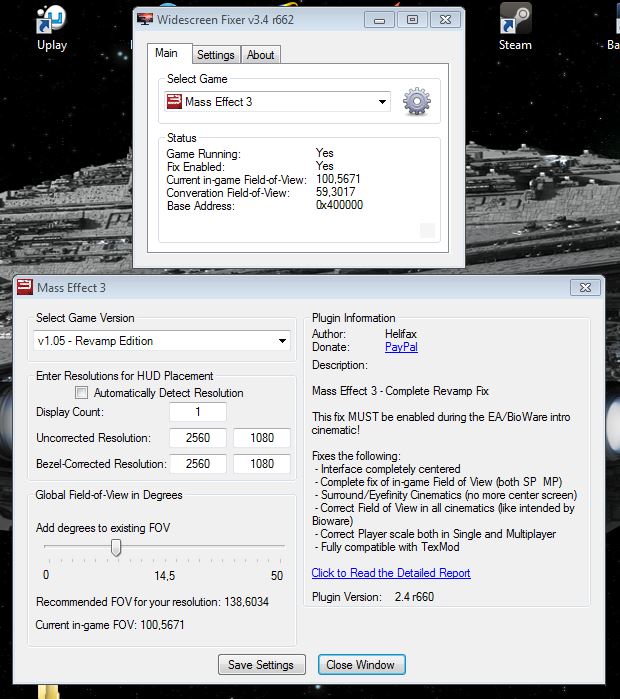
- Mass Effekt 3.JPG (95.63 KiB) Viewed 6637 times
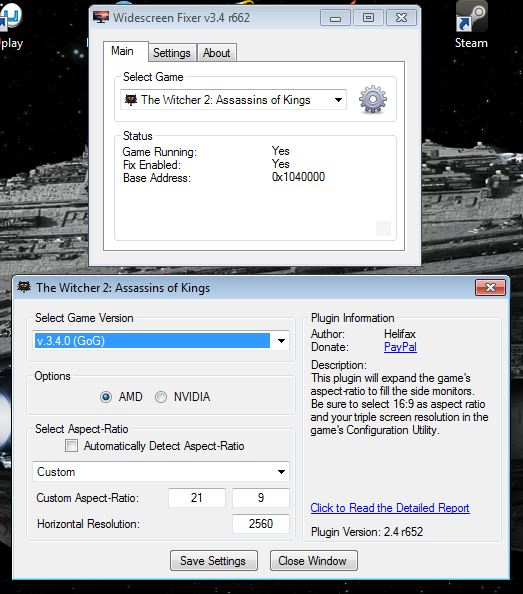
- The Wichter 2.JPG (70.19 KiB) Viewed 6637 times
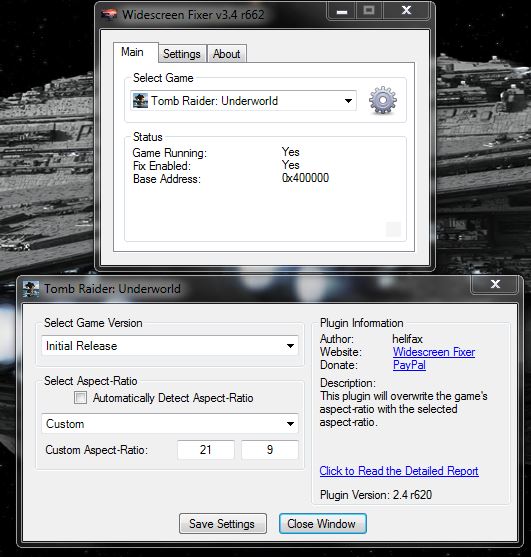
- Tomb Raider Underworld.JPG (65.37 KiB) Viewed 6622 times
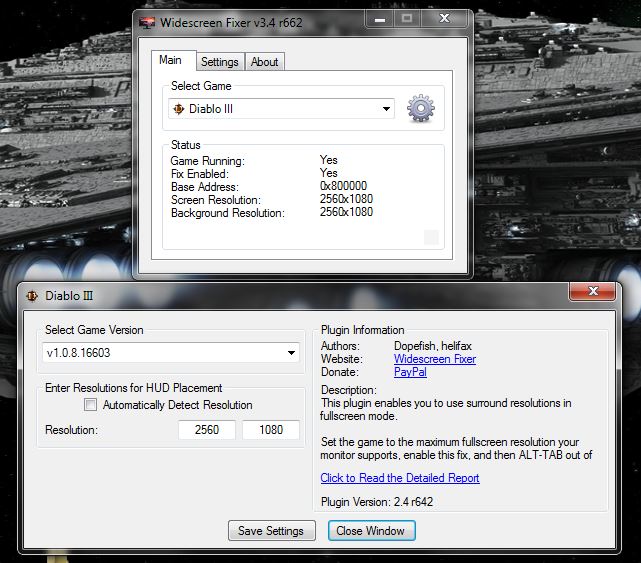
- Diablo 3.JPG (80.79 KiB) Viewed 6631 times
I hope this examples helps you to find a solution.
My Grafik system.
2x Nvidia GTX 680 2GB SLI
1x Dell U2913 WM 21" monitor or a 3x 24" monitor NV surround Setup. It depends

Wurfi
Re: X COM The Bureau multi monitor
Posted: 03 Sep 2013, 17:22
by helifax
After making some tests...
I managed to create a 21:9 resolution on my 16:10 monitor (1866x800)
Unfortunately even the plugins that appear to WORK (like Me3) don't work correctly.
See image:

as you can see everything IS zoomed and cropped.
The actual results should be like this:

And In-game:

As you can see the whole UI is technically created around 16:9 AR. A 21:9 AR gets you in the same scenario as multi-monitor rendering. As you can see in the image above, fixing is possible.
Also fixed the plugin for XCOM The Bureau for 21:9 Aspect Ratio. It now looks like this:
 The trick is to consider your 21:9 monitor as a 16:9 with EXTENSIONS
The configuration for the plugins should be like this:

This way it will Work;))
So far I have fixed the following plugins:
- Mass Effect 3
- XCom The bureau
- Dragon Age Origins
- Dragon Age 2
If you find other plugins that dont work correctly in 21:9 let me know.
You can download the latest versions from my website
3D Surround Gallery => WideScreen Fixer MODSRegards,
Helifax
Re: X COM The Bureau multi monitor
Posted: 03 Sep 2013, 17:49
by Doctorfish
Hi Helifax. I am sorry for delay but i had a lot of work :-/ Thanks a lot for your testing. I´ll tell u if i find other plugins that dont work correctly in 21:9.
PS: i was testing your configuration. This is my result.


Re: X COM The Bureau multi monitor
Posted: 03 Sep 2013, 18:29
by Doctorfish
Another screen from your configuration.

Re: X COM The Bureau multi monitor
Posted: 03 Sep 2013, 18:36
by helifax
Doctorfish wrote:Hi Helifax. I am sorry for delay but i had a lot of work :-/ Thanks a lot for your testing. I´ll tell u if i find other plugins that dont work correctly in 21:9.
PS: i was testing your configuration. This is my result.
I see the menu is correctly scaled now...but is it me? or is not properly centered?
What values did you use?
1920x1080
2560x1080
?
Re: X COM The Bureau multi monitor
Posted: 03 Sep 2013, 18:48
by Doctorfish

My false..i tried your configuration..this is screen with 1920x1080 / 2560x1080. It works perfectly
Re: X COM The Bureau multi monitor
Posted: 03 Sep 2013, 19:11
by helifax
Doctorfish wrote:My false..i tried your configuration..this is screen with 1920x1080 / 2560x1080. It works perfectly

) See:P
Basically that was just an example:)) I don't have a native 21:9 monitor so I forced via drivers a 21:9 resolution.
The one that I came up with was 1866x800 (in your case it would be 2560x1080 - native)
From there basically I calculated the normal 16:10 one which is (16/10)*800(height) = 1280
In your case for 2560 : (16/9)*1080 = 1920 which acts as the normal 16:9 res (un-corrected) and the 2560 acts as the corrected one;)) (21:9)
The same logic goes for all the other plugins;))
Regards,
Helifax
Re: X COM The Bureau multi monitor
Posted: 08 Oct 2013, 22:09
by helifax
Updated the plugin for the latest version of the game on Steam.
Re: X COM The Bureau multi monitor
Posted: 08 Oct 2013, 23:50
by Shockwave_S08
Nope, it's not working with my 21:9 monitor now. Before today's update, the widescreen hack you applied fixed the gameplay and menu view, but screwed up the FMV playback. Now it just crashes the game immediately after the initial loading screen.

Re: X COM The Bureau multi monitor
Posted: 09 Oct 2013, 13:42
by helifax
Shockwave_S08 wrote:Nope, it's not working with my 21:9 monitor now. Before today's update, the widescreen hack you applied fixed the gameplay and menu view, but screwed up the FMV playback. Now it just crashes the game immediately after the initial loading screen.
Oh yes it is working! Just for the sake of things I re-tested it and it works as described. The Movies are "screwed up" since the plugin is CREATED for Multi-monitor resolutions. Last I checked 21:9 is one monitor. For 21:9 since the game doesn't support it correctly the safest way is to get to a 16:9 Resolution one your one monitor.
Also, be sure to check your game install before saying "is not working" as it is working rather fine. After all, is the exact SAME fix as before. If it worked before and now it doesn't guess where the fault lies.....
(Be sure that your game has actually updated and verify steam integrity cache)
Re: X COM The Bureau multi monitor
Posted: 23 Nov 2014, 00:17
by RED-FROG
helifax wrote:Updated the plugin for the latest version of the game on Steam.
uhm...where do I find it?
Re: X COM The Bureau multi monitor
Posted: 23 Nov 2014, 03:56
by anteronoid
RED-FROG wrote:helifax wrote:Updated the plugin for the latest version of the game on Steam.
uhm...where do I find it?
Hi,
In the the second post on the second page ->
http://3dsurroundgaming.com/WSF.html
Re: X COM The Bureau multi monitor
Posted: 02 Oct 2016, 15:46
by XwolfhoundX
Can't get it to work with my 3440x1440 monitor


