Mass Effect 2

Detailed breakdowns of how games react to widescreen, ultra-wide, 4k and multi-mon
Guest

Re: Mass Effect 2

Post by Guest »

Hello French Guys !
J'ai trouvé le problème qui fait que Flawless Widescreen ne marche pas avec la version Francaise de Mass Effect 2 , c'est un problème dans le fichier TLK des sous titres FR à la ligne 291309 Position : 57011 Data : Mass Effect 2 .

Pour une raison que j’ignore cette ligne fait bugée FW . mais maintenant ca devrait fonctionné.

J'ai pas eu le temps de tester les dialogue en profondeur, j’espère ne pas avoir fait d'erreur et que le jeu reste stable.

Enfin, avec ce nouveau fichier de soustitres nous devrions pouvoir jouer en full FR avec Widescreen sauf si y il a aussi des erreurs dans les fichiers Audio auquel cas seule la VOSTFR fonctionne pour le moment .

Des bisous ;-)


I found the problem that Flawless Widescreen does not work with the French version of Mass Effect 2, it is a problem in the TLK file of the subtitles FR at line 291309 Position: 57011 Data: Mass Effect 2.

For some reason FW doesnt want this line ...., its exacly the same line that in ENG file ........but it just want the ENG version of the line ... . now it should work......

I have no time to check the ingame entire dialogue , I hope I have not made any mistake and that the game remains stable.

Finally, with this new file of subtitles we should be able to play in full French Widescreen except if they are some errors in the Audio files which only case the VOSTFR works at the moment.

Kisses ;-)


http://www.partage-fichiers.com/upload/4wu44s9u
letigre33
Posts: 1
Joined: 04 May 2017, 22:24

Re: Mass Effect 2

Post by letigre33 »

Hey mec, je vois que tu as réglé le problème avec FW et Mass Effect 2. Peux-tu me donner ton fichier et me dire comment tu fais? Stp
Speeko
Posts: 1
Joined: 04 Dec 2017, 02:18

Re: Mass Effect 2

Post by Speeko »

I've just completed a run through of ME1 using Flawless Widescreen which corrected most issues. Except for the offset targeting reticule (not the cross-hairs). I put up with it for the entire game in the hopes there was a fix for ME2.

There still doesn't seem to be a solution for this. The best option is to entirely disable it which can be done using these instructions:

steelyeyed wrote:I found a way to remove the red bracket reticle by setting the value

BIOUI/SFXGame.SFXSF_ReticleCombatTarget.m_fSelectionBoxScailingFactor

In the Coalesced.ini go ahead and set the value of this line to a very large number. I am using 1000.0f

The file can be found in
Steam = C:Program Files (x86)/Steam/SteamApps/common/Mass Effect 2/BioGame/Config/PC/Cooked
Origin = C:Program Files (x86)/Origin Games/Mass Effect 2/Biogame/Config/PC/Cooked

Use a tool like Notepad++ but personally I prefer Spine's Mass Effect 2 Coalesced Editor (pay no mind the dragon age symbol it works for masseffect 2 as well)

This value determines how large the reticle is relaive to the apparent high of the selected enemy. The value is normally 0.9f, slightly smaller than the enemy. By setting it to a very large value, the reticle becomes so large that is it off the screen, effectively making it disappear.

Just search for the value and change it as described above. I hope this helps someone, the off center red bracket reticle was driving me crazy

Note: I have not figured out how to correct the square orange box one for destructive items yet tho, but that is not such a huge issue.


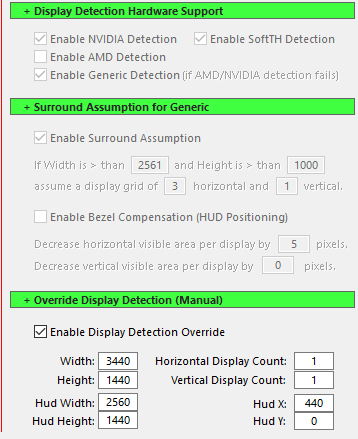
I'm playing in 3440x1440 using Flawless Widescreen with these settings (in the toolbar under Settings > Configuration > Display Detection):
Image

Hope it helps someone else.
User avatar
Rifte
Posts: 25
Joined: 04 Oct 2014, 15:31

Re: Mass Effect 2

Post by Rifte »

Speeko wrote:I've just completed a run through of ME1 using Flawless Widescreen which corrected most issues. Except for the offset targeting reticule (not the cross-hairs). I put up with it for the entire game in the hopes there was a fix for ME2.

There still doesn't seem to be a solution for this. The best option is to entirely disable it which can be done using these instructions:

steelyeyed wrote:I found a way to remove the red bracket reticle by setting the value

BIOUI/SFXGame.SFXSF_ReticleCombatTarget.m_fSelectionBoxScailingFactor

In the Coalesced.ini go ahead and set the value of this line to a very large number. I am using 1000.0f

The file can be found in
Steam = C:Program Files (x86)/Steam/SteamApps/common/Mass Effect 2/BioGame/Config/PC/Cooked
Origin = C:Program Files (x86)/Origin Games/Mass Effect 2/Biogame/Config/PC/Cooked

Use a tool like Notepad++ but personally I prefer Spine's Mass Effect 2 Coalesced Editor (pay no mind the dragon age symbol it works for masseffect 2 as well)

This value determines how large the reticle is relaive to the apparent high of the selected enemy. The value is normally 0.9f, slightly smaller than the enemy. By setting it to a very large value, the reticle becomes so large that is it off the screen, effectively making it disappear.

Just search for the value and change it as described above. I hope this helps someone, the off center red bracket reticle was driving me crazy

Note: I have not figured out how to correct the square orange box one for destructive items yet tho, but that is not such a huge issue.


I'm playing in 3440x1440 using Flawless Widescreen with these settings (in the toolbar under Settings > Configuration > Display Detection):
Image

Hope it helps someone else.


I managed to find a 'fix' sort of for the first one by removing the targeting reticle (outside of combat) completely. It was still there for targeting, but all of the arrows pointing way off centre to NPCs etc were gone.

I have the steam version of the game and my flawless widescreen settings are as follows for a 21:9 2560 x 1080 resolution :

To get rid of the off centre targeting reticle outside of gun use do the following :

1)Go into \Documents\BioWare\Mass Effect\ConfigBIOGuiResources.ini
2)Make the following edit and save
3)[BIOC_Base.BioSFHandler_Reticule]

m_fMinScalingRange=1000.0f

m_fMinScalingValue=0.2f


to


[BIOC_Base.BioSFHandler_Reticule]

m_fMinScalingRange=0.0f

m_fMinScalingValue=0.0f
darkkyle
Posts: 5
Joined: 13 Jan 2018, 11:08

Re: Mass Effect 2

Post by darkkyle »

Bonjour à tous,

pour tous les utilisateurs français de ME2 il y a bien un soucis avec flawless.
Le problème vient du fichier BIOGame_FRA.tlk

J'ai corrigé le fichier, le voici :)

http://uptobox.com/ddqanyywhu3q

il faut remplacer le fichier original se trouvant dans "Mass Effect 2\BioGame\CookedPC"

Bon jeu à tous ^^
Chachardus
Posts: 20
Joined: 13 Jan 2018, 15:34

Re: Mass Effect 2

Post by Chachardus »

Merci darkkyle,
Le fix proposé pour les utilisateurs français de Mass Effect 2 marche du tonnerre. Le jeu est enfin reconnu par Flawless Widescreen, et le jeu devient pleinement jouable en 21/9 pour les français. Depuis le temps que j'attendais ça. Trop génial !
darkkyle
Posts: 5
Joined: 13 Jan 2018, 11:08

Re: Mass Effect 2

Post by darkkyle »

Content de pouvoir rendre service :)

S'il y a des personnes intéressées, j'ai aussi fait un correctif pour Mass Effect 3 (je refais la trilogie en ce moment ^^).
Chachardus
Posts: 20
Joined: 13 Jan 2018, 15:34

Re: Mass Effect 2

Post by Chachardus »

Le correctif pour Mass Effect 3 VF m'intéresse énormément. Flawless WideScreen ne reconnaissant pas la version française du jeu, je suis obligé de faire des modifications dans le registre à chaque lancement du jeu pour avoir un affichage en 21/9. Donc, oui, ce serait vraiment sympa d'avoir un correctif évitant ces manipulations.
Cordialement.
User avatar
scavvenjahh
Editors
Editors
Posts: 3424
Joined: 06 Mar 2008, 17:20

Re: Mass Effect 2

Post by scavvenjahh »

Darkkyle, thanks for the fix. That hosting site is terribly annoying, though. If you send me your fixes by PM I will attach them directly to the Detailed Reports.
darkkyle
Posts: 5
Joined: 13 Jan 2018, 11:08

Re: Mass Effect 2

Post by darkkyle »

Hi scavvenjahh,

no problem, I'll send you a PM soon :)
User avatar
scavvenjahh
Editors
Editors
Posts: 3424
Joined: 06 Mar 2008, 17:20

Re: Mass Effect 2

Post by scavvenjahh »

Received and uploaded ! Thanks :welcome
darkkyle
Posts: 5
Joined: 13 Jan 2018, 11:08

Re: Mass Effect 2

Post by darkkyle »

Bonjour Chachardus,

désolé, je n'avais pas vu ta réponse pour ME3.
Et voici le correctif pour Mass Effect 3 en français :)

http://uptobox.com/a9rk91k8osl4

Bon jeu
User avatar
scavvenjahh
Editors
Editors
Posts: 3424
Joined: 06 Mar 2008, 17:20

Re: Mass Effect 2

Post by scavvenjahh »

Or try our awesome local link: http://www.wsgf.org/f/u/contrib/dr/1999 ... FRA_ME3.7z
Thanks again buddy. Could you explain what you did to fix the issue ? Owners of other localized versions would surely appreciate.
darkkyle
Posts: 5
Joined: 13 Jan 2018, 11:08

Re: Mass Effect 2

Post by darkkyle »

Yes of course.
I'll make this soon.
Ralf27
Posts: 1
Joined: 24 May 2018, 12:24

Re: Mass Effect 2

Post by Ralf27 »

Hello everybody!
Is there any flawless widescreen news regarding the galaxy map marker issue?
I tried to find position definitions in ME2 swf content in pcc files but I'm not a profesional coder and I worry I have to give up. It seems it is defined differently.
Would be nice to get an update.
With ALOT MOD the game is still nice to me. :)
Tallon
Posts: 1
Joined: 01 Jul 2018, 16:09

Re: Mass Effect 2

Post by Tallon »

Does anybody have this running on Flawless Widescreen @ 5760x1080 setup, and if so, how did you do it?

I am running round in circles trying to sort this out, I can run ME3 without an issue but although Flawless is registering ME1 & 2 running it will not allow me to configure it to run in 5760x1080 :(

I am running NVidia GTX 1050 TI 4GB, Corei7 Skylake 4GHz with 3x 21.5" BenQ senseye monitors.


Thankyou in advance :)
User avatar
Skoda Zek
Posts: 26
Joined: 15 Nov 2016, 19:36

Re: Mass Effect 2

Post by Skoda Zek »

Cant get passed new game options screen

Hey folks,

Running game in 3440x1440 and resolution works fine with flawless widescreen (Except i noticed in menus tops and bottoms get cut off a bit)

When starting a new game there is a screen that asks you what difficulty and squad level up etc... but there is no way to go forward or back off that screen and if there is it must be cut off screen.

I have found no way to go forward or back with keystrokes. Need help
Sincerely,
Skoda Zek
Zek Gaming: http://www.modsrigs.com/detail.aspx?BuildID=36010
If you like my build, please give me a +1 on ModsRigs. Thanks!
User avatar
Skoda Zek
Posts: 26
Joined: 15 Nov 2016, 19:36

Re: Mass Effect 2

Post by Skoda Zek »

Skoda Zek wrote:Cant get passed new game options screen

Hey folks,

Running game in 3440x1440 and resolution works fine with flawless widescreen (Except i noticed in menus tops and bottoms get cut off a bit)

When starting a new game there is a screen that asks you what difficulty and squad level up etc... but there is no way to go forward or back off that screen and if there is it must be cut off screen.

I have found no way to go forward or back with keystrokes. Need help


I have found the issue though it requires different Flawless Widescreen settings for Mass Effect 1 and 2 and have yet to test Mass Effect 3

For Mass Effect 1
Width: 3440
Height: 1440
HUD Width: 2560
HUD Height: 1080
HUD X: 440
HUD Y: 0


For Mass Effect 2
Width: 3440
Height: 1440
HUD Width: 2560
HUD Height: 1440
HUD X: 437
HUD Y: 0


It is odd because I played these games before (all 3) in 3440x1440 and one setting worked for all of them (cant remember what that setting was)
Sincerely,
Skoda Zek
Zek Gaming: http://www.modsrigs.com/detail.aspx?BuildID=36010
If you like my build, please give me a +1 on ModsRigs. Thanks!
User avatar
Skoda Zek
Posts: 26
Joined: 15 Nov 2016, 19:36

Re: Mass Effect 2

Post by Skoda Zek »

Skoda Zek wrote:
Skoda Zek wrote:Cant get passed new game options screen

Hey folks,

Running game in 3440x1440 and resolution works fine with flawless widescreen (Except i noticed in menus tops and bottoms get cut off a bit)

When starting a new game there is a screen that asks you what difficulty and squad level up etc... but there is no way to go forward or back off that screen and if there is it must be cut off screen.

I have found no way to go forward or back with keystrokes. Need help


I have found the issue though it requires different Flawless Widescreen settings for Mass Effect 1 and 2 and have yet to test Mass Effect 3

For Mass Effect 1
Width: 3440
Height: 1440
HUD Width: 2560
HUD Height: 1080
HUD X: 440
HUD Y: 0


For Mass Effect 2
Width: 3440
Height: 1440
HUD Width: 2560
HUD Height: 1440
HUD X: 437
HUD Y: 0


It is odd because I played these games before (all 3) in 3440x1440 and one setting worked for all of them (cant remember what that setting was)


One final update.

It appears the following settings work for all 3 games:

Width: 3440
Height: 1440
HUD Width: 2560
HUD Height: 1440
HUD X: 440
HUD Y: 0


Took the HUD X value from Mass Effect 1 and the HUD Width and Height values from Mass Effect 2, combined them and it appears to work for all 3 Mass Effect games.

When looking online I could only find individual solutions for each game that varied and had different values. The aforementioned values seem to work universally for all 3 thus no need to look for individual fixes.
Sincerely,
Skoda Zek
Zek Gaming: http://www.modsrigs.com/detail.aspx?BuildID=36010
If you like my build, please give me a +1 on ModsRigs. Thanks!
User avatar
Kayden
Insiders
Insiders
Posts: 213
Joined: 06 Sep 2011, 15:27

Re: Mass Effect 2

Post by Kayden »

I figured out the culprit for the planets markers in the Galaxy Map, it's HUD Scaling in Flawless Widscreen (FWS). When I disable it and then engage the Galaxy Map it works but everything else is borked like the planet descriptions, menu and etc. It seems the fix with FWS isn't identifying the changes. In ME1 I just disabled FWS all together with a hotkey and I could navigate the Galaxy Map just fine but this having to alt+tab constantly is annoying. I am running the Origin ver since I didn't have to manually install the DLC one by one, also bonus info if got the base game of ME2 on Origin (it was On The House at one point and glad I grabbed it now) it will recognize your DLC and will download it into your game even if you owned it on Steam first, which was my scenario. This version is not detectable by Widescreen Fixer (WSF) even though it is running, says it does support Origin and yes I am running English and not another language. I have no idea what's up but I can't figure out how to test this any further with WSF. Hopefully this helps someone.

EDIT: Okay I figured out a dirty trick to make this work faster since I run secondary monitors. I went into my GamerSettings.ini ( in ... Documents\BioWare\Mass Effect 2\BIOGame\Config) and changed Fullscreen=True to Fullscreen=False and I also changed BorderlessWindow=False to BorderlessWindow=True. This lets me quickly alt+tab in and out of the game without having to minimize and reload shaders when it was fullscreen. I wish there was something more permanent I could do but this is all that works and you can't hotkey specific features in FWS, only whether or not if the fix is enabled in general.

Edit 2: I just figured out something else that makes it easier to navigate the Galaxy Map. Do what I mentioned before, disable HUD Scaling only and then bring up the galaxy map in game, after it is up everything will look smashed together but at least the markers will be over the systems and planets. Than you need to disable the fix completely, the default hotkey for this is ctrl+alt+z. This will stretch the galaxy map so it isn't all smashed together. This makes navigating way easier but since it is stretched you do have look around a lot more. The UI will be borked when you go to a planet or refuel ship in system so you will have to reenable the fix and hud scaling but, if you need to go to the galaxy overview for choosing what system to go to, just double click on the mass relay, in the glowing part works best. If I find any other tricks for this game I'll let yall know.

With Fix and HUD Scaling enabled

Image


With Fix enabled and HUD Scaling disabled

Image


With Fix and HUD Scaling disabled

Image

Edit 3: And if you need fuel with the HUD Scaling disabled you can just double click on the fuel ship and you will get fuel, for probes you'll need to reenable the the HUD Scaling to get the prompt to buy probes. To make things a little less confusing here is what I do to make this complicated process work.

Navigating the Galaxy Overview Map:

In game at Normandy's Ship Holo and Galaxy Map > Alt+Tab out of game to FWS and uncheck HUD Scaling > Go back into the game and engage the Galaxy Map > Disable the fix either by hotkey Ctrl+Alt+Z or Alt+Tab out again and uncheck it than go back into the game > Head to a Mass Relay and double click on the blue spinning animation > The Galaxy Overview of systems should look like the third picture above.

What you will need to do in a local system is:

In game at Normandy's Ship Holo and Galaxy Map > Alt+Tab out of game to FWS and uncheck HUD Scaling > Go back into the game and engage the Galaxy Map > The Hud will look fine with the names and mission descriptions.

When you're in a system I don't recommend disabling the fix because the text isn't as cluttered in local system as they are in the galaxy overview.

What you need to do to interact with planets with the resource minigame, land on planets and buy probes:

As I mentioned before you can double click on a refuel ship to get fuel and a mass relay in the blue spinning but also double clicking on a planet or system that the Normandy is sitting on will bring up the next menu but it will be unusable due to HUD Scaling being disabled for a planet. HUD Scaling cannot just be enabled and it work like the disabling and reenabling the overall fix, you MUST go back to the Normandy > Alt+Tab out of game to FWS and check HUD Scaling > Go back into the game and engage the Galaxy Map > The Hud will look fine for the planet and refinery ship if you want to buy probes. This also must be enabled to to scan for resources.

This is a pain for sure but it's the only thing you can do aside from dropping your resolution to 1080p.

Azza Fusion 4000 Liquid Cooled Full/Mini-ITX Tower - AMD Ryzen 1700x CPU - Tt Water 3.0 Ultimate CPU Cooler - ASUS ROG Crosshair VI Extreme - 2x EVGA GTX 980 in SLI - Geil 16GB - Klipsch 5.1 THX Speakers - Vertex 4 128GB SSD, Sandisk 256GB SSD, Samsung 512GB 850 PRO SSD, WD Black 320GB & Two times Toshiba 5TB (one for Games and the other for Storage) - Logitech G502 - Corsair K65 RGB - Logitech G13 - Win10 Pro 64bit - 2-over-1 Viewsonic VA2448M 24" (2x 1920x1080 Secondary) & Samsung CHG90 Series Curved 49" (3840x1080) - Ergotech Monitor Stand - Shout out to WSGF for the upgrade on my stand!
Post Reply

Who is online

Users browsing this forum: No registered users and 7 guests