Page 2 of 2
Re: Call of Duty: Modern Warfare 3
Posted: 11 Jan 2018, 16:46
by LaUs3r
Hi folks,
I've been playing MW3 since months now on my ASUS ROG SWIFT PG348Q (34", 3440x1440, 21:9) on a resolution of 2560x1440 which is fine but I get the black stripes on the left and right side.
Now I found this beautiful tool "flawless Widescreen" and "widescreen fixer", but I can't manage to get either of them to work in 21:9 wide screen.
The game itself offers a resolution of 3440x1440 but it looks pretty crappy.
I set the image quality to "native" in the advanced menu. and both tools indicate the the fix is "on".
Any advice if the game could be set to 21:9 in 3440x1440?
cheers
Re: Call of Duty: Modern Warfare 3
Posted: 22 Jan 2018, 14:34
by LaUs3r
anyone?
Re: Call of Duty: Modern Warfare 3
Posted: 24 Jan 2018, 20:32
by czarman
I tried it out and its still working. Here are some Advises for Flawless Widescreen: Ensure your graphics settings are set to "NATIVE" - this is in graphics settings under Image Quality, if you fail to do this the menu may not render correctly and the ingame resolution may appear blocky.
And also you need to change the Display Options in FW like in this Screenshot:
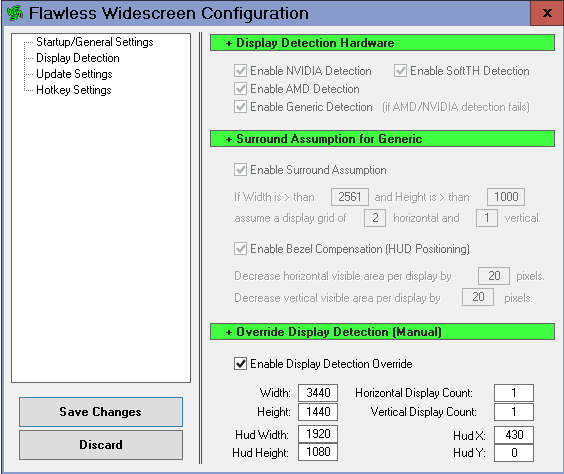
- WF.PNG (19.24 KiB) Viewed 8380 times
Re: Call of Duty: Modern Warfare 3
Posted: 25 Jan 2018, 09:35
by LaUs3r
thank you. Now it works with the settings....
Re: Call of Duty: Modern Warfare 3
Posted: 09 Mar 2018, 10:20
by Zoirot2W
Even I follow the settings, the Flawless Widescreen doesn't work in MW3 on my Samsung 3440x1440 monitor.
The "Status Window" shows: "Searching for Call of Duty: MW3 process, please configure desired settings and launch the game." even I have already run the game.
Re: Call of Duty: Modern Warfare 3
Posted: 09 Mar 2018, 11:55
by LaUs3r
Zoirot2W, ensure that your settings in Flawless Widescreen are correct. That did the trick for me.
1) check the display Detection settings: here are my settings which do work on my ASUS ROG SWIFT PG348Q (34", 3440x1440, 21:9) with a GTX 1080.

2) configure a valid hotkey. I use for example the following:

3) When you are in-game in MW3 set the resolution to: 3440x1440
4) Verify that the fix is running. the menu should change when you press the defined hotkey (in my case "L"). if it's not working, jump to desktop and check the flawless widescreen app
Re: Call of Duty: Modern Warfare 3
Posted: 09 Mar 2018, 14:07
by Zoirot2W
LaUs3r wrote:Zoirot2W, ensure that your settings in Flawless Widescreen are correct. That did the trick for me.
1) check the display Detection settings: here are my settings which do work on my ASUS ROG SWIFT PG348Q (34", 3440x1440, 21:9) with a GTX 1080.
2) configure a valid hotkey. I use for example the following:
3) When you are in-game in MW3 set the resolution to: 3440x1440
4) Verify that the fix is running. the menu should change when you press the defined hotkey (in my case "L"). if it's not working, jump to desktop and check the flawless widescreen app
Sorry, friend. I can't zoom in your picture.
I downloaded the x64 version, I follow the setting and there's nothing changed in Status Window. It's still searching for the MW3 process.
Re: Call of Duty: Modern Warfare 3
Posted: 09 Mar 2018, 14:09
by Botan
Is it safe to use Flawless Widescreen on MW3 MP on VAC protected server?
Re: Call of Duty: Modern Warfare 3
Posted: 09 Mar 2018, 14:30
by LaUs3r
Botan wrote:Is it safe to use Flawless Widescreen on MW3 MP on VAC protected server?
mmh, I don't think so because it's an "code injection", BUT:
- think about how old MW3 is and how much effort one would put in proofing that you actually used this SW
- I personally do not play in MP with FW because I have the feeling that with FW enabled I get a little latency...
Re: Call of Duty: Modern Warfare 3
Posted: 09 Mar 2018, 15:54
by Zoirot2W
The Flawless Widescreen works in COD: Ghosts, BO1 and BO2 except MW3 on my PC. I also can't change the FOV with Flawless Widescreen.
I use MW3 FoV Changer to set the FOV.
The Widescreen Fixer works in MW2 and it crashes in MW3.
Re: Call of Duty: Modern Warfare 3
Posted: 09 Mar 2018, 16:08
by LaUs3r
Zoirot2W wrote:LaUs3r wrote:Zoirot2W, ensure that your settings in Flawless Widescreen are correct. That did the trick for me.
1) check the display Detection settings: here are my settings which do work on my ASUS ROG SWIFT PG348Q (34", 3440x1440, 21:9) with a GTX 1080.
2) configure a valid hotkey. I use for example the following:
3) When you are in-game in MW3 set the resolution to: 3440x1440
4) Verify that the fix is running. the menu should change when you press the defined hotkey (in my case "L"). if it's not working, jump to desktop and check the flawless widescreen app
Sorry, friend. I can't zoom in your picture.
I downloaded the x64 version, I follow the setting and there's nothing changed in Status Window. It's still searching for the MW3 process.
sorry, I changed it. the pics are now accessible.
mmmh, make sure that you actually LOAD the plugin as you can see in the next screenshot --> "INSTALLED PLUGINS"

also make sure to start WF as admin
cheers
Re: Call of Duty: Modern Warfare 3
Posted: 09 Mar 2018, 19:31
by Zoirot2W
I reinstalled system again, it works! Thanks!!
Re: Call of Duty: Modern Warfare 3
Posted: 29 May 2019, 16:05
by loki31
Hi, this solution did not work for me! Need a Hex Code to fix the 21:9 stretch problem. Could you help? 3440 x 1440 are my desired solution.
Flawless did not work 4me.


