Page 2 of 2
Hey just in case you haven't
Posted: 10 Jun 2012, 14:46
by Toothless Spoon
Hey just in case you haven't tried, but if you change the interface size to normal it makes a difference.
It already is, it doesn't
Posted: 10 Jun 2012, 15:30
by Skid
It already is, it doesn't help, the game just doesn't work outside of the AMD or NVIDIA APIs, this is what I get, the mouse position is actually just to the left of the currently selected options tab, but its highlighting the drop down box for refresh rate.
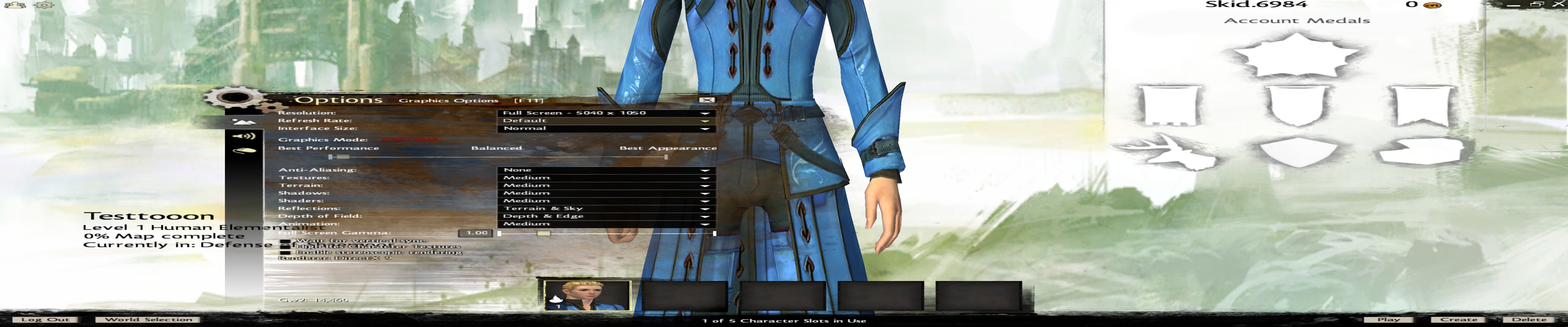
Ingame is handled the same way.
I'm late on the report
Posted: 11 Jun 2012, 06:35
by sixshot
I'm late on the report because I jumped in as soon as the door opened. I had planned on re-reporting the issues with multi-monitor but it seems that they have noted the issues in a "Known Issues" post on their forums. Here's a copy of the "Hardware Compatibility" section:
- We are currently optimizing Guild Wars 2, making ongoing improvements to the game’s frame rate. Presently, the game is CPU-bound on most high-end systems, so lowering graphics settings or upgrading your video card may not have a large impact on performance.
[list]
- On older or lower-end machines, it is recommended that you try disabling reflections to improve frame rate.
[*]Forcing anti-aliasing through AMD Catalyst™ Control Center or AMD VISION™ Engine Control Center typically results in a black screen when playing.
[*]Windows TDR (Timeout Detection and Recovery) will sometimes restart a user’s graphics drivers if they become unresponsive, resulting in a notification that the graphics driver has been restarted.
[*]Currently, adjusting the core clock speed of the GPU or CPU typically results in lower performance.
- It is advised that you leave core clock speeds at factory defaults.
[*]AMD CrossFire™ and NVIDIA® SLI™ are not currently supported.
- These features should be disabled while running the game.
[*]Enabling NVIDIA 3D VISION® may cause a crash on some systems.
- If you experience a crash while this setting is enabled, it is recommended that you disable it in the NVIDIA Control Panel.
[*]AMD Eyefinity Technology is not officially supported at this time, and players using systems with Eyefinity enabled may encounter problems.
- If you experience issues while using Eyefinity, it is recommended that you disable the feature in the AMD Catalyst Control Center or AMD VISION Engine Control Center.
[/list]
So... yeah... like everyone else have noticed, no change. It's a bit of a disappointment... but... well... they've already noted so it's just a matter of time until they get around to tackling the issue. I just hope they'll have the problem resolved by the time the game goes gold.
At least they addressed the
Posted: 11 Jun 2012, 18:59
by Zodiak
At least they addressed the UI scaling issue that I asked them about... now if only they would fix it some more, LOL
No framerate issues on my computer but the UI would normally only scale so large, even on the "Larger" setting. my monitors being in portrait mode @ 4525x2560 the UI looked VERY tiny and the old compass was of no use and coudnt be read.
Its now much larger and can be resized, up to a point! But i still wish i could make it bigger due to the 81" display @ 4525x2560.
Cant wait for the 2012 release :D
Hey guys, thought I'd come on
Posted: 17 Jul 2012, 05:45
by Toothless Spoon
Hey guys, thought I'd come on here and share a beta key that I scored for the final beta weekend...if you want it, let me know. :)
Also got one to spare as
Posted: 18 Jul 2012, 06:31
by sixshot
Also got one to spare as well. Need to find a venue to post it on so it can be put to good use. Something tells me I'll end up on gwguru just so it'll get taken up right on the spot.
Well, it's the last beta before it going gold. What will we get when the doors open? Wish I could test Crossfire + Eyefinity performance but my 1st card (XFX 6950 2GB) had to be RMA'd due to fan failure. That card won't be back for a while and it'll be long over before I can pop the card back in and get back to gaming. Here's to hoping all Eyefinity and Surround issues are resolved.
Who's currently playing the
Posted: 21 Jul 2012, 04:06
by Amon Amarth
Who's currently playing the beta, and on NVIDIA Surround? I've noticed some minor FPS improvements in this one through the latest beta drivers.
It also seems that the chat box UI still won't move to the center monitor. Anyway to fix this yet - something I can't see?

I am playing in the Guild
Posted: 21 Jul 2012, 06:07
by Mixelplix
I am playing in the Guild Wars 2 Beta weekend event July 20-22. This is some info I from a thread on GW 2's beta forums that I found from a dev post. Looks like Crossfire/SlI still unsupported and technically no Eyefinity support atm.
Ashley Segovia
"While SLI and Crossfire should work, it is unsupported at this time. This also goes for Eyefinity which is currently unsupported as well. Unfortunately we do not have information at this time as to whether or not it will be supported by launch, but I would keep an eye out on the official Guild Wars 2 website, Twitter, and Facebook as well as the official forums for any news and announcements regarding Guild Wars 2."
about 2 hours ago
Their beta forums noted that
Posted: 21 Jul 2012, 10:33
by sixshot
Their beta forums noted that both SLI/Crossfire as well as Surround/Eyefinity are (still) known issues. I gave it a run in Eyefinity and nearly every issues that has been noted still remains.
Login screen: not fixed. Normally you should easily make out the "2" logo. Zoomed.
Character creation: not fixed. 3D characters are zoomed, race and gender selection are zoomed
Dialog scenes: not fixed, 3D characters are zoomed up, dialog text spans across monitors
Quest reward UI: not fixed, the shield pop-up that signifies the completion of a quest is zoomed up. UI elements for selecting which reward to take is not affected.
HUD UI: not fixed, the chat, minimap, quest/event notification, and UI menu are still flushed to their appropriate corners.
I might have missed one or two but those are what I can note out for the Eyefinity end. Is character creation still messed up on Surround? Before the whole event is over, I am considering compiling up a list of items that still plagues multi-monitor users with screenshots to make sure that the devs know where to look. Despite that they acknowledge the issues, I don't think we know how they are going to address it. There's a hack job that they could do... or they can go all-out and code in support across the board.
Still texture pop up issues I
Posted: 22 Jul 2012, 14:55
by Gilly
Still texture pop up issues I reported from the first beta that have seemingly gone unnoticed. If they can't even change the distance that textures are brought from low to high resolution, I am not holding my breath on the eyefinity issues anyway :)
Gilly wrote:Still texture pop
Posted: 22 Jul 2012, 22:46
by sixshot
Still texture pop up issues I reported from the first beta that have seemingly gone unnoticed. If they can't even change the distance that textures are brought from low to high resolution, I am not holding my breath on the eyefinity issues anyway :)
It could be part their whole "it's not optimized yet" thing. We still don't have a DX10/DX11 rendering path. I kinda wonder just how much they can get done in a single month. Do they intend to beta-test the DX10/DX11 rendering engine on their own when they could have done so this beta? I get the feeling there's going to be a lot of bug reports come launch time when people try out the DX10/DX11 rendering path for the first time and seeing there are performance issues or something. Or that the aforementioned rendering path is not implemented as of yet when they said they'll have one for the game.