
I think it's working now. I've went into the Nvidia Control Panel, and enabled the SLI Visual Indicator, and the green bars where moving properly.
As far as Surround goes, I tried the solution from this post by making the autoexec.cfg file, and it still didn't work.
http://gamers-underground.com/action-fps/34662-brink-tweaks-fixes.html
I'll try inputting console commands to see if that does the trick.
EDIT: Ignore the part in that post that mentions to create an autoexec file. Just use wordpad to edit the brinkconfig file and you should be good to go. Surround + SLI is working just fine now. The SLI solution seems to be just with Nvidia, I'm not too sure about Crossfire.
EDIT 2: Just wanted to add that I seem to be getting a strange stuttering issue with this game. It's not Microstutter, since all my games run fine. Not sure if it's the Surround, or the SLI, but it feels like the game is rather on the choppy side. I'm getting 40 FPS most of the time, so it's not that. But the surround is indeed working, aside from the HUD not being centered.
Brink - TH2Go Support?
Re: Brink - TH2Go Support?
Does anyone know, if these config settings are the same for 3840x1024?
like this:
seta r_mode "-1"
seta r_customWidth "3840"
seta r_customHeight "1024"
seta r_aspectRatio "-1"
seta r_customAspectRatioH "16"
seta r_customAspectRatioV "3"
thanks
pudel
like this:
seta r_mode "-1"
seta r_customWidth "3840"
seta r_customHeight "1024"
seta r_aspectRatio "-1"
seta r_customAspectRatioH "16"
seta r_customAspectRatioV "3"
thanks
pudel
Re: Brink - TH2Go Support?
So.... pretty much sums it up to being not even worth downloading to the multi monitor rig. Unless wanting to jump through hoops to get it to work properly . Ah well .
-
Mach1.9pants

- Insiders

- Posts: 1512
- Joined: 29 Jul 2007, 05:24
- Location: NZ
Re: Brink - TH2Go Support?
So.... pretty much sums it up to being not even worth downloading to the multi monitor rig. Unless wanting to jump through hoops to get it to work properly . Ah well .
Well that is not uncommon
-
Amon Amarth
- I Donated

- Posts: 513
- Joined: 18 Jul 2007, 04:19
Re: Brink - TH2Go Support?
[quote]So.... pretty much sums it up to being not even worth downloading to the multi monitor rig. Unless wanting to jump through hoops to get it to work properly . Ah well .
Well that is not uncommon
In retrospec, it's not that bad. A simple wordpad edit and SLI patch is all that's needed. But what's bad is the HUD is not centered, and there's some pretty bad stuttering going on. Some people might be able to play through it, but I'm rather sensitive to it.
May want to wait for Splash Damage to patch the game.
Re: Brink - TH2Go Support?
Here you go guys I found a configurator from Rush-Zone.com it works pretty good for me, figured I would pass it on :cheers
http://www.rush-zone.com/downloads/gaming/brink/brinkconfigv1.2/details.html
http://www.rush-zone.com/downloads/gaming/brink/brinkconfigv1.2/details.html
Re: Brink - TH2Go Support?
[quote][quote]So.... pretty much sums it up to being not even worth downloading to the multi monitor rig. Unless wanting to jump through hoops to get it to work properly . Ah well .
Well that is not uncommon
In retrospec, it's not that bad. A simple wordpad edit and SLI patch is all that's needed. But what's bad is the HUD is not centered, and there's some pretty bad stuttering going on. Some people might be able to play through it, but I'm rather sensitive to it.
May want to wait for Splash Damage to patch the game.
Right... though it's a simple patch and wordpad edit it is the combination of that and the potential performance issues Im really not willing to mess with right now. for the most part you can get these issues worked out with workarounds . but sometimes it leads to other issues. Any more it's getting to were i wont even mess around buying a game if it doesn't support muti out of the box. although i did pre order this game with the Idea that i could always play it on my other rig . But who am I kidding . I never use the single monitor computer anymore now that i have surround
-
Mach1.9pants
- Insiders
- Posts: 1512
- Joined: 29 Jul 2007, 05:24
- Location: NZ
Re: Brink - TH2Go Support?
It is a good game though, very deep. I am OK with single screen til we get centred HUD, need it centred if you are going to compete.
-
LordJuanlo

- Posts: 97
- Joined: 06 Nov 2006, 10:37
Re: Brink - TH2Go Support?
It still hasn't unlocked for me (Europe), however I have found this tool that will allow us tweak advanced settings:
http://www.fileplanet.com/220057/220000/fileinfo/Brink---Brink-Configurator-v1.2
http://www.fileplanet.com/220057/220000/fileinfo/Brink---Brink-Configurator-v1.2
Asus Rampage IV Formula / Intel i7 3930K C2 / 32 GB G.Skill RipjawsZ DDR3 2133 Quad Channel
Corsair Force GT 60 GB SATA3 / WD Caviar Black 2 TB / Seagate Barracuda Green 2 TB
3 x Radeon 7970 in Benq XL2420T (EyeFinity 5760x1080 @ 120Hz)
Oculus Rift
Corsair Force GT 60 GB SATA3 / WD Caviar Black 2 TB / Seagate Barracuda Green 2 TB
3 x Radeon 7970 in Benq XL2420T (EyeFinity 5760x1080 @ 120Hz)
Oculus Rift
Re: Brink - TH2Go Support?
It still hasn't unlocked for me (Europe), however I have found this tool that will allow us tweak advanced settings:
http://www.fileplanet.com/220057/220000/fileinfo/Brink---Brink-Configurator-v1.2
He He, we both posted the same program just different download locations, :hide
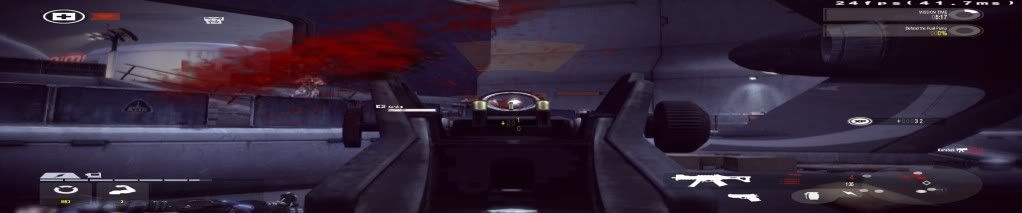
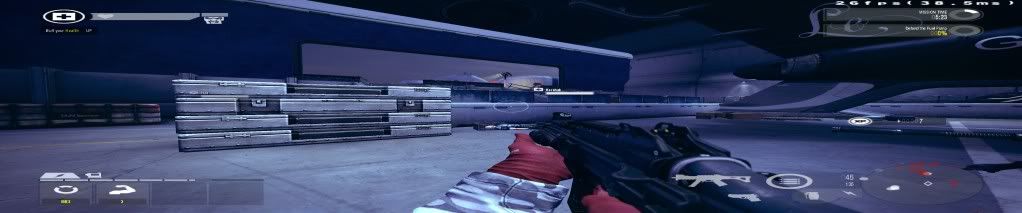
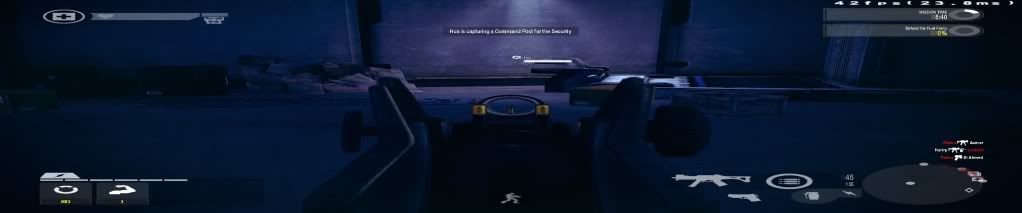
Yes it centers the game really well.
My current settings are 5040 x 1050 and I am using a FOV of 115 and it doesnt look that bad, now if they would just fix the stupid sound issue (make sure your realtek drivers are up to date or the sound will really really suck...ask me how I know).
-
Mach1.9pants
- Insiders
- Posts: 1512
- Joined: 29 Jul 2007, 05:24
- Location: NZ
Re: Brink - TH2Go Support?
stretched and unplayable with weird jumping of FoV when sprinting, I'll sick with single screen til they fix it proper.
-
fuzioninfinity
- Insiders
- Posts: 162
- Joined: 18 Oct 2008, 03:58
Re: Brink - TH2Go Support?
Stretched HUD and weapon? Bleh..
Did the devs acknowledge these issues and say they're going to fix them somewhere? I want to get this game but I simply refuse to buy games that don't properly support Eyefinity/Surround.
stretched and unplayable with weird jumping of FoV when sprinting, I'll sick with single screen til they fix it proper.
Did the devs acknowledge these issues and say they're going to fix them somewhere? I want to get this game but I simply refuse to buy games that don't properly support Eyefinity/Surround.

Re: Brink - TH2Go Support?
come with any gift passes? not a game that interests me enough to purchase it.
Resident Jester - Flawless Widescreen - Widescreen gaming the way it should be.
[Steam Profile]
Want to keep Flawless Widescreen alive? Donate Here
[Steam Profile]
Want to keep Flawless Widescreen alive? Donate Here
-
streetridaz
- Posts: 28
- Joined: 14 Jul 2010, 14:48
Re: Brink - TH2Go Support?
come with any gift passes? not a game that interests me enough to purchase it.
I'm dying to try this but I'm just not sure if it's worth my $50 especially when it's not working with Eyefinity. Is anyone working on a fix. I see the config ini can be tweaked to work but is it going to be another "Bulletstorm" where sprinting and iron sights and special events are all jacked up because I'm getting the feeling like we can't alter the config file to the extent as we could with bulletstorm.
-
Mach1.9pants
- Insiders
- Posts: 1512
- Joined: 29 Jul 2007, 05:24
- Location: NZ
Re: Brink - TH2Go Support?
Well it is not playable in MM, sounds same as BS. Whether it could be properly fixed I don't know...No gift passes that I can see.
-
Amon Amarth
- I Donated
- Posts: 513
- Joined: 18 Jul 2007, 04:19
Re: Brink - TH2Go Support?
[quote]It still hasn't unlocked for me (Europe), however I have found this tool that will allow us tweak advanced settings:
http://www.fileplanet.com/220057/220000/fileinfo/Brink---Brink-Configurator-v1.2
He He, we both posted the same program just different download locations, :hide
Yes it centers the game really well.
My current settings are 5040 x 1050 and I am using a FOV of 115 and it doesnt look that bad, now if they would just fix the stupid sound issue (make sure your realtek drivers are up to date or the sound will really really suck...ask me how I know).
Wait, how come your game is stretched? I edited the brinkconfig file, and I was able to get surround working just fine without the streching.
-
Mach1.9pants
- Insiders
- Posts: 1512
- Joined: 29 Jul 2007, 05:24
- Location: NZ
Re: Brink - TH2Go Support?
The program just changes the res but not these type of settings:
seta r_aspectRatio "-1"
seta r_customAspectRatioH "16"
seta r_customAspectRatioV "3"
The annoying thing is the flipping back and forth of zooming when sprinting = un playable to me.
EDIT: OK I turned off all the graphical goodies, set the shadows to medium and just used the seta r_ settings first listed in the autoexec.cfg and it is now fine. The HUD isn't centred but that is liveable, it seems as long as you don't mess with the FoV you don't get the flickering FoV on sprint and with the graphical stuff off (and who notices that in this tpe of game) it doesn't stutter and runs at 90-120 FPS.
Happy with purchase now, be good to get the HUD done tho.
seta r_aspectRatio "-1"
seta r_customAspectRatioH "16"
seta r_customAspectRatioV "3"
The annoying thing is the flipping back and forth of zooming when sprinting = un playable to me.
EDIT: OK I turned off all the graphical goodies, set the shadows to medium and just used the seta r_ settings first listed in the autoexec.cfg and it is now fine. The HUD isn't centred but that is liveable, it seems as long as you don't mess with the FoV you don't get the flickering FoV on sprint and with the graphical stuff off (and who notices that in this tpe of game) it doesn't stutter and runs at 90-120 FPS.
Happy with purchase now, be good to get the HUD done tho.
Re: Brink - TH2Go Support?
Wait, how come your game is stretched? I edited the brinkconfig file, and I was able to get surround working just fine without the streching.
Its the FOV I havent taken the time to set it up properly yet
Re: Brink - TH2Go Support?
For me its working fine as well, using auteoexec.cfg with following settings:
seta r_mode "-1"
seta r_customWidth "3840"
seta r_customHeight "1024"
seta r_aspectRatio "-1"
seta r_customAspectRatioH "15"
seta r_customAspectRatioV "4"
seta pm_sprintfov "0"
seta g_sprintburstfov "100"
seta g_fov "100"
The flickering FOV shall be changed with next patch.
seta r_mode "-1"
seta r_customWidth "3840"
seta r_customHeight "1024"
seta r_aspectRatio "-1"
seta r_customAspectRatioH "15"
seta r_customAspectRatioV "4"
seta pm_sprintfov "0"
seta g_sprintburstfov "100"
seta g_fov "100"
The flickering FOV shall be changed with next patch.
-
streetridaz
- Posts: 28
- Joined: 14 Jul 2010, 14:48
Re: Brink - TH2Go Support?
For me its working fine as well, using auteoexec.cfg with following settings:
seta r_mode "-1"
seta r_customWidth "3840"
seta r_customHeight "1024"
seta r_aspectRatio "-1"
seta r_customAspectRatioH "15"
seta r_customAspectRatioV "4"
seta pm_sprintfov "0"
seta g_sprintburstfov "100"
seta g_fov "100"
The flickering FOV shall be changed with next patch.
Okay hold up a minute. lol So we got this working? What is the Auteoexec.cfg? this isn't the Brink Config Ini right? I want to get his game but not if I can't get Eyefinity to work. Can you help me out so I understand what you did.
Who is online
Users browsing this forum: No registered users and 6 guests