Page 2 of 10
Re: L4D2 Center HUD fix
Posted: 02 Dec 2009, 19:19
by A Small White Box
[quote]Works now, good stuff.
Glad to hear it. Are you working on a particular res/AR?
5040x1050, I did my own .res files and followed your instructions for the hex edit. I tried to modify baschat.res to move the chat box as well, but it didn't work on my first attempt and I gave up after that.
I am curious if anyone knows of a console command that can be used to load a .res file similar to .cfg files like autoexec.cfg. It would be much simpler to launch with a console command or launch parameter than to hex edit.
Re: L4D2 Center HUD fix
Posted: 02 Dec 2009, 19:34
by GeneralAdmission
I'm assuming that if you contacted support about it you will get a canned response that they cant tell you what VAC bans for. Skins require the same vpk edit that you are doing and they have never banned for skins.
I've asked Valve about VAC issues twice in the past and both times got real responses. One was even a simple 'No, that should not be a problem'.
I am curious if anyone knows of a console command that can be used to load a .res file similar to .cfg files like autoexec.cfg. It would be much simpler to launch with a console command or launch parameter than to hex edit.
Keeping my eyes out for something like that. In my email to Valve I also asked if they had any tips on how to improve the HUD mod. Maybe we'll get a generous response. ;)
Care to share your 5040x1050 .res file? I'll add it to the download list with credit to you. I'm all for this being a community production.
Re: L4D2 Center HUD fix
Posted: 02 Dec 2009, 19:41
by Downtown1
I seem to recall there definitely being a console command (can't remember what it was), but I can't remember if it actually worked or not to reload the HUD.
I've only needed to get the first HUD up anyway after that when patches came in any new subsections of the hudlayout.res just got treated with the same +600 treatment and they worked without further tweaking.
Definitely getting the HUD working for TH the first time ever is the hard part.
BTW you will probably need to edit a separate chat file to fix the chat box placement.. if you really care that much.. :).
Re: L4D2 Center HUD fix
Posted: 02 Dec 2009, 20:50
by A Small White Box
Care to share your 5040x1050 .res file? I'll add it to the download list with credit to you. I'm all for this being a community production.
Should be pretty much the same thing as yours, but if you want to take a gander, here it is.
http://www.filefront.com/15045489/hudlayout.res
Re: L4D2 Center HUD fix
Posted: 02 Dec 2009, 21:17
by A Small White Box
Went scrolling through the command list and found a few.
Code: Select all
cl_drawhud            : 1        : , "cheat", "cl"  : Enable the rendering of the hud

   gameui_activate       : cmd      :                  : Shows the game UI

   hud_reloadscheme      : cmd      :                  : Reloads hud layout and animation scripts.

   ui_reloadscheme       : cmd      :                  : Reloads the resource files for the active UI window
The only problem is that reloading the scheme will still simply load the res file located in the .vpk. We just need a way to point to a different file in order to not mess with the hex editor.
Re: L4D2 Center HUD fix
Posted: 04 Dec 2009, 18:46
by MaxDarklighter
Nothing new about HUD fix?
Re: L4D2 Center HUD fix
Posted: 04 Dec 2009, 20:07
by GeneralAdmission
Nothing new about HUD fix?
Not yet, sorry. My time has been monopolized with work/life. I *might* have a chance to update this weekend.
update
Got a first reply from Valve. Unfortunately they misunderstood my question, so I wrote back to clarify.
Re: L4D2 Center HUD fix
Posted: 05 Dec 2009, 11:56
by MaxDarklighter
OK waiting for new info :cheers
Re: L4D2 Center HUD fix
Posted: 10 Dec 2009, 22:03
by Aexrael
Any way to adjust FoV?
Re: L4D2 Center HUD fix
Posted: 11 Dec 2009, 00:32
by GeneralAdmission
Any way to adjust FoV?
There is a fov_desired command in the console. Not sure if it does anything.
Re: L4D2 Center HUD fix
Posted: 11 Dec 2009, 09:46
by MaxDarklighter
Any info about HUD fix? :bowdown
Re: L4D2 Center HUD fix
Posted: 11 Dec 2009, 19:05
by GeneralAdmission
Any info about HUD fix? :bowdown
Haven't forgotten. :wink: Finished work last night so this project is back on the table.
Which AR do you need? 3x16:10 or 3x16:9?
Re: L4D2 Center HUD fix
Posted: 11 Dec 2009, 21:13
by MaxDarklighter
[quote]Any info about HUD fix? :bowdown
Haven't forgotten. :wink: Finished work last night so this project is back on the table.
Which AR do you need? 3x16:10 or 3x16:9?
Sorry I meant not fix but Valve allow of usage this fix in multiplayer :rockout I really afraid of ban.
P.S.: But I use 3x1680x1050
Re: L4D2 Center HUD fix
Posted: 13 Dec 2009, 21:45
by Downtown1
I've been using TF2/L4D center HUD fixes forever, trust me, they're not going to ban you... plus people have been making custom HUDs forever also that's the whole point of making it easy to edit RES files.
Re: L4D2 Center HUD fix
Posted: 16 Dec 2009, 01:59
by MaxDarklighter
OK guys I replaced hud file and nothing wrong - I am not bunned yet :D
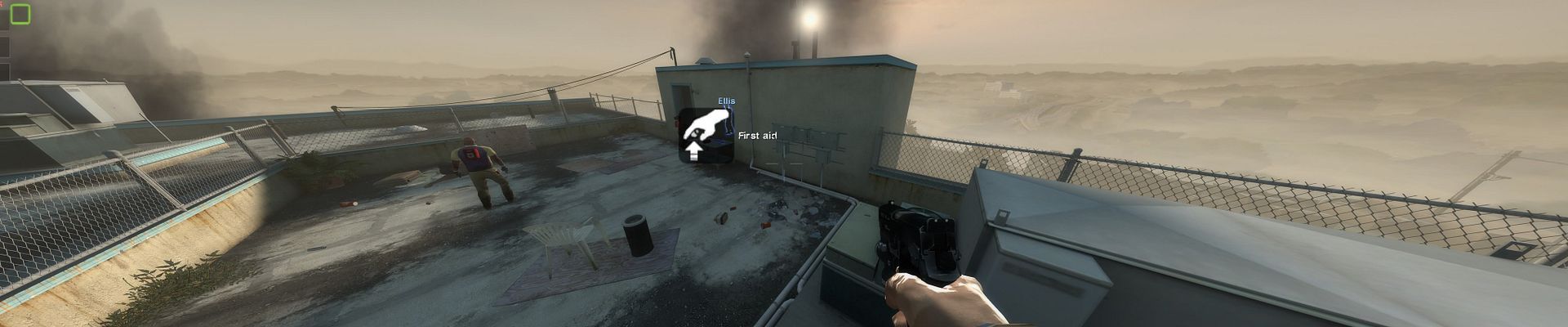
Find CHudLocalPlayerDisplay line and find out that the best values is x 933, y 91. But I can't find value of crosshair to change not it's position but it's size(as we know in triplehead crosshair geting 3-time bigger than it must be). I find HudCrosshair line but changing of it's wide & tall value have no effect.
Re: L4D2 Center HUD fix
Posted: 22 Dec 2009, 01:00
by Leapo
When SoftTH does bezel correction, it actually increases the horizontal resolution it presents to games so it can fill in the edges of the screen after shifting the image of the side screens inward. I've set up SoftTH to account for bezels that are 128 pixels wide, making my resolution in Left4Dead2 5296x1050.
I had to tweak the config for the first Left4Dead myself to get everything to stay on the center screen, though I still haven't managed to get it perfect. Any chance of getting a premade mod for 5296x1050 for Left4Dead2 so SoftTH users don't have to tweak manually?
Re: L4D2 Center HUD fix
Posted: 24 Dec 2009, 08:12
by Freelancer852
When SoftTH does bezel correction, it actually increases the horizontal resolution it presents to games so it can fill in the edges of the screen after shifting the image of the side screens inward. I've set up SoftTH to account for bezels that are 128 pixels wide, making my resolution in Left4Dead2 5296x1050.
I had to tweak the config for the first Left4Dead myself to get everything to stay on the center screen, though I still haven't managed to get it perfect. Any chance of getting a premade mod for 5296x1050 for Left4Dead2 so SoftTH users don't have to tweak manually?
I'm having this problem as well, my resolution with bezel correction is 6020x1200!
Re: L4D2 Center HUD fix
Posted: 27 Dec 2009, 15:06
by Delphium
Hi, I am new to these forums, been reading about a week now since I found this place.
I have long been into multi-monitor setups and trying to get various games working across them, untill I recently discovered softTH which came to yeild much better results, for which I then stumbled across WSGF :D in search for some HUD fixes.
So having read the various comments mainly by Downtown I have managed to put together a res pack for
3x1920x1080 (5760x1080).
This is my first attempt and thought I would share it with you folks, the vast majoprity of HUD content is now centered including "Delphium killed the Hunter" "Delphium was protected by Nick". The scores (pressing tab) are still on the left, as is the main game menu although starting a game and lobby area is centered.
3x1920x1080 (5760x1080) working as of 27th December 2009.
 http://empire.ispeeds.net/~delphi/wsgf/l4d2/left4dead2-5760x1080_27_12_2009.rar
This is a steady host however please feel free to mirror it on WSGF.
http://empire.ispeeds.net/~delphi/wsgf/l4d2/left4dead2-5760x1080_27_12_2009.rar
This is a steady host however please feel free to mirror it on WSGF.
Re: L4D2 Center HUD fix
Posted: 27 Dec 2009, 17:11
by skipclarke
Any chance someone can test this on 5760x1200 (same horizontal res)? Any chance of getting one for 5040x1050?
Re: L4D2 Center HUD fix
Posted: 31 Dec 2009, 03:31
by fatlazyhomer
It doesnt work on my 57x12 res.