Page 2 of 3
Need For Speed Shift
Posted: 29 Sep 2009, 08:05
by Darkmotion
http://www.youtube.com/watch?v=yI9XaDpcmYc&fmt=22 FTW :D
rply
Posted: 29 Sep 2009, 19:17
by Yui
If you are able to max out everything in NFS shift with that high resolution and filtering, then why bother getting a new video card? Lol!
Re: rply
Posted: 29 Sep 2009, 23:08
by Darkmotion
If you are able to max out everything in NFS shift with that high resolution and filtering, then why bother getting a new video card? Lol!
I am very happy with my two HD 4870. Using ATI CrossFire Xtension v1.4 for better CF Performance. :wink:
Need For Speed Shift
Posted: 29 Sep 2009, 23:29
by Supertaff
Running fine for me at 5040 * 1050.
Frame rates seem really good and no slwo downs or jumpy views at all.
Taff
Need For Speed Shift
Posted: 06 Oct 2009, 05:04
by ViciousXUSMC
5760x1200 seems to never noticeably slow down with everything max except motion blur is off since I heard that is one of the settings that has a hard impact on performance.
ATI 5870 and a Q6600 @ 3.6ghz w 4gb System Ram.
Need For Speed Shift
Posted: 06 Oct 2009, 05:40
by MobsterOO7
Motionblur usually has a big hit because it pretty much averages the current fram and the previous one. That is of course a gross generalization, and possibly even inaccurate; but it's the explanation I've been rolling with for a while now.
Need For Speed Shift
Posted: 10 Oct 2009, 14:03
by RKipker
I'm running 3840X1024 and of course I'm sure most of you can. With the Real Mod 2.0b this is a much better game. I'm satisfied how the game runs and looks in TH2G standard resolution.
Racer S thanks for the Track IR fix.
RKip 8)
Need For Speed Shift
Posted: 11 Oct 2009, 23:00
by ViciousXUSMC
Here you go guys, to show off the rig not my driving skills :D
http://www.youtube.com/watch?v=cG2unnJupKM
http://www.youtube.com/watch?v=XmMLgU5RMvc
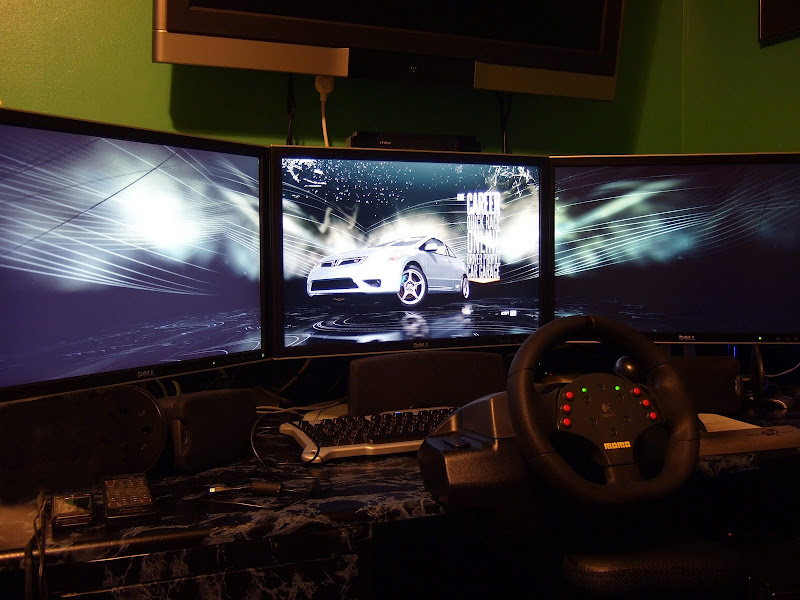
I need a real camcorder to do better than that, I was using my point & shoot camera :( More light wouldn't hurt its pretty dark in my room.
While I like this game I found that I like Burnout Paradise: The Ultimate Box a lot more. Its just pure fun and gives me more sense of speed, works with the wheel better too.
Need For Speed Shift
Posted: 11 Oct 2009, 23:51
by DaFox
Why do you not have the wrist pad on your saitek keyboard?! Thats the best part about the keyboard!
Need For Speed Shift
Posted: 12 Oct 2009, 05:15
by ViciousXUSMC
Why do you not have the wrist pad on your saitek keyboard?! Thats the best part about the keyboard!
My old desk had one built into the sliding drawer so I took it off, and as I was cleaning my room to build the new setup I found it in a pile of junk covered in dust and kinda tossed it as trash, but yeah I wish I had it now.
Saitek Gamers is like the best keyboard ever for the money, great key feedback, nice back lighting, the programmable pad is like just a bonus.
Need For Speed Shift
Posted: 12 Oct 2009, 08:47
by DaFox
Saitek Gamers is like the best keyboard ever for the money, great key feedback, nice back lighting, the programmable pad is like just a bonus.
I never use the pad simply because I dont want to use their software, but I have to disagree with you slightly, I like the Eclipse quite a bit better, the only actual difference to the gamer is that its built a little bit better, and the light seeps through the letters, so the keys them selves are illuminated not the area between the keys.
I never ever use the lighting though personally, it hurts my eyes.
We better hop back on topic though heh
Need For Speed Shift
Posted: 13 Oct 2009, 06:26
by Mesh
I'm sure 'ergonomic experts' would disagree but to some of us wrist pad/rests are worse, every keyboard I've tried with one, I end up ripping it off. They make my wrists hurt, while not having any, I've never had my wrists hurt, even after hours on the computer typing.
Need For Speed Shift
Posted: 13 Oct 2009, 06:33
by ViciousXUSMC
I got a original eclipse keyboard on the way now from buy.coms ebay store. My Saitek I think has an issue with the caps lock sticking so it was an excuse to get a new one. Also I find its HID device properties sometimes interfears with other controllers and things I am hoping the eclipse wont do that.
Was like $35 but I used a $1.20 ebay bucks certificate and the 8% bing cashback so only about $30 after the fact and will sell my saitek for like $10 on craigslist.
Need For Speed Shift
Posted: 13 Oct 2009, 06:41
by DaFox
Yeah I dont think the HID stuff is fixed, I'm pretty sure its present even in the Eclipse II. That's my only real gripe with it, thankfully its pretty rare and its easy to disable.
Need For Speed Shift
Posted: 13 Oct 2009, 18:21
by Mesh
The eclipse II uses the same HID/detection as the first one, including a non-existant command pad, it does send bogus gamepad controls though, but disabling it in dev. manager fixes it, just open dev. manager + gamepad control panel and disable the one that removes the command pad from the gamepad control panel listing.
Need For Speed Shift
Posted: 05 Nov 2009, 06:18
by Bumpinthenight
Well, to finally see a need for speed title that supports surround gaming resolutions out of the box...and its a half decent game to boot, fantastic!
...however I doubt I'm alone in being annoyed to death that the mini-map at the bottom left is sliced up by your bezels with 3840x1024 mode eh? Considering that's my only real gripe with the game so far I'm pretty impressed.
Need for Speed Shift
Posted: 23 Jan 2010, 02:18
by Zer0dB
I just tried nfs shift in 5040x1050 for the first time and it's getting up to the "if you want to race, take it to the track" warning and then the screen strobes endlessly between black and my desktop. The audio plays just fine, and I can hear the menu selector going up and down if I push up or down on the keyboard, but the screen stays strobing between black and my desktop. It works just with no problems on 1680x1050, but does as described above when I change it to any setting that includes 5040x1050. Any help on this would be appreciated.
Re: Need for Speed Shift
Posted: 23 Jan 2010, 10:10
by scavvenjahh
Hi, please fix your sig as per the rules :
List system specs horizontally - not vertically. No more than four rows at size 10 font.
Also try searching for existing threads next time ;)
Anyway:
- try deleting My DocumentsNFS SHIFTgraphicsconfig.xml to start from scratch.
- display modes in Shift consist of resolution + AA setting + refresh rate, did you try all 5040 modes ?
Re: Need For Speed Shift
Posted: 03 Jun 2010, 13:01
by starfighter
Hello,
I am running the game in 3840 TH but during or after the first race (the test phase with the bmw 6er series) the game crashes.
In single head resolution it does not crash.
Does anybody have an idea?
Re: Need For Speed Shift
Posted: 03 Jun 2010, 13:30
by scavvenjahh
Too much pressure on your config ? :?
Is the rest of the game ok at 3840 after that first race ?