
I'm running the exact same setup except for the monitors (I use 3 19" at 1680x1050) with no problem.
I saw where someone mentioned about their not being many Tri-SLI GTX280 players here and wanted to chime in.
Bottom Line: something is going wrong with your actual TH2GO hardware. The fact it's not working with your Macbook shows that.
Sorry I can't be more helpful. Thank God I've not had a similar problem.
EDIT: Oops - saw where the prob was with the USB hub. That sort of makes sense given that it's a power source for the TH2GO.
TH2GO+280GTX TriSLI Issues
TH2GO+280GTX TriSLI Issues
I'm running the exact same setup except for the monitors (I use 3 19" at 1680x1050) with no problem.
I saw where someone mentioned about their not being many Tri-SLI GTX280 players here and wanted to chime in.
Bottom Line: something is going wrong with your actual TH2GO hardware. The fact it's not working with your Macbook shows that.
Sorry I can't be more helpful. Thank God I've not had a similar problem.
EDIT: Oops - saw where the prob was with the USB hub. That sort of makes sense given that it's a power source for the TH2GO.
Is your system watercooled? Looks like a nice rig your got there, up to what frequencies did you get those GTXs?
TH2GO+280GTX TriSLI Issues
Air-cooled all the way. I had intended to go watercooling, but it turned out not to be necessary, The 3 GTX280's idle at about 46C and under load top out at about 68C - well within design parameters.
I usually run them overclocked to 650/1400/2400 with fan set to 100% while gaming. When not, I run them at stock speed with 70% fan.
Many have said that at 100% they sound like a vacuum cleaner, but I disagree. At 70%, they are drowned out by background noise in my house, and at 100% they're certainly audible - but not while playing with the sound turned up even a little.
I hate to leave the fans on "Auto", since the stupid Nvidia algorithm lets the cards heat up to a ridiculous degree (over 80C) before it will really cut in the fans. So you end up with this endless cycling of fan speed and temps.
I can play Warhead all day long with the cards oc'ed and the fan on 70% without breaking 75C. Just can't see why I would need to bother with the H2O...
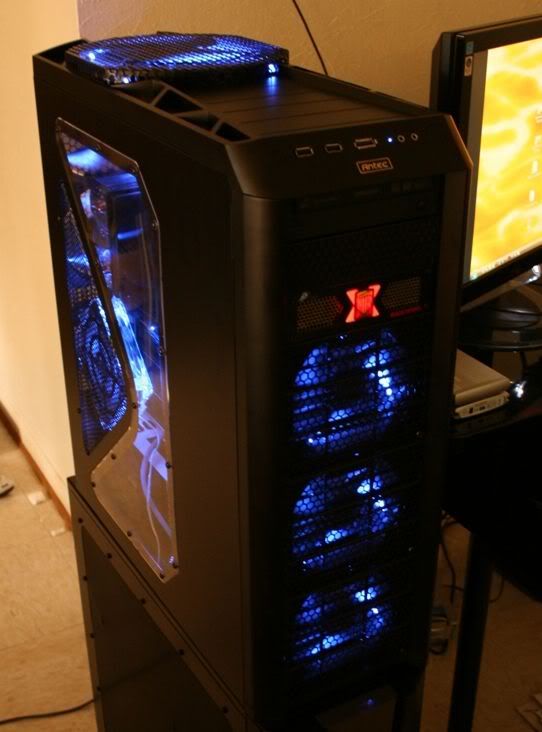
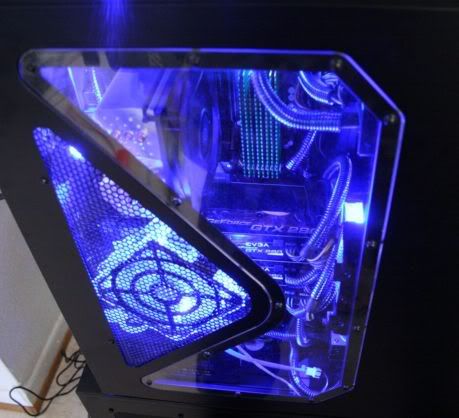
I usually run them overclocked to 650/1400/2400 with fan set to 100% while gaming. When not, I run them at stock speed with 70% fan.
Many have said that at 100% they sound like a vacuum cleaner, but I disagree. At 70%, they are drowned out by background noise in my house, and at 100% they're certainly audible - but not while playing with the sound turned up even a little.
I hate to leave the fans on "Auto", since the stupid Nvidia algorithm lets the cards heat up to a ridiculous degree (over 80C) before it will really cut in the fans. So you end up with this endless cycling of fan speed and temps.
I can play Warhead all day long with the cards oc'ed and the fan on 70% without breaking 75C. Just can't see why I would need to bother with the H2O...
Who is online
Users browsing this forum: No registered users and 5 guests