Page 2 of 2
Re: The WSGF is looking for your screenshots and videos
Posted: 14 Feb 2014, 11:52
by Delphium
b1k3rdude wrote:Looking at your YT channel and noticed the 'chase the sun' video ihas the 2160p option available, how were you able to do this as a recent video(
http://youtu.be/B_TpGQLoIjg) I recorded at the same 5140*1050 as you just appears green when I select 2160p on youtube.
Skid wrote:You Tube is not capable of processing videos beyond a 4K resolution, the encoding just fails and the video turns green, so make sure you stay within the 4K resolution limit (4096).
To clarify, you need to encode the video to a width of no more than 4096, using an
Aspect Ratio Calculator you can work out the right resolution to keep the right aspect ratio when shrinking the video down.
Example:- 5140x1050 = 4096x837 to keep the aspect ratio as close as possible to the original.
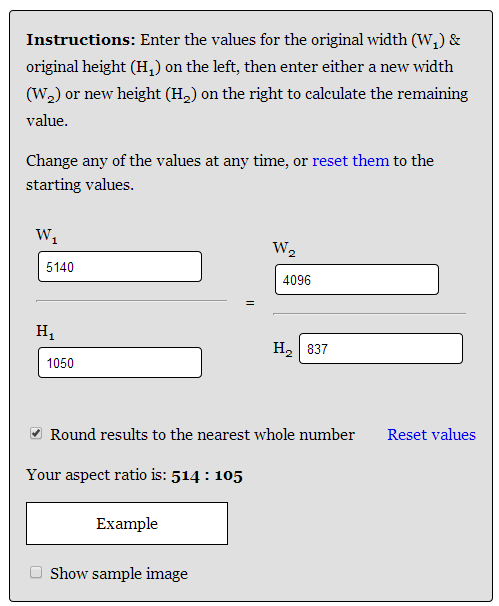
- arc.png (18.77 KiB) Viewed 6612 times
I find also that XSplit Broadcaster can also be of some use to capture to 4k resolutions and even allows you to setup a custom resolution of say 4096x837 and output to .mp4 ready for youtube uploading, i think it even has a youtube plugin for live streaming but ive not worked this out yet.
Note xplit will not capture 3D/Directx content you will need DXTory to capture the DirectX output and convert it into a stream format that XSplit can pickup to then capture.
Re: The WSGF is looking for your screenshots and videos
Posted: 17 Feb 2014, 18:02
by b1k3rdude
Skid wrote:1. Dxtory, whichever works best at the time.
2. Depending on the video I'm making, ether AVISynth with MeGUI using X264.
3. Because You Tube is not capable of processing videos beyond a 4K resolution, the encoding just fails and the video turns green, so make sure you stay within the 4K resolution limit (4096).
1. grand Ill give this a try and I fraps too cumbersome.
2. I shall download these and give them a try.
3. ah, cool thanks.
Delphium wrote:To clarify, you need to encode the video to a width of no more than 4096, for example 5140x1050 = 4096x837 to keep the aspect ratio as close as possible to the original.
Thanks for the info.
Re: The WSGF is looking for your screenshots and videos
Posted: 26 Feb 2015, 16:03
by rares24
Yes, I had too problems with 4K videos on youtube. Like @Delphium and @Skid said before, you need to stay on 4K resolution and not going further. I realised that after 5-6 failed videos

)
I tried two months ago to upload a video,
calculated aspect ratio with the calculator, but still getting error that the resolution is to big.
Re: The WSGF is looking for your screenshots and videos
Posted: 26 Feb 2015, 23:11
by Haldi
Youtube changed the maximum Resolution!
There is no "Original" quality anymore but 2160p(4k) so all videos will be reduced to 3840x2160 pixel no matter what!
Right click on "Statistics" shows the resolution. in this case 3840*686 pixel

the original i uploaded was 4090*720p
https://www.youtube.com/watch?v=Zjqz9BDbayc
Re: The WSGF is looking for your screenshots and videos
Posted: 27 Feb 2015, 12:56
by Delphium
Does that mean that Youtube will now accept videos of say 5760x1080 resolution, and then scale them down to 2160p or does one still need to stick to the 4096pixels width when uploading?
Re: The WSGF is looking for your screenshots and videos
Posted: 27 Feb 2015, 18:08
by Haldi
Now thats a good question!
I'll test that when i'm back home.
The good thing of 3840x686 pixel is that's roughly 2MP, same as 1920x1080 so the filesize is small
