Page 2 of 7
Should I move to a Cordless Mouse?
Posted: 21 Apr 2007, 07:49
by Daemonius
ESReality.com has long review of different kinds of mouses. Check it out.
Should I move to a Cordless Mouse?
Posted: 21 Apr 2007, 08:57
by stenchlord
If you aren't that set on a wireless mouse then perhaps the Logitech G5 2007 version (rev.02)?
It's pretty much the same as the G5 with a few improvements, like the return of two side buttons. In Oz it sells for $75-$100. It looks sexy too.

Should I move to a Cordless Mouse?
Posted: 21 Apr 2007, 09:36
by JohnnyWakko
Now THAT is what I am talking about!
Does the DPI buttons, are they programable? I don't really want to change the DPI on the fly.
EDIT - Yes that is one fine mouse!
Why can't they make a mouse that can be plugged in, as well as wireless? The plugin can recharge it, but also make it wired.
Damn Haoles!
Should I move to a Cordless Mouse?
Posted: 21 Apr 2007, 11:59
by ctrlsteef
Ow man, that new G5 looks awesome. :o
Should I move to a Cordless Mouse?
Posted: 21 Apr 2007, 12:15
by Paddy the Wak
The Logitech G5 2007 look great but the cord on them isn't too flexible ... I found it a pain in the ass.
I now use a ... Razer DeathAdder = awesome !

* 1800dpi infrared sensor, ergonomic right-handed design,
* 1000Hz ultrapolling, 1Ms response
* 5 programmable, ultra-large non-slip buttons with hyperesponse
* 16-bit ultra-wide data channel, award-winning on-the-fly sensitivity drivers
* 1600dpi Infrared Optical Engine Powered by Razer Precision
* 16-bit data transmission
* Connection: USB
Should I move to a Cordless Mouse?
Posted: 21 Apr 2007, 12:48
by ctrlsteef
The Logitech G5 2007 look great but the cord on them isn't too flexible ... I found it a pain in the ass.
I recon it still has this rugged with cloth covered cords? I actually kinda like that. :)
After it's been used a bit it becomes a lot less stiff.
Should I move to a Cordless Mouse?
Posted: 21 Apr 2007, 14:39
by Paddy the Wak
That is exactly it ...
Mine has a few kinks in it from the way it was packaged/boxed ... bought it in the US ... no real way to take it back without a lot of hassle ...
May be I'll just have to use it a bit more to get it less stiff ... :D
Thanks for the tip ...
Should I move to a Cordless Mouse?
Posted: 21 Apr 2007, 15:31
by JohnnyWakko
Dear Johnny Wakko,
Thank you for contacting Logitech Customer Support. My name is Vincent and I will assist you with this issue.
Based on your email I see that you have a question on what is the report per second for this mouse.
Johnny, I am sorry but I am not able to retrieve any information on this request. We only have the DPI information but we do not have any information on the record information.
Please do let me know if you have further enquiries. Thank you.
Sincerely,
Vincent
Logitech Technical Support
http://www.Logitech.com/support
Logitech's customer service is awsome! Replies within 12hours, after two emails, I got the above reponse to the MXRevolution. I am going to buy it and compare it with my current Logitech mouse.
The key factore in me getting a mouse is reponse time, and Buttons. I also want a wheel taht has left to right too.
Some of the flashy mice just don't have enough buttons. I think any decent mouse should have at least 7 Buttons, 2 more if you include left and right mouse wheel. The more buttons, the better for FPS that is for sure.
I will report back on teh MXRevolution if I end up getting it tomorow.
After another email, Vincent kinldy replied and found something on the MXRevo Reporting.
Discussion Thread
Response (Vicent P.) 04/20/2007 06:36 PM
Dear Johhny,
Thank you for the update.
Johnny, after sending the earlier response, I searched the Internet and found some information that might be useful.
The 2.4 GHz wavelength of the MX Revolution wireless mouse reports laser position at about 570 Hz (times per second). This means that if the software driver is written correctly (more on that in a minute) then the mouse has absolutely no detectable lag at its 800 DPI (dots per inch) resolution (yes, you can notice the difference even compared to the already nice Logitech MX 1000 laser mouse).
http://www.pricegrabber.com/rating_getprodrev.php/masterid=24555757/form_keyword=/
I hope this would make you to decide on a possible mouse for your usage.
Please do let me know if you require any further assistance.
Thank you.
Sincerely,
Vincent
Logitech Technical Support
Should I move to a Cordless Mouse?
Posted: 21 Apr 2007, 18:09
by DanielTC
The Logitech G5 2007 look great but the cord on them isn't too flexible ... I found it a pain in the ass.
I now use a ... Razer DeathAdder = awesome !
* 1800dpi infrared sensor, ergonomic right-handed design,
* 1000Hz ultrapolling, 1Ms response
* 5 programmable, ultra-large non-slip buttons with hyperesponse
* 16-bit ultra-wide data channel, award-winning on-the-fly sensitivity drivers
* 1600dpi Infrared Optical Engine Powered by Razer Precision
* 16-bit data transmission
* Connection: USB
<3
DeathAdder is awesome, especially when paired with a Func 1030 Archetype.
Should I move to a Cordless Mouse?
Posted: 21 Apr 2007, 18:18
by marwan
Logitech G7 cordless mouse, end of story! :)
the best part is that the wireless USB sensor is a charging base and they provide you with 2 batteries, one being used by the mouse while the other charges. Switching batteries when one dies is fast and easy.
i also have a Logitech MX Revolution, but i lost the USB wireless adapter as soon as i unpacked it!!!!! :cry:
anyone knows where i could buy the usb adapter seperately?
Should I move to a Cordless Mouse?
Posted: 22 Apr 2007, 08:20
by JohnnyWakko
No, not end of story.
I have purchased this:
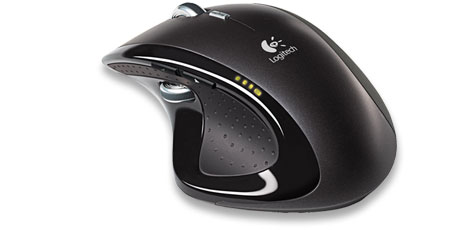
At this point (pun intended) in time, this mouse is such a jump in performance from anything I have experience or expected.
I have played UT2004 and have had no noticable lag at this stage. I will keep this thread posted if that changes.
The weight, shape and button are absolutely beautiful to use.
Very happy camper.
EDIT - AT LAST I AM FREE FROM FRIGGIN CORDS FOR MY MOUSE! YAY! :D
EDIT 2 - It looks and feels sooooooo sexy with my all black system! I will pwn you allzors!111
EDIT3 - OMFGZORS!111 You can (with the installation of UberOptions) assign keyboard strokes, to all programs, or a single game, to each of the button or functions, which in practicle terms means tehre are:
6 buttond on top
5 Buttons of the side!
PHWOAR!111
The mouse buttons, all 11 of them can be programmed customised to do different things for each individual program that you computer has. Incredible! The thumb wheel is so so so so handy. I only EVER have to touch my keyboard now when I am typing text. THe mouse has everyother conceiviabubble function that I can imagine.
Man, now this is my mouse! What a BEAST!
**I still got my eye peeled for any lag issues.
Should I move to a Cordless Mouse?
Posted: 22 Apr 2007, 10:54
by marwan
No, not end of story.
I have purchased this:
At this point (pun intended) in time, this mouse is such a jump in performance from anything I have experience or expected.
I have played UT2004 and have had no noticable lag at this stage. I will keep this thread posted if that changes.
The weight, shape and button are absolutely beautiful to use.
Very happy camper.
dude, you are killing me :( please read this post i posted regarding the MX mouse...
http://www.widescreengamingforum.com/node/
i lost the USB wireless adapter and now my mouse won't work without it, even though i have a Logitech G7 wireless mouse, the wireless adapter on the G7 doesnt work with the MX.
is there anyway i can buy the MX adapter from without buying the mouse all over again?
Should I move to a Cordless Mouse?
Posted: 22 Apr 2007, 12:46
by JohnnyWakko
I am sure if you ask Logitech nicely they will send you one.
Should I move to a Cordless Mouse?
Posted: 22 Apr 2007, 17:35
by skipclarke
dude, you are killing me Sad please read this post i posted regarding the MX mouse...
http://www.widescreengamingforum.com/node/
i lost the USB wireless adapter and now my mouse won't work without it, even though i have a Logitech G7 wireless mouse, the wireless adapter on the G7 doesnt work with the MX.
is there anyway i can buy the MX adapter from without buying the mouse all over again?
Didn't you already make another post about this already?
Anyways, congratulations on that beast of a mouse! How much did it end up costing you? That's one of the things that annoys me about the first G5's, not enough buttons!!
Should I move to a Cordless Mouse?
Posted: 22 Apr 2007, 18:23
by DanielTC
I am waiting for Logitech release the gamer version of the MX Revolution; I was deadset on that mouse for a while, but decided to get a Razer DeathAdder instead.
I held it at couple stores, it has an awesome shape to it, and the wheel on side is really nice.
Re: Should I move to a Cordless Mouse?
Posted: 22 Apr 2007, 22:16
by Manny Calavera
What are people's experience and knowledge on the use of Cordless mouse in games? Is there lag? Is there less repsone?
I am a twitch gamer (UT2004) and any lag or slowdown of the signal getting from mouse to PC is not good.
That is why I have refrained from going to cordless, but I think that technology should be better by now.
What do you think?
I have tried going cordless with Logitech and MS mouse's and was horribly let down with the tech thats out.Gaming was frustrating,and
I'll never go back,way too much lag...Corded FTW !!! 8)
Should I move to a Cordless Mouse?
Posted: 23 Apr 2007, 01:41
by JohnnyWakko
Well the MX REVOLUTION SO FAR:
The mouse has no lag that eveyone is talking about, but it does have what I will call INTERFERENCE to the signal, between the mouse and the reciever which means instructions do not get received, which can be...no IS frustratin in game.
I think it will also happen with any cordless. However, I don't think this is a "HECK LETS DITCH THE MOUSE" I think there is a better solution, a potential one whereby if the signal interference can be eliminated, then the mouse will be fine, no worries mate! She'll be right!
So, I have moved the reciever to the front of my PC and have not yet had any problems. If I do run into more interfenence, then I will put the receiver on a USB Extension cord, and stick the reciever LITTERALLY DIRECTLY under the mouse pad under the desk. If that does't work, then I guess I gotta think of another position. I will not be giving up on this mouse. No Sir-E.
Should I move to a Cordless Mouse?
Posted: 23 Apr 2007, 02:08
by JohnnyWakko
Anyways, congratulations on that beast of a mouse! How much did it end up costing you? That's one of the things that annoys me about the first G5's, not enough buttons!!
Yes, the more buttons the better. In FPS you use your left hand to move, and if you take fingers off the move buttons then you are an easy target. Thus if you have more buttons on the mouse, means you can nearly always be moving.
The mouse cost me a total of in AU$120 (inc shipping). Street value is AU$115.00 (exc shipping), straight from Logitech is US$99 (AU$123.00 exc shipping).
Very happy. My work mouse feel so "fake and plastic now", light and delicate compared to my Roles Royce of a mouse. :D
Should I move to a Cordless Mouse?
Posted: 23 Apr 2007, 09:50
by BongoTrumman
I haven't read the whole thread yet. Just noticed we have some MX Revolution users. I have one too and wanted to give you a tip on a mod for the driver. Logitechs driver sucks. It doesn't let you customize all the buttons. For example there is only a few pre-defined bindings for the thumbwheel. There is a mod you apply over the existing driver that lets you program all the buttons. I have tried it and it has worked great for me so far. There are a bunch of pre-defined and you can have your own keystrokes.
And finally the link:
http://www.mstarmetro.net/~rlowens/uberOptions/
Should I move to a Cordless Mouse?
Posted: 23 Apr 2007, 11:45
by JohnnyWakko
And finally the link:
http://www.mstarmetro.net/~rlowens/uberOptions/
Way ahead of you Trumman, but thanks for looking out for me.
UberOptions rock bumbiscuits!
Tell me, how is your signal interference, you having any? Where is your USB Dongle positioned?
Mine is at front of my PC, soon to be right under my mouse pad under the desk if I have any probs.