
world of warcraft in widescreen problem
world of warcraft in widescreen problem
Ohh, the camera behind my character seems to be closer in the 16:10 screenshot. You can see the top of the rock in the 4:3 screenshot but not the 16:10 one. So the FoV is right after all. But again, I'm sure it's always been correct...
world of warcraft in widescreen problem
The fov is indeed differnt for widescreen and 'fullscreen' I took 2 screen shots without moving the camera, one at 1024x768 and another at 1680x1050. I matched the sizes of the two and overlayed them on top of each other. While the widescreen does show a tad bit more on the sides, it cuts a lot more off the top and bottom. See for your self.
1024x768
http://www.sharpandshiny.com/images/WoW_ws1.jpg
1680x1050
http://www.sharpandshiny.com/images/WoW_ws2.jpg
both combined
http://www.sharpandshiny.com/images/WoW_ws3.jpg
1024x768
http://www.sharpandshiny.com/images/WoW_ws1.jpg
1680x1050
http://www.sharpandshiny.com/images/WoW_ws2.jpg
both combined
http://www.sharpandshiny.com/images/WoW_ws3.jpg
-
Paddy the Wak

- Editors

- Posts: 3436
- Joined: 27 Jul 2004, 17:42
world of warcraft in widescreen problem
CodE-E ... Please don't use such big screenshots ... it is a pain having to scroll left and right if the images are so big and dial up users find it a nightmare.
I have removed the IMG tags ... please use thumbnails with links to the larger shots.
Thank you.
Whilst I'm having a moan ... sorry ... but your user-bar is also a bit large again a pain for dial-up users ... :wink: ... any chance you could reduce it's size or remove it altogether.
I hope you understand ... 8)
I have removed the IMG tags ... please use thumbnails with links to the larger shots.
Thank you.
Whilst I'm having a moan ... sorry ... but your user-bar is also a bit large again a pain for dial-up users ... :wink: ... any chance you could reduce it's size or remove it altogether.
I hope you understand ... 8)
world of warcraft in widescreen problem
But, but... dial-up users use old crappy 4:3 CRT monitors though and won't be browsing around this forum, hehe. :twisted: And my userbar's only 68KB, which isn't that much. It's also hosted on my own webspace which has good speeds, so it shouldn't hold up page loads.
-
Paddy the Wak
- Editors
- Posts: 3436
- Joined: 27 Jul 2004, 17:42
world of warcraft in widescreen problem
Paradigm Shifter is on dial up .... :wink: ... please reduce it to atleast 28KB
world of warcraft in widescreen problem
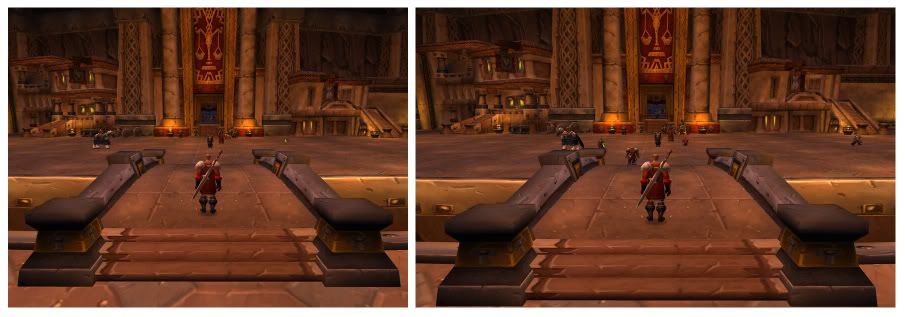
Just to confirm, the FOV problems have not been corrected. Here's a sample @ 1600 x 1200 and 1920 x 1200 - I started playing warcraft again recently and my guild went to Onyxia's Lair for the first time this evening. The vertical cut off was very irritating, particularly during phase two when she takes to the air :( I'd like a fix for this.
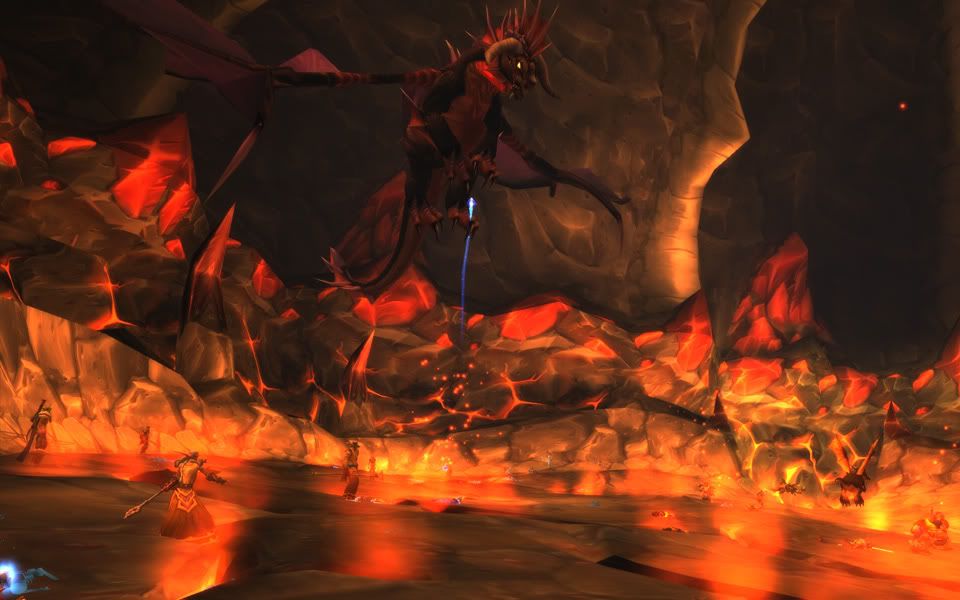
Here's one from the fight. Note we were on opposite sides of the lair and i had to pan up quite a bit for this.
Not to be off topic but i need help
Can i make the text/hud larger than the in game controls allow me to? I just started a 10 day trial and so far i like the game but i am having a hard time reading stuff its hurting my eyes. Here are two pics i wanna make the stuff i need to read much larger im playing on my 50" hdtv thanks.


world of warcraft in widescreen problem
Just to confirm, the FOV problems have not been corrected. Here's a sample @ 1600 x 1200 and 1920 x 1200 - I started playing warcraft again recently and my guild went to Onyxia's Lair for the first time this evening. The vertical cut off was very irritating, particularly during phase two when she takes to the air :( I'd like a fix for this.
Here's one from the fight. Note we were on opposite sides of the lair and i had to pan up quite a bit for this.
If you look closely, the view frustum in 16:10 is a tiny bit wider, but there is a lot of horizontal chop-off, yeah. The actual aspect ratio is correct, and that's really all that matters imho since you can just zoom your camera out in 3rd-person view to see more.
Robdoggz:
There are two things you can do. To only chance the text size in the chat windows, hover your cursor above the chat window you want to change, then right-click on the chat window's title bar, and somewhere there you should be able to set the text size to something bigger.
Alternatively, you can enlarge ALL graphical interface pieces by going to Options, and somewhere there's something called "UI Scaling". By default it's set to some automatic value, I think.
Who is online
Users browsing this forum: Bing [Bot], Google [Bot] and 6 guests