Dark Souls III - 21:9 Broken

Gaming on 21:9 and ultra-wide single screen monitors
Kaldaien
Posts: 7
Joined: 06 Nov 2015, 20:24

Re: Dark Souls III - 21:9 Broken

Post by Kaldaien »

Incidentally, this hex editing people are doing isn't exactly necessary. If you hook GetSystemMetrics (...) and change a few values, you can make the game happy enough to create a window that wouldn't normally fit on screen.

Resolutions like 3440x1440 are greyed-out because the game requests the monitor's working area (sans taskbar), subtracts space for the border and title and then if it thinks the window will fit on screen, offers it in the list.

It uses the same set of resolutions for fullscreen, just adds that secondary test condition to widdle the list down. Spoofing certain metrics fixes both HUD scaling and the number of resolutions available in windowed mode.


    I don't expect many to understand what I just wrote, but I'll put it this way ... I can do the same thing without editing any game memory and that should keep anti-cheat systems very happy :)
CY:G
Posts: 273
Joined: 16 Apr 2008, 17:16

Re: Dark Souls III - 21:9 Broken

Post by CY:G »

Kaldaien, are you the same one working on the Steam fix (Souls unsquezzed)???

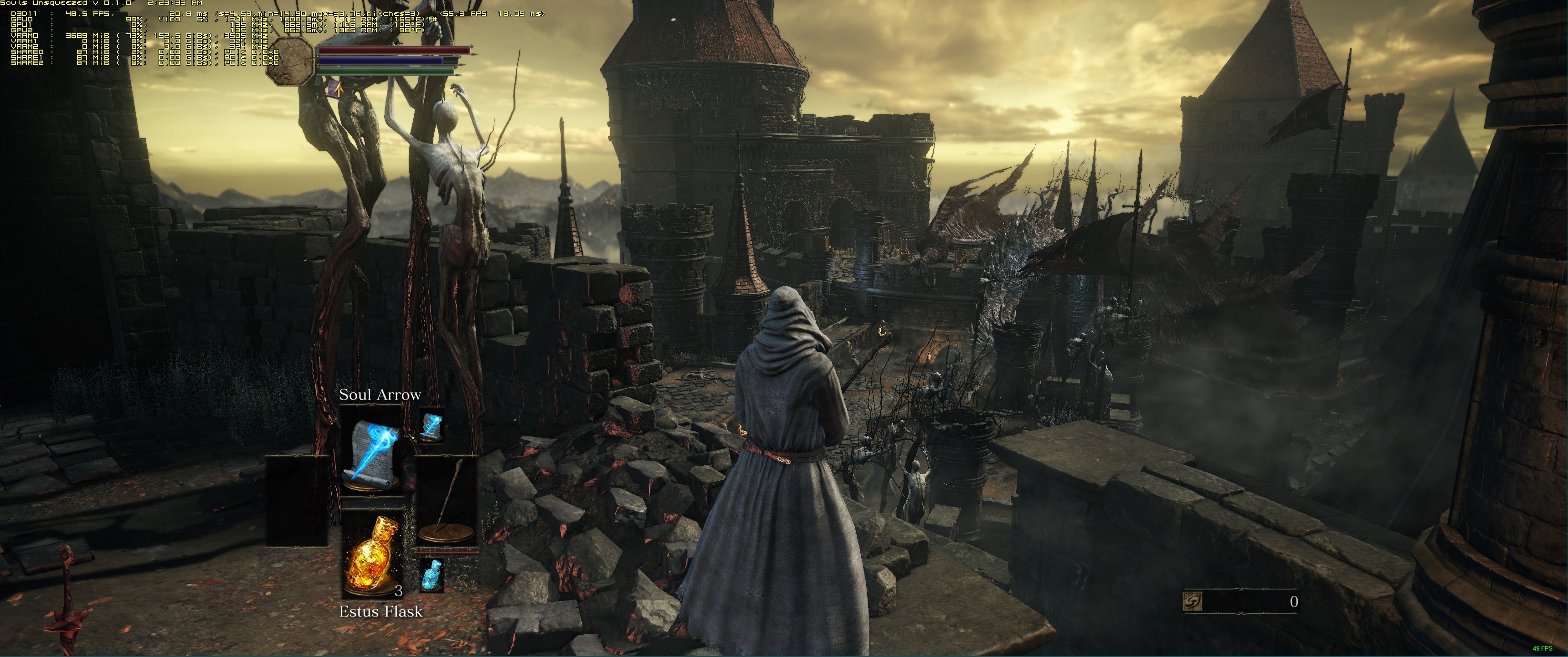
It seems like you figured out how to remove the black vignetting, praise the sun, thank you so very much. cant wait for release of V0.1.0 Please let me know once you setup some donation links.

Image

Above picture is from Kaldaien, from here:

http://steamcommunity.com/sharedfiles/f ... =663922936
Amon Amarth
I Donated
I Donated
Posts: 513
Joined: 18 Jul 2007, 04:19

Re: Dark Souls III - 21:9 Broken

Post by Amon Amarth »

CY:G wrote:It seems like you figured out how to remove the black vignetting, praise the sun, thank you so very much.


Could either you or Kaldaien let us know how to remove the vignetting?
Padellus
Posts: 25
Joined: 18 Oct 2012, 09:33

Re: Dark Souls III - 21:9 Broken

Post by Padellus »

Is there a way to play DS3 in 1280x1024 without black bars?
Polito
Posts: 5
Joined: 17 Jan 2016, 22:11

Re: Dark Souls III - 21:9 Broken

Post by Polito »

Im just checking in, i've been playing with full 21:9 resolution (modified exe) for like 40+ hours, online all the time, pvp and coop pretty much all the time as well, and even after the wave of bans im still fine.
User avatar
Deh
Posts: 10
Joined: 14 Mar 2016, 17:42

Re: Dark Souls III - 21:9 Broken

Post by Deh »

Polito wrote:Im just checking in, i've been playing with full 21:9 resolution (modified exe) for like 40+ hours, online all the time, pvp and coop pretty much all the time as well, and even after the wave of bans im still fine.


How did you get 21:9 to work?
User avatar
Volkov
Posts: 6
Joined: 10 Nov 2015, 10:33

Re: Dark Souls III - 21:9 Broken

Post by Volkov »

Deh wrote:
Polito wrote:Im just checking in, i've been playing with full 21:9 resolution (modified exe) for like 40+ hours, online all the time, pvp and coop pretty much all the time as well, and even after the wave of bans im still fine.


How did you get 21:9 to work?


Look earlier in the thread.
User avatar
Razed
I Donated
I Donated
Posts: 58
Joined: 28 Feb 2014, 21:02

Re: Dark Souls III - 21:9 Broken

Post by Razed »

ccv123 wrote:I already tried that fix from steam and it worked, but here is the issue:
I use Reshade / Sweetfx in all of my games to change their look and this fix requires me to overrite some of the files from Reshade.
And for me Reshade >> HUD Fix


Can you share your .ini settings for the 21:9 HUD fix? I can't get the HUD offset fix to work and would like to know what I am doing wrong. I'm running in 21:9 but using Nvidia DSR to run at 3840x1620, which is why I set the values to that. The HUD is still centered as if I am on a 1920x1080 resolution.

Here is what I have right now:

Code: Select all

SoulsUnsqueezed.ini

[SUS.Window]
Borderless=false
Fullscreen=true
Center=true

[SUS.Display]
HUDResX=3840
HUDResY=1620
HUDOffsetX=480
HUDOffsetY=
StretchHUD=false

[SUS.Render]
DefaultResX=3840
DefaultResY=1620
FlipMode=false
Tlords
Posts: 1
Joined: 28 Apr 2016, 03:37

Re: Dark Souls III - 21:9 Broken

Post by Tlords »

OMG - this forum is too awesome! Thanks for the help getting me to 21 x 9.
zorranco
Posts: 25
Joined: 01 Nov 2012, 11:20

Re: Dark Souls III - 21:9 Broken

Post by zorranco »

Thanks to evertbody contributing.

I am starting to get bored of doing lots of things to be able to play properly (21:9 aspect ratio, FoV fixes, etc)
Last edited by zorranco on 28 Apr 2016, 12:59, edited 3 times in total.
adriano_99
Posts: 5
Joined: 28 Apr 2016, 11:09

Re: Dark Souls III - 21:9 Broken

Post by adriano_99 »

Someone has the new modified .exe upgrade? The old that posting here will not work.
User avatar
Deh
Posts: 10
Joined: 14 Mar 2016, 17:42

Re: Dark Souls III - 21:9 Broken

Post by Deh »

Volkov wrote:
Deh wrote:
Polito wrote:Im just checking in, i've been playing with full 21:9 resolution (modified exe) for like 40+ hours, online all the time, pvp and coop pretty much all the time as well, and even after the wave of bans im still fine.


How did you get 21:9 to work?


Look earlier in the thread.


I tried SoulsUnsqueezed and the exe edit, nothing works.
matthias
Posts: 13
Joined: 08 Jan 2015, 15:03

Re: Dark Souls III - 21:9 Broken

Post by matthias »

Something did indeed break the hex edit fix, however SUS is working for me right now.
LordTohjo
Posts: 3
Joined: 19 Apr 2016, 21:13

Re: Dark Souls III - 21:9 Broken

Post by LordTohjo »

Latest update messed up the fix if you want widescreen support you need to modify the ds3.exe again. I just did and everything looks nice again :)
NitroX
Posts: 1
Joined: 28 Apr 2016, 17:39

Re: Dark Souls III - 21:9 Broken

Post by NitroX »

I wish i was skilled enough to do so. I just have to wait until one of you awesome guys uploads the new modified .exe

I registered though to just say thank you guys for all your hard work. I thought all was lost. But thanks, i love to enjoy my games in 21:9.
oldestgregg
Posts: 5
Joined: 28 Apr 2016, 20:04

Re: Dark Souls III - 21:9 Broken

Post by oldestgregg »

How do you guys find the code to hex edit? Theres a mountain of numbers!
User avatar
Peer_Review
Posts: 76
Joined: 11 Jun 2014, 02:54

Re: Dark Souls III - 21:9 Broken

Post by Peer_Review »

oldestgregg wrote:How do you guys find the code to hex edit? Theres a mountain of numbers!


1) Just copy the hex string for 1920x1080: 800700003804

2) Make sure you have it on 64bit up in the top menu bar, it will most likely start on 16bit

3)Hit ctrl+f so the search dialogue pops up; alternatively you can go to the top bar and hit edit, and click on find or search. It will be different depending on what Hex editor you use.Hitting Ctrl+F is the easiest way. That is the search shortcut for almost every word processor, text editor, web browser......... and so on.

4 Make sure you pick Hex string on the search pop up other wise it won't be looking for it. It will be right there under the blank that you paste 800700003804 into.

5) when it brings you to the string put the cursor in front of the first number and just type the new one you need for your resolution. There is no need to delete the string of old numbers, as you type it will replace them. If you delete it you can actually mess up the executable if your not being careful. So again just type and it will replace the numbers .

6) Hit Ctrl+S or go up to the menu and hit save. Bam you're done. Easy peazy lemon squeezy about 30 seconds to have it done.

Correct Hex Strings.
2560x1080: 000A00003804

3440x1440: 700D0000A005

5760x1080: 801600003804

I hope this is clear enough. I just got home after a 16 hour day so I'm a little out of it. It looks clear to me but that might not mean anything.
Hope that does it for you.

oldestgregg
Posts: 5
Joined: 28 Apr 2016, 20:04

Re: Dark Souls III - 21:9 Broken

Post by oldestgregg »

Thank you. I will give it a go now and see if I understand it!
oldestgregg
Posts: 5
Joined: 28 Apr 2016, 20:04

Re: Dark Souls III - 21:9 Broken

Post by oldestgregg »

Sorry but one more question...what hex editor do you use? I'm using hex workshop hex editor and some of the options you say to pick are not there or maybe listed as something else? Sorry again
oldestgregg
Posts: 5
Joined: 28 Apr 2016, 20:04

Re: Dark Souls III - 21:9 Broken

Post by oldestgregg »

Shame its not 3440x1440 Adriano or I would be straight on that
Post Reply

Who is online

Users browsing this forum: No registered users and 10 guests