Page 10 of 16
Re: Displayport-to-VGA Adapter = Successful 3 Monitor Eyefinity
Posted: 09 Mar 2010, 19:42
by grandpatzer
I'm starting to regret getting the adapter with 0.2m cable, maybe that adapter that Arotto post has better chip inside it but I will see when connecting it.
Re: Displayport-to-VGA Adapter = Successful 3 Monitor Eyefinity
Posted: 11 Mar 2010, 16:02
by joemazz
Well folks, i received my adapter from monoprice this morning (probably the last shipment before their site was compromised)....
Here is what i am using.
3 Acer x203H 20" Monitors
Intel e5200 dual core - Oc'ed to 3.4
ATI 5850 Video Card - 10.3 beta driver
Monoprice DP Male to VGA Female adapter
http://www.monoprice.com/products/product.asp?c_id=104&cp_id=10428&cs_id=1042801&p_id=5135&seq=1&format=2
My center and right screens are plugged into each DVI port on the card from the DVI port on the monitors. The left screen is running from the VGA port on the monitor to the adapter and into the displayport port on the card.
Catalyst recognized the DP monitor immediately and sees it as a displayport monitor. I created my group no problem, did the bezel management fine and viola! eyefinity is working as advertised. 4800x900 across three screens.
As for iracing, picked all my new display settings, fired it up in a test with legends on south boston. An average of 200fps. My settings there right now are as follows...
Cars. Event, Grandstands, Objects all on high
No limit frame rate
Trilinear filtering on
Ani Filter - 8x
AA - 4x
vertex, pixel, advanced shaders checked
steering wheel, virtual mirror, far terrain, high res car textures checked
Ive had this all up and running over 2 hours now, the screen hasnt flickered, turned off or done anything funny yet. In fact i dont see any difference in quality between the dp adapted screen or the regular dvi screen.
So, at the moment i call this a SUCCESS. I will post a video in a bit.
Re: Displayport-to-VGA Adapter = Successful 3 Monitor Eyefinity
Posted: 11 Mar 2010, 18:38
by adebisi
This Displayport-to-VGA Adapter £15 deliverd from ebay works fine for eyefinity (so far) each monitor is at 1920x 1200
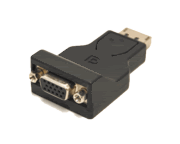
*edit I am using the 10.3 beta drivers*
My specs are
CPU Intel® Core™2 Quad Processor Q6600 @ 3.6Hgz
Motherboard Gigabyte GA-X48-DS4 (rev. 1.3)
Memory Crucial 8GB (4X2GB) DDR2 800MHz/PC2-6400 Ballistix
Graphics Card ATI Radeon asus HD 5870
Hard Drive 1TB Samsung Spinpoint F3
Sound Card X-Fi Platinum Fatal1ty Champion Series
Power Supply 850W NorthQ Black Magic Flex Modular
Case Coolermaster Cosmos Pure Black V2
CPU cooling Corsair H50 Liquid Mod: 2x SilverStone FM123
OS Win 7 64bit Professional
Monitor Dell 24" E248WFP x 3 (eyefinity)
Re: Displayport-to-VGA Adapter = Successful 3 Monitor Eyefinity
Posted: 11 Mar 2010, 22:00
by boxrick
nope ;(
2560x1600 is dual link resolution
so you need active DP @ DVI adapter from sapphire/dell/bizlink
but does this DP adapter has to be connected to biggest screen?
can't I have one 20" 1600x1200 by DP-VGA adapter and 30" and second 20" conected to two DVI?
can you confirm it before i get this adapter? :)
I have 2 x 20" and 1 x 30" and eyefinity will not work full stop with this setup. You cannot have Portrait Landscape Portrait mode... Only doing something by SoftTripleHead makes it work. Nothing to do with eyefinity.
Re: Displayport-to-VGA Adapter = Successful 3 Monitor Eyefinity
Posted: 12 Mar 2010, 06:06
by Dubardo
This dongle's working pretty nice with my setup!
2x HP L2445m and 1x Samsung 245bw
i7 920(oc 3,76ghz)
XFX Radeon 5870
Win 7 64 bit
Re: Displayport-to-VGA Adapter = Successful 3 Monitor Eyefinity
Posted: 12 Mar 2010, 21:26
by TexasTango
People over on overclock.net are saying that the Displayport-to-VGA Adapter will not work.
They're wrong
Re: Displayport-to-VGA Adapter = Successful 3 Monitor Eyefinity
Posted: 12 Mar 2010, 21:43
by adebisi
[quote]
People over on overclock.net are saying that the Displayport-to-VGA Adapter will not work.
They're wrong
I know that now :lol:
Re: Displayport-to-VGA Adapter = Successful 3 Monitor Eyefinity
Posted: 13 Mar 2010, 00:53
by joemazz
[quote]
People over on overclock.net are saying that the Displayport-to-VGA Adapter will not work.
They're wrong
definitely wrong...
http://www.youtube.com/watch?v=s0oMowdTxIk
Re: Displayport-to-VGA Adapter = Successful 3 Monitor Eyefinity
Posted: 13 Mar 2010, 11:06
by aaaaa77777
OK
So all my problems I wrote about before were solved by changing card...
I read about it a lot and talked to some computer chain in Poland and they said there is some kind of issue with 5750/5770 and sometimes it crashes after installing/booting Win7...
I changed it to 5850 and instantly everything worked fine.
So to summ it somehow:
- using HIS 5850
- Win 7 Ultimate
- 2x20" HPLP2065 1600x1200
- 1x30" HPLP3065 2560x1600
- cheap HP DP-VGA adapter
One of 20" is connected by HP DP-VGA adapter and works fine. Second 20" and this big 30" are connected to two DVI ports.
So my total resolution is:
1200x1600 + 2560x1600 + 1200x1600 = 4960x1600 :)
I just need bigger working space/desktop and everything works fine with that. No flickering etc
Didn't try eyefinity or other things you use for games but I don,t need it at all so no need to (but don,t know if it will wirk with different screen sizes)
cu
Re: Displayport-to-VGA Adapter = Successful 3 Monitor Eyefinity
Posted: 15 Mar 2010, 03:36
by duniek
OK
So all my problems I wrote about before were solved by changing card...
FINALLY :cheers
Re: Displayport-to-VGA Adapter = Successful 3 Monitor Eyefinity
Posted: 16 Mar 2010, 18:11
by rebelstar
I have three 24' Benq's with DVI/VGA and 5850
Guys, please let me know :bowdown , can I do eyefinity this way?
DVI + VGA* + DPtoVGA ? OR DVI + DVI + DPtoVGA?
*usual DVItoVGA adapter
I don't see such way according to this ATI config

Currently i'm trying to buy simple DPtoVGA adapter, still no luck in our country :(
Re: Displayport-to-VGA Adapter = Successful 3 Monitor Eyefinity
Posted: 18 Mar 2010, 07:45
by rebelstar
Guys, finally I did it! Connected via usual DPtoVGA adapter.
Here is my way:
DPtoVGA left monitor +
DVI middle monitor +
DVItoVGA right monitor.
CCC showing DVItoVGA as CRT monitor and DPtoVGA as DVI.
I dunno about bios and problems you had here in the first posts, flashed card few months ago with 5850 ASUS bios when wanted to overclock my stock card to 900/1200, so I have no flickering at all, everything works perfect!
First photo made
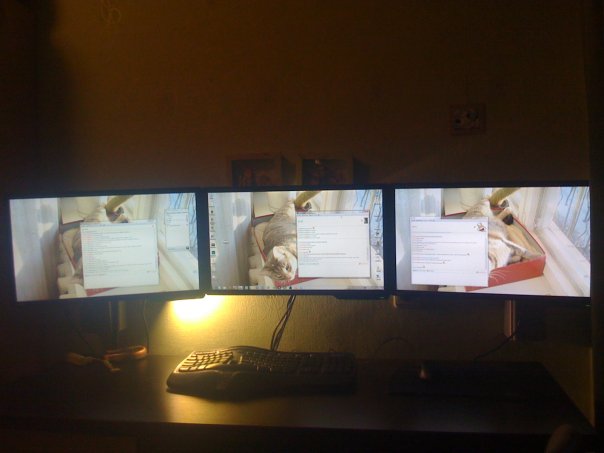
:cheers
Re: Displayport-to-VGA Adapter = Successful 3 Monitor Eyefinity
Posted: 18 Mar 2010, 11:06
by adebisi
just top report - I have had the turn off thing (off for a second and back on again) happen on the Displayport-to-VGA Adapter monitor twice in the week of quite intence gaming. Am I right in thinking this also happens on the Displayport-to-DVI adaptor (reports and posts on forums seem to say it does)?
I think I will go with a Displayport-to-DVI once they sort this out and when they come down in price.
Re: Displayport-to-VGA Adapter = Successful 3 Monitor Eyefinity
Posted: 19 Mar 2010, 01:28
by rebelstar
Well... After 1 day of fun with eyefinity my monitor which is connected to DPtoVGA has started to turn off, getting "No cable connected". I tried to plug/unplug it many times and no result. Few times it's randomily turned on again himself while I'm doing nothing, but when I tried to manage my display group in CCC I lost monitor again! I'm really in mad. Flashed 5850 with the latest bios I found http://www.techpowerup.com/vgabios/66524/Sapphire.HD5850.1024.100122.html and no results! Looks like DP port stopped working. I'm really lost. Guys, what to do?
Re: Displayport-to-VGA Adapter = Successful 3 Monitor Eyefinity
Posted: 19 Mar 2010, 12:28
by Phoenixdancer
do as ATI said. Buy a display port monitor lol
Re: Displayport-to-VGA Adapter = Successful 3 Monitor Eyefinity
Posted: 19 Mar 2010, 12:32
by adebisi
Well... After 1 day of fun with eyefinity my monitor which is connected to DPtoVGA has started to turn off, getting "No cable connected". I tried to plug/unplug it many times and no result. Few times it's randomily turned on again himself while I'm doing nothing, but when I tried to manage my display group in CCC I lost monitor again! I'm really in mad. Flashed 5850 with the latest bios I found http://www.techpowerup.com/vgabios/66524/Sapphire.HD5850.1024.100122.html and no results! Looks like DP port stopped working. I'm really lost. Guys, what to do?
can you not flash the old bios back onto it?
Re: Displayport-to-VGA Adapter = Successful 3 Monitor Eyefinity
Posted: 19 Mar 2010, 21:21
by rebelstar
Thanks for reply. I did it also, nothing happened.
Well, I'm really "karma-boy". Taken friends Sapphire 5850 and guess what? the same, looks like my DPtoVGA adapter simply died (I heard it has own microchip) :evil: . Anyway I RMA it already and returned my $70 back, at least some good news. Now I have finally decided to wait 2-3 weeks shipping for HP DP to VGA adapter which will be working (crossing fingers) for 100% fine as I read in this topic.
Re: Displayport-to-VGA Adapter = Successful 3 Monitor Eyefinity
Posted: 31 Mar 2010, 13:50
by stall3
I'm using the Accell B101C-001B and it's not working so well with 3 monitors. I've tried all the tips & tricks posted here.
I have a question though, The VisonTek 5750 I have says it has Dual Link DVI-X2 "*May require Adapter sold Seperately".
Does this mean one DVI port on the 5750 can be used for TWO monitors? with one of these:
http://www.amazon.com/Digital-Dual-Link-Splitter-Cable/dp/B0016CGX9I
and then can I hook up my 3rd monitor to the second DVI on the VisonTek 5750 ??
My goal is to hook up my 3 DVI monitors, in 1280x1024, without eyefinity. The 3 monitors support VGA too which is why I tried the Accell B101C-001B
Thanks again for your help.
Re: Displayport-to-VGA Adapter = Successful 3 Monitor Eyefinity
Posted: 01 Apr 2010, 09:53
by oktane
Hey guys. This wall-o-text is mostly about electrical and technical stuff about the adapters. So just skip it if you aren't interested in this stuff. I wanted to hide it but this board doesn't have spoiler tags that I found.
This post refers to the DP->VGA adapter shown here: http://www.monoprice.com/products/product.asp?c_id=104&cp_id=10428&cs_id=1042801&p_id=5135&seq=1&format=1#largeimage
Which is identical to many others made by Accell and various ebay vendors note the ones with the unique case, they have identical guts.
Anyways, these adapters have this 640x480 issue, where the monitor is detected as 'fake' in ccc and can't be changed out of it. I asked the Accell people if they had a firmware for it, but no reply yet. Honestly, I'm beginning to think that it's driver related. This is all after the ATI-dp hotfix BIOS btw.
How to fix the 640 issue: You have to power cycle the device, it's the only way I know so far. This involves unplugging/replugging it in, which if you do it enough times.. may break your card's DP socket.
Things I have investigated:
Doesn't work at all for eyefinity: Dell DP to DVI cable that came with a dell NVS card. It does have a chip but CCC detects it as DVI, which means that the chip is a simple level shifter, NOT a native DP converter. (changes the voltage only)
Now before I got this monoprice dealie, I was impatient and wanted to get it going. (before I knew about all these damn issues!) As a lot of you have probably figured out, these adapters are hard to find from brick and mortar stores. However, I did find that Apple makes adapters and they are sold all over the place. So I went to Best Buy and got this for 30 bucks: http://store.apple.com/us/product/MB572Z/A Now this should not be confused with the very expensive apple active DVI adapter with the two cables, this is made for the new macbooks and has VGA output. It is a well made device, as with most apple hardware, very good construction. (inside is what matters) But it has a MiniDP connector which would not do at all, and nobody sells adapters to full size DP locally of course. In the end, I hacked off the cable and soldered a spare DP cable on that I had around. But in testing, I ended up frying it by supplying it with too much voltage. See this is the pitfall of Apple making up the MiniDP standard as they went along, the specification whitesheet said that the voltage was valid from 3.3v to like 16v, but not Apple's little adapter.. it was only made to be used on a macbook. Perhaps I misread it but I thought I comprehended it pretty clearly, I read these kind of data sheets all the time. So after hours of meticulously reverse engineering the pinouts and making my hardwired adapter cable which replaces the old one, I was left with a 30$ junk pcb board.
So then, I caved and ordered the Monoprice adapter. And it had issues as most everyone has experienced. So trying to debug this thing, I desoldered the fuse that provides the 3.3v to the conversion chip via pin 20 from the video card. I then powered the converter with a separate ATX power supply, using the 3.3v line of course. Still does the 640 thing unfortunately. This means the power from the ATI card is ample and the problem lies in the device itself or drivers. (Note this pin 20 'power' I refer to is not related to what the bios fixed, that was DP signaling voltage on the data lines afaik) Btw, the build quality of the MP adapter is horrendous, there were solder balls and bridges from apparent hand soldering of the connections, as well as pitted joints. I guess you can't expect much.
The monoprice adapter exhibits the following behavior:
Any time the resolution is changed, windows or game, eyefinity or not, the adapter goes tits up with a black monitor and CCC says 640x480.
Going from eyefinity to non-eyefinity does the same.
Going from non-eyefinity to eyefinity does the same.
If going to Eyefinity, CCC tries to recreate the group but since it can only do 640 on one of the monitors, it puts all monitors in 640. :cry:
Rebooting up often results in the 640 madness.
Edit: Coming out of power save causes the issue.
I dealt with these issues for a month or two, and they drove me insane. I cannot leave the system in eyefinity mode because then windows GUI becomes useless and hard to manage, and the nView like software ATI provides called HydraVision is severely lacking, it can't even force the start menu to one screen. I got fed up with reaching under my desk so much to reset the stupid adapter, and I got to the point where I decided to get another Apple adapter.
I get the new Apple adapter (same kind as before) and quickly solder my custom cable onto it. I had to modify the end of the cable which plugs into the video card a little because it didn't originally pass pin 20, it was only meant to be a monitor cable, not power a device. I plugged it in, and low and behold, it works great first try. (I am a bit parinoid about frying my new video card, I rigorously checked and rechecked everything before doing this, and I don't recommend anyone do this unless you have been comfortable around electronics for at least a decade, and skilled in SMT work) I'm super happy now because it seems to work and doesn't do the 640 thing! But then I do some tests, switching profiles from normal triple monitor to eyefinity group mode, and it does it. Argh. :x
Symptoms of the Apple adapter:
Going from eyefinity to non-eyefinity causes the issue.
Going from non-eyefinity to eyefinity causes the issue.
Resolution changes don't seem to affect it now.
Rebooting still sometimes results in the issue.
Edit:Coming out of power save is a-ok.
This leads me to come to the following conclusions:
-The monoprice adapter may have crummy firmware which has resolution switching issues. Good luck getting anyone to give a damn about it though. I asked for a firmware file but I doubt I'll get it. And if I do, I'll have to desolder the SPI eeprom and flash it externally.
-The apple adapter, while being of the highest quality that you could possibly find, still has the issues and this is why I believe it is a driver issue. Do note that the 640 issue happened less on 9.12. (Which I read on the ati forums, and then verified it myself)
-The base issue seems to occur with any DP->VGA adapter, regardless of the type of conversion chip inside. The Apple and Monoprice adapters have different conversion chips, but they are both made by ST Microelectronics. Maybe it is an ST issue, who knows for sure. I couldn't find the datasheets for either chip.
How I am coping with these bugs and limitations:
-I use my custom Apple adapter which has less issues. (until I retest and verify the MP adapter has less issues in 10.3 edit: verified.. Apple adapter has less issues, MP goes 640 far more often.)
-I leave the system in Eyefinity mode.
-I rotated all 3 monitors to landscape to make windows more usable in eyefinity mode. (start menu isn't 5 ft long now)
-I use an app called WinSplit Revolution to manage window placements very quickly, it's a godsend. HydraVision is horrible, ATI needs to take a course in application usability. Winsplit is a bit buggy on my 7 x64 machine, but it wasn't made for 64 bit windows and I think the author hardcoded some reg paths, programming nono. It works fine though, errorboxes in the config aside. http://www.winsplit-revolution.com/
-This 640 issue is not limited to VGA adapters, I have read reports of it happening on DVI adapters too. (the expensive ones)
Ideas I may try or possible solutions:
-With a microcontroller like a pic or arduino, I may be able to detect when a res change occurs and power cycle the adapter. I have no idea how to detect a res change though, what pin would be a likely candidate to sniff, or what. In DP, the lanes carry pure data, and other than 3 extra GPIO wires, there isn't anything else. Perhaps the hotplug pin flops, I'd have to scope them while changing resolutions. I may be able to detect the change on a dvi port instead, and have that cause the DP adapter to reset.
-I have to etch a pcb for an SPI eeprom programmer, I may dump the firmware and try to disassemble it, but since the damn datasheet is nearly impossible to get, I don't even know it's host architecture! And this may yield nothing, since I don't think the issue stems from the adapters in the first place.
-Apple released a firmware update for the adapter I think, but I'll have to depackage the update binary and burn it to the eeprom myself, since I don't have a mac with a displayport out of any kind. Doing this successfully is going to be time consuming and difficult, and with my luck my adapter already has the update.
Here are some pics of the hardware for the electronics geeks: http://picasaweb.google.com/electrosthetics/Eyefinity?authkey=Gv1sRgCJKT7vPz3rW3UA#
I gotta say, issues aside, my computer is something like Minority Report now with 3x 1920x1200 monitors. This tech is super cool.
Re: Displayport-to-VGA Adapter = Successful 3 Monitor Eyefinity
Posted: 02 Apr 2010, 02:00
by adebisi
I just want to report that I have 3 x same model of monitors and when setting them up again after a room change I must have changed the one that was on the Displayport-to-VGA Adapter and it came up with a displayport error (power I think) but still worked. I moved the monitors around and the error went away. So I believe that my monitors do not have the same build inside. You may find the same problem.