
just ordered 2 MiniDP->VGA adapters, will test when 5876 comes out.
EDIT: Just wondering am I going to have to invest in DVI adapters? I don't know the maximum ammount of VGA adapters the 5876 can use.
Displayport-to-VGA Adapter = Successful 3 Monitor Eyefinity
-
suiken_2mieu

- Insiders

- Posts: 2351
- Joined: 20 Aug 2009, 04:20
- Location: Virginia
- Contact:
Re: Displayport-to-VGA Adapter = Successful 3 Monitor Eyefinity
System Core: | Intel Core i5-2500K + ASUS P8Z68-V + 16GB Corsair XMS3 DDR3 1333 MHz | Win7 x64 | MSI R7970 Lightning 3GB [1105/1400] |
Display: | 3 x Dell Ultrasharp 3007WFP-HC @ 7680x1600 | Dell u3011 |
Display: | 3 x Dell Ultrasharp 3007WFP-HC @ 7680x1600 | Dell u3011 |
Re: Displayport-to-VGA Adapter = Successful 3 Monitor Eyefinity
OK so the passive displayport to vga works for eyefinity? my resolutions arent even that high. 1280 x 1024 is my max on my 3 dell 19 inch lcd's so this adapter should be fine for me
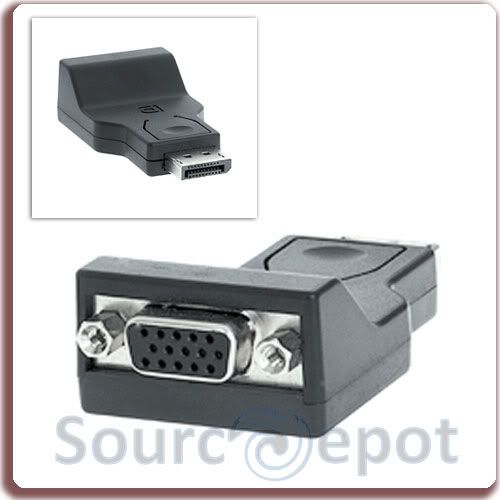
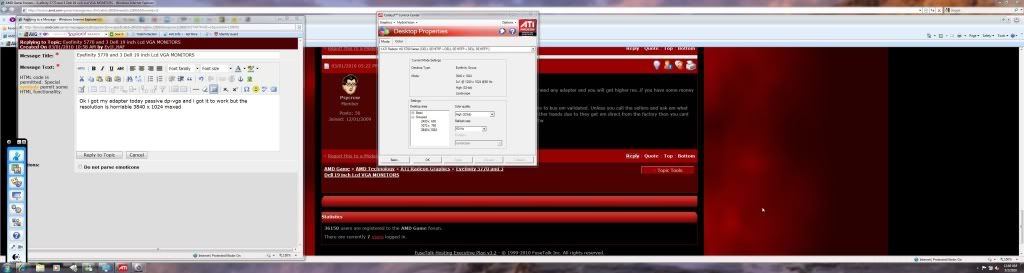
Ok i got my adapter in and i can confirm it works....one problem is the resolution isnt great 3840 x 1024 is max . If you have no other choice you can use it on vga monitors I just rush ordered the more common active adapter and will report back with my results of testing with vga screens
-
suiken_2mieu
- Insiders
- Posts: 2351
- Joined: 20 Aug 2009, 04:20
- Location: Virginia
- Contact:
Re: Displayport-to-VGA Adapter = Successful 3 Monitor Eyefinity
[quote]OK so the passive displayport to vga works for eyefinity? my resolutions arent even that high. 1280 x 1024 is my max on my 3 dell 19 inch lcd's so this adapter should be fine for me
Ok i got my adapter in and i can confirm it works....one problem is the resolution isnt great 3840 x 1024 is max . If you have no other choice you can use it on vga monitors I just rush ordered the more common active adapter and will report back with my results of testing with vga screens
Did you try using an EDID mask on the monitor with the adapter? For some reason DP->VGA adapters have an issue with sending EDID information.
System Core: | Intel Core i5-2500K + ASUS P8Z68-V + 16GB Corsair XMS3 DDR3 1333 MHz | Win7 x64 | MSI R7970 Lightning 3GB [1105/1400] |
Display: | 3 x Dell Ultrasharp 3007WFP-HC @ 7680x1600 | Dell u3011 |
Display: | 3 x Dell Ultrasharp 3007WFP-HC @ 7680x1600 | Dell u3011 |
-
grandpatzer
- Posts: 12
- Joined: 02 Mar 2010, 18:11
Re: Displayport-to-VGA Adapter = Successful 3 Monitor Eyefinity
hmm only 3840 x 1024?
I want to use dp vga adapter in eyefinity: 2pc 23" 1920*1080 and 1pc 24" 1920*1200, I will run all at same resolution so something like 3240*1920 in portrait.
would this be any problem? I'm currently running my 2405fpw though vga and it shows without any problems 1920*1200, VGA from monitor to DVI on GPU.
Ok i got my adapter in and i can confirm it works....one problem is the resolution isnt great 3840 x 1024 is max . If you have no other choice you can use it on vga monitors I just rush ordered the more common active adapter and will report back with my results of testing with vga screens
Did you try using an EDID mask on the monitor with the adapter? For some reason DP->VGA adapters have an issue with sending EDID information.
I want to use dp vga adapter in eyefinity: 2pc 23" 1920*1080 and 1pc 24" 1920*1200, I will run all at same resolution so something like 3240*1920 in portrait.
would this be any problem? I'm currently running my 2405fpw though vga and it shows without any problems 1920*1200, VGA from monitor to DVI on GPU.
[quote][quote]OK so the passive displayport to vga works for eyefinity? my resolutions arent even that high. 1280 x 1024 is my max on my 3 dell 19 inch lcd's so this adapter should be fine for me
Ok i got my adapter in and i can confirm it works....one problem is the resolution isnt great 3840 x 1024 is max . If you have no other choice you can use it on vga monitors I just rush ordered the more common active adapter and will report back with my results of testing with vga screens
Did you try using an EDID mask on the monitor with the adapter? For some reason DP->VGA adapters have an issue with sending EDID information.
-
grandpatzer
- Posts: 12
- Joined: 02 Mar 2010, 18:11
Re: Displayport-to-VGA Adapter = Successful 3 Monitor Eyefinity
does it have to be a dp to vga adapter?
nobody tried connecting a dp to dvi adapter and use a DVI to VGA cable to monitor?
the dp to vga is not available in Sweden so I'm considering ordering the passive DP to DVI and then use my DVI----VGA cable to connect to my 2405FPW display.
nobody tried connecting a dp to dvi adapter and use a DVI to VGA cable to monitor?
the dp to vga is not available in Sweden so I'm considering ordering the passive DP to DVI and then use my DVI----VGA cable to connect to my 2405FPW display.
Re: Displayport-to-VGA Adapter = Successful 3 Monitor Eyefinity
No i didnt but it does work on 2 games i have cod mw2 and guild wars,,,The graphics arent spetactular I did go ahead and buy a active adapter so ill be able to test alot more when it gets here. If you are low on cash you can use this but you will be disappointed for sure
-
suiken_2mieu
- Insiders
- Posts: 2351
- Joined: 20 Aug 2009, 04:20
- Location: Virginia
- Contact:
Re: Displayport-to-VGA Adapter = Successful 3 Monitor Eyefinity
No i didnt but it does work on 2 games i have cod mw2 and guild wars,,,The graphics arent spetactular I did go ahead and buy a active adapter so ill be able to test alot more when it gets here. If you are low on cash you can use this but you will be disappointed for sure
What resolution are you're monitors? In general people have been able to get up to 1920x1200 on there monitors. To get higher resolutions u should try an EDID mask. If you don't mind an analog signal I'd try it, as it'll save you money (you can RMA the other adapter).
System Core: | Intel Core i5-2500K + ASUS P8Z68-V + 16GB Corsair XMS3 DDR3 1333 MHz | Win7 x64 | MSI R7970 Lightning 3GB [1105/1400] |
Display: | 3 x Dell Ultrasharp 3007WFP-HC @ 7680x1600 | Dell u3011 |
Display: | 3 x Dell Ultrasharp 3007WFP-HC @ 7680x1600 | Dell u3011 |
-
grandpatzer
- Posts: 12
- Joined: 02 Mar 2010, 18:11
Re: Displayport-to-VGA Adapter = Successful 3 Monitor Eyefinity
I bought this one: http://cgi.ebay.com/DP-DisplayPort-to-VGA-Male-To-FeMale-Apple-MacBo-0-2M_W0QQitemZ290398900664QQcmdZViewItemQQptZLH_DefaultDomain_0?hash=item439d1f91b8
I could have bought just the adapter without 0.2m cable but the above seller had slightly better feedback.
Would there be any difference between the adaptor and this one that also has 20cm cable?
I could have bought just the adapter without 0.2m cable but the above seller had slightly better feedback.
Would there be any difference between the adaptor and this one that also has 20cm cable?
Re: Displayport-to-VGA Adapter = Successful 3 Monitor Eyefinity
do you relize that adapter is coming from hong kong? im waiting over 2 wekks for a item stuck in customs. As for my screen resolution they are native 1280 x 1024 max on windows 7
Re: Displayport-to-VGA Adapter = Successful 3 Monitor Eyefinity
Hi everyone,
I'm happy to report a fully functioning eyefinity setup using the HP DP->VGA adapter. Ive had zero problems so far after 1 day, incl no flickering of any kind.
If its of any interest to anyone (perhaps it may aid in fault finding), the details of my setup are as follows:
- XFX 5870 Extreme
- HP DP->VGA adapter on middle screen (Did not try any other config)
- CCC 10.2
- Driver Version 8.14.10.0728
- BIOS Version VER012.014.000.005.035264
- Windows 7

I'm happy to report a fully functioning eyefinity setup using the HP DP->VGA adapter. Ive had zero problems so far after 1 day, incl no flickering of any kind.
If its of any interest to anyone (perhaps it may aid in fault finding), the details of my setup are as follows:
- XFX 5870 Extreme
- HP DP->VGA adapter on middle screen (Did not try any other config)
- CCC 10.2
- Driver Version 8.14.10.0728
- BIOS Version VER012.014.000.005.035264
- Windows 7
-
grandpatzer
- Posts: 12
- Joined: 02 Mar 2010, 18:11
Re: Displayport-to-VGA Adapter = Successful 3 Monitor Eyefinity
do you relize that adapter is coming from hong kong? im waiting over 2 wekks for a item stuck in customs. As for my screen resolution they are native 1280 x 1024 max on windows 7
yes, but what other choise do I have?
the HP adapter costs 70usd in Sweden, I might aswell buy a active DVI.
Hi everyone,
I'm happy to report a fully functioning eyefinity setup using the HP DP->VGA adapter. Ive had zero problems so far after 1 day, incl no flickering of any kind.
If its of any interest to anyone (perhaps it may aid in fault finding), the details of my setup are as follows:
- XFX 5870 Extreme
- HP DP->VGA adapter on middle screen (Did not try any other config)
- CCC 10.2
- Driver Version 8.14.10.0728
- BIOS Version VER012.014.000.005.035264
- Windows 7
thats nice, maybe I should try find a seller that ships to Sweden that HP, I saw a adapter on ebay for 27usd that was similar shape to the one from HP
Re: Displayport-to-VGA Adapter = Successful 3 Monitor Eyefinity
thats nice, maybe I should try find a seller that ships to Sweden that HP, I saw a adapter on ebay for 27usd that was similar shape to the one from HP
Thanks!
I bought mine in Australia for AUS$25 (US$22.50) from this online retailer http://www.citysoftware.com.au/HP_Displayport_To_Vga_Adapter_HCO0189.aspx I believe you would get it for AUS$22.73 (US$20.53) as I dont think you pay the GST.
I have bought a couple of things from them and they have proved to be very reliable.
-
suiken_2mieu
- Insiders
- Posts: 2351
- Joined: 20 Aug 2009, 04:20
- Location: Virginia
- Contact:
Re: Displayport-to-VGA Adapter = Successful 3 Monitor Eyefinity
do you relize that adapter is coming from hong kong? im waiting over 2 wekks for a item stuck in customs. As for my screen resolution they are native 1280 x 1024 max on windows 7
Well then that makes sense why you're only getting 1280x1024 per monitor. :p Anyway why did you say that we'd be disappointed? The adapter wont make a difference on whether the graphics are better (Except maybe the crispness on that one monitor), or whether a game is compatible. That all deals with settings in-game.
System Core: | Intel Core i5-2500K + ASUS P8Z68-V + 16GB Corsair XMS3 DDR3 1333 MHz | Win7 x64 | MSI R7970 Lightning 3GB [1105/1400] |
Display: | 3 x Dell Ultrasharp 3007WFP-HC @ 7680x1600 | Dell u3011 |
Display: | 3 x Dell Ultrasharp 3007WFP-HC @ 7680x1600 | Dell u3011 |
-
grandpatzer
- Posts: 12
- Joined: 02 Mar 2010, 18:11
Re: Displayport-to-VGA Adapter = Successful 3 Monitor Eyefinity
Has anyone tried to have the DP --- VGA adapter to a monitor not in center?
Or must the DP --- VGA monitor be in centre?
Or must the DP --- VGA monitor be in centre?
-
suiken_2mieu
- Insiders
- Posts: 2351
- Joined: 20 Aug 2009, 04:20
- Location: Virginia
- Contact:
Re: Displayport-to-VGA Adapter = Successful 3 Monitor Eyefinity
Has anyone tried to have the DP --- VGA adapter to a monitor not in center?
Or must the DP --- VGA monitor be in centre?
it can be any monitor placement, infact i recommended putting on the sides, because VGA has some distortion to it on many monitors, it'll harder to spot this in game if it's on the sides.
System Core: | Intel Core i5-2500K + ASUS P8Z68-V + 16GB Corsair XMS3 DDR3 1333 MHz | Win7 x64 | MSI R7970 Lightning 3GB [1105/1400] |
Display: | 3 x Dell Ultrasharp 3007WFP-HC @ 7680x1600 | Dell u3011 |
Display: | 3 x Dell Ultrasharp 3007WFP-HC @ 7680x1600 | Dell u3011 |
Re: Displayport-to-VGA Adapter = Successful 3 Monitor Eyefinity
well, put my order out for a 5850 and the monoprice adapter today, hopefully i will reporting back sometime next week on how awesome my new eyefinity setup is on my acer 20" x203h screens.
Re: Displayport-to-VGA Adapter = Successful 3 Monitor Eyefinity
The real answer depends on what you are attempting to accomplish.
If you are planning this for Eyefinity, or a three monitor set-up. whith three different outputs, you must use an active adapter.
Here's the reason. Most video cards are designed for the connection of a maximum of 2 monitors. These Video cards contain two timing circuits for syncing the timings of the video card's output and the monitor connected.
Displayport does not require the timing signal that is required for say a DVI connection, but once converted to VGA/DVI the monitor connected, does require some form of timing signal.
If you have only two monitors connected... great.. your video card can produce 2 timing signals for the two monitors, regardless of where your connections are. A non-active display port converter can carry the timing signal, when it is one of only two connections to the video card. Add a third monitor, and the video card does not have the ability to provide this third timing signal, and a seperate video output.
As mentioned before, a displayport connection to a displayport input on a monitor, does not require the timing signal. Using a non-active adapter to convert displayport to DVI/VGA in this senario, does not add a timing signal, that the monitor can sync with. Yotr other two displays (presumably connected via DVI/HDMI/VGA, are already using the timing signals the Vid card is capable of. The active adapter does just that... It creates a timing signal for the third monitor that has be converted to another input type, other than displayport.
People over on overclock.net are saying that the Displayport-to-VGA Adapter will not work.
-
thatdude90210
- Posts: 81
- Joined: 27 Sep 2009, 06:43
Re: Displayport-to-VGA Adapter = Successful 3 Monitor Eyefinity
They do work sometimes, as examples in this thread have shown. But it's pretty much a lucky adapter/resolution/monitor combo thing. And Displayport to VGA adapter aren't passive as there is a chip inside (powered by the displayport) that converts the DP digital signal to VGA analog. Dave talked about this in the following post:
http://www.widescreengamingforum.com/forum/viewtopic.php?f=64&t=18175&start=45
http://www.widescreengamingforum.com/forum/viewtopic.php?f=64&t=18175&start=45
Re: Displayport-to-VGA Adapter = Successful 3 Monitor Eyefinity
Hey, I just got my adapter, too!
IT WORKS!!
I got it from ebay (retailer sits in hongkong) for about €13 and he shipped it to germany without shipping fee:
http://cgi.ebay.de/ws/eBayISAPI.dll?ViewItem&item=330379051140
PS: I'm using it with a Radeon HD 5850 and three 19'' DVI/VGA displays from Viewsonic.
PPS: Mind you, while I managed to get all three displays running I wasn't able to activate the Eyefinity mode, which gives me the 3840x1024 desktop. CCC is absolute shit.
IT WORKS!!
I got it from ebay (retailer sits in hongkong) for about €13 and he shipped it to germany without shipping fee:
http://cgi.ebay.de/ws/eBayISAPI.dll?ViewItem&item=330379051140
PS: I'm using it with a Radeon HD 5850 and three 19'' DVI/VGA displays from Viewsonic.
PPS: Mind you, while I managed to get all three displays running I wasn't able to activate the Eyefinity mode, which gives me the 3840x1024 desktop. CCC is absolute shit.
FUS RO DAH!
Shaolin style
Re: Displayport-to-VGA Adapter = Successful 3 Monitor Eyefinity
Took some time but I got my problems sorted out.
I had occasional problems with the analog monitor not being recognized after changing the catalyst setup. Had only 640x480 on the vga display for a time.
I solved it by swapping one display for the other, starting the detection process from scratch (after a reboot).
Then I created a new display group but with the analog adapter display as primary display. And indeed, after creating the display group the resolution stayed, i.e. the display was still recognized. Then I could use the wizard to make the big display and bingo - game on. :D
I had occasional problems with the analog monitor not being recognized after changing the catalyst setup. Had only 640x480 on the vga display for a time.
I solved it by swapping one display for the other, starting the detection process from scratch (after a reboot).
Then I created a new display group but with the analog adapter display as primary display. And indeed, after creating the display group the resolution stayed, i.e. the display was still recognized. Then I could use the wizard to make the big display and bingo - game on. :D
FUS RO DAH!
Shaolin style
Who is online
Users browsing this forum: No registered users and 5 guests