Page 8 of 44
Re: Metal Gear Solid 5: The Phantom Pain- 21:9 support broke
Posted: 07 Sep 2015, 00:30
by Valcron
Guys I am gaming in 7680 X 1600 can anyone help here? I really don't know what to do
Re: Metal Gear Solid 5: The Phantom Pain- 21:9 support broke
Posted: 07 Sep 2015, 02:11
by Amaury
what do you do with the cheat engine file? I'm running the game at 5916x1080 bezel corrected but with markers messed up. Do you open the main exe again with a hex editor and find those lines and change them like was done for the surround resolution to fix the marker position and size?
Re: Metal Gear Solid 5: The Phantom Pain- 21:9 support broke
Posted: 07 Sep 2015, 03:58
by wallacefu
Just FYI, Steam just updated EXE file and the target indicator fix is no longer working. thanks
Re: Metal Gear Solid 5: The Phantom Pain- 21:9 support broke
Posted: 07 Sep 2015, 04:03
by wallacefu
Jackfuste, is it possible for you to post a tutorial of how to use the Cheat Engine for the indicator fixer? thanks agian.
Re: Metal Gear Solid 5: The Phantom Pain- 21:9 support broke
Posted: 07 Sep 2015, 05:37
by ekrboi
wallacefu wrote:Just FYI, Steam just updated EXE file and the target indicator fix is no longer working. thanks
The update only updated the exe so just put the 1.0.0.3 exe back in for now. I keep a backup, but if you have not then just grab one of the ones Jackfuste posted.
Re: Metal Gear Solid 5: The Phantom Pain- 21:9 support broke
Posted: 07 Sep 2015, 05:46
by wallacefu
Thanks man, I reverted the EXE back to the previous one and it's working now. However, I do want to know how we can find the changed address and repopulate the value in CE so that we don't have to bother you guys whenever a new patch comes.
Re: Metal Gear Solid 5: The Phantom Pain- 21:9 support broke
Posted: 07 Sep 2015, 06:22
by ekrboi
wallacefu wrote:Thanks man, I reverted the EXE back to the previous one and it's working now. However, I do want to know how we can find the changed address and repopulate the value in CE so that we don't have to bother you guys whenever a new patch comes.
Just found the new address for the first part of the CE cheat table is mgsvtpp.exe+300AEFF (14300AEFF), the second didn't change. I've attached a new cheat table. Never used CE before.. i like this tool

Re: Metal Gear Solid 5: The Phantom Pain- 21:9 support broke
Posted: 07 Sep 2015, 06:51
by ElderCub
Excellent work. Is the process for finding the address relatively easy? It would be nice to be able to do this ourselves, at least the one's who would like to do it themselves rather than wait.
Edit: Scratch that, the fix did not work for me.
Edit2: Ok, actually working now. However the calculation for (64(Width/Height)/1.77777)= is no longer accurate for the size value.
Re: Metal Gear Solid 5: The Phantom Pain- 21:9 support broke
Posted: 07 Sep 2015, 08:11
by ekrboi
ElderCub wrote:Excellent work. Is the process for finding the address relatively easy? It would be nice to be able to do this ourselves, at least the one's who would like to do it themselves rather than wait.
Edit: Scratch that, the fix did not work for me.
Edit2: Ok, actually working now. However the calculation for (64(Width/Height)/1.77777)= is no longer accurate for the size value.
Assuming you didn't just mistype that your math for the second value is wrong it should be 64 * ((width/height)/1.77777)=
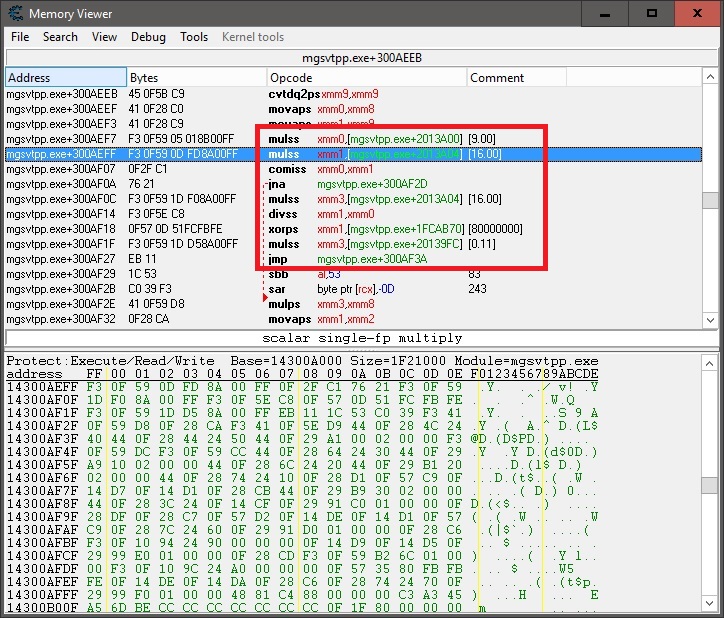
I loaded the 1.0.0.3 exe and looked at what the "code" looked like at the address region and then put the 1.0.0.4 exe back in. Then assuming that code chunk would be the same AND not too far from the old address I started there and then started to page up/down until I found it. The hex is a little different from 1.0.0.3(FD 8A 00 FF instead of BD B5 00 FF) but I just tried changing the same bit(even though it was different) to C1 like Jackfuste had mentioned earlier and it worked. It would be great if Jackfuste could explain a bit what/why changing it to C1 works. For the second part I used 192.00048 for 5760x1080, same as before.
The SS below shows the "code chunk" for future reference.
- Untitled.jpg (236.64 KiB) Viewed 5571 times
Re: Metal Gear Solid 5: The Phantom Pain- 21:9 support broke
Posted: 07 Sep 2015, 08:20
by ElderCub
Thanks for the explanation, I'll try that when the next patch comes out. And yes, entered the equation in my reply wrong, however while doing the calculations I was using the correct formula getting 198.66753 for 5960x1080. With that value, the hud elements take up only a small portion of the screen. Instead I ballparked the number and decided on 120, which was relatively close to the original hud size. So for some reason, that math doesn't work for me.
Re: Metal Gear Solid 5: The Phantom Pain- 21:9 support broke
Posted: 07 Sep 2015, 12:26
by jackfuste
Here's update for v. 1.004
For 4:3 (800x600, 1024x768 etc.)
mgsvtpp.7zFor 5:4 (1280x1024)
mgsvtpp.7zFor 2560x1080
mgsvtpp.7zFor 3440x1440
mgsvtpp.7zFor 48:10 (5040x1050; 5760x1200 etc.)
mgsvtpp.7zFor 48:9 (4800x900; 5760x1080 etc.)
mgsvtpp.7z Markers fix:
For 2560x1080; 3440x1440
For triple 16:9 screen 11520x2160; 5760x1080; 4800x900 etc.
For triple 16:10 screen 5760x1200; 5040x1050 etc.
Cheat Engine table
First value should be changed
from
F3 0F 59 0D FD 8A 00 FF to
F3 0F 59 0D 01 8B 00 FFthis fixes marker position.
Second value - 64, is size for marker and some ui elements.
Proper value should be calculated by formula:
64 * ((width/height)/1.77777)
For example, 64 * ((6000/1080)/1.77777) = 200.00087
So, 64 should be changed to 200.00087
ekrboi wrote:I loaded the 1.0.0.3 exe and looked at what the "code" looked like at the address region and then put the 1.0.0.4 exe back in. Then assuming that code chunk would be the same AND not too far from the old address I started there and then started to page up/down until I found it. The hex is a little different from 1.0.0.3(FD 8A 00 FF instead of BD B5 00 FF) but I just tried changing the same bit(even though it was different) to C1 like Jackfuste had mentioned earlier and it worked. It would be great if Jackfuste could explain a bit what/why changing it to C1 works. For the second part I used 192.00048 for 5760x1080, same as before.
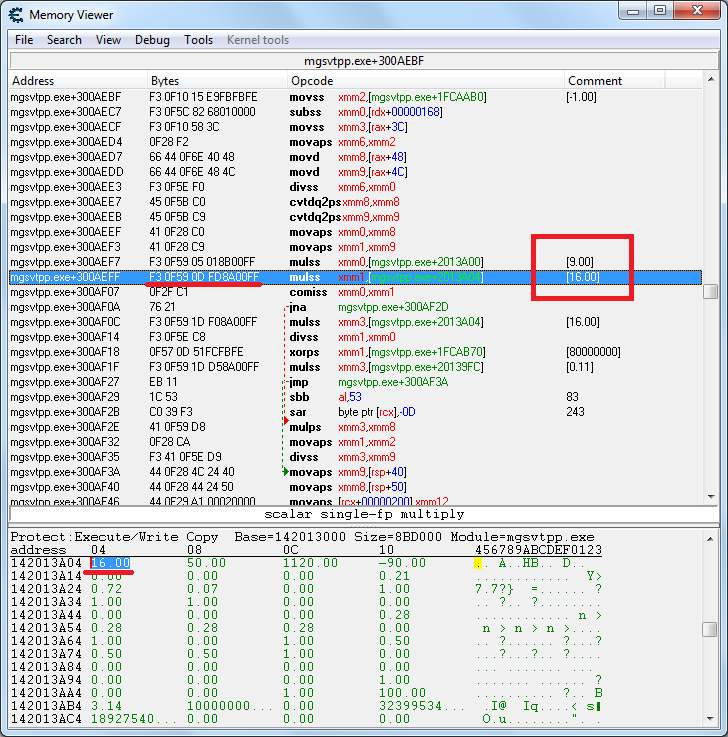
Markers are limited to 16:9 aspect ratio.
- 16_9.png (47.69 KiB) Viewed 7216 times
We change instruction from
mulss xmm1,[142013A04] - bytes
F3 0F 59 0D FD 8A 00 FF to
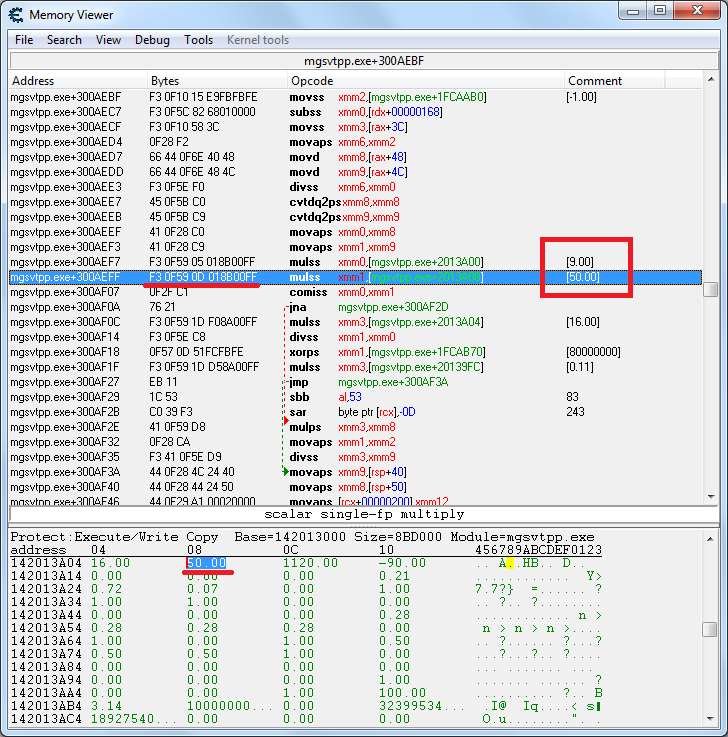
mulss xmm1,[142013A08] - bytes
F3 0F 59 0D 01 8B 00 FFthat set limit to 50:9.
- 50_9.png (47.71 KiB) Viewed 7373 times
Re: Metal Gear Solid 5: The Phantom Pain- 21:9 support broke
Posted: 07 Sep 2015, 13:21
by Scarnecedor
Re: Metal Gear Solid 5: The Phantom Pain- 21:9 support broke
Posted: 07 Sep 2015, 14:42
by Pilgore
Dude, MUCH APPRECIATED!!! I'll spread the word on Twitter.
Re: Metal Gear Solid 5: The Phantom Pain- 21:9 support broke
Posted: 07 Sep 2015, 15:15
by doomberry
anteronoid wrote:doomberry wrote:Hey guys, new 21:9 user here.
Thanks a lot for the fix! However, I still have an issue.
I don't know exactly why this happens, but playing with the 21:9 fix makes my game very blurry, as if it's not rendering at the proper resolution (This includes UI elements, whose size does not change with the 21:9 fix.)
At first I thought it was a bad implementation of Temporal AA, but the game looks fine in 16:9, plus I get this nasty pixel crawl that's typical of uprezzed games.
http://imgur.com/a/yvE6Z (Sorry for the JPG compression)
As you can see, the game is much blurrier in 21:9, even the UI elements.
Can anyone help with that? I'd be happy to provide more info!
I had similar problem, I changed from "Borderless Fullscreen" to "Fullscreen" and that fixed it for me.
Yep, after a setting change and a few restarts, that fixed it. I would've never guessed it, but I'll keep it in mind when troubleshooting in the future. Thank you!
Re: Metal Gear Solid 5: The Phantom Pain- 21:9 support broke
Posted: 07 Sep 2015, 16:29
by blaztardz
Jackfuste, do you have a paypal?
Re: Metal Gear Solid 5: The Phantom Pain- 21:9 support broke
Posted: 07 Sep 2015, 17:02
by OsirisWake
Signed up just to say thanks Jackfuste. Konami should be disgraced with themselves. And what confuses me is that Kojima apparently tweeted a picture of himself playing MGSV on his new 21:9 ultrawide WITH the black borders!
Like blaztardz asked above me, PM me your paypal address so I can send you a few quid because It's bloody awesome that you're doing this everytime the updates break it.
Re: Metal Gear Solid 5: The Phantom Pain- 21:9 support broke
Posted: 07 Sep 2015, 17:26
by AFKing
Hey Guys, thanks for the fixes. quick question, do you have to do anything apart from run the marker fix and then press f1 ingame? when i do the marker fix exe file disappears from its folder and subsequently f1 does nothing in game. wondering if im missing some step? (rez fix is perfect)
cheers
Re: Metal Gear Solid 5: The Phantom Pain- 21:9 support broke
Posted: 07 Sep 2015, 17:51
by Rescend
I signed up to thank Jackfuste for what he's doing so far.
I have a question so far, no one seems to be bothered by it but I thought i'd ask anyway. I assume modifying the game EXE would affect your achievements/online play etc?
Re: Metal Gear Solid 5: The Phantom Pain- 21:9 support broke
Posted: 07 Sep 2015, 18:02
by jackfuste
blaztardz wrote:Jackfuste, do you have a paypal?
No. If you want donate, you can send Steam wallet code to me.
AFKing wrote:Hey Guys, thanks for the fixes. quick question, do you have to do anything apart from run the marker fix and then press f1 ingame?
Not needed to do anything special, just run trainer and press F1.
If trainer doesn't work for some reasons, try to use Cheat Engine table.
AFKing wrote:when i do the marker fix exe file disappears from its folder and subsequently f1 does nothing in game. wondering if im missing some step? (rez fix is perfect)
cheers
Maybe your anti-virus software detects trainer as unwanted software and remove it.
Rescend wrote:I have a question so far, no one seems to be bothered by it but I thought i'd ask anyway. I assume modifying the game EXE would affect your achievements/online play etc?
Afaik it doesn't affect on achievements/online.
Re: Metal Gear Solid 5: The Phantom Pain- 21:9 support broke
Posted: 07 Sep 2015, 18:31
by TacticalDev91
Rescend wrote:I have a question so far, no one seems to be bothered by it but I thought i'd ask anyway. I assume modifying the game EXE would affect your achievements/online play etc?
jackfuste wrote: Afaik it doesn't affect on achievements/online.
Would it be possible to get this fix for Ground Zeros as well? I tried changing the aspect ratio in the ground zereos exe but I get a steam fails to load error. If I use the modded exe there is an issue with both achievements and the markers.


 TNX !!!!!!!!!!!!!!