Page 8 of 15
Re: Freedom WSGF Edition Ultimate Desk Stand v2
Posted: 21 Jan 2016, 00:52
by MrD1sturbed
Would the WSGF Ultimate V2 work for the following config in a 3 over 1 setup:
1x Dell 27" Gsync in middle of bottom row
2x Asus VH238H in portrait on the sides of the Dell
1x Dell U3415W above the the other three
The two Asus don't HAVE to be in portrait, but it would be my preferred setup. But will this work with the stand? I'm really only unsure of the Dell 34 UW on the top.
Re: Freedom WSGF Edition Ultimate Desk Stand v2
Posted: 21 Jan 2016, 06:17
by CaptainSteyr
I just received this stand and am setting in up with 3 ASUS 24" VG248QE monitors (I don't have the monitor I'm attaching up top yet). I am experiencing the arm sag on the outer monitors that others on this board have posted about. The height adjustment screws are sufficient in making up the difference and make the outer monitors vertically flush with the center monitor. The problem I have is that I can't rotate the left monitor to be flush with the center monitor. It needs to rotate more clockwise, but the pivots have stoppers that prevent any more rotation in that direction. Should I remove the stoppers or file down the groove? Would that cause an issue?
Re: Freedom WSGF Edition Ultimate Desk Stand v2
Posted: 23 Jan 2016, 03:59
by c1em3ntchua
CaptainSteyr wrote:I just received this stand and am setting in up with 3 ASUS 24" VG248QE monitors (I don't have the monitor I'm attaching up top yet). I am experiencing the arm sag on the outer monitors that others on this board have posted about. The height adjustment screws are sufficient in making up the difference and make the outer monitors vertically flush with the center monitor. The problem I have is that I can't rotate the left monitor to be flush with the center monitor. It needs to rotate more clockwise, but the pivots have stoppers that prevent any more rotation in that direction. Should I remove the stoppers or file down the groove? Would that cause an issue?
Don't remove the stopper of the mounts. Install the mount upside down (with the height adjustment screw pointing towards the floor) and rotate it the right way round.

I experienced arm sag as well, but I solved it by tightening the nuts on the arm further. They are hard to tighten further but it's possible.
Re: Freedom WSGF Edition Ultimate Desk Stand v2
Posted: 23 Jan 2016, 06:08
by skipclarke
MrD1sturbed wrote:Would the WSGF Ultimate V2 work for the following config in a 3 over 1 setup:
1x Dell 27" Gsync in middle of bottom row
2x Asus VH238H in portrait on the sides of the Dell
1x Dell U3415W above the the other three
The two Asus don't HAVE to be in portrait, but it would be my preferred setup. But will this work with the stand? I'm really only unsure of the Dell 34 UW on the top.
This will work. But, the two portrait monitors would have space between them and the center monitor. They still have to clear the top 34" panel.
Re: Freedom WSGF Edition Ultimate Desk Stand v2
Posted: 23 Jan 2016, 06:11
by MrD1sturbed
skipclarke wrote:MrD1sturbed wrote:Would the WSGF Ultimate V2 work for the following config in a 3 over 1 setup:
1x Dell 27" Gsync in middle of bottom row
2x Asus VH238H in portrait on the sides of the Dell
1x Dell U3415W above the the other three
The two Asus don't HAVE to be in portrait, but it would be my preferred setup. But will this work with the stand? I'm really only unsure of the Dell 34 UW on the top.
This will work. But, the two portrait monitors would have space between them and the center monitor. They still have to clear the top 34" panel.
I'm actually ok with the space. The two sides are merely for monitoring Twitch chat, notifiers etc while i'm streaming. The two Dell's are the main monitors in the setup.
Re: Freedom WSGF Edition Ultimate Desk Stand v2
Posted: 23 Jan 2016, 06:13
by skipclarke
c1em3ntchua wrote:Don't remove the stopper of the mounts. Install the mount upside down (with the height adjustment screw pointing towards the floor) and rotate it the right way round.
I experienced arm sag as well, but I solved it by tightening the nuts on the arm further. They are hard to tighten further but it's possible.
Thanks for the help here. You are correct on the pivot. If it's not rotating far enough, then you'll need to remove the monitor and rotate it 90 or 180 degrees, and then you'll have plenty of room to rotate.
Sorry about the issue with the monitor arm not being tight. Looks like I may need to do some individual inspections on this lot.
Curious about the WSGF Stands!
Posted: 29 Jan 2016, 03:53
by Panzernacker2k
G'Day from Australia,
I'm just curious about the stands that you have on offer here.
i currently run 3 X Asus PB278Q as the picture below, but i wish to get a stand to make it a bit more stable.
My current play to mount the 3 27inc but i also wanted to mount a another 27 or 30 or even a longshot of a Sony 42" above it for my ps4.
So my question is since im new to this, what would be the best way to go about it or what parts would be best to get?
Thanks for you time.
Regards
David
Re: Curious about the WSGF Stands!
Posted: 29 Jan 2016, 04:13
by skipclarke
For those three monitors you'd need a WSGF Ultimate v2. The Ultimate v2 would also support "1+3" with another 27" over those three. To put a 30" or 42" above the three, you'd need to add the XL Pole (which we also offer in the store). Just be sure the TV you put up there has a 100mm VESA pattern. Some might have a larger pattern.
Re: Freedom WSGF Edition Ultimate Desk Stand v2
Posted: 07 Feb 2016, 17:51
by Snipeon
May I know where I can get the heavy duty pivots? Or does the WSGF v2 come with them?
Re: Freedom WSGF Edition Ultimate Desk Stand v2
Posted: 10 Feb 2016, 03:49
by skipclarke
Snipeon wrote:May I know where I can get the heavy duty pivots? Or does the WSGF v2 come with them?
I have a couple. I could do a custom invoice through PayPal. I may update the WSGF Stand to include them in the future. However, I need to make sure enough people need that upgrade before I change the SKU as a whole.
Re: Freedom WSGF Edition Ultimate Desk Stand v2
Posted: 10 Feb 2016, 13:23
by Snipeon
skipclarke wrote:]I have a couple. I could do a custom invoice through PayPal. I may update the WSGF Stand to include them in the future. However, I need to make sure enough people need that upgrade before I change the SKU as a whole.
So if I just need them I indicate in the buying comments? Would I need to pay extra for it?
Re: WSGF Ultimate Desk Stand v2
Posted: 10 Feb 2016, 15:53
by skipclarke
I didn't realize you were also buying a v2 stand. Let me add those to the store.
Sent from my iPhone using Tapatalk
Re: WSGF Ultimate Desk Stand v2
Posted: 10 Feb 2016, 17:10
by Snipeon
Yea, I'm mounting a x34 in the middle, and seeing your comments, thought it would be best to include 1 heavy duty just in case.
Though are you able to provide any further suggestions for me? I'm planning on a 24" x x34 x 24" + 28" setup. Do I need the 36" pole or is 28" enough? Any suggestions to improve on my setup are welcome.
Re: WSGF Ultimate Desk Stand v2
Posted: 11 Feb 2016, 00:25
by skipclarke
Snipeon wrote:Yea, I'm mounting a x34 in the middle, and seeing your comments, thought it would be best to include 1 heavy duty just in case.
Though are you able to provide any further suggestions for me? I'm planning on a 24" x x34 x 24" + 28" setup. Do I need the 36" pole or is 28" enough? Any suggestions to improve on my setup are welcome.
For 28" over 34", you'll need the 36" XL pole
Re: WSGF Ultimate Desk Stand v2
Posted: 11 Feb 2016, 14:58
by Snipeon
btw do I just include the heavy duty pivot in my purchase comments? I noticed it still hasn't been added into the store.
Re: WSGF Ultimate Desk Stand v2
Posted: 11 Feb 2016, 15:50
by skipclarke
Snipeon wrote:btw do I just include the heavy duty pivot in my purchase comments? I noticed it still hasn't been added into the store.
Give me a day or two. The day job, and dealing with the spammers here has kept me busy. It will be load with a price.
Re: WSGF Ultimate Desk Stand v2
Posted: 13 Feb 2016, 01:15
by oghabib
Hello I purchased your mount last month, and am so happy with it!
Today I noticed one of my monitors is tilting down and when I position back it just tilts back down by itself. I Would assume just tightening the bolt should fix it. Would you happen to know the exact size tool I would need to get from the store?
Sent from my iPhone
Re: WSGF Ultimate Desk Stand v2
Posted: 14 Feb 2016, 04:50
by skipclarke
oghabib wrote:Hello I purchased your mount last month, and am so happy with it!
Today I noticed one of my monitors is tilting down and when I position back it just tilts back down by itself. I Would assume just tightening the bolt should fix it. Would you happen to know the exact size tool I would need to get from the store?
Sent from my iPhone
It is a 5mm hex wrench. If that doesn't work, please let me know (I also replied to your email). That way I can get you any needed replacement parts.
Re: WSGF Ultimate Desk Stand v2
Posted: 28 Feb 2016, 06:35
by Snipeon
Hope you don't mind me asking again, but when is the heavy duty pivot going to be added in?
On another note, why is the XL pole price stated as $30 however the below price is stated as $40?
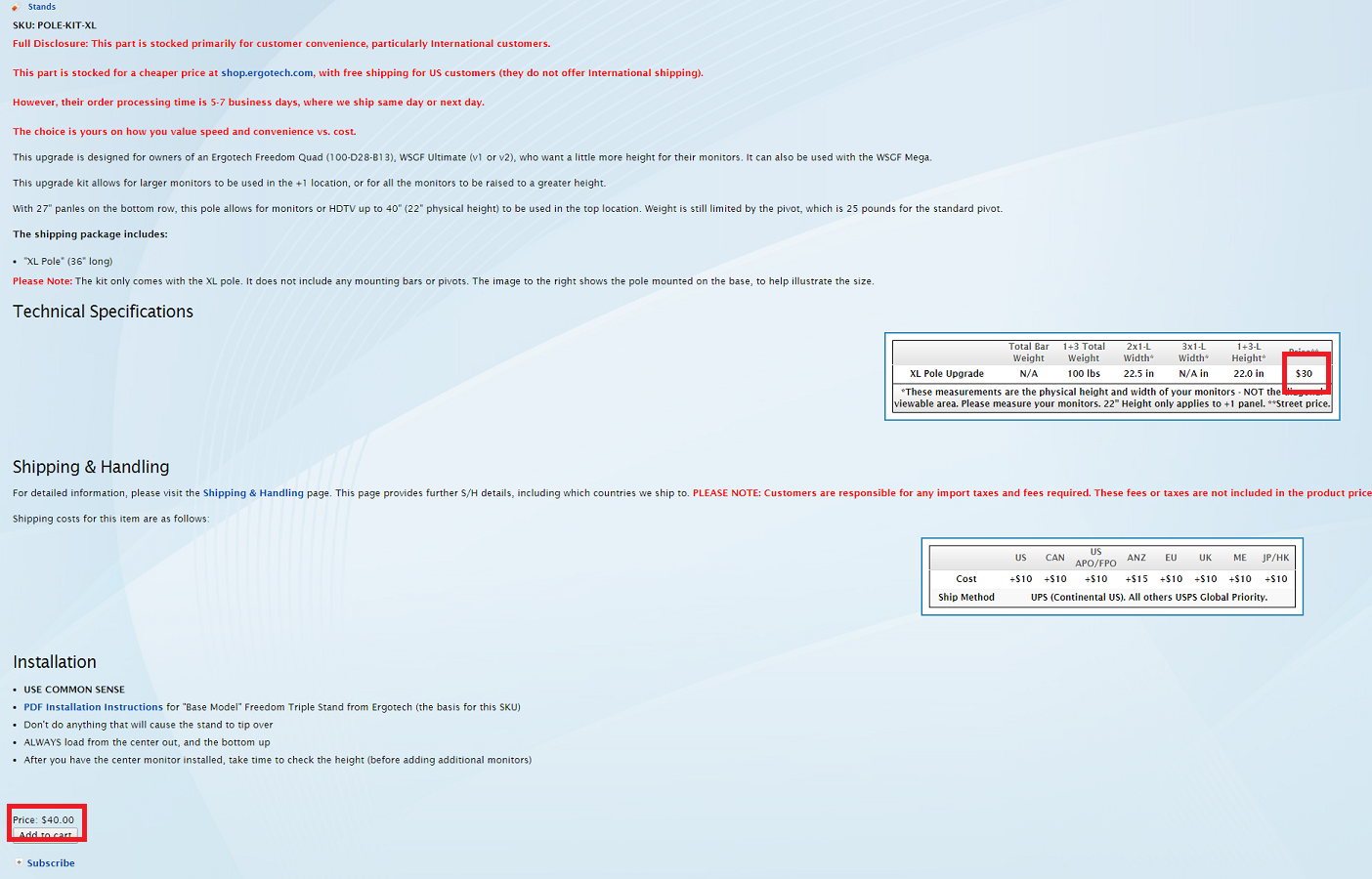
- Untitled.png (746.66 KiB) Viewed 3993 times
And have the shipping prices increased? I remember it was $150 to HK/JP.
Re: WSGF Ultimate Desk Stand v2
Posted: 29 Feb 2016, 00:24
by skipclarke
Snipeon wrote:Hope you don't mind me asking again, but when is the heavy duty pivot going to be added in?
On another note, why is the XL pole price stated as $30 however the below price is stated as $40?
And have the shipping prices increased? I remember it was $150 to HK/JP.
Snipeon, I don't mind you asking again. Helps keep my on my toes.

I've just got it added now. The price of the XL Pole is $40. I've corrected the entry on the product page table. And yes, international shipping fees have increased by $25. I recently got "burned" on a few shipments to Australia and Canada, where the fees were higher than what they historically have been.
After doing a check of other countries, I find that USPS has increased its fees by about $25 (even though oil prices are down). Not sure why their fees have increased, but our increase is simply to match their price movements. International shipping costs are still considerably lower than when we started, as we do track the trends.