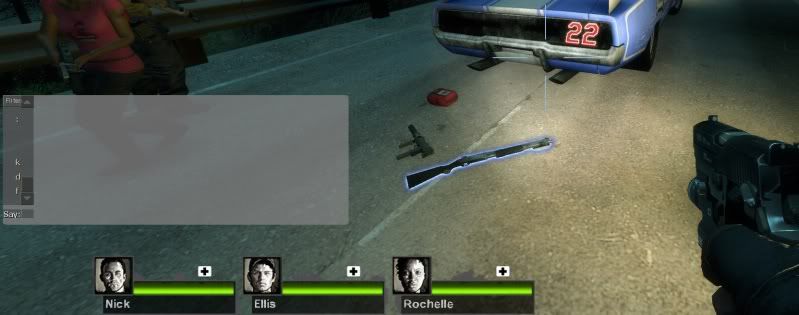
L4D2 Center HUD fix

Discussions about getting games to run in a Multi-Mon setup.
bowser koopa
Posts: 4
Joined: 02 Jul 2010, 15:18

Re: L4D2 Center HUD fix

Post by bowser koopa »

[quote]Oh my god... can't Valve fix this themselves? Should be a snap to do this.

I conducted an extended email conversation with Valve on that very point. After repeatedly not understanding my questions, their ultimate answer was "sorry, we can't help with that. Try to find some assistance on the forums." :? :roll: Wish I had a channel to the actual developers rather than customer support....

Honestly, I can't really blame Valve. I'm seriously shocked that a lot of their games (that are 4-5 years old) even work natively with surround at all. All I had to do to get games like L4D2 and TF2 to work with my setup was set a custom resolution in the launch options.

Anyway, technology like Eyefinity is still pretty new. Sure, gaming with 3+ monitors probably isn't. But, I can say through my experience of working in the industry that most game studios only plan for what most gamers use on their computers, which is probably one widescreen monitor (or an older 4:3 aspect monitor). Even then if a game is launched primarily for console (PC being an afterthought), some game studios don't seem to give a lick about how the PC performs at all. And I'm sure most gamers out there don't have 3 monitors for gaming, so getting their huds to work for so many different configurations is more work than they're willing to slap manpower at.

Yeah, it's frustrating to have to work around, but...I'm still thinking that in the future, more game studios will make their huds more customizable out of the box. Here's to hoping!

djorourke
Posts: 1
Joined: 28 Jun 2010, 03:44

Re: L4D2 Center HUD fix

Post by djorourke »

Works brilliantly in L4D2!! Many thanks!!

Now I'm eager to get a fix like this in CS:S.
GitDat
Posts: 131
Joined: 09 Feb 2010, 20:11

Re: L4D2 Center HUD fix

Post by GitDat »

Also that the following files are in the correct locations?

SteamSteamAppscommonleft 4 dead 2left4dead2pak01_dir.vpk
SteamSteamAppscommonleft 4 dead 2left4dead2scriptshudlayout.res
SteamSteamAppscommonleft 4 dead 2left4dead2resourceuibasechat.res (if you are moving the chat interface)


I copied my L4D1 basechat.res to this location for L4D2 but my chatbox is still on the left monitor :( Is there something special that has to be done to get it to the center screen?
Cooler Master Cosmos II | ASUS X99-Deluxe | Thermaltake Water 3.0 Extreme S | 5930k @ 4.5GHz | 32GB G.Skill Ripjaws V 3200MHz | SLI GTX 1080 Ti's | Samsung 960 Pro NVMe M.2 SSD | Corsair AX1500i | 3DMark Fire Strike Ultra - 13,780 | Windows 10 Pro 64-bit | Nvidia Surround® 3 x BenQ XL2735 | Samsung CHG90 Auxiliary Monitor
User avatar
Delphium
Administrators
Administrators
Posts: 1789
Joined: 27 Dec 2009, 14:27

Re: L4D2 Center HUD fix

Post by Delphium »

Is there something special that has to be done to get it to the center screen?
Yes, hex edit the pak01_dir.vpk, I suspect you need to rename the basechat.res file.
Or try my one which is already edited.
| Gigabyte X79S-UP5-WiFi Skt2011 | i7 4820k @4.4GHz Watercooled (Ivy Bridge-E) | Corsair Vengence 32GB @2133MHz 11-11-11-27 2T Quad-Channel (8x4GB) | AMD R9-Fury-X 4GB @1140/505MHz + EKWB Watercooled | 256GB Crucial MX200 SSD | 8x 1TB Samsung F3 SATA-II | Corsair 850W TX PSU | 3x Dell S2209W 22"wide TFT's (5760x1080res) | Logitech Z-5400 5.1ch speakers | Win7 Ultimate x64 |
GitDat
Posts: 131
Joined: 09 Feb 2010, 20:11

Re: L4D2 Center HUD fix

Post by GitDat »


I just tried that linked pak file and this is what happened :( All the text got squished on the left side somehow.
Cooler Master Cosmos II | ASUS X99-Deluxe | Thermaltake Water 3.0 Extreme S | 5930k @ 4.5GHz | 32GB G.Skill Ripjaws V 3200MHz | SLI GTX 1080 Ti's | Samsung 960 Pro NVMe M.2 SSD | Corsair AX1500i | 3DMark Fire Strike Ultra - 13,780 | Windows 10 Pro 64-bit | Nvidia Surround® 3 x BenQ XL2735 | Samsung CHG90 Auxiliary Monitor
User avatar
Delphium
Administrators
Administrators
Posts: 1789
Joined: 27 Dec 2009, 14:27

Re: L4D2 Center HUD fix

Post by Delphium »

Erm...
I need to check the game, dont have time right nows, but will later.
| Gigabyte X79S-UP5-WiFi Skt2011 | i7 4820k @4.4GHz Watercooled (Ivy Bridge-E) | Corsair Vengence 32GB @2133MHz 11-11-11-27 2T Quad-Channel (8x4GB) | AMD R9-Fury-X 4GB @1140/505MHz + EKWB Watercooled | 256GB Crucial MX200 SSD | 8x 1TB Samsung F3 SATA-II | Corsair 850W TX PSU | 3x Dell S2209W 22"wide TFT's (5760x1080res) | Logitech Z-5400 5.1ch speakers | Win7 Ultimate x64 |
User avatar
GeneralAdmission
Editors
Editors
Posts: 1560
Joined: 12 Sep 2007, 19:14

Re: L4D2 Center HUD fix

Post by GeneralAdmission »

Anyone else getting this message lately?


I tried multiple connections to Official Dedicated and Best Available Dedicated servers last night, once even with a 3rd party map, and got this error every time. As soon as I swapped my hud-modded pak01_dir.vpk file out for the original I connected without issue. I really hope Valve didn't add consistency enforcement for this file to dedi servers.

-edit-
NVM, found the update. Valve did add a consistency check on July 9:
Default consistency checks now include pak01_dir.vpk. Addon authors should not hack the pak01_dir.vpk directly but instead include content in a VPK

Obviously this nukes the HUD fix for multi-monitor players. So we have 3 possibilities: 1) Hud-modded .res files must now be used/distributed in a .VPK and hopefully will maintain universal compatibility with all servers, 2) we get ALL server operators to add pak01_dir.vpk to the whitelist (NOT remotely possible), 3) we are up fecal creek, sans paddle.

If 3 is the end result I'd say we need to raise a serious protest to Valve. First we need to test solution #1. I'll start looking into this but will certainly need help. For now, anyone who uses the HUD mod, please attempt connecting to various servers like I did and report your results in this thread. Data and evidence is what we need first...torches and pitchforks may come later. ;) :twisted:
User avatar
Delphium
Administrators
Administrators
Posts: 1789
Joined: 27 Dec 2009, 14:27

Re: L4D2 Center HUD fix

Post by Delphium »

:doh Ughh not good.
Ill try confirm tonight GA.
| Gigabyte X79S-UP5-WiFi Skt2011 | i7 4820k @4.4GHz Watercooled (Ivy Bridge-E) | Corsair Vengence 32GB @2133MHz 11-11-11-27 2T Quad-Channel (8x4GB) | AMD R9-Fury-X 4GB @1140/505MHz + EKWB Watercooled | 256GB Crucial MX200 SSD | 8x 1TB Samsung F3 SATA-II | Corsair 850W TX PSU | 3x Dell S2209W 22"wide TFT's (5760x1080res) | Logitech Z-5400 5.1ch speakers | Win7 Ultimate x64 |
User avatar
GeneralAdmission
Editors
Editors
Posts: 1560
Joined: 12 Sep 2007, 19:14

Re: L4D2 Center HUD fix

Post by GeneralAdmission »

First round of testing and things don't look good.

Test 1 - I created a .vpk addon with only the modded hudlayout.res file that I use. Named it hudmod.vpk. Launched the game and it doesn't even appear in the addon menu, despite the fact that it is listed in addonlist.txt within the l4d2 directory:


Test 2 - I unpacked a working 3rd party mod, Fort Noesis, added the hudlayout.res file, then re-packed it in a vpk file. The mod appears and loads normally in-game, but the modded HUD information is completely ignored:


So far this doesn't bode well. Even if the corrected HUD works within an addon, it would still not work with standard servers. As it stands, such .res files may not even be acceptable for .vpk addons.

Any other users out there please post your experience and relevant information.
User avatar
Delphium
Administrators
Administrators
Posts: 1789
Joined: 27 Dec 2009, 14:27

Re: L4D2 Center HUD fix

Post by Delphium »

My own testing so far has yielded pritty much the same results.
Will need to look further into making addons/mods.
| Gigabyte X79S-UP5-WiFi Skt2011 | i7 4820k @4.4GHz Watercooled (Ivy Bridge-E) | Corsair Vengence 32GB @2133MHz 11-11-11-27 2T Quad-Channel (8x4GB) | AMD R9-Fury-X 4GB @1140/505MHz + EKWB Watercooled | 256GB Crucial MX200 SSD | 8x 1TB Samsung F3 SATA-II | Corsair 850W TX PSU | 3x Dell S2209W 22"wide TFT's (5760x1080res) | Logitech Z-5400 5.1ch speakers | Win7 Ultimate x64 |
User avatar
Delphium
Administrators
Administrators
Posts: 1789
Joined: 27 Dec 2009, 14:27

Re: L4D2 Center HUD fix

Post by Delphium »

UPDATE:- Valve are looking into the .vpk support.
Info here.
| Gigabyte X79S-UP5-WiFi Skt2011 | i7 4820k @4.4GHz Watercooled (Ivy Bridge-E) | Corsair Vengence 32GB @2133MHz 11-11-11-27 2T Quad-Channel (8x4GB) | AMD R9-Fury-X 4GB @1140/505MHz + EKWB Watercooled | 256GB Crucial MX200 SSD | 8x 1TB Samsung F3 SATA-II | Corsair 850W TX PSU | 3x Dell S2209W 22"wide TFT's (5760x1080res) | Logitech Z-5400 5.1ch speakers | Win7 Ultimate x64 |
User avatar
Delphium
Administrators
Administrators
Posts: 1789
Joined: 27 Dec 2009, 14:27

Re: L4D2 Center HUD fix

Post by Delphium »

I have created a new .vpk HUD mod, have copy the mod to the addons folder, double clicked which claims it installed sucsessfully.
Load game, goto addons, "Delph's 48_9 Eyefinity HUD" addon avaiable, have selected it and clicked install (think i needed to install addon support which is a ~800mb download via steam).
Once the download was complete, I ensured the addon was listed still, which it was.
Started a co-op campaign, create lobby, start loading game....

error message "Server is enforcing consitency for this file: File is left4dead2/pak02_dir.vpk is not allowed to be moddifed."

I dont ever recall a pak02_dir.vpk file in the L4D2 folders, can someone else confirm these files are new?
I know for sure I have never touched them, I just wonder if they are anything to do with the ~800mb addon support that was downloaded via steam? :S

EDIT: after checking pak02 files sizes, they come to 817mb which is about the same as the addon support download from steam, so as these files are fresh they have not been modded... strange.

For anyone interested here is my .vpk file should you wish to have a crack at getting this to work.

NOTE: This issue could be to do with the related issue that Valve are apprently trying to fix as linked in my previous post.

EDIT: Just completed a game file verify check, replaced 1 file (although it did not say what file, I am going to assume pak02_dir.vpk), game now connects to a server, however the HUD does appear to be as standard, not eyefinity shifted. :(
| Gigabyte X79S-UP5-WiFi Skt2011 | i7 4820k @4.4GHz Watercooled (Ivy Bridge-E) | Corsair Vengence 32GB @2133MHz 11-11-11-27 2T Quad-Channel (8x4GB) | AMD R9-Fury-X 4GB @1140/505MHz + EKWB Watercooled | 256GB Crucial MX200 SSD | 8x 1TB Samsung F3 SATA-II | Corsair 850W TX PSU | 3x Dell S2209W 22"wide TFT's (5760x1080res) | Logitech Z-5400 5.1ch speakers | Win7 Ultimate x64 |
User avatar
GeneralAdmission
Editors
Editors
Posts: 1560
Joined: 12 Sep 2007, 19:14

Re: L4D2 Center HUD fix

Post by GeneralAdmission »

Word of warning, Chet F. of Valve posted this on the Steam forums:
I would also encourage people to not hack the pak file or create work arounds and then try and attach to a vac server.

I don't know how likely it is that our (currently non-functioning) HUD mods might trigger a VAC kick or ban, so exercise your own judgment. The July 21 update for l4d2 also notes this:
Added additional protection for critical files

About as clear as mud. Take what you will from it.
User avatar
Delphium
Administrators
Administrators
Posts: 1789
Joined: 27 Dec 2009, 14:27

Re: L4D2 Center HUD fix

Post by Delphium »

:doh ughhh

Clear as mud indeed :(
Just catching up on the syeam forums atm.
EDIT: got a linky to chets comments?

I am quite disapointed like many others over this of cause.
Although I agree that we dont wish to have to hex edit the game files! However a replacement method would be much more ideal.
As I posted on steam before, it would make sense and be so much easier if the game would simply detect the external.res files as much as the likes of TF2 does. - thats hoping tf2 stays that way.

Anyways, cheers for the heads up GA, so long as we dont screw with the consistency checked files and setup the mod in a .vpk system as they now prefer we should be ok.
Im going to sit tight for a while and ride this one out, await for the next update and see if that fixes any issues that some other folks have claimed that makes other mods fail.
| Gigabyte X79S-UP5-WiFi Skt2011 | i7 4820k @4.4GHz Watercooled (Ivy Bridge-E) | Corsair Vengence 32GB @2133MHz 11-11-11-27 2T Quad-Channel (8x4GB) | AMD R9-Fury-X 4GB @1140/505MHz + EKWB Watercooled | 256GB Crucial MX200 SSD | 8x 1TB Samsung F3 SATA-II | Corsair 850W TX PSU | 3x Dell S2209W 22"wide TFT's (5760x1080res) | Logitech Z-5400 5.1ch speakers | Win7 Ultimate x64 |
User avatar
GeneralAdmission
Editors
Editors
Posts: 1560
Joined: 12 Sep 2007, 19:14

Re: L4D2 Center HUD fix

Post by GeneralAdmission »

Good news. Latest game update now recognizes hudlayout.res inside of .vpk addons:

Haven't tested basechat.res yet.

A .vpk addon will now have to be created for every different multi-monitor resolution, but the upside is patches to pak01_dir.vpk are now unnecessary, support is now official so no VAC concerns, and game updates will not break modded HUDs. Once we have a collection of vpk addons created they should (theoretically) be valid forever.

I still need to figure out how to get the addon to show up in the Extras menu in-game, but that's a minor issue. I think the file name convention should be something like this:

Code: Select all

wsgfhud-5040x1050.vpk

I'll also get to work on a standard addoninfo.txt file that we can include for all the vpks (should allow embedding links directly to the WSGF and this thread).

I think we can guess the most commonly used resolutions, but folks with bezel managed configurations should post the exact resolution they need.

Delph, does your HUD calculator keep any records of what resolutions have been submitted by users?
User avatar
Delphium
Administrators
Administrators
Posts: 1789
Joined: 27 Dec 2009, 14:27

Re: L4D2 Center HUD fix

Post by Delphium »

Interesting, I was just loking at this, I can get the vpk listed in the game, you have to add a text file called "addoninfo.txt"
Which contains the following info.

Code: Select all

// The addoninfo.txt file is a metadata file that is required by all Source Engine Add-ons. 

   
   "AddonInfo"
   {
        addonSteamAppID         550                  // 550 is the app ID for Left 4 Dead
        addontitle              "Delph's 48:9 Eyefinity & Surround HUD"               // Add-on title that shows up in Add-ons list. ~20 chars max
        addonversion            1.0                  // Version number of add-on version of the form <major>.<minor>
        addontagline            "Eyefinifty & Surround HUD"               // Add-on tagline or wrap-up- a short description. ~100 chars max
        addonauthor             "Delphium@WSGF"               // Name/alias of the author
        addonSteamGroupName     "Widescreen Gaming Forum"               // (Optional) Steam group related to the add-on. We use this to construct a URL to the group page.
        addonauthorSteamID      "Delphium"               // (Optional) Steam ID of author. We use this to construct a URL to the author's page.
        addonContent_Campaign   0               // This addon provides muliple connected maps with a finale
        addonURL0               "http://www.widescreengamingforum.com/forum/viewtopic.php?f=57&t=17516"      // An html home page for the add-on that includes a download link.
   
        // short description that appears in the Add-on list screen...
        addonDescription        "Delph's Eyefinity & Surround HUD for 48:9 aspect ratio resolutions"
   }


With the .res files located in "scripts" and "resource/ui" folders.

EDIT: Here is my test mod for 5760x1080 it includes basechat and scoreboard.

+1 to naming convention.
Unfortunately the calc does not store stats yet.

EDIT: For the addoninfo content above, I would recommend we can also stick to a convention :onethumb

EDIT:


| Gigabyte X79S-UP5-WiFi Skt2011 | i7 4820k @4.4GHz Watercooled (Ivy Bridge-E) | Corsair Vengence 32GB @2133MHz 11-11-11-27 2T Quad-Channel (8x4GB) | AMD R9-Fury-X 4GB @1140/505MHz + EKWB Watercooled | 256GB Crucial MX200 SSD | 8x 1TB Samsung F3 SATA-II | Corsair 850W TX PSU | 3x Dell S2209W 22"wide TFT's (5760x1080res) | Logitech Z-5400 5.1ch speakers | Win7 Ultimate x64 |
User avatar
GeneralAdmission
Editors
Editors
Posts: 1560
Joined: 12 Sep 2007, 19:14

Re: L4D2 Center HUD fix

Post by GeneralAdmission »

hmmmmm....I just tried an Official Dedicated server and my modded HUD was ignored. Not sure what is going on since HUD is active in Addons menu and loads fine in SP. Out time for now so I'll have to test more later.
User avatar
Delphium
Administrators
Administrators
Posts: 1789
Joined: 27 Dec 2009, 14:27

Re: L4D2 Center HUD fix

Post by Delphium »

Ok, so I just done some more testing...

Playing Campaign mode with friends on the following server types...
Offcial Dedicated = Not working
Best Available Dedicated = Working
Local Server = Working
| Gigabyte X79S-UP5-WiFi Skt2011 | i7 4820k @4.4GHz Watercooled (Ivy Bridge-E) | Corsair Vengence 32GB @2133MHz 11-11-11-27 2T Quad-Channel (8x4GB) | AMD R9-Fury-X 4GB @1140/505MHz + EKWB Watercooled | 256GB Crucial MX200 SSD | 8x 1TB Samsung F3 SATA-II | Corsair 850W TX PSU | 3x Dell S2209W 22"wide TFT's (5760x1080res) | Logitech Z-5400 5.1ch speakers | Win7 Ultimate x64 |
User avatar
Delphium
Administrators
Administrators
Posts: 1789
Joined: 27 Dec 2009, 14:27

Re: L4D2 Center HUD fix

Post by Delphium »

.vpk addons for...

5760x1080
5040x1050

3x4:3 and 3x5:4 aspect ratios to come tomorrow as I ran out of time today.

Each pack contains hudlayout.res, basechat.res and scoreboard.res.

Working on "best available dedicated" and "local host" servers.
"offcial dedicated" ignores the addon.

To install, place the .vpk file into your addons folder...
"Steam/SteamApps/common/left 4 dead 2/left4dead2/addons"

GA, I was thinking of sticking to the wsgf-l4d2_hud-5040x1050.vpk naming convention, with the following convention for the addoninfo.txt file, although I am open to suggestions :) ...

Code: Select all

// The addoninfo.txt file is a metadata file that is required by all Source Engine Add-ons. 

   
   "AddonInfo"
   {
        addonSteamAppID         550                  // 550 is the app ID for Left 4 Dead
        addontitle              "WSGF - L4D2 5040x1050 Eyefinity & Surround HUD"   // Add-on title that shows up in Add-ons list. ~20 chars max
        addonversion            1.0                  // Version number of add-on version of the form <major>.<minor>
        addontagline            "WSGF - L4D2 5040x1050 Eyefinity & Surround HUD"   // Add-on tagline or wrap-up- a short description. ~100 chars max
        addonauthor             "Delphium@WSGF + GeneralAdmission@WSGF"      // Name/alias of the author
        addonSteamGroupName     "Widescreen Gaming Forum"            // (Optional) Steam group related to the add-on. We use this to construct a URL to the group page.
        addonContent_Campaign   0                     // This addon provides multiple connected maps with a finale
        addonURL0               "http://www.widescreengamingforum.com/forum/viewtopic.php?f=57&t=17516"      // An html home page for the add-on that includes a download link.
        addonDescription        "Centered L4D2 HUD for 5040x1050 Eyefinity & Surround users - from the WSGF community"      // short description that appears in the Add-on list screen...
   }
| Gigabyte X79S-UP5-WiFi Skt2011 | i7 4820k @4.4GHz Watercooled (Ivy Bridge-E) | Corsair Vengence 32GB @2133MHz 11-11-11-27 2T Quad-Channel (8x4GB) | AMD R9-Fury-X 4GB @1140/505MHz + EKWB Watercooled | 256GB Crucial MX200 SSD | 8x 1TB Samsung F3 SATA-II | Corsair 850W TX PSU | 3x Dell S2209W 22"wide TFT's (5760x1080res) | Logitech Z-5400 5.1ch speakers | Win7 Ultimate x64 |
User avatar
GeneralAdmission
Editors
Editors
Posts: 1560
Joined: 12 Sep 2007, 19:14

Re: L4D2 Center HUD fix

Post by GeneralAdmission »

Great work, Delph. I'm out on a family excursion today. Will check in and get back to work this weekend. ;)
Post Reply

Who is online

Users browsing this forum: Semrush [Bot] and 6 guests