
ok, i think i found a way to make it work - at least for my config.
windows7 64bit (ultimate)
powercolor 5870 lcs
3 acer h5360 projectors, one via hdmi-hdmi, one vis dvi->hdmi, one via dp->vga
i had it working 3 days, but was only able to get grouped mode running in 1080p. it looks like this happens due to the fact that the beamers support 1080p and the catalys driver only uses the max. available res. for group mode..
anyway, yesterday i tried to be smart and played around with modfied edid files. result was a disaster. the dp-vga adapter was totaly messing my system up, when ever i connected the adapter it had no link in windows, cursor was gone on the other projectors etc. basicly every problem u can find in this thread.
i reinstalled my backup edid files from the projectors, tried several cataylst versions, cleaned my system with driver sweeper in secured mode etc. etc.
the only way to get it working again - and that was the same procedure i did when it worked first time 3 days bevore -
1) fresh win7 installation with one monitor at dvi port
2) installing 10.1 (no hotfix)
3) when the installation of 10.1 is finished and the system has to be restarted i turned the system of and connected the projectors (seems to be the crucial part)
4) restart system.
now all projectors are found with name again, cursor working, no flickering, no problems after restarts/power off...although again i can only use 1080p*3 in grouped mode.
Displayport-to-VGA Adapter = Successful 3 Monitor Eyefinity
-
suiken_2mieu

- Insiders

- Posts: 2351
- Joined: 20 Aug 2009, 04:20
- Location: Virginia
- Contact:
Re: Displayport-to-VGA Adapter = Successful 3 Monitor Eyefinity
I'm building a 3x2 Eyefinity setup, would you guys recommended me use VGA to save some money (They are not DP native Displays)? I've already bough 5 of 6 so I'm really not looking to sell them, but i also don't want to spend the money on 4 Active DP->DVI converters unless they come down to like $40 like DP->VGA is.
System Core: | Intel Core i5-2500K + ASUS P8Z68-V + 16GB Corsair XMS3 DDR3 1333 MHz | Win7 x64 | MSI R7970 Lightning 3GB [1105/1400] |
Display: | 3 x Dell Ultrasharp 3007WFP-HC @ 7680x1600 | Dell u3011 |
Display: | 3 x Dell Ultrasharp 3007WFP-HC @ 7680x1600 | Dell u3011 |
Re: Displayport-to-VGA Adapter = Successful 3 Monitor Eyefinity
OMG
it works with cheap adapter
HD5850 sapphire NOT
but i plug HIS 5770 and works and widnows7 @ first shot
no flickering or sth like that
I think sth is going with sapphire bios/card
it works with cheap adapter
HD5850 sapphire NOT
but i plug HIS 5770 and works and widnows7 @ first shot
no flickering or sth like that
I think sth is going with sapphire bios/card
-
green_comet
- Posts: 23
- Joined: 10 Nov 2009, 01:00
Re: Displayport-to-VGA Adapter = Successful 3 Monitor Eyefinity
Hey all, I got my eyefinity setup up and running a couple days ago. I have a 5870 running 3x 24" Benq V2400W screens. I used the HP displayport to vga adapter, and everything is working fine with not one problem. No screens flickering, or turning off and on. Even switching from extended to eyefinity via hotkeys works fine.
Here is a photo for you all.

and a couple videos I made.
http://www.youtube.com/watch?v=8pxCfhpqLTA
http://www.youtube.com/watch?v=jIQqcg3U0tg
Thanks for the thread it really helped me out. :bowdown
Here is a photo for you all.
and a couple videos I made.
http://www.youtube.com/watch?v=8pxCfhpqLTA
http://www.youtube.com/watch?v=jIQqcg3U0tg
Thanks for the thread it really helped me out. :bowdown
Re: Displayport-to-VGA Adapter = Successful 3 Monitor Eyefinity
I'd like to confirm that the displayport-to-VGA adapter does work to provide a 3 monitor Eyefinity display.
Apparently it is active without the need for the additional USB power.
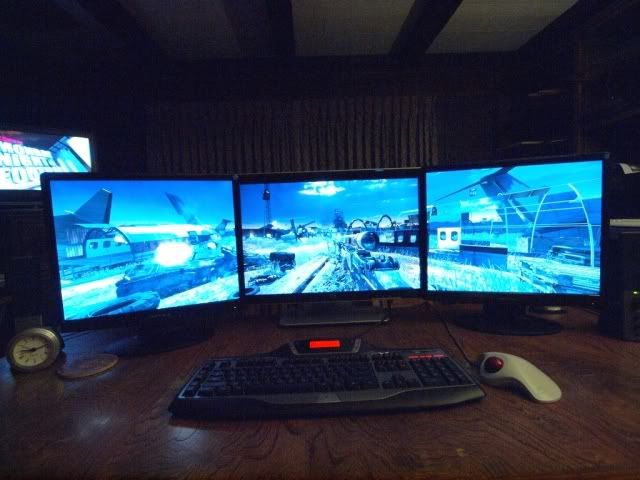
I have a 22" widescreen, flanked by two square 19" (pic taken with wide-angle lens, makes the 19" monitors look widescreen, but they're not).
The resolution is 3840x1024.
When I first hooked it up, I connected the displayport/VGA adapter to one of the 19" monitors - did not work. When hooked to the 22" monitor, it does.
Therefore, connect it to your monitor with the highest native resolution, and you're good to go! (thanks, whismerhill)
I bought the adapter from Directron. I live close to Houston, so walked in and picked it up. I was skeptical, but for less than $23, I gave it a shot.
Hope this helps.
This is the adapter:
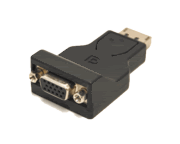
This is where I got it:
http://www.directron.com/apdpvga.html
Here's my setup:
TexasTango, what are your native resolutions on this setup??
-
aaaaa77777
- Posts: 15
- Joined: 09 Feb 2010, 20:14
Re: Displayport-to-VGA Adapter = Successful 3 Monitor Eyefinity
Can I connect my main 30" 2560x1600 by VGA cable?
what is max vga posible resolution? Cause when i try it just doesn,t work :(
thats why I have my side 20" 1600x1200 connected to this DP - VGA adapter 30" 2560x1600 to first DVI and second 20" to second DVI...
Under XP first 2 work fine but still cannot install Win7 (tried 5+ different versions).... Every single time the same thing
- instalation is all done, everything works fine
- 2 monitors are cloned in lowest posible resolution
- i can restart win7 etc and everything works before instaling drivers
- but when I install display drivers (from Ati, His, saphire, atached CD etc) every single time it goes the same, after instaling them Win7 freezes with the flag screen and I can,t boot it anymore... have to install it all over again :(
Will get 5850 in few days and will try with it but if it doesn,t work too i will just buy new PC with 2 PCIe slots and put there 2 normal cards in crossfire and maybe this will work...
Never spend this much time repairing something withoud any results and idea what to do :(
what is max vga posible resolution? Cause when i try it just doesn,t work :(
thats why I have my side 20" 1600x1200 connected to this DP - VGA adapter 30" 2560x1600 to first DVI and second 20" to second DVI...
Under XP first 2 work fine but still cannot install Win7 (tried 5+ different versions).... Every single time the same thing
- instalation is all done, everything works fine
- 2 monitors are cloned in lowest posible resolution
- i can restart win7 etc and everything works before instaling drivers
- but when I install display drivers (from Ati, His, saphire, atached CD etc) every single time it goes the same, after instaling them Win7 freezes with the flag screen and I can,t boot it anymore... have to install it all over again :(
Will get 5850 in few days and will try with it but if it doesn,t work too i will just buy new PC with 2 PCIe slots and put there 2 normal cards in crossfire and maybe this will work...
Never spend this much time repairing something withoud any results and idea what to do :(
Re: Displayport-to-VGA Adapter = Successful 3 Monitor Eyefinity
Can I connect my main 30" 2560x1600 by VGA cable?
what is max vga posible resolution? Cause when i try it just doesn,t work :(
nope ;(
2560x1600 is dual link resolution
so you need active DP @ DVI adapter from sapphire/dell/bizlink
-
TexasTango
- Posts: 30
- Joined: 24 Nov 2009, 19:08
Re: Displayport-to-VGA Adapter = Successful 3 Monitor Eyefinity
[quote]I have a 22" widescreen, flanked by two square 19".
The resolution is 3840x1024.
TexasTango, what are your native resolutions on this setup??
Center: 22" (1680x1050)
Sides: 19" (1280x1024)
-
suiken_2mieu
- Insiders
- Posts: 2351
- Joined: 20 Aug 2009, 04:20
- Location: Virginia
- Contact:
Re: Displayport-to-VGA Adapter = Successful 3 Monitor Eyefinity
Just to get a confirmation, people have been able to get 1080p... hell 1200p on these VGA adapters right?
System Core: | Intel Core i5-2500K + ASUS P8Z68-V + 16GB Corsair XMS3 DDR3 1333 MHz | Win7 x64 | MSI R7970 Lightning 3GB [1105/1400] |
Display: | 3 x Dell Ultrasharp 3007WFP-HC @ 7680x1600 | Dell u3011 |
Display: | 3 x Dell Ultrasharp 3007WFP-HC @ 7680x1600 | Dell u3011 |
-
aaaaa77777
- Posts: 15
- Joined: 09 Feb 2010, 20:14
Re: Displayport-to-VGA Adapter = Successful 3 Monitor Eyefinity
nope ;(
2560x1600 is dual link resolution
so you need active DP @ DVI adapter from sapphire/dell/bizlink
but does this DP adapter has to be connected to biggest screen?
can't I have one 20" 1600x1200 by DP-VGA adapter and 30" and second 20" conected to two DVI?
can you confirm it before i get this adapter? :)
Re: Displayport-to-VGA Adapter = Successful 3 Monitor Eyefinity
Just to get a confirmation, people have been able to get 1080p... hell 1200p on these VGA adapters right?
yes 1080 worked for me.
Re: Displayport-to-VGA Adapter = Successful 3 Monitor Eyefinity
can't I have one 20" 1600x1200 by DP-VGA adapter and 30" and second 20" conected to two DVI?
ofcourse you can connect the dp-vga adapter to the smallest screen.
Re: Displayport-to-VGA Adapter = Successful 3 Monitor Eyefinity
OK so the passive displayport to vga works for eyefinity? my resolutions arent even that high. 1280 x 1024 is my max on my 3 dell 19 inch lcd's so this adapter should be fine for me
Re: Displayport-to-VGA Adapter = Successful 3 Monitor Eyefinity
can't I have one 20" 1600x1200 by DP-VGA adapter and 30" and second 20" conected to two DVI?
can you confirm it before i get this adapter? :)
dont know
as far as I know vga can operate 1920x1200 max
and for eyefinity group I think you need plug main/center screen to DP port
but I am not sure
technically 30" to DVI + 20" to DVI + 20" to dp @ vga should work, but its preety new technology so never know how its works in gpu at all
Re: Displayport-to-VGA Adapter = Successful 3 Monitor Eyefinity
My other question would be , ive heard and read in a few places that crossfire and eyefinity doesnt work together? any truth to this?
-
suiken_2mieu
- Insiders
- Posts: 2351
- Joined: 20 Aug 2009, 04:20
- Location: Virginia
- Contact:
Re: Displayport-to-VGA Adapter = Successful 3 Monitor Eyefinity
[quote]Just to get a confirmation, people have been able to get 1080p... hell 1200p on these VGA adapters right?
yes 1080 worked for me.
thanks. as i said before im doing a 3x2 setup with all 1080p monitors. I'm kinda sad though i have to resort to VGA as it's not really crisp on these monitors without alot of tweaking. One day Ill put out the money to replace the 4 DP->VGA cables with DP->DVI cables I suppose.
System Core: | Intel Core i5-2500K + ASUS P8Z68-V + 16GB Corsair XMS3 DDR3 1333 MHz | Win7 x64 | MSI R7970 Lightning 3GB [1105/1400] |
Display: | 3 x Dell Ultrasharp 3007WFP-HC @ 7680x1600 | Dell u3011 |
Display: | 3 x Dell Ultrasharp 3007WFP-HC @ 7680x1600 | Dell u3011 |
-
aaaaa77777
- Posts: 15
- Joined: 09 Feb 2010, 20:14
Re: Displayport-to-VGA Adapter = Successful 3 Monitor Eyefinity
don't know if it makes any difference but now when I use 2 monitors I have 1 20" 1600x1200 conected by this DP-VGA adapter and it works fine so I quess it supports 1200p...
I think i doesn't make any difference if I have 2 or 3 monitors connected :)
I think i doesn't make any difference if I have 2 or 3 monitors connected :)
Re: Displayport-to-VGA Adapter = Successful 3 Monitor Eyefinity
passive dp @ vga works
but some ppl says dp@ vga must be connected to center screen
dont have time to checking it maybe tommorow
but some ppl says dp@ vga must be connected to center screen
dont have time to checking it maybe tommorow
Re: Displayport-to-VGA Adapter = Successful 3 Monitor Eyefinity
My adapter hasnt arrived as of yet but i will post my results as soon as it does,,
Testing system for eyefinity:
XFX 5770
Dell 19inch lcd's vga native ports Resolution recomondation by windows 7 1280 x 1024
Adapter DP - VGA ( yet to arrive )
Testing system for eyefinity:
XFX 5770
Dell 19inch lcd's vga native ports Resolution recomondation by windows 7 1280 x 1024
Adapter DP - VGA ( yet to arrive )
Re: Displayport-to-VGA Adapter = Successful 3 Monitor Eyefinity
passive dp @ vga works
but some ppl says dp@ vga must be connected to center screen
dont have time to checking it maybe tommorow
mine was on a side screen without any problems.
Who is online
Users browsing this forum: Google [Bot], Semrush [Bot] and 3 guests