Page 8 of 24
Re: My Monitor keeps going out ? ? ?
Posted: 09 Dec 2009, 18:52
by Mixelplix
Um, you might want to take that Asus vw266h off the list of working monitors. I have 3 set up. I have Dells displayport adapter . I get the monitor cutting out.
I set this up Monday morning. and it has done it 3 separate times. so about once a day. it starts as what looks to be just interference then it flickers on and off. with each time it flickers the staying off lasts longer. .If I unplug the adapter and immediately plug it back in. It stops and I'm good to go for a while. this appears to be completely random.
I have 2 5870's with of coarse one card just sitting there not in crossfire (insert choice word here).
It's not as frequent as some of you others have mentioned. but it bugs me enough to go searching for a solution.
So I end up here. bummed because there doesn't seam to really be a low cost solution. I think ATI's decision to market this eyefinty without fully testing it. Is BS. all because they wanted to top there rival Nvidia.
Well it seems there has been some collateral damage for that decision. and they either don't care or they don't care
My Computer Specifications and 13 year old daughter playing dirt 2
To anyone using the Dell/Bizlink Adapter that is giving them the flickering screen, I HIGHLY recommend trying the adapter in the link below from Amazon. Apparently, Accell and Bizlink are part of the same company and the two adapters look exactly alike other than the brand name. I got mine in yesterday after failing with the Dell one on all my monitors and it has worked perfectly. I did experience some small black lines in a test run of WoW at first. I reloaded the 9.11 catalyst drivers, uninstalled the HDMI sound output driver, unloaded all my mods and it cleared up. If you play WoW, your mods should work, but only initiate a few at a time to make sure it doesnt cause that black line appearance.
http://www.amazon.com/Accell-UltraAV-B087B-002B-DisplayPort-Dual-Link/dp/B002ISVI3U/ref=sr_1_3?ie=UTF8&s=electronics&qid=1260380814&sr=1-3
Re: My Monitor keeps going out ? ? ?
Posted: 09 Dec 2009, 19:19
by scooby
OK gang looks like you've tried almost everything with little to no results on this blinking issue.
Now this will be MY confirmation that the new bois WORKS.
I bit the bullet and flash my card today (thanks psygnosi) with the bios Mr. Dave Baumann offered earlier. I have been playing in Eyefinity as well as desktop mode for most of the day and have yet to see my DP monitor blink or go black and so far nothing. I use to see tiny little line on the screen which usually means that it will be blinking or going out soon but after the flash I did not see that happen. All the games I have been playing have been excellent and the setup is solid.
Thank you Mr. Dave Baumann for this fix.
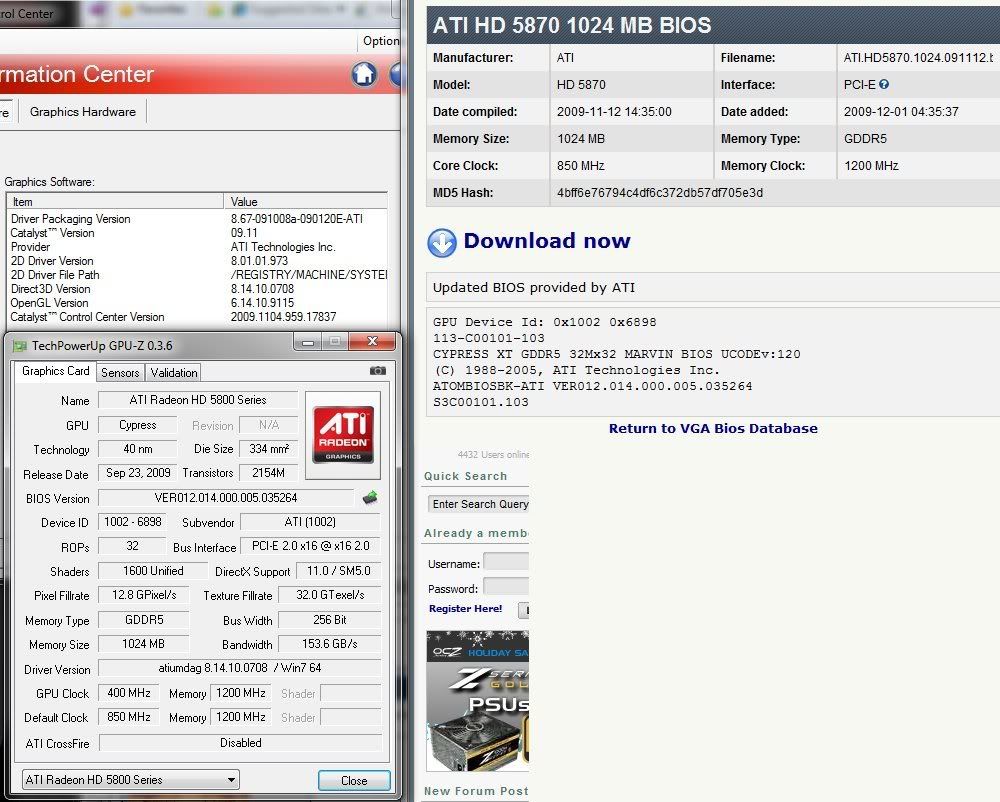
What I have noticed is earlier cards had the 113-C00101-101 Bios with a default voltage of 1.162V and the new 113-C00101-103 Bios has a default voltage of 1.174V. Apparently this extra voltage stabilized the card hence no more blinking. All of you who think it may be the DP adaptor or your monitors being the problem it is not. A few other chaps have confirmed this on other forums too.
This is the DP adaptor I'm using and it is connected to my mobo's USB.
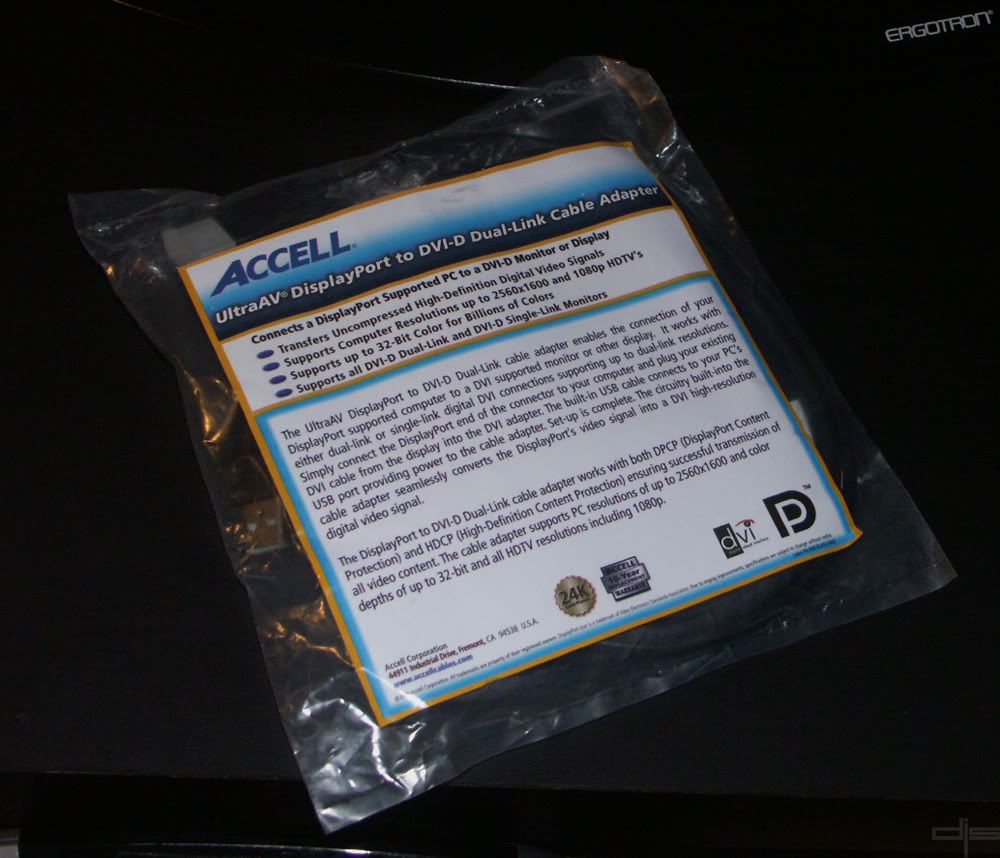
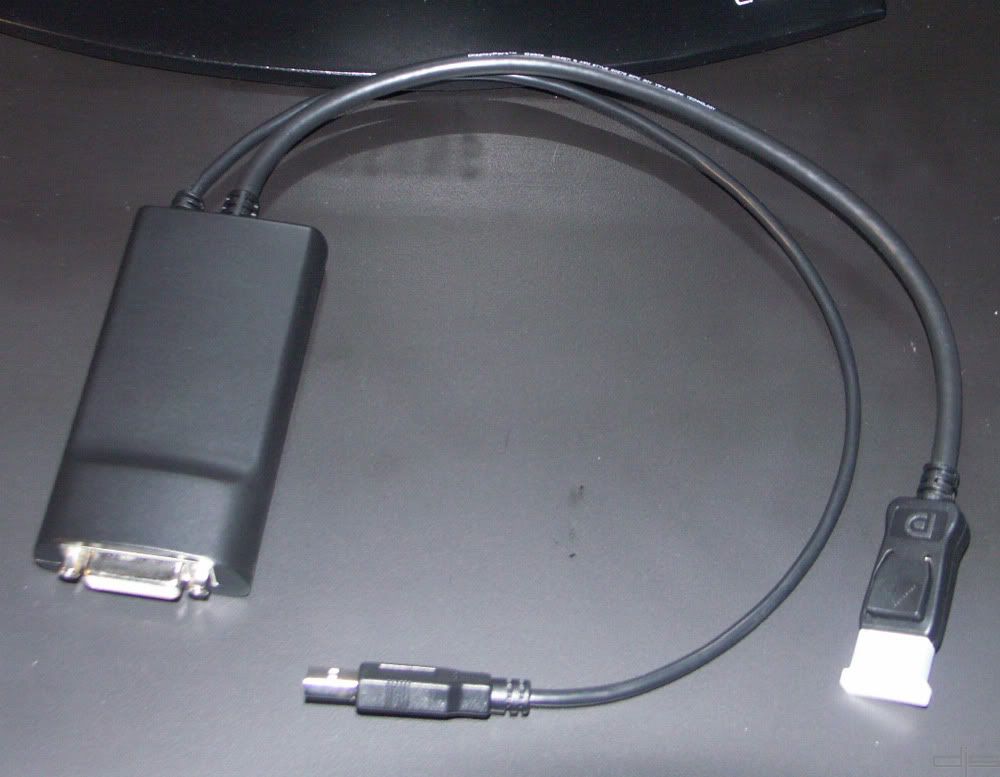
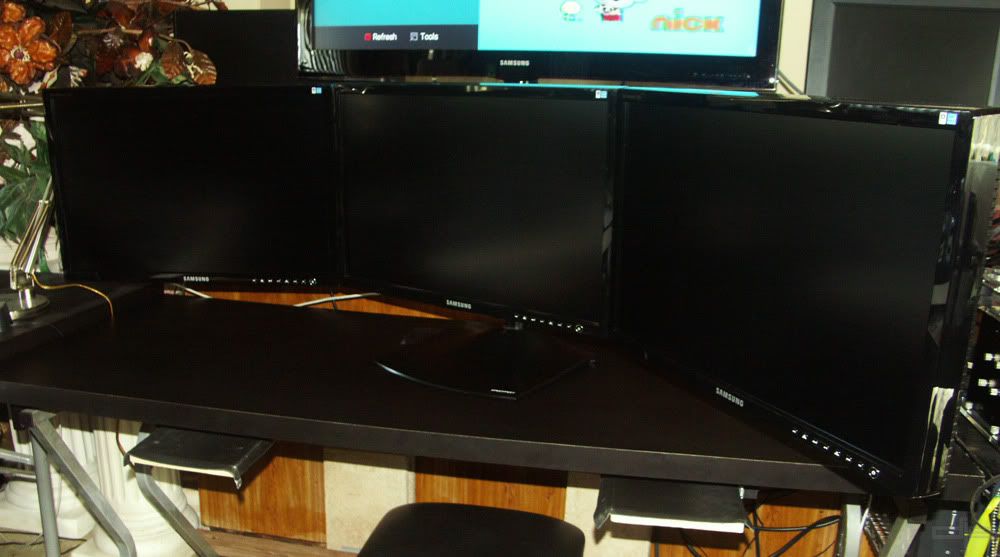
My three Samsung 245T setup.
Here is a shot of GPU-Z and CCC info after the flash.
I know most of you may be apprehensive to do a bios flash on your brand new card but if you want to run Eyefinity with out the blinking I highly recommend this BIOS. I must stress that you MUST know how to flash a GPU or it may go bad but you can still recover from it if you have a PCI video card handy.
Again I'm speaking for myself here but I can say that I'm a very happy camper now. I hope this helps guys. Good Luck. :wink:
Re: My Monitor keeps going out ? ? ?
Posted: 09 Dec 2009, 19:53
by McKie
here are some shots to better show . although we all know by now what it does. here they are non the less.
Video
Although I have flashed Bios on mobo before. I have also flashed a bios with not so good results. once. so yes I'm a little apprehensive about doing it to both of my cards. but may give it a go . Could you provide the link to the page you refer to.
Re: My Monitor keeps going out ? ? ?
Posted: 09 Dec 2009, 20:19
by Dave Baumann
Now this will be MY confirmation that the new bois WORKS.
Scooby, its good to hear that this BIOS has helped you out. Please note that this may not resolve all issues as there are multiple failure points when looking at dongles. The change in voltage is actually just incidental (and, even though the BIOS says that, it doesn't necessarily get applied on all boards); the main thing this BIOS does is boost the drive strength of the DP output. We're finding that the adapters are more sensitive than DP panels, so we've beefed up the output of the DP in this BIOS.
One thing - could you please point out which flash utility you used?
Re: My Monitor keeps going out ? ? ?
Posted: 09 Dec 2009, 20:35
by Sideeffect
Is there a 5850 version of the fixed BIOS? Also is the BIOS voltage unlocked so it can be used with MSI Afterburner?
Re: My Monitor keeps going out ? ? ?
Posted: 09 Dec 2009, 20:53
by scooby
Hi Dave, yes we used atiflash utility and the BIOS file and created a boot disk then installed in dos. I will get a full list of file we included on that disk from my friend and post it in a few hours or so.
It makes sense now that you have explained it a little. That little bust of juice did the trick at least for me. BTW this was done on a XFX 5870 card.
@McKie, here is the link...
http://techpowerup.com/vgabios/61848/ATI.HD5870.1024.091112.html
Re: My Monitor keeps going out ? ? ?
Posted: 09 Dec 2009, 21:02
by McKie
Re: My Monitor keeps going out ? ? ?
Posted: 09 Dec 2009, 21:03
by bowenac
[quote]Now this will be MY confirmation that the new bois WORKS.
Scooby, its good to hear that this BIOS has helped you out. Please note that this may not resolve all issues as there are multiple failure points when looking at dongles. The change in voltage is actually just incidental (and, even though the BIOS says that, it doesn't necessarily get applied on all boards); the main thing this BIOS does is boost the drive strength of the DP output. We're finding that the adapters are more sensitive than DP panels, so we've beefed up the output of the DP in this BIOS.
One thing - could you please point out which flash utility you used?
Dave have you guys ran into any of these problems with the adapters. I even noticed in this video from Sapphire
http://www.youtube.com/watch?v=aYorUpN4PQo they mention these active DP to DVI adapters to hook up a third monitor.
I have not had any problems with my setup. The only issue I am having right now is switching from Eyefinity to Extended but you already know about that from my other thread here
http://www.widescreengamingforum.com/forum/viewtopic.php?f=64&t=17672&p=175918#p175918
I am using
Dell Adapter
XFX 5870
Gateway FHD 2401
Re: My Monitor keeps going out ? ? ?
Posted: 09 Dec 2009, 21:25
by McKie
Why should I have to take the chance of according to Dave B. " of possibly voiding my warranty"
on 2 brand new cards at $400 each.
Re: My Monitor keeps going out ? ? ?
Posted: 09 Dec 2009, 21:27
by Mixelplix
I think I would have rather just bought a DP native monitor and cable then attempt a bios flash on a brand new card
Re: My Monitor keeps going out ? ? ?
Posted: 09 Dec 2009, 21:59
by McKie
I would of done the same had it not been told to me that the active Display port adapter would work. but it's a little late for that now.
already today it has done it 3 times.
The question that I have now. Is this the official fix "flashing the Bio's" and voiding your warranty. or will something be available later where a typical user can fix this problem without flashing. can this be done in a driver update or is this just a Bios operation?
and if a bio's flash is the only remedy. Will there be an official "how to" put out?
Re: My Monitor keeps going out ? ? ?
Posted: 09 Dec 2009, 22:48
by kondor999
And you can take my 32LG60 off the list too. It started flickering today for no apparent reason after working all yesterday.
OK - I give up. I did go ahead and order the Accell just because I could return it, but I'm pretty much resigned to getting a 24" native DP monitor. I've noticed in pics that ATI is using a Dell U2410, and so that's probably what I'll get. Now I just need to find another decent HP w2408h to go with the one I have.
Life's too short. I'm tired of dealing with this nonsense.
ATI: To release something like this and not bother testing it with typical hardware setups was irresponsible.
Re: My Monitor keeps going out ? ? ?
Posted: 09 Dec 2009, 22:52
by bowenac
Well hopefully ATI gets a move on and figures this crap out before they end up getting sued by someone. They advertise this Eyefinity all over but yet it has not worked for many people. These types of things should work out of the box we should not have to be your testers.
And don't say oh well you should be using a native DP monitor because I have already posted a video of a rep showing how to connect using a Active display port adapter. There is also images floating around of ATI adapters that should be released soon. Seems like they rushed this one out fellas.
Re: My Monitor keeps going out ? ? ?
Posted: 09 Dec 2009, 23:38
by McKie
ATI: To release something like this and not bother testing it with typical hardware setups was irresponsible.
It's unacceptable. whats more unacceptable is Bill Donnelly with sapphire Tech on You
tube saying it works. and everyone running to the store to buy non native monitors thinking it will work. The only one making out in this deal is Dell. There laughing all the way to the bank. I'm getting more and more angry as i think about this I'm not waiting I'm writing a long letter as i speak
Re: My Monitor keeps going out ? ? ?
Posted: 10 Dec 2009, 00:37
by trn
Agreed, I'm waiting on 3 Dell 2310Hs and have already RMA'd the dp>dvi adapter. Wish I would have seen this post before buying the active adapter pos and 2 more non DP monitors.
Life's too short. I'm tired of dealing with this nonsense.
ATI: To release something like this and not bother testing it with typical hardware setups was irresponsible.
Re: My Monitor keeps going out ? ? ?
Posted: 10 Dec 2009, 00:46
by Cygone
Why should I have to take the chance of according to Dave B. " of possibly voiding my warranty"
on 2 brand new cards at $400 each.
This i completly understand, ive got two 5850's both give me issues with the DP adaptor connected monitor.
what i dont understand if if my IT company sold items like this, everyone of them would get returned as a faulty item (and at the cost to my company and not to the cost of the end user). But ATI being as big as there are they get away with it.
May be ATI will learn from this, from now on they may actually test there kit before it gets sold. Rushing kit out because you want to beat NVidia to a DX11 part does you no favors in the the high end market where alot of your initial income will come from with faulty kit / bad drivers / bad bios / bad testing.
Asking 'end users' to flash there video cards bios and risk the chance of voiding warranty, to basically do you internal testing for you, to fix a problem that is ATI's fault is a complete joke. especially as ATI are advertising these cards as 'EYFINITY, 3 MONITOR CARDS'
Every1 of these cards if caused by a faulty / bad bios should have the chance to be returned for free (inc shipping) getting fixed with a bios update to not void warranties. Once costs start hitting companies like ATI then and may be then things will get tested on what most people consisder 'standard kit' or only advertised to work with DVI+DVI+NATIVE DP panels.
Unless ATI release a official fix for my 5850's then i have a good mind to send both cards back for RMA as not working as advertised, with DP and EF,
/sorry rant over
On the other hand, when i manage to get my SLS working its great, i just wish that the drivers and bios were as good as the initial concept. and that it all worked when i booted systems, rather than the hit and miss it is currently.
Re: My Monitor keeps going out ? ? ?
Posted: 10 Dec 2009, 01:07
by djspiel
Ok status update.
I own the Bizlink Active Display Port Adapter
I am on ATI's recent drivers
My motherboard has the latest BIOS
The exact model of my card can be found here
http://www.newegg.com/Product/Product.aspx?Item=N82E16814102856
My video card (does infact have an updated BIOS) I did this essentially when I was running some test and never bothered changing it back.
Here is the BIOS that I am running....it is off of the ASUS EAH model
http://www.nvnews.net/reviews/asus_eah5870/images/asus_eah5870_1.jpg
Now, I am experiencing both flashing/flickering every few hours/minutes in both EyeFinity Mode & Extended Desktop Mode. Swapping DVi Cable/Monitors didn't help. It is clearly a hardware issue not a software issue. As for the Accell UltraAV B087B-002B DisplayPort/ I don't see how that would help anyone if it is manufactured by the same company.....
If I buy that Active Display port and it's flaky or doesn't work I am still out of money. Sure I can return it but I am sure I will get taxed/shipping/return fee something always happens.
Re: My Monitor keeps going out ? ? ?
Posted: 10 Dec 2009, 01:14
by kondor999
ATI, overall, feels relatively amateurish. Whether it's banning users from its forums for even the smallest dissent, or releasing hardware without adequate testing and/or drivers - their performance is just really uneven. The hardware itself has great potential. But that's all it has in many cases.
ATI just did not sweat the details on this one. And, reading between the lines, it seems like Eyefinity was tacked on at some point and is being managed by a small, probably underfunded/overworked team. Meanwhile, Nvidia comes out with great new drivers (remember I still have a GTX280/Core2 system as a HTPC) about 3 times as often as ATI. I can't point to a *single* game that runs significantly worse on Nvidia hardware, whereas there are plenty of games with serious problems on ATI hardware: Batman AA, Need for Speed Shift, and Dawn of War II among them. And those aren't small titles. Those are big-name, popular games. Even CODMW2 runs noticeably better on my GTX280 than on my dual 5870's.
Getting back to Eyefinity, it seems like they tested it with one or two different monitors and called it a day. And I'd be very surprised if they ever fix this problem. They just don't have the resources or the interest. Easier just to come out with another whiz-bang piece of hardware that the reviewers will all go crazy for (in order to get review samples, no doubt) - and hope they can keep capturing first-adopters.
I'll keep playing with my 5870's, and I'll do Eyefinity. But, when Fermi arrives, I suspect that I and a lot of other people will jump ship. Having become accustomed to the level of software/hardware compatibility provided by Nvidia, it's hard to adjust to the prospect of being an unpaid beta tester for ATI's QA department.
Re: My Monitor keeps going out ? ? ?
Posted: 10 Dec 2009, 01:15
by Mixelplix
I dont know how it was different for me, but the Accell did work for me where the Bizlink didn't. Since noone seems to know/agree on what exactly the problem is, I say give the Accell a try as you can always return it if it doesnt work. Mine has been working two days so far without a problem. The Bizlink flickered after every 10 mintues or so and more the longer the machine was on.
Re: My Monitor keeps going out ? ? ?
Posted: 10 Dec 2009, 01:17
by McKie
I suggest as I have already done is to create a support ticket to ATI partners such as XFX, Saphhire, and others. to maybe put some pressure on ATI.
Who in there right mind would put there sticker on a product that does not work as advertised.
It's not just ATI either . Here is this Guy from Sapphire telling everyone the Adapter works and everyone is rushing out to the store. the only reason I didn't get the dell monitor is 1. there expensive and 2. I would of needed to get three if i wanted them to match.
I wouldn't be so angry if this was just over a couple of $200 cards . but crap! people are spending a lot of money getting monitors, adapters. and most of us have that stuff shipped to our home . it's not like it's an easy task shipping all that stuff back and getting refunded.