Page 7 of 15
Re: Ace Combat 7 no Ultrawide (Fix !!)
Posted: 19 Feb 2019, 01:06
by lanis
markuscicero5 wrote:Alright, I'm updating my script to get the screen size at the start and doing the math automatically. So you don't have to enter the resolution by hand or do any math.
I also tried my hand at 3dmigoto. This thing is pretty sweet, gotta say. But I hunted and pecked through all the shaders on screen, and I couldn't make the dark mini-map background disappear and reappear. I could make the entire screen black some times, so the possibilities I see are a) that it's part of one of the "all black screen" shaders, or that it's part of the HUD shader already and we just haven't figured out which value it is.
Thank you for your work susahamat! If you notice during the menu screens there looks like a shader layer that is shifted to the left. could this be the same layer as the background for the radar and radio portraits?
Re: Ace Combat 7 no Ultrawide (Fix !!)
Posted: 20 Feb 2019, 01:16
by markuscicero5
lanis wrote:Thank you for your work susahamat!
o_o
lanis wrote:If you notice during the menu screens there looks like a shader layer that is shifted to the left. could this be the same layer as the background for the radar and radio portraits?
If you're still asking me, and you mean the green filter applied to the menus, then yes I did notice it. You can definitely disable it using 3dmigoto's hunting feature, but I haven't figured out how to make it permanent yet.
It is also not the same shader as the map background, haven't figured that out yet either.
Re: Ace Combat 7 no Ultrawide (Fix !!)
Posted: 20 Feb 2019, 01:39
by Winkelmann
markuscicero5 wrote:It is also not the same shader as the map background, haven't figured that out yet either.
I have a theory how the background works that I am currently investigating, maybe you can figure something out: I think that the background is a pattern that actually extends over the entire size of the screen, I think even outside the original 16:9 area regardless of fixes BUT it is controlled by some shader that controls its transparency. I think the solution is finding that shader and shifting it.
Regarding the subtitles: I know there is a shader that affects certain text, including subtitles, on the screen, however, it was just dismissed as simply controlling the opacity of the little bloom effect around text, it also affects the HUD text as well regardless of whether it was moved.
I haven't been able to make it do anything except change the bloom around the text.
Pro Tip: Try both the "zero" and "pink" hunting modes, those can uncover some more shaders that affect these two HUD elements.
Re: Ace Combat 7 no Ultrawide (Fix !!)
Posted: 21 Feb 2019, 00:18
by markuscicero5
Winkelmann wrote:markuscicero5 wrote:It is also not the same shader as the map background, haven't figured that out yet either.
Pro Tip: Try both the "zero" and "pink" hunting modes, those can uncover some more shaders that affect these two HUD elements.
Hot pink did the trick. See attached. hellothere.png
EDIT: Oh cool, 3dmigoto saves a screenshot with the shader GUID when you hit NUM3 or NUM6. Added that too. e6f41464a78a35c4-ps.jpg
EDIT2: OH NO this shader is huge...
EDIT3: There's actually more than 1 shader that makes up those sections. And the map background position is somehow dependent on whether or not a speaking character is on screen. Uploaded another screenshot. bb2189abc2f519a1-ps.jpg
I think the "bb21..." shader just handles the pattern of the background - like this uniform diamond pattern. And the "e6f4..." shader handles it's position.
EDIT4: AAAAAA so close! I was able to move the map background to its correct position... when no one is talking. fixed_bg1.png
EDIT 5: Now its fixed when people are talking. fixed_bg2.png
EDIT 6:
Link to shaders below. Add them to the ACE COMBAT 7\ShaderFixes directory. They're set up for 3440 x 1440 by default, so you will need to change the "0.1719" value as needed for your monitor size.https://github.com/mpm11011/ac7-ultrawide/tree/master/ShaderFixes
Re: Ace Combat 7 no Ultrawide (Fix !!)
Posted: 21 Feb 2019, 03:37
by lukanyan
I've followed the fix that Winkelmman told us in the page 5, but now I have stereo disabled and some code / words on the top and bottom.
How to disable it? Thanks!
Re: Ace Combat 7 no Ultrawide (Fix !!)
Posted: 21 Feb 2019, 06:54
by susahamat
@lukanyan = make sure change hunting=1 to 0
Re: Ace Combat 7 no Ultrawide (Fix !!)
Posted: 21 Feb 2019, 07:17
by Winkelmann
Niiice! Now only the subtitles are missing I believe.
I have been saving playing the story for when the fixes are complete, does anyone know if there are parts in the story with other, mission specific elements that are still buggy?
Edit: I have some more info that might help regarding text:
- Relevant Shaders and Buffers:
Vertex Shader: da86a094e768f000 (just put o0.x += SOMETHING in the line before "return;")
^ Moves entire hud including text, including main menu, affected by a ton of issues with clipping and general glitchiness, it's possible to move the HUD entirely and compensate within the individual HUD shaders but they will still experience clipping (see screenshot, test values were 0.1720 in da86. . . and 0.085 in the rest (including your HUD shaders)).
I don't think this is a good idea, even if we manage to get it to work as we essentially have to find every single HUD element that is within that vertex shader and move it back.
I know there is a single pixel shader that affects all the text in the hud including the subtitles, I'll give that another shot later today but I believe I already tried everything with it (only got it to change color), I don't have the hash saved but you can find it pretty easily with pink mode scrolling through pixel shaders (the control hint in first mission is very useful for that because they are probably part of the same shader).
I also found the specific buffers for exactly the text that has to be moved, but I don't know if/how buffers can be moved with 3dmigoto, the lack of documentation can be infuriating sometimes.
Vertex Buffer: e08203e6
Index Buffer: 3e4f8614
Edit 2: I also randomly discovered that you can disable the vignette by setting "r1.y = 0" (from 1) in vertex shader 2dd6baecb6836aeb.
Re: Ace Combat 7 no Ultrawide (Fix !!)
Posted: 21 Feb 2019, 08:26
by TheRazgriz
markuscicero5 wrote:Winkelmann wrote:markuscicero5 wrote:It is also not the same shader as the map background, haven't figured that out yet either.
EDIT 6:
Link to shaders below. Add them to the ACE COMBAT 7\ShaderFixes directory. They're set up for 3440 x 1440 by default, so you will need to change the "0.1719" value as needed for your monitor size.https://github.com/mpm11011/ac7-ultrawide/tree/master/ShaderFixes
Worked like a charm, thanks man!
Re: Ace Combat 7 no Ultrawide (Fix !!)
Posted: 21 Feb 2019, 09:23
by RGSPro
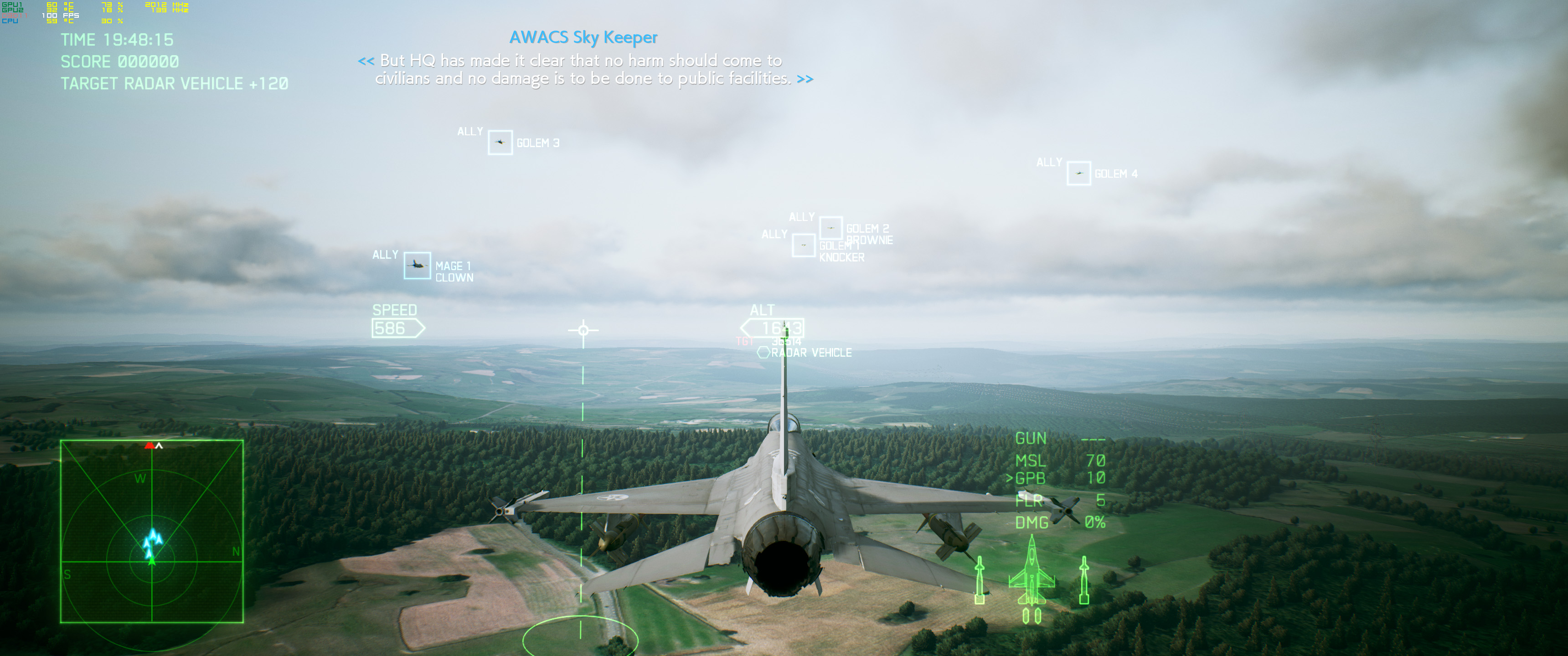
I wanted to say thanks for the excellent work on this fix. It's a shame that they weren't willing to make this support native to the game. So far the only issue I am having is my hud is shifted to the left, which makes using the machine gun pretty tough. See how the ALT indicator is right in the center of the screen and the bomb targeting reticle is off to the left? How would I go about fixing this. I am on 3440x1440 and using the default 9958a636cbef5557-ps_replace, e6f41464a78a35c4-ps_replace, and f355a6eae7adfe8e-ps_replace.
Thanks!
Edit:
Not sure why, but this shader fix solved the issue for me.
https://gist.githubusercontent.com/mart ... eplace.txtNot sure if it's older or not because the other 3 I pulled from here:
https://github.com/mpm11011/ac7-ultrawi ... haderFixes
- ac7_edited.jpg (871.12 KiB) Viewed 5535 times
Re: Ace Combat 7 no Ultrawide (Fix !!)
Posted: 21 Feb 2019, 11:02
by Winkelmann
Both of these "should" basically be the same and they work for me. The only difference in the shader for the main HUD positioning from the pack with the map background fix is that the adjusted value is in a different spot (I don't think it makes a difference) and that it is due to the proper calculation one lower than what I quickly came up with by matching the pixels in the old version (the one that you say works for you).
I am using the improved version from
markuscicero5 with the map background fix without any issues, from your screenshot it looks like the HUD position is unchanged and the map background as well, this tells me that none of the shader fixes were applied. I think it may have just been a bug that caused the fixes to not apply, try reinstalling Markus's shaders and see if it works now.
Edit: Made text clearer
Re: Ace Combat 7 no Ultrawide (Fix !!)
Posted: 21 Feb 2019, 16:10
by markuscicero5
Yeah sorry I moved the position of the fix on you. My reasoning was that all three of those shaders start with taking cb1[127].y and multiplying by 1.777777. It's no coincidence that that number is equal to 16 divided by 9. So I figured that was where they were handling the size and position of the shader.
Re: Ace Combat 7 no Ultrawide (Fix !!)
Posted: 21 Feb 2019, 18:57
by Liberator
from what i gather on the last page i need to change the values
"r0.y = 1.77777779 * cb1[127].y;"
for the 3 "ps_replace.txt" files
so what are values i need for 2560x1080 ...?
Re: Ace Combat 7 no Ultrawide (Fix !!)
Posted: 21 Feb 2019, 19:50
by Winkelmann
Liberator wrote:from what i gather on the last page i need to change the values
"r0.y = 1.77777779 * cb1[127].y;"
for the 3 "ps_replace.txt" files
so what are values i need for 2560x1080 ...?
No, the method we use adds a new line which we modify. If you use the fixes from here:
https://github.com/mpm11011/ac7-ultrawi ... haderFixesall you need to do is search for the one occurrence of "0.1719" in every of the three shaders and replace it with the corresponding value for your resolution, by default that is for 3440x1440.
Markus explained how to calculate the value for your resolution here:
http://www.wsgf.org/forums/viewtopic.ph ... 50#p174650
Re: Ace Combat 7 no Ultrawide (Fix !!)
Posted: 21 Feb 2019, 20:02
by cuongpn
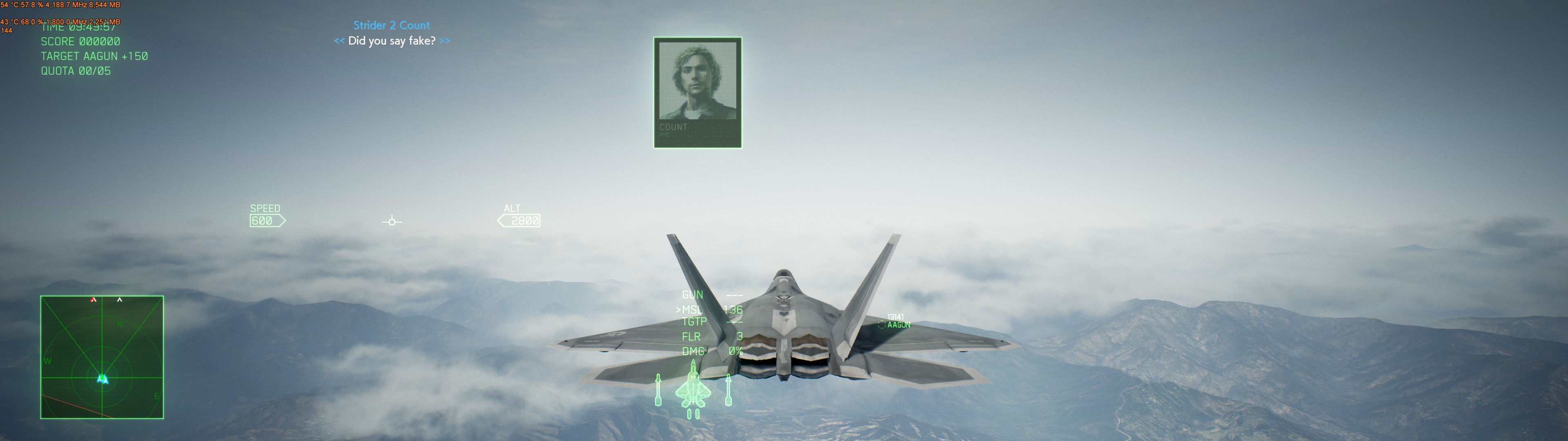
So I applied 3 shaderfix files, adjust the 0.17919 to my screen ratio (which is 0.5). It seems worked great, but why my crosshair is off center like this? how can I fix this?
- 20190221125856_1.jpg (620.33 KiB) Viewed 5539 times
Re: Ace Combat 7 no Ultrawide (Fix !!)
Posted: 21 Feb 2019, 20:39
by Winkelmann
cuongpn wrote:So I applied 3 shaderfix files, adjust the 0.17919 to my screen ratio (which is 0.5). It seems worked great, but why my crosshair is off center like this? how can I fix this?
20190221125856_1.jpg
The crosshair and hud is exactly what these shaders are supposed to fix and do so correctly for me, from what I am seeing it looks like none of the shaders are being applied.
Please send screenshots of your game and "shaderfixes" directory, I think there might've been some error in the install process.
Re: Ace Combat 7 no Ultrawide (Fix !!)
Posted: 21 Feb 2019, 20:47
by cuongpn
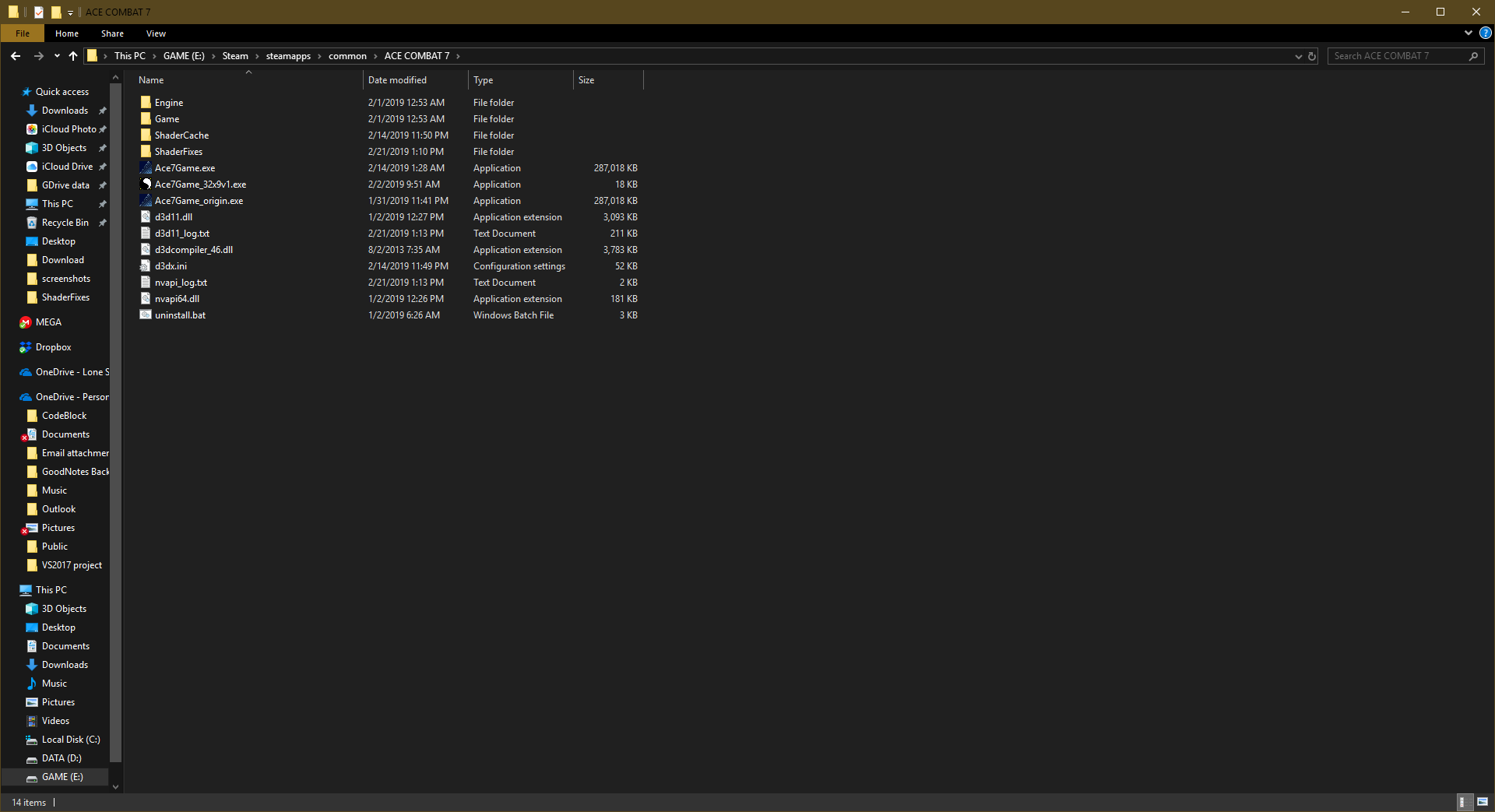
- 2019-02-21.png (77.78 KiB) Viewed 6240 times
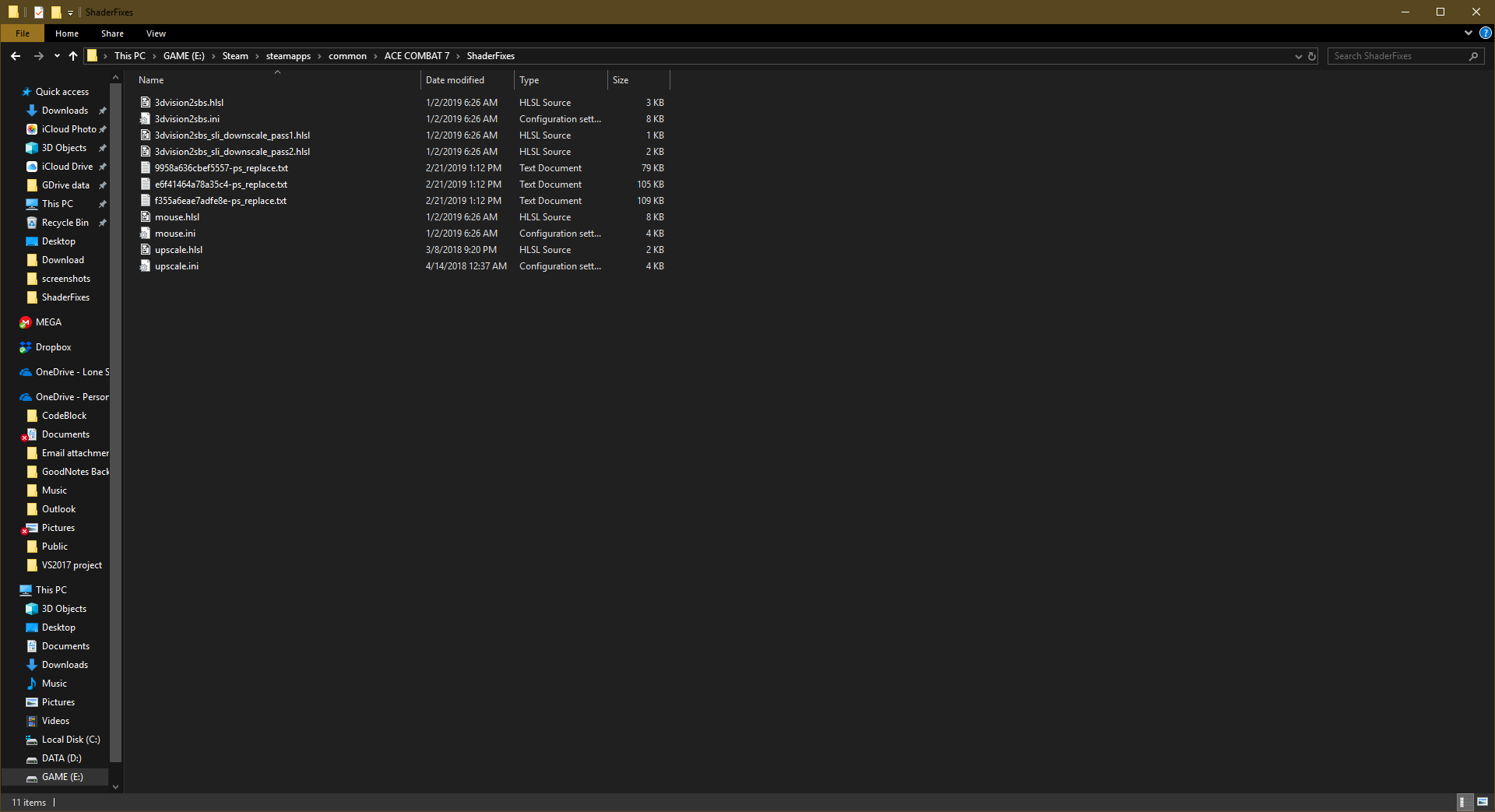
- 2019-02-21 (2).png (72.12 KiB) Viewed 6130 times
Re: Ace Combat 7 no Ultrawide (Fix !!)
Posted: 21 Feb 2019, 22:37
by Liberator
Ok Got it, Thanks
doh sometimes i get this
weird circle on the leftside of the screen/map
Re: Ace Combat 7 no Ultrawide (Fix !!)
Posted: 21 Feb 2019, 22:38
by lukanyan
susahamat wrote:@lukanyan = make sure change hunting=1 to 0
Thanks! I thought I changed it already but somehow was still on 1.
Changed it back again on 0 and now it works perfectly

Thanks to all for the effort

Re: Ace Combat 7 no Ultrawide (Fix !!)
Posted: 21 Feb 2019, 22:50
by markuscicero5
Liberator wrote:Ok Got it, Thanks
doh sometimes i get this
weird circle on the leftside of the screen/map
Woah.
I think those circles are part of the minimap, they grow bigger or smaller depending on how far you are from the currently selected target. I haven't had that issue happen to me though.
Can you post one of the shaders' full text, and tell us what your resolution is?
Re: Ace Combat 7 no Ultrawide (Fix !!)
Posted: 21 Feb 2019, 23:02
by Winkelmann
### EDIT: NEW VERSION WITH WORKAROUND FOR BUGGED CUTSCENE TEXT HERE: http://www.wsgf.org/forums/viewtopic.ph ... 50#p174750 ###Hey everyone, I managed to find a fix for the HUD text as well!
There are a couple bugs related to the fact that certain elements of real time cutscenes and the black box fading in and out certain parts of the UI are part of the same buffer. I am really interested to hear how this behaves, especially on wider screens.
Installation:
Open the d3dx.ini and uncomment "include_recursive = Mods".
Create a folder called "Mods" next to the game executable
Put this file inside:
https://gist.githubusercontent.com/mart ... extfix.iniFinally put this in the ShaderFixes folder:
https://gist.githubusercontent.com/mart ... eplace.txtThis is approximately the correct value for 3440x1440, to adjust it replace "0.2500"
Huge thanks to
masterotaku from the Helixmod / 3Dmigoto Discord for helping me figure out how this all works!
We're getting pretty close to full ultrawide support in AC7.