
Hello WSGF.
New eyefinity set up.No blinking issues for a week+ .
Cat 10.6 and 10.7
Accell B087B-003J
5970
ATI Needs to fix the flickering on DP!
Re: ATI Needs to fix the flickering on DP!
Hello WSGF.
New eyefinity set up.No blinking issues for a week+ .
Cat 10.6 and 10.7
Accell B087B-003J
5970
Strange, i still have problems with exact setup..
HD5970 spec + bios please! Monitor specs please!
Re: ATI Needs to fix the flickering on DP!
[quote]Hello WSGF.
New eyefinity set up.No blinking issues for a week+ .
Cat 10.6 and 10.7
Accell B087B-003J
5970
Strange, i still have problems with exact setup..
HD5970 spec + bios please! Monitor specs please!
Hope this helps.Bios available at techpowerup.
win 7 64bit
Powercolor LCS HD 5970 Master
GPU Device Id: 0x1002 0x689C
113-C00001-103
HEMLOCK SLAVE XT BIOS UCODEv:120
(C) 1988-2005, ATI Technologies Inc.
ATOMBIOSBK-ATI VER012.013.000.002.034996
HD5970S.102
3 Dell st2210.All dvi-d with Accell B087B-003J REV F/W2.0(mini)
Re: ATI Needs to fix the flickering on DP!
I was getting flickering on my DP 3008wfp, i had to get a custom bios and overclock my video card to a custom overclock on the 2D mode.
was a pain in the ***
ATI needs to fix this.
was a pain in the ***
ATI needs to fix this.
Re: ATI Needs to fix the flickering on DP!
I was getting flickering on my DP 3008wfp, i had to get a custom bios and overclock my video card to a custom overclock on the 2D mode.
was a pain in the ***
ATI needs to fix this.
A 2D overclock to fix it, really?? Wil try..
-
suiken_2mieu

- Insiders

- Posts: 2351
- Joined: 20 Aug 2009, 04:20
- Location: Virginia
- Contact:
Re: ATI Needs to fix the flickering on DP!
Hey I'm going to go get 3 30"rs. I have one atm, but I need a Dual link dvi adapter for it. What's the best one to get to not have to deal with blinky blinkiness?
System Core: | Intel Core i5-2500K + ASUS P8Z68-V + 16GB Corsair XMS3 DDR3 1333 MHz | Win7 x64 | MSI R7970 Lightning 3GB [1105/1400] |
Display: | 3 x Dell Ultrasharp 3007WFP-HC @ 7680x1600 | Dell u3011 |
Display: | 3 x Dell Ultrasharp 3007WFP-HC @ 7680x1600 | Dell u3011 |
Re: ATI Needs to fix the flickering on DP!
@ Hun,
You're 100% Correct, the issues appear to be driver related and (for me) anything other than 10.3 drivers---> I lose my 3rd display. I have not even bothered with 10.7 because the rest have not worked. ATI is luck they dont have a class action lawsuit against them yet.
You're 100% Correct, the issues appear to be driver related and (for me) anything other than 10.3 drivers---> I lose my 3rd display. I have not even bothered with 10.7 because the rest have not worked. ATI is luck they dont have a class action lawsuit against them yet.
I have the same problem.
Cat 10.4, 10.5 and 10.6 gives the blinking and disappearing disply problem.
Cat 10.3 has NO such problems.
I don't believe Accell or the active DP adapter manufacturers are at fault.
If it worked up 10.3, then isn't it a driver issue? (although ATI would defend this).
Endless finger pointing. :nudgenudge
Re: ATI Needs to fix the flickering on DP!
never had a blinking problem with my setup.
i have a hp zr24w dp monitor and 2 dells on dvi, 5850 gfx card 10.6.
i have a hp zr24w dp monitor and 2 dells on dvi, 5850 gfx card 10.6.
Re: ATI Needs to fix the flickering on DP!
Hope this helps.Bios available at techpowerup.
win 7 64bit
Powercolor LCS HD 5970 Master
GPU Device Id: 0x1002 0x689C
113-C00001-103
HEMLOCK SLAVE XT BIOS UCODEv:120
(C) 1988-2005, ATI Technologies Inc.
ATOMBIOSBK-ATI VER012.013.000.002.034996
HD5970S.102
3 Dell st2210.All dvi-d with Accell B087B-003J REV F/W2.0(mini)
Nope, exactly the same BIOS.. Only difference: my adapter has F/W:034
And could you please make a picture of the label with the REV F/W2.0 on it? That would really help! (going to contact Accel, again)
Re: ATI Needs to fix the flickering on DP!
[quote]
Hope this helps.Bios available at techpowerup.
win 7 64bit
Powercolor LCS HD 5970 Master
GPU Device Id: 0x1002 0x689C
113-C00001-103
HEMLOCK SLAVE XT BIOS UCODEv:120
(C) 1988-2005, ATI Technologies Inc.
ATOMBIOSBK-ATI VER012.013.000.002.034996
HD5970S.102
3 Dell st2210.All dvi-d with Accell B087B-003J REV F/W2.0(mini)
Nope, exactly the same BIOS.. Only difference: my adapter has F/W:034
And could you please make a picture of the label with the REV F/W2.0 on it? That would really help! (going to contact Accel, again)
Bios is clocked at 750/1050.Cant be the same one,unless i posted wrong bios.Power color is sending a updated one shortly to me.The one currently installed has a date of 1/15/10, if i recall correctly.
No blinking at all,so far.Play a fair amout of games and surfing.One time upon boot,had 2 screens at 5670x1080 and one at 1920x1080.
Reboot fixed it.
Question:
Upon windows boot.Only two screens show.Once in windows all 3 display.Normal?
Picture:
Removed
Re: ATI Needs to fix the flickering on DP!
Just got my new card. Same crap. Middle monitor goes to sleep at random and won't turn back on.
EDIT: Sorry for the raging. It's just really frusterating. I deleted my rage comments lol.
Anyways, I tried something I haven't yet. I thought maybe the DP monitor wasn't getting enough juice, so I tried this: Plug in the DVI monitors AWAY from the DP port. I'm thinking that the dvi connections are starving the DP connection of power somehow. So closest to the mb it goes: DP monitor, blank, dvi, blank, dvi, blank. So far so good. I even restarted the computer(which usually makes the DP monitor not turn on again) and it seems to work. I also let the monitors go to sleep and it powered on when I moved the mouse. But all in all who knows at this point. It worked for a while with my previous card and then started doing it again, so we'll see.
EDIT: Sorry for the raging. It's just really frusterating. I deleted my rage comments lol.
Anyways, I tried something I haven't yet. I thought maybe the DP monitor wasn't getting enough juice, so I tried this: Plug in the DVI monitors AWAY from the DP port. I'm thinking that the dvi connections are starving the DP connection of power somehow. So closest to the mb it goes: DP monitor, blank, dvi, blank, dvi, blank. So far so good. I even restarted the computer(which usually makes the DP monitor not turn on again) and it seems to work. I also let the monitors go to sleep and it powered on when I moved the mouse. But all in all who knows at this point. It worked for a while with my previous card and then started doing it again, so we'll see.
Re: ATI Needs to fix the flickering on DP!
Just got my new card. Same crap. Middle monitor goes to sleep at random and won't turn back on.
EDIT: Sorry for the raging. It's just really frusterating. I deleted my rage comments lol.
Anyways, I tried something I haven't yet. I thought maybe the DP monitor wasn't getting enough juice, so I tried this: Plug in the DVI monitors AWAY from the DP port. I'm thinking that the dvi connections are starving the DP connection of power somehow. So closest to the mb it goes: DP monitor, blank, dvi, blank, dvi, blank. So far so good. I even restarted the computer(which usually makes the DP monitor not turn on again) and it seems to work. I also let the monitors go to sleep and it powered on when I moved the mouse. But all in all who knows at this point. It worked for a while with my previous card and then started doing it again, so we'll see.
What does that mean "Plug in the DVI monitors AWAY from the DP port"? Anyway I hope it holds up for you.
Re: ATI Needs to fix the flickering on DP!
[quote]Just got my new card. Same crap. Middle monitor goes to sleep at random and won't turn back on.
EDIT: Sorry for the raging. It's just really frusterating. I deleted my rage comments lol.
Anyways, I tried something I haven't yet. I thought maybe the DP monitor wasn't getting enough juice, so I tried this: Plug in the DVI monitors AWAY from the DP port. I'm thinking that the dvi connections are starving the DP connection of power somehow. So closest to the mb it goes: DP monitor, blank, dvi, blank, dvi, blank. So far so good. I even restarted the computer(which usually makes the DP monitor not turn on again) and it seems to work. I also let the monitors go to sleep and it powered on when I moved the mouse. But all in all who knows at this point. It worked for a while with my previous card and then started doing it again, so we'll see.
What does that mean "Plug in the DVI monitors AWAY from the DP port"? Anyway I hope it holds up for you.
Sorry, I'm really bad at explaining things. :P
Here's a pic so I don't confuse anyone:
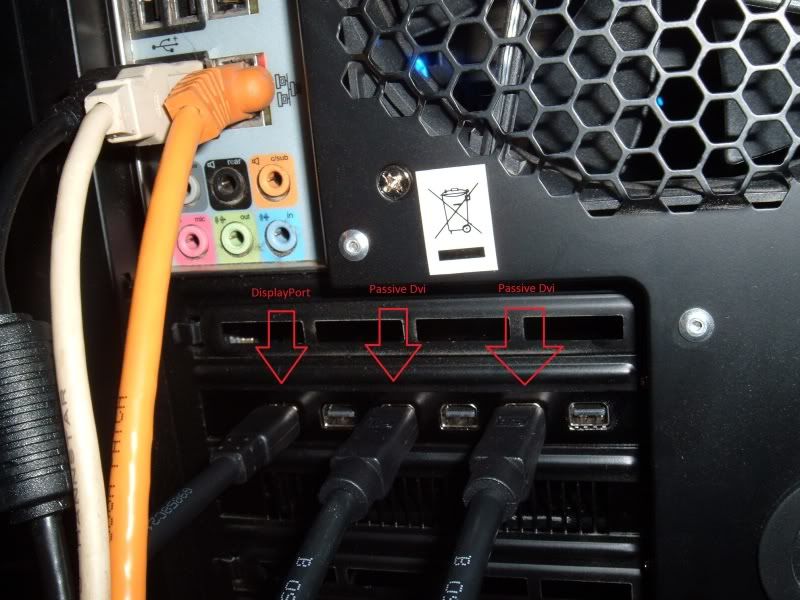
So far it's been working all day plugged in like that with the 10.7a hotfix drivers. Haven't tried any other drivers with it plugged in like this though.
-
thatdude90210
- Posts: 81
- Joined: 27 Sep 2009, 06:43
Re: ATI Needs to fix the flickering on DP!
@ Hun,
You're 100% Correct, the issues appear to be driver related and (for me) anything other than 10.3 drivers---> I lose my 3rd display. I have not even bothered with 10.7 because the rest have not worked. ATI is luck they dont have a class action lawsuit against them yet.
I'm seeing this with Cat 10.7 also. My Bizlink DP to DVI monitor goes blank after short awhile (within a minute or two). Haven't used Eyefinity lately due to not much gaming except some Mass Effect 2 so I'm don't know when it started.
But I just did custom uninstall and uninstalled Catalyst control center only, then just installed CCC from 10.3. So far, running 10.7 drivers with 10.3 CCC, my DP to DVI monitor seems to be fine. No blanking yet so far tonight.
Re: ATI Needs to fix the flickering on DP!
[quote]@ Hun,
You're 100% Correct, the issues appear to be driver related and (for me) anything other than 10.3 drivers---> I lose my 3rd display. I have not even bothered with 10.7 because the rest have not worked. ATI is luck they dont have a class action lawsuit against them yet.
I'm seeing this with Cat 10.7 also. My Bizlink DP to DVI monitor goes blank after short awhile (within a minute or two). Haven't used Eyefinity lately due to not much gaming except some Mass Effect 2 so I'm don't know when it started.
But I just did custom uninstall and uninstalled Catalyst control center only, then just installed CCC from 10.3. So far, running 10.7 drivers with 10.3 CCC, my DP to DVI monitor seems to be fine. No blanking yet so far tonight.
What is your firmware version on the Bizlink adapter? F/W:034 maybe?
Re: ATI Needs to fix the flickering on DP!
First off: thanks for your feedback! Just contacted ACCELL and Kabeltje.com with this info.
I also have one MSI stock @725/1000 and a Sapphire OC @730/1010 with exact the same BIOS so it is possible.. Why are you getting a new BIOS version??
Quite normal i have that all the time also. Not specifically the DP or DVI only tho, sometimes it changes which two are posting..
Bios is clocked at 750/1050.Cant be the same one,unless i posted wrong bios.Power color is sending a updated one shortly to me.The one currently installed has a date of 1/15/10, if i recall correctly.
I also have one MSI stock @725/1000 and a Sapphire OC @730/1010 with exact the same BIOS so it is possible.. Why are you getting a new BIOS version??
Question:
Upon windows boot.Only two screens show.Once in windows all 3 display.Normal?
Quite normal i have that all the time also. Not specifically the DP or DVI only tho, sometimes it changes which two are posting..
-
thatdude90210
- Posts: 81
- Joined: 27 Sep 2009, 06:43
Re: ATI Needs to fix the flickering on DP!
What is your firmware version on the Bizlink adapter? F/W:034 maybe?
I can't tell, checked the back of the unit, and a small sticker on the wire, but I'm not seeing firmware number. It's a fairly early one, I got it last Oct from dell before they ran into some shortages.
Re: ATI Needs to fix the flickering on DP!
If it's a early one, it will definitely not have firmware 2.0!
It's crazy to think this is a Video-card BIOS thingy.. Why would it work with earlier drivers then??
Could be something driverlike tho.. 10.3 works, anything above->not!
But now we have someone on the forum with a working ACCELL (Bizlink,Dell,Sapphire) with a newer Firmware!!

And if you look in the AMD Validated list it says: 2.0! Go figure.. :doh
It's crazy to think this is a Video-card BIOS thingy.. Why would it work with earlier drivers then??
Could be something driverlike tho.. 10.3 works, anything above->not!
But now we have someone on the forum with a working ACCELL (Bizlink,Dell,Sapphire) with a newer Firmware!!
And if you look in the AMD Validated list it says: 2.0! Go figure.. :doh
Re: ATI Needs to fix the flickering on DP!
Send to ACCEL an kabeltje.com:
Return mail from ACCEL support, dig this:
The point is that this adapter should work with the 5xxx series from ATI regardless of the driver version.
Point is i bought the adapter as being Eyefinity certified, which it isn’t!
AMD certifies the B087B-003J with firmware version 2.0. I have F/W:034.
I have information from someone who is using the exact same adapter, same card and driver version (10.6) and his system doesn’t blank.
BUT his firmware version is F/W:2.0. Info can be found here: http://www.widescreengamingforum.com/forum/viewtopic.php?f=64&t=19299&p=196723#p196723
Attached you wil find a picture of my adapter (FW/034) and a picture of the working adapter (FW/20). Also i will include a picture from AMD validated dongles.
Website can be found on: http://support.amd.com/us/eyefinity/Pages/eyefinity-dongles.aspx
I just want a working adapter…
Return mail from ACCEL support, dig this:
Hello,Gentlemen: draw you conclusions! Up next: flame mail to Kabeltje.com :twisted: Bigbadaboom...
Thanks for your email.
We are sorry to hear you have problem with your Accell UltraAV DisplayPort to DVI Dual-Link Adapter with FW .034 (B087B-002B). Please contact your supplier Rapbid and follow their return/refund policy and right now they should carry adapters with FW 2.0, which proves to solve the quality problem.
Thank you for shopping Accell products.
Re: ATI Needs to fix the flickering on DP!
First off: thanks for your feedback! Just contacted ACCELL and Kabeltje.com with this info.
[quote] Bios is clocked at 750/1050.Cant be the same one,unless i posted wrong bios.Power color is sending a updated one shortly to me.The one currently installed has a date of 1/15/10, if i recall correctly.
I also have one MSI stock @725/1000 and a Sapphire OC @730/1010 with exact the same BIOS so it is possible.. Why are you getting a new BIOS version??
Previous bios installed was dated 1/5/10.
Current bios installed for testing dated 7/26/10.
Good luck getting a updated firmware adapter :) .
Who is online
Users browsing this forum: No registered users and 10 guests