Page 7 of 41
Bioshock: artistic vision - or not as the case may be
Posted: 21 Aug 2007, 21:14
by Paddy the Wak
[quote]Yawgmoth ... welcome to the WSGF ... 8)
Crazy eh ... Ok maybe ... but ... we need is a fix for this FOV so I can play across three screens ... :mrgreen:
loan me some money so i can get 2 more monitors. ... but then everyone would want a loan from me ... :wink:
Welcome to you too ... 8)
Bioshock: artistic vision - or not as the case may be
Posted: 21 Aug 2007, 21:14
by ctrlsteef
Well, we allready experienced in the past how thick headed some people are. So I'm not really suprised.
Ah well, aslong as we get our widescreen goodness I don't care what other people think. :lol:
Welcome to all the new members btw. :wink:
Bioshock: artistic vision - or not as the case may be
Posted: 21 Aug 2007, 21:16
by Elios
paddy can you post my shots of the load screen over on 2k board i sill havnt got an e-mail to finish reging over there
Bioshock: artistic vision - or not as the case may be
Posted: 21 Aug 2007, 21:18
by sirmonster
paddy can you post my shots of the load screen over on 2k board i sill havnt got an e-mail to finish reging over there
took me 2 hours to get it. the thread has devolved into nothing but bashing people for making a legitimate complaint because the issue doesnt effect them personally.
Bioshock: artistic vision - or not as the case may be
Posted: 21 Aug 2007, 21:21
by Yawgmoth
edit: nevermind ... you can delete this post ... lol it just took steam 10 minutes to recognize that it was released :/
Bioshock: artistic vision - or not as the case may be
Posted: 21 Aug 2007, 21:21
by Paddy the Wak
Apparently there is a temporary fix ... by someone called ... Princess_Frosty over on the 2K forums ...
I haven't tried it yet.
PLEASE READ THE WHOLE POST BEFORE YOU DO ANYTHING - this is so you understand what you're doing, thanks.
Goto the .../builds/release/ folder
Open up the file called "startup.ini" in notepad
Add a new line at the top by hitting return and add the command FOV xx where xx is equal to the FOV you want to use. once you're done your file should look something like this:
Quote:
fov 120
[Filesystem]
FilePath=....ContentSystem
FilePath=....Content
BakedFilePath=....ContentBakedPCSystem
BakedFilePath=....ContentBakedPC
ScriptPath=.
BakedScriptPath=BakedScriptsPC
CensoredFilePath=....ContentCensoredSystem
CensoredFilePath=....ContentCensored
It's important the command goes before the [FileSystem] tag, also note that I picked 120 for experimental purposes and you will need to change the FOV to whatever you think is best, I will spend time soon working out what it should be set to for 16:10 monitors.
Now save that file and you can load Bioshock with that FOV
I am not exactly sure what the default FOV is but it's probably 85 or 90, so if you want to return back to another FOV you will have to change the file again and re-load
This allows you to change the horizontal FOV but NOT the vertical which is ideally what we'd need to change to fix this easily.
So what we have to do instead is change the resolution in game to something that has a 4:3 or 5:4 aspect ratio (this is for non widescreen CRT or LCD respectivly) so pick someting that has a smaller vertical resolution than your monitors native resolution (since this is the smaller of the 2)
Example: if you have a 1680x1050 monitor like me then 1280x1024 is close to the same vertical resolution while remaining smaller so it will fit and not need much stretching.
Your monitor will then stretch the 4:3 or 5:4 resoltion to fit the whole screen thus stretching the horizontal a lot, and this is what the larer FOV compensates for, it gives you a wider viewing angle to start with and so the final result looks normal, only you have a wider FOV and you keep the top and bottom parts of the screen.
I've been struggling to bind a key to get the console working so you can just open that but theres no documentation for switches for the executatble to enable it, nor what the keybind is called so we could do it in the startup.ini file.
Please note that this is workaround and you do it at your own risk, the worst that can happen is you set a stupid FOV and cant get it back or someting daft, in which case just uninstall/reinstall the demo.
Bioshock: artistic vision - or not as the case may be
Posted: 21 Aug 2007, 21:24
by skipclarke
I have a question, and I'm serious here: Why is it that everyone automatically expect the 16:9 aspect ratio version to have a wider FOV than the 4:3 one?
If a game is primarily designed for 4:3 it is wrong to chop to 16:9. Rather, you should add to the sides.
Equally, if a game is primarily designed to be viewed in 16:9 it is also wrong to chop from the sides to 4:3. Rather you should add to the top and bottom.
I postulate that: When converting from a primary to a secondary aspect ratio you should never chop but always use an 'open matte'.
Now: What is likely to be the 'native' aspect ratio for Bioshock (i.e. the way it's primarily designed to be seen)?
When comparing an open matte 1.78:1 DVD transfer of a movie (which is 'more', but also 'wrong') to the director's 2.35:1 theatrical cut, no one in their right mind would argue that the theatrical one is missing information on both sides. Yet, that is exactly what is happening here.
I'm honestly dumbfounded...
Bioshock: artistic vision - or not as the case may be
Posted: 21 Aug 2007, 21:25
by Elios
btw the game supports 1400x1050 :D so you can use that if you have 1680x1050 too
Bioshock: artistic vision - or not as the case may be
Posted: 21 Aug 2007, 21:28
by sirmonster
I have a question, and I'm serious here: Why is it that everyone automatically expect the 16:9 aspect ratio version to have a wider FOV than the 4:3 one?
If a game is primarily designed for 4:3 it is wrong to chop to 16:9. Rather, you should add to the sides.
Equally, if a game is primarily designed to be viewed in 16:9 it is also wrong to chop from the sides to 4:3. Rather you should add to the top and bottom.
I postulate that: When converting from a primary to a secondary aspect ratio you should never chop but always use an 'open matte'.
Now: What is likely to be the 'native' aspect ratio for Bioshock (i.e. the way it's primarily designed to be seen)?
When comparing an open matte 1.78:1 DVD transfer of a movie (which is 'more', but also 'wrong') to the director's 2.35:1 theatrical cut, no one in their right mind would argue that the theatrical one is missing information on both sides. Yet, that is exactly what is happening here.
I'm honestly dumbfounded...
i think people expected it when the developers told us to.
Bioshock: artistic vision - or not as the case may be
Posted: 21 Aug 2007, 21:28
by Cabezone
So, if I put 1600x1200 for my 1920x1200, and use that FOV trick...it should give me the correct view right?
Bioshock: artistic vision - or not as the case may be
Posted: 21 Aug 2007, 21:36
by Ice[DDZ]
So, if I put 1600x1200 for my 1920x1200, and use that FOV trick...it should give me the correct view right?
Yep, Just select the 4:3 resolution that closely matches your LCD's max vertical resolution.
Bioshock: artistic vision - or not as the case may be
Posted: 21 Aug 2007, 21:38
by Cabezone
Anyone know what the default FOV is? I thought I read 60 somewhere.....
Bioshock: artistic vision - or not as the case may be
Posted: 21 Aug 2007, 21:39
by Tolyngee
I don't see the issue.
If the game was developed 16:9 (which I'm sure it was), then the shipping 16:9 FOV is what they intended, and the 4:3 version is simply "vert+", in the nomenclature of this forum. It's not unlike Super35 in film, where the 4:3 version often has more information on the top an bottom than the 1.85:1 version does.
Doing comparisons between the two versions isn't really meaningful. If the 16:9 FOV isn't to your liking, then that's your issue. What Irrational (sorry, 2K Boston, ugh) decided to do for the 4:3 version is pretty immaterial, right?
http://images.pikapuff.com/games/bioshockws.png
Now, keep in mind there are people with a TH2G that play at 3840x1024...
What those players now would basically see is just the crotch of the figure on the right... They basically would lose the top third of that picture, and the bottom third...
They would not see the figure's head, the feet, nor the "ticket" sign, nor the blood on the ground...
Their view would be very, very much zoomed-in...
(interesting that the "bioshock widescreen" on also lose the "ticket" sign, for the most part...)
To understand what a TH2G user will see, look at the "normal standard" shot, and realize that while their width of their screen will go from red line to red line, the top of their screen will start where the top-most bullet hole is on the left, and the bottom of their screen will be at the bottom-most bullet hole that is INSIDE the red lines...
TH2G users will be WILDLY looking up/down just trying to get an idea of what their surroundings are...
Does this make more sense now?
And if you don't know what TH2G is, then please look around the forums for examples...
Actually, there's a previous post in this thread itself that shows off 4:1 versus 4:3... Now if that 4:1 image is just a zoom of what you see in the 4:3 image, that can't be right, no?
Here's the image for reference:
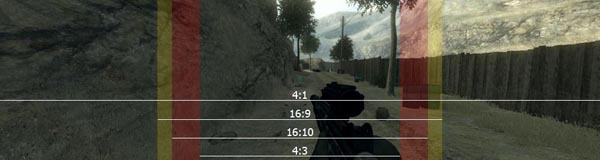
- FOV-t.jpg (38.85 KiB) Viewed 2812 times
The whole problem is FOV, which when all resolutions have the H-FOV, something's wrong!!!
Bioshock: artistic vision - or not as the case may be
Posted: 21 Aug 2007, 21:41
by skipclarke
Stop posting those overlays, they're totally wrong.
Matter of fact, pictures taken with a digital camera seem to show a clear width gain and height loss with 16:9 settings as it should be.
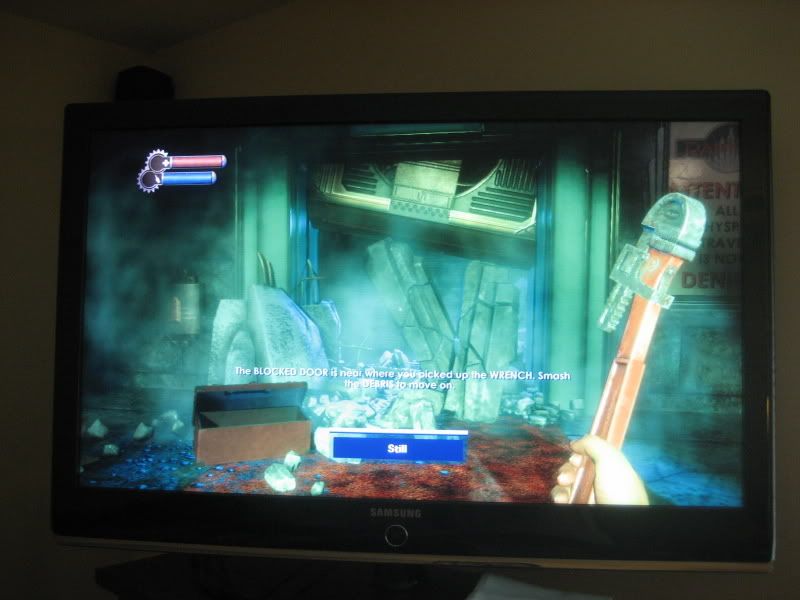
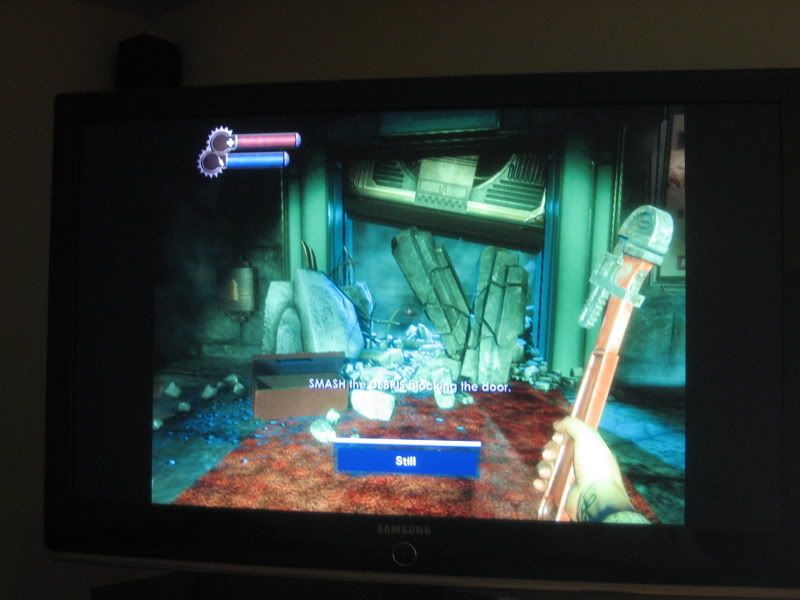
Thx Lefty42o from neogaf.
Sorry for my poor english, but i just wanted to point it out. =)
Bioshock: artistic vision - or not as the case may be
Posted: 21 Aug 2007, 21:41
by Paddy the Wak
The temp fix didn't work for me ... :(
Bioshock: artistic vision - or not as the case may be
Posted: 21 Aug 2007, 21:44
by skipclarke
i think people expected it when the developers told us to.
Where? Citing (and linking) a source where thay explicitly state that the 16:9 AR will be wider than the 4:3 one would be nice.
And, no: A generic statement like "of course it will be designed for widescreen" won't do. It is quite possible (probable even?) that it is, and that the taller 4:3 ratio is the best way to convert from the 'proper' 16:9 ratio.
Bioshock: artistic vision - or not as the case may be
Posted: 21 Aug 2007, 21:44
by Ice[DDZ]
Stop posting those overlays, they're totally wrong.
Matter of fact, pictures taken with a digital camera seem to show a clear width gain and height loss with 16:9 settings as it should be.
Thx Lefty42o from neogaf.
Sorry for my poor english, but i just wanted to point it out. =)
He clearly isnt in the same position, this comparison is moot. Direct captures will always show whats going on versus shots off a television.
Bioshock: artistic vision - or not as the case may be
Posted: 21 Aug 2007, 21:45
by Paddy the Wak
Stop posting those overlays, they're totally wrong.
Your opinion ... we don't think they are "totally wrong" ... :wink:
Those with a brain do understand them.
BTW ... welcome to the WSGF ... :D
Bioshock: artistic vision - or not as the case may be
Posted: 21 Aug 2007, 21:53
by Paddy the Wak
[quote]i think people expected it when the developers told us to.
Where? Citing (and linking) a source where thay explicitly state that the 16:9 AR will be wider than the 4:3 one would be nice.
And, no: A generic statement like "of course it will be designed for widescreen" won't do. It is quite possible (probable even?) that it is, and that the taller 4:3 ratio is the best way to convert from the 'proper' 16:9 ratio.Here ... http://forums.2kgames.com/forums/showthread.php?t=659
Fourth post by - Chris Kline, Lead Programmer, Bioshock
You will see more in widescreen. We use a different projection matrix; there is no squashing or stretching of the image involved.
Bioshock: artistic vision - or not as the case may be
Posted: 21 Aug 2007, 21:57
by Elios
i have been messing with the FOV edit and it doesnt seem to do any thing for me atlest