Skyrim Multi-Monitor User Interface Fix Discussion

Topics about game solutions, and success or failure in getting them to work.
User avatar
Kayden
Insiders
Insiders
Posts: 213
Joined: 06 Sep 2011, 15:27

thales100 wrote:V0.3 fixed

Post by Kayden »

V0.3 fixed the dark objects in inventory, lock pick is still a bit darker, plus if you fast travel, you should press "TAB" after you "arrive" to re-enable the fix.


I must have missed that, thanks Thales!

EDIT:

I have found 2 mods that I think will interest every one here.

lets you configure your gamepad, I don't use a gamepad but some have mentioned they do. I haven't tested it.
http://www.skyrimnexus.com/downloads/file.php?id=655

QD Inventory, redoes the entire inventory UI so make it more friendly for PC players. I have tested this and it does work with HaYDeN's fix, I have not tried it with helifax's yet but it shouldn't be a problem.
http://www.skyrimnexus.com/downloads/file.php?id=667

EDIT2: I tried it and it worked just fine for my alt+tab problem. Thanks again Thales for pointing that out. Next time I should read everything in detail rather then just skimming. (c;

Azza Fusion 4000 Liquid Cooled Full/Mini-ITX Tower - AMD Ryzen 1700x CPU - Tt Water 3.0 Ultimate CPU Cooler - ASUS ROG Crosshair VI Extreme - 2x EVGA GTX 980 in SLI - Geil 16GB - Klipsch 5.1 THX Speakers - Vertex 4 128GB SSD, Sandisk 256GB SSD, Samsung 512GB 850 PRO SSD, WD Black 320GB & Two times Toshiba 5TB (one for Games and the other for Storage) - Logitech G502 - Corsair K65 RGB - Logitech G13 - Win10 Pro 64bit - 2-over-1 Viewsonic VA2448M 24" (2x 1920x1080 Secondary) & Samsung CHG90 Series Curved 49" (3840x1080) - Ergotech Monitor Stand - Shout out to WSGF for the upgrade on my stand!
JoeDavola
Posts: 6
Joined: 13 Nov 2011, 05:38

Thank you HaYDeN the new

Post by JoeDavola »

Thank you HaYDeN the new version works great. I run bezel corrected 5960x1080 and leaving the settings on auto detect ( 5760x1080 ) works great.
kohan69
Posts: 48
Joined: 09 Feb 2006, 00:23

bakersville123 wrote:Thanks

Post by kohan69 »

Thanks for the v.3 release HaYden

One comment, it would appear that text gets jumbled together on the 2nd level and higher of the skill/perk trees


I also experienced this! like when looking at the second branch of sneak, the text overlaps

another small issue is in the map when it saays something in the top-left of the screen (like error about unable to travel there, or whatever), it's on the top left of the left monitor, not the middle one.

also, because the fix hooks the tab and m key, sometimes when you press shift+tab ingame, you will be unable to leave the menu, and will think you're stuck

FEAR NOT!! press ctrl+tab to "release" the tab key
BobMarkinson
Posts: 11
Joined: 19 Nov 2011, 08:05

Still CTDs to desktop withj Hayden 0.3

Post by BobMarkinson »

Hello,

Since Hayden's 0.3, I'm experiencing the same immediate crash to desktop as I have with Helifax's most recent solution when starting the game. Hayden's 0.1 works fine.

Running 3840x1024. (3x1). Tried 3072x768 - same issue. Tried setting the resolution manually - no dice. Running Cat 11.10 no bezel comp.

Here's 0.3's output - nothing out of the ordinary...

+ Searching for RUNNING Skyrim Process...
+ Skyrim process found...
+ Process opened successfully!
+ Executing ASM injection...
+ Allocating additional memory to process...
+ Generating Function call 1...
+ Function 1 written successfully...
+ Generating Function call 1...
+ Generating Function call 2...
+ Function 2 written successfully...
+ Patching Mouse Handler...
+ Patched Mouse Handler Successfully...
+ Patching Overscaling..
+ Patched Overscaling Successfully...
+ Too close for missles, switching to guns (switching to hotkey mode)
+ Skyrim thread exited... we're done!

Is there some kind of crash log I can enable to help solve this issue?
It's interesting that both Hayden's and Helifax's crash exactly at the same point (immediately).

Thanks!
Redsplinter
Posts: 3
Joined: 16 Nov 2011, 00:46

Running Hayden's 0.3 - all I

Post by Redsplinter »

Running Hayden's 0.3 - all I can say is it's freaking awesome. Been waiting for a fix with a natural feel so I can truly enjoy the game as it should be played.

There are a few hitches, but nothing close to game breaking if you don't mind navigating skill trees with WASD. It seems the mouse handling patch or some related part of the engine thinks the monitor resolution is 2x, and starts at the left edge of my center monitor, the effects of which only seem apparent in the skill menu and when I try and mouse look during a conversation - left look occurs when the mouse hits the left edge of the center monitor, but right look occurs upon hitting the right edge of the right monitor - further, the mouse cursor is invisible on the right monitor.

Again, awesome work - honestly I'd be happy if 0.3 ends up being the final version, but I'll cross my fingers that it isn't. :p


(Oh, and I can see flame distortion through walls and other objects.... but that's mostly just funny.)
"Someday, someone will best me. But it won't be today, and it won't be you."
wt73
Posts: 55
Joined: 11 Nov 2011, 17:43

Mods

Post by wt73 »

Not sure if this has been posted but here is a list of mods for Skyrim from PCgamer/Skyrim Nexus
http://www.pcgamer.com/2011/11/14/the-10-best-skyrim-mods-so-far/
I tried the 3D enhanced map but it was too dark and un-detailed to use properly. That might be due to other mods already in place, but if it works it's a great tool.
There is also a different Large Address Aware program to try if deemed necessary.

I have read about Alt+Tab problems and find that if I MINIMIZE with Alt+Tab I can open back up w/ no issues if I hit Windows+Tab a few times until it shows game instead of blank black screen
BobMarkinson
Posts: 11
Joined: 19 Nov 2011, 08:05

Just installed ati's 11.11 -

Post by BobMarkinson »

Just installed ati's 11.11 - same issue. :
Running on a 6950, Win7 32 bit, 4 GB.
c69
Posts: 108
Joined: 04 Nov 2011, 07:13

BobMarkinson wrote:Just

Post by c69 »

Just installed ati's 11.11 - same issue. :
Running on a 6950, Win7 32 bit, 4 GB.


Run msconfig and shut down all non-Microsoft system services, reboot, make sure the services are still off, then try the game.

I dont think the fix has anything to do with your crash.
timtl
Posts: 3
Joined: 19 Nov 2011, 17:22

Doesn't work with non-english localizations.

Post by timtl »

I have installed the english skyrim localization, and now I can confirm that the fix works perfect!
But with non-english all sad :(
Hydralisk_X
Posts: 190
Joined: 26 Jan 2010, 00:20

Thanks a bunch Hayden! I've

Post by Hydralisk_X »

Thanks a bunch Hayden! I've been bogged down this week and have only put about 12 hours into the game. Now I'm kind of glad I can go the rest of the way with this awesome fix.
User avatar
HaYDeN
Insiders
Insiders
Posts: 761
Joined: 14 Feb 2010, 13:39

timtl wrote:I have installed

Post by HaYDeN »

I have installed the english skyrim localization, and now I can confirm that the fix works perfect!
But with non-english all sad :(


If this is the case then likely the layout for the executable for the different localization is completely different, unless there was call for a specific localization to be added for support unfortunately you'd need to continue using the english EXE....

Have you tried the English EXE with the localized data files? - I could imagine playing the game in non-native language probably quite annoying.
Resident Jester - Flawless Widescreen - Widescreen gaming the way it should be.
[Steam Profile]

Want to keep Flawless Widescreen alive? Donate Here
User avatar
ugzz
Posts: 241
Joined: 12 Nov 2011, 22:00

poop. i said "thanks hayden

Post by ugzz »

poop. i said "thanks hayden and thanks hayden. i obviously meant thanks hayden and thanks helifax :P
also keydan or kayden, i forget how its spelled heh, but a BIG thanks for modding helifax's files. also thanks to Thales for keeping the detailed report up to date. its thanks to the 4 of you (any any other who may have helped) that everyone out there has been able to really play this game. you guys are all our Saviors!
Asus P8P67 Pro, I7 2600k @ 4.6Ghz, 8gb, 250GB SSD/ 4TB Mechanical, Modded GTX 780TI, 3x AOC 27" IPS 5760x1080
-Sn1PeR-
Posts: 71
Joined: 19 Oct 2010, 14:50

thales100, What FOV are

Post by -Sn1PeR- »

thales100,

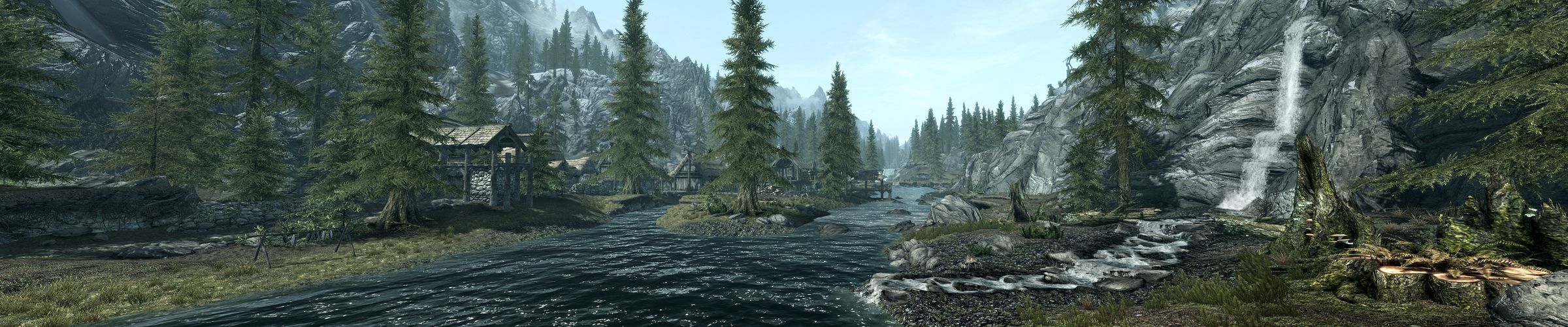
Did you do anything special when taking those screenshots? There really isn't much noticeable fisheye at all in those. What's your default FOV set to? I've been trying to get screenshots of the landscape like those and they never look quite that good. I noticed that you are really close in the majority of your 3rd person views - maybe that's the trick.
edgarecayce
Posts: 3
Joined: 15 Nov 2011, 02:44

Oh Hell Yeah

Post by edgarecayce »

HaYDen's Fix is THE BOMB. Just had a blast of a time.

Thanks HaYDen!!! Thanks Helifax!
SilenTKK8
Posts: 11
Joined: 11 Nov 2011, 17:46

Awesome fixes by the two

Post by SilenTKK8 »

Awesome fixes by the two legends!
User avatar
thales100
Editors
Editors
Posts: 1898
Joined: 06 Nov 2008, 01:08

-Sn1PeR- wrote:thales100,

Post by thales100 »

thales100,

Did you do anything special when taking those screenshots? There really isn't much noticeable fisheye at all in those. What's your default FOV set to? I've been trying to get screenshots of the landscape like those and they never look quite that good. I noticed that you are really close in the majority of your 3rd person views - maybe that's the trick.


Hey -Sn1PeR-, no nothing special, running default FOV (i havent changed it), yes 3rd person view in 3D is a winner.
User avatar
thales100
Editors
Editors
Posts: 1898
Joined: 06 Nov 2008, 01:08

HaYDeN will soon release a

Post by thales100 »

HaYDeN will soon release a new version of his fix, without any toggles ! :love: Yes you'll run the app, start the game and no other adjustments will be required, including after a fast travel or exiting the map, he found out a way of hooking the map to a memory value, not to M key,so please keep checking WSGF.
slaWter
Posts: 5
Joined: 11 Dec 2006, 21:55

The large address fix finally

Post by slaWter »

The large address fix finally allowed me to take screenshots in Surround without CTDs :D So happy now!

I really love the world in this game, so diverse and stunning!


Thanks for the continuous work that goes into fixing this game for Surround! I'm going to donate a few bucks in a minute.
Gaming PC Intel Core i7 980X Extreme Edition 4.0GHz # ASUS Rampage III Extreme # 6GB DDR3 1600MHz # Zotac GTX 680 4GB SLI # Intel X25-M G2 160GB # 4TB HDDs, 6.75TB eSATA # Silverstone TJ10

Screen Setup 3x HP ZR30w 30" 7680x1600, LG Flatron W2363D 120Hz 3D Vision, Samsung LE-46M87BD

Mac Pro Mid 2010 # Intel Xeon 6 Core 3.33GHz # 12GB DDR3 1333MHz # 2x AMD Radeon HD 5770 # OCZ Vertex 2 120GB, 5TB HDDs, 2TB USB

MacBook Pro Retina 15" Mid 2012 # Intel Core i7 2.7GHz # 16GB DDR3 1600MHz # nVidia 650M 1024MB # 768GB Flash, 1TB USB # 27" LED Cinema Display

Fileserver Intel Core i3 530 1.2GHz # 4GB DDR3 1333MHz # Intel X25-V G2 40GB, WDC Scorpio 250GB # 16TB RAID 6 # Adaptec RAID 5405 w/ Chenbro CK12804 SAS Expander # Norco RPC 4220

El Tigre
Posts: 1
Joined: 20 Nov 2011, 13:06

That's so sexy.

Post by El Tigre »

That's so sexy.
User avatar
HaYDeN
Insiders
Insiders
Posts: 761
Joined: 14 Feb 2010, 13:39

Does there need to be a FOV

Post by HaYDeN »

Does there need to be a FOV option in the tool? seems like it resets everytime I reload the level, I hate how zoomed in the hands are...
Resident Jester - Flawless Widescreen - Widescreen gaming the way it should be.
[Steam Profile]

Want to keep Flawless Widescreen alive? Donate Here
Post Reply

Who is online

Users browsing this forum: No registered users and 14 guests