
Did you try changing the 09 value only? It went from 08 to 09 when you went from 800x600 to 1024x768 so maybe that is the value for you to try.
You could also try a reinstall if you have not already. Other than that... :?
GTA: San Andreas version 3.0 via Steam no 1080 16:9
GTA: San Andreas version 3.0 via Steam no 1080 16:9
Yeah...the value above that is "09" in the "1024x768x32" picture is the one I tried changing in intervals.
I changed it from 01 to 25 and every time it went back to the default 800x600x32 when I would start up the game after the change.
I have also re installed 3 times so far.
...I think that this is a bust.
Thanks for the help/advice everyone.
....and Happy Thanksgiving. :D
I changed it from 01 to 25 and every time it went back to the default 800x600x32 when I would start up the game after the change.
I have also re installed 3 times so far.
...I think that this is a bust.
Thanks for the help/advice everyone.
....and Happy Thanksgiving. :D
GTA: San Andreas version 3.0 via Steam no 1080 16:9
Ok so I pulled an OCD card and and started from scratch.
I deleted all local content and uninstalled steam.
I then pulled a system restore to "out of the box" status.
Updated all of my drivers manually one by one instead of letting windows 7 do it.
Installed steam and then GTA:SA
Ran the game once and then deleted the gta_sa.set file.
Ran the game again, changed nothing.
Downloaded HxD, opened the fresh gta_sa.set file.
I then found the "08" and began from "00" and changed it in increments of one up to "25".....I got a clear record below.
Fresh gta_sa.set file:

Changing of the "08" results:

This still may not change anything...but I thought I would toss it out there.
I deleted all local content and uninstalled steam.
I then pulled a system restore to "out of the box" status.
Updated all of my drivers manually one by one instead of letting windows 7 do it.
Installed steam and then GTA:SA
Ran the game once and then deleted the gta_sa.set file.
Ran the game again, changed nothing.
Downloaded HxD, opened the fresh gta_sa.set file.
I then found the "08" and began from "00" and changed it in increments of one up to "25".....I got a clear record below.
Fresh gta_sa.set file:
Changing of the "08" results:
This still may not change anything...but I thought I would toss it out there.
-
whismerhill
- Posts: 760
- Joined: 28 Jun 2009, 22:17
GTA: San Andreas version 3.0 via Steam no 1080 16:9
I hate to say that but what about trying another GTA:SA main executable ?
it seems to be going around in circles here...
it seems to be going around in circles here...
GTA: San Andreas version 3.0 via Steam no 1080 16:9
I'm not entirely sure of what you mean.
Where would one get another GTA:SA main executable file other than the one provided from steam upon downloading and installing the game.
....or am I showing how little knowledge I have on this matter...because that is very possible. :D
Where would one get another GTA:SA main executable file other than the one provided from steam upon downloading and installing the game.
....or am I showing how little knowledge I have on this matter...because that is very possible. :D
GTA: San Andreas version 3.0 via Steam no 1080 16:9
He means to search for a no-cd file and see if it works with your game.
It has occured to me through a basic forum search that none of the GTA III games appear to support triplehead(prove me wrong otherwise). This leads me to the belief that the GTA III games are using a fixed resolution list. So I would give up on the set file method because I think any fixed resolution that is selected but not in the game options causes a revert to 800x600 which I guess is the default.
You could try making the set file read only but it will most likely be the same behavior.
I will look around the GTA III games and see if I can find a resoluton list.
It has occured to me through a basic forum search that none of the GTA III games appear to support triplehead(prove me wrong otherwise). This leads me to the belief that the GTA III games are using a fixed resolution list. So I would give up on the set file method because I think any fixed resolution that is selected but not in the game options causes a revert to 800x600 which I guess is the default.
You could try making the set file read only but it will most likely be the same behavior.
I will look around the GTA III games and see if I can find a resoluton list.
GTA: San Andreas version 3.0 via Steam no 1080 16:9
Ok....I fiddled around a little and got 1920x1080.
I found this page:
http://www.widescreengaming.net/wiki/Grand_Theft_Auto:_San_Andreas
Under "Supported Resolutions" it states that 1920x1080 can only be achieved with version 1.01.
So, with the no cd fix in mind I hunted down the only version 1.01 crack I could find..."GTA: San Andreas v1.01 [EURO] No-CD/Fixed EXE"
Downloaded, installed, and 1920x1080 was among the available res.
Unfortunately, in order for the game not to lag/chop I had to turn most of the settings down....and the picture seems to be either stretched out or smushed down.
I was even able to add the new .exe file to steam so I can launch it from there.
So...these seem to be my two options...
Version 3.0
Draw Distance - 16/16
Fame Limiter - No
Wide Screen - off
Visual FX Quality - Very High
Mip Mapping - On
Anti Aliasing - 3 (max)
Resolution - 1024x768x16 (4:3)
-The picture is proportional and super smooth
Version 1.01
Draw Distance - 8/16
Fame Limiter - No
Wide Screen - off
Visual FX Quality - Very High
Mip Mapping - On
Anti Aliasing - Off
Resolution - 1920x1080x16 (16:9)
-The picture is stretched and/or smushed and if I adjust one setting up any it starts to lag/chop
Go figure I can run doom 3 at 1080 on high settings smoothly and I have to back off the GTA:SA settings at 1080.
Anyway...
So, there you have it....I guess its s personal preference from here eh?
Maybe someone here knows of something I can do/mod with version 1.01 to get proper proportions (not so smushed) or maybe if you find a resolution list something more can be done with version 3.0.
....I'm going to go eat more turkey :D
I found this page:
http://www.widescreengaming.net/wiki/Grand_Theft_Auto:_San_Andreas
Under "Supported Resolutions" it states that 1920x1080 can only be achieved with version 1.01.
So, with the no cd fix in mind I hunted down the only version 1.01 crack I could find..."GTA: San Andreas v1.01 [EURO] No-CD/Fixed EXE"
Downloaded, installed, and 1920x1080 was among the available res.
Unfortunately, in order for the game not to lag/chop I had to turn most of the settings down....and the picture seems to be either stretched out or smushed down.
I was even able to add the new .exe file to steam so I can launch it from there.
So...these seem to be my two options...
Version 3.0
Draw Distance - 16/16
Fame Limiter - No
Wide Screen - off
Visual FX Quality - Very High
Mip Mapping - On
Anti Aliasing - 3 (max)
Resolution - 1024x768x16 (4:3)
-The picture is proportional and super smooth
Version 1.01
Draw Distance - 8/16
Fame Limiter - No
Wide Screen - off
Visual FX Quality - Very High
Mip Mapping - On
Anti Aliasing - Off
Resolution - 1920x1080x16 (16:9)
-The picture is stretched and/or smushed and if I adjust one setting up any it starts to lag/chop
Go figure I can run doom 3 at 1080 on high settings smoothly and I have to back off the GTA:SA settings at 1080.
Anyway...
So, there you have it....I guess its s personal preference from here eh?
Maybe someone here knows of something I can do/mod with version 1.01 to get proper proportions (not so smushed) or maybe if you find a resolution list something more can be done with version 3.0.
....I'm going to go eat more turkey :D
GTA: San Andreas version 3.0 via Steam no 1080 16:9
Maybe someone here knows of something I can do/mod with version 1.01 to get proper proportions (not so smushed) or maybe if you find a resolution list something more can be done with version 3.0.
I wonder if the 3.0 version is not updated? Sad, but possible.
You can remove the stretching by toggling the widescreen option on. It forces a 16:9 aspect ratio and will remove the stretching in the 3D world.
GTA: San Andreas version 3.0 via Steam no 1080 16:9
I cannot believe I did not toggle the wide screen option to see the difference.
I just assumed the widescreen toggle was for non widescreen aspect ratios (example: 4:3) so that they would be forced fit.
After toggling the widescreen option the characters feet are below the screen, but this seems to be the best fix so far. Everything on the screen seems to be in proportion.
I think this is it... :D
To get 1920x1080 in GTA:SA and have a single launch Icon within my "games" section on steam I did the following;
1. Downloaded GTA:SA ver 3.0 via steam
2. Copied these two folders to my desk top:
-A."...Steamsteamappscommongrand theft auto san andreas"
-B."...DocumentsGTA San Andreas User Files"
3. Downloaded "GTA: San Andreas v1.01 [EURO] No-CD/Fixed EXE"
4. Replaced the "gta_sa.exe" file in my desk top copied folder of "...common/grand theft auto san andreas" with the "gta_sa.exe" file obtained from the No-CD Crack download.
5. Go to steam and delete all local content of GTA:SA.
6. Moved desk top copies to previous locations.
7. Go to steam and "add non steam game" ...find the gta_sa.exe file in "...Steamsteamappscommongrand theft auto san andreas" ( this will be the 1.01 version .exe)
8. Launch the game and set the game as follows:
Draw Distance - 8/16
Fame Limiter - No
Wide Screen - On
Visual FX Quality - Very High
Mip Mapping - On
Anti Aliasing - Off
Resolution - 1920x1080x16 (16:9)
9. Enjoy game
I may have taken the long road around but I tried just replacing the .exe and steam refused to launch the game...so I found that this worked. I did not like haveing two GTA:SA in my games list. :D
Any final thoughts? ....I think this is my fix.
I just assumed the widescreen toggle was for non widescreen aspect ratios (example: 4:3) so that they would be forced fit.
After toggling the widescreen option the characters feet are below the screen, but this seems to be the best fix so far. Everything on the screen seems to be in proportion.
I think this is it... :D
To get 1920x1080 in GTA:SA and have a single launch Icon within my "games" section on steam I did the following;
1. Downloaded GTA:SA ver 3.0 via steam
2. Copied these two folders to my desk top:
-A."...Steamsteamappscommongrand theft auto san andreas"
-B."...DocumentsGTA San Andreas User Files"
3. Downloaded "GTA: San Andreas v1.01 [EURO] No-CD/Fixed EXE"
4. Replaced the "gta_sa.exe" file in my desk top copied folder of "...common/grand theft auto san andreas" with the "gta_sa.exe" file obtained from the No-CD Crack download.
5. Go to steam and delete all local content of GTA:SA.
6. Moved desk top copies to previous locations.
7. Go to steam and "add non steam game" ...find the gta_sa.exe file in "...Steamsteamappscommongrand theft auto san andreas" ( this will be the 1.01 version .exe)
8. Launch the game and set the game as follows:
Draw Distance - 8/16
Fame Limiter - No
Wide Screen - On
Visual FX Quality - Very High
Mip Mapping - On
Anti Aliasing - Off
Resolution - 1920x1080x16 (16:9)
9. Enjoy game
I may have taken the long road around but I tried just replacing the .exe and steam refused to launch the game...so I found that this worked. I did not like haveing two GTA:SA in my games list. :D
Any final thoughts? ....I think this is my fix.


GTA: San Andreas version 3.0 via Steam no 1080 16:9
It wont' let you play with 32-bit color?
GTA: San Andreas version 3.0 via Steam no 1080 16:9
After toggling the widescreen option the characters feet are below the screen
You could try the San Andreas hack on this site for that fix.
GTA: San Andreas version 3.0 via Steam no 1080 16:9
It wont' let you play with 32-bit color?
For some reason the game lags/chops really bad if I switch to 32 bit, turn on Anti Aliasing, or increase the Draw Distance. :?
I'm going to go check out the camera hack right now and see if i can get it to work....
....I tried three different version of the camera hack and all failed to launch. Version 1.1 gave a reason..."failed to find dx8"...
BUT!....after you mentioned the hack and i read this thread on this site:
http://www.widescreengamingforum.com/node/
I tried just hitting "V".....and it worked.
The furthest view in the game puts the characters feet about 3/4 inch from the bottom of the screen.
This is exactly what I was hoping to achieve when i came here looking for help. 1080 res, 16:9, smooth gameplay, good proportions.
Thank you all so very much. :D
Re: GTA: San Andreas version 3.0 via Steam no 1080 16:9
Hi all,
Yesterday I bought San Andreas on Steam and had a similar problem.
However, I have more resolutions (4:3, 5:4 and 16:10) proposed, up to 1440x900 (unfortunately my screen resolution is 1600x900).
But I think I found something: apparently, those experiencing this issue have an ATI card. So I went to Catalyst and opened the screen configuration panel (which can be accessed through "Display Management > Screen 0 (at the bottom) > configure") and there there is an option to detect automatically the max screen resolution or to set it manually.
So I tried to set it manually (I put 1680x1050 even though my screen doesn't support it) and launched GTA. Some resolutions above 1440x900 (up to 1680x1050) were available. When I compared the possible max resolutions in the control panel of Catalyst and those of the game, I saw they were the same.
So that's why I think the gta_sa.set and the main executable are only partly responsible for this "inconvenience":
- The drivers define some usable resolutions (different from those accessible from Windows)
- The executable references those resolutions
- gta_sa.set stores the code for the reference used, therefore if the resolution is no longer available for the drivers, the game crashes and the file must be deleted (happened to me on several occasions after a driver update).
The simplest way to correct this would be for Catalyst to include every resolutions (as 1600x900 for example). But is ATI going to correct this... ?
Yesterday I bought San Andreas on Steam and had a similar problem.
However, I have more resolutions (4:3, 5:4 and 16:10) proposed, up to 1440x900 (unfortunately my screen resolution is 1600x900).
But I think I found something: apparently, those experiencing this issue have an ATI card. So I went to Catalyst and opened the screen configuration panel (which can be accessed through "Display Management > Screen 0 (at the bottom) > configure") and there there is an option to detect automatically the max screen resolution or to set it manually.
So I tried to set it manually (I put 1680x1050 even though my screen doesn't support it) and launched GTA. Some resolutions above 1440x900 (up to 1680x1050) were available. When I compared the possible max resolutions in the control panel of Catalyst and those of the game, I saw they were the same.
So that's why I think the gta_sa.set and the main executable are only partly responsible for this "inconvenience":
- The drivers define some usable resolutions (different from those accessible from Windows)
- The executable references those resolutions
- gta_sa.set stores the code for the reference used, therefore if the resolution is no longer available for the drivers, the game crashes and the file must be deleted (happened to me on several occasions after a driver update).
The simplest way to correct this would be for Catalyst to include every resolutions (as 1600x900 for example). But is ATI going to correct this... ?
-
whismerhill
- Posts: 760
- Joined: 28 Jun 2009, 22:17
Re: GTA: San Andreas version 3.0 via Steam no 1080 16:9
no ATI ain't gonna fix this or at least not intentionally, they may fix it while fixing another more recent game though but I wouldn't count on it...
Re: GTA: San Andreas version 3.0 via Steam no 1080 16:9
Yes. The 1.1 patch fix the res.
Here some pics:
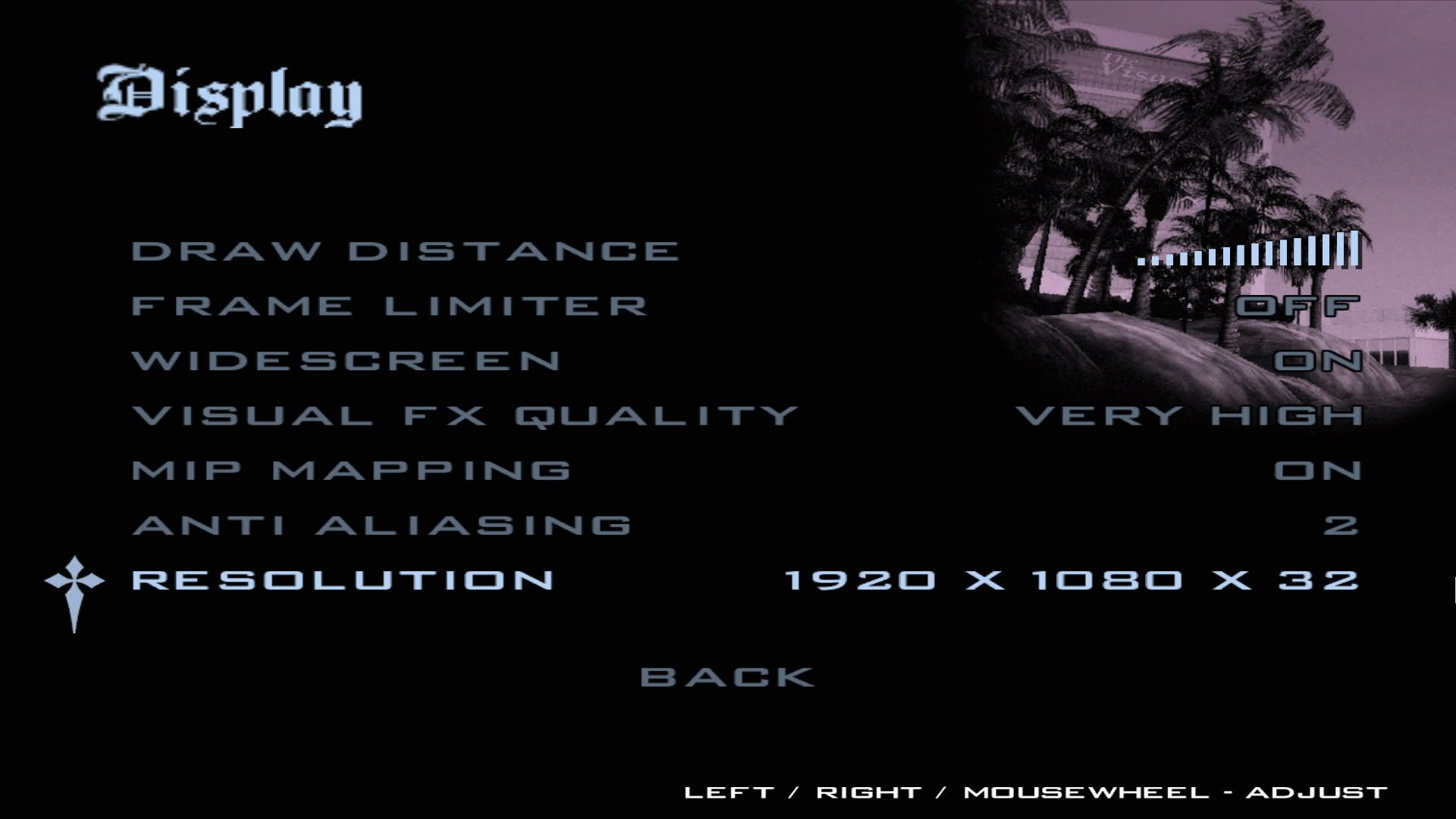
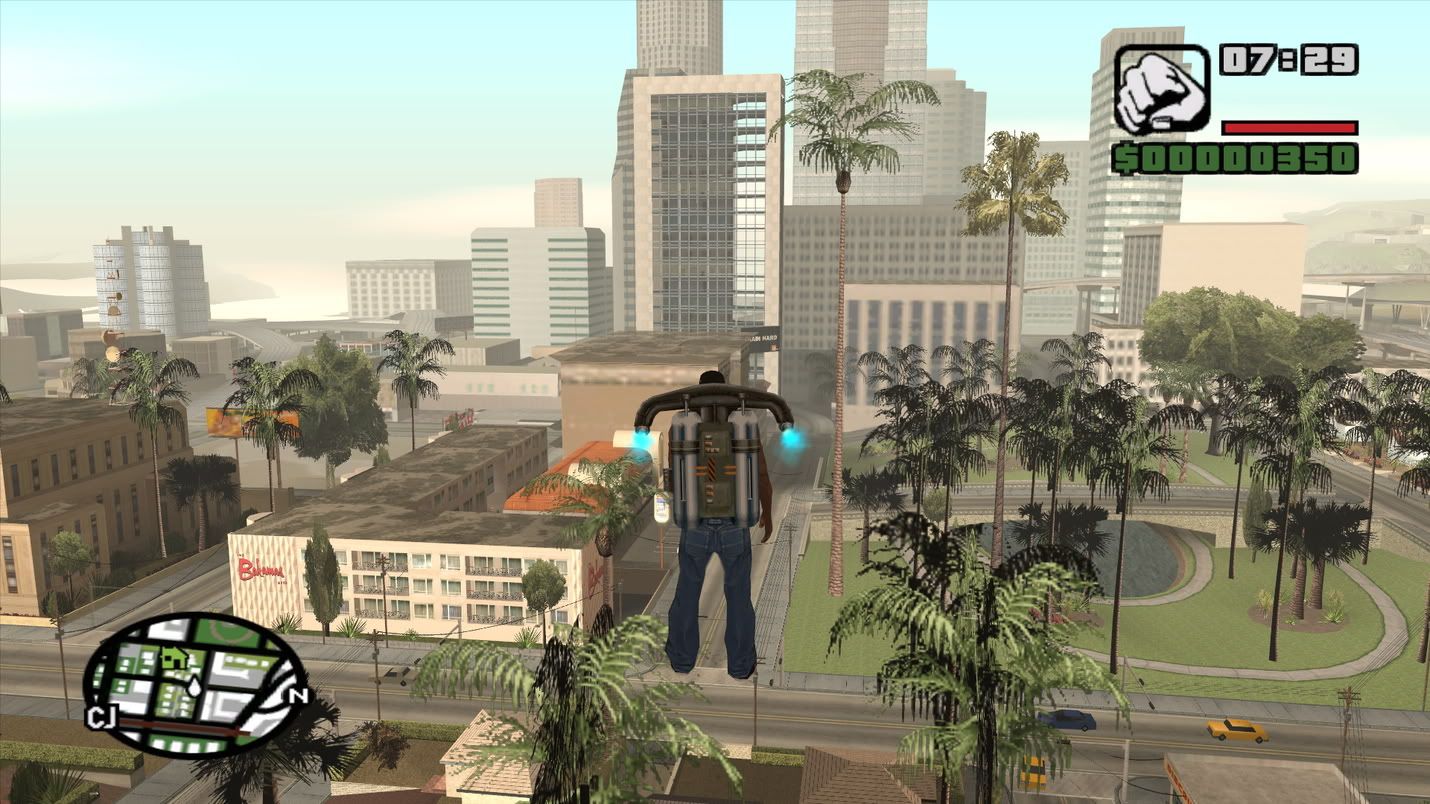
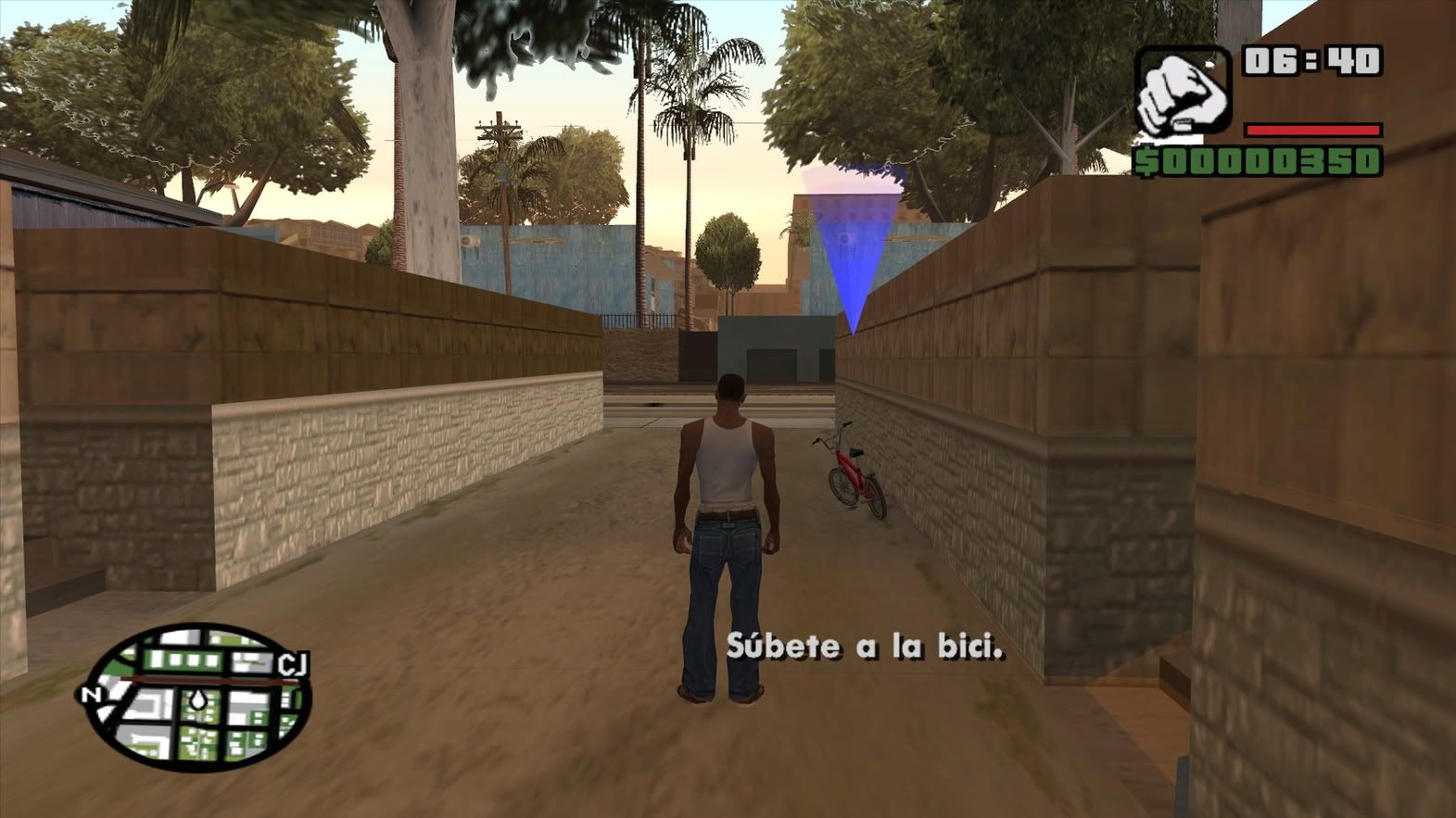
*.*
Here some pics:
*.*
Re: GTA: San Andreas version 3.0 via Steam no 1080 16:9
It looks like this is the fix we all have been looking for!
Ryosuke's Display Settings Extender
Right click "exdisp.asi" and save the data. Save/Move this file into the root of your GTA SA directory
Next you need an ASI loader. I used JernejL's ASI Loader. Create a backup of the vorbisFile.dll file since the one in the ASI loader will require you to overwrite the original.
When you load up GTA:SA using this method the following resolutions should be available.
512x384, 640x400, 640x480, 720x480, 720x576, 800x600,
960x600, 1024x768, 1280x720, 1280x800, 1280x1024,
1440x900, 1600x1200, 1680x1050, 1920x1080, 1920x1200
You can also see from the pictures on the author's website that you can select the aspect ratio and more options to the frame limiter have been added. Now you are probably like "why would I do all this?" Its simple really. This works with GTA:SA 1.0 which means you can not only mod the game but can use SAAC v1.2 which adds better controller support. So hook up your PS2 and Xbox gamepads and have at it. I believe if you use the Steam version you need the old 1.0 no-cd but that is all I can say. Just google it. I believe it was discussed earlier in this thread on which version you need.
I got all of this info from the GTA forums (Info on what to do)
*Perhaps someone might want to redo the detailed report. I doubt it will change the score but still it would be nice to have this all in one place.*
Ryosuke's Display Settings Extender
Right click "exdisp.asi" and save the data. Save/Move this file into the root of your GTA SA directory
Next you need an ASI loader. I used JernejL's ASI Loader. Create a backup of the vorbisFile.dll file since the one in the ASI loader will require you to overwrite the original.
When you load up GTA:SA using this method the following resolutions should be available.
512x384, 640x400, 640x480, 720x480, 720x576, 800x600,
960x600, 1024x768, 1280x720, 1280x800, 1280x1024,
1440x900, 1600x1200, 1680x1050, 1920x1080, 1920x1200
You can also see from the pictures on the author's website that you can select the aspect ratio and more options to the frame limiter have been added. Now you are probably like "why would I do all this?" Its simple really. This works with GTA:SA 1.0 which means you can not only mod the game but can use SAAC v1.2 which adds better controller support. So hook up your PS2 and Xbox gamepads and have at it. I believe if you use the Steam version you need the old 1.0 no-cd but that is all I can say. Just google it. I believe it was discussed earlier in this thread on which version you need.
I got all of this info from the GTA forums (Info on what to do)
*Perhaps someone might want to redo the detailed report. I doubt it will change the score but still it would be nice to have this all in one place.*
Who is online
Users browsing this forum: No registered users and 5 guests