
can any1 here pls help.
got tripple head to go digital edition. 3x dell 22 inch widescreen monitors.
and using latest widescreen fixer programe.
no matter what i do i cant get the graphics right. all streched and squashed. pls help before i tear my hair out. thx in responce.
call of duty 4 probs :(


call of duty 4 probs :(
Set aspect ratio to 4:3 in the game menu.
Try to run the widesreenfixer after you have launched COD 4 (thats how it works here).
Try to run the widesreenfixer after you have launched COD 4 (thats how it works here).
-
Mach1.9pants

- Insiders

- Posts: 1512
- Joined: 29 Jul 2007, 05:24
- Location: NZ
call of duty 4 probs :(
Are you pushing ; to enable the fixer, sorry to ask!
And picking the right patch version etc?
And picking the right patch version etc?
call of duty 4 probs :(
Are you pushing ; to enable the fixer, sorry to ask!
And picking the right patch version etc?
done what u said got it working now thx ;)
just 1 more prob im using windows 7 64 bit and 5040x1050 res.
when i play online punkbuster keeps kicking me. can any1 help here.
want to play online . :(

call of duty 4 probs :(
Make sure you choose v1.7 MP SAFE. :)
Widescreen Fixer - https://www.widescreenfixer.org/
Widescreen Fixer Twitter - https://twitter.com/widescreenfixer
Personal Twitter - https://twitter.com/davidrudie
Widescreen Fixer Twitter - https://twitter.com/widescreenfixer
Personal Twitter - https://twitter.com/davidrudie
-
Nosferatu05
- Posts: 64
- Joined: 20 Jun 2009, 08:55
call of duty 4 probs :(
great help over here but please tell me what is the widescreen fixer? :oops:
call of duty 4 probs :(
It's a small tool I wrote that corrects field of view and aspect-ratios in certain games.
Call of Duty 4 has support for 4:3, 16:10, and 16:9 out of the box, but nothing else. My fixer enables 5:4, 15:9, and triple-head aspect-ratios.
Call of Duty 4 has support for 4:3, 16:10, and 16:9 out of the box, but nothing else. My fixer enables 5:4, 15:9, and triple-head aspect-ratios.
Widescreen Fixer - https://www.widescreenfixer.org/
Widescreen Fixer Twitter - https://twitter.com/widescreenfixer
Personal Twitter - https://twitter.com/davidrudie
Widescreen Fixer Twitter - https://twitter.com/widescreenfixer
Personal Twitter - https://twitter.com/davidrudie
-
suiken_2mieu

- Insiders
- Posts: 2351
- Joined: 20 Aug 2009, 04:20
- Location: Virginia
- Contact:
call of duty 4 probs :(
I just got Cod4 and I'm trying to run it on my triplehead. I have 3 19" so im trying to use the 3x16:10 Wide Surround on Widescreen Fixer. I've chosen the right patch and did configured it the way thales100 said to. But I get no results.
I'm using Windows 7. Would that be the issue? I'm running Widescreen Fixer as an administrator.
I'm using Windows 7. Would that be the issue? I'm running Widescreen Fixer as an administrator.
System Core: | Intel Core i5-2500K + ASUS P8Z68-V + 16GB Corsair XMS3 DDR3 1333 MHz | Win7 x64 | MSI R7970 Lightning 3GB [1105/1400] |
Display: | 3 x Dell Ultrasharp 3007WFP-HC @ 7680x1600 | Dell u3011 |
Display: | 3 x Dell Ultrasharp 3007WFP-HC @ 7680x1600 | Dell u3011 |
call of duty 4 probs :(
Actually, if you're using the latest one, you shouldn't have to mess with the in-game aspect-ratio anymore. It will just override it.
Can you provide more information, suiken? Does it report that the game is running? When you are in an active match, does it report any number there by default? (Does it say 0? or does it say something like 1.333?)
Can you provide more information, suiken? Does it report that the game is running? When you are in an active match, does it report any number there by default? (Does it say 0? or does it say something like 1.333?)
Widescreen Fixer - https://www.widescreenfixer.org/
Widescreen Fixer Twitter - https://twitter.com/widescreenfixer
Personal Twitter - https://twitter.com/davidrudie
Widescreen Fixer Twitter - https://twitter.com/widescreenfixer
Personal Twitter - https://twitter.com/davidrudie
-
suiken_2mieu
- Insiders
- Posts: 2351
- Joined: 20 Aug 2009, 04:20
- Location: Virginia
- Contact:
call of duty 4 probs :(
Actually, if you're using the latest one, you shouldn't have to mess with the in-game aspect-ratio anymore. It will just override it.
Can you provide more information, suiken? Does it report that the game is running? When you are in an active match, does it report any number there by default? (Does it say 0? or does it say something like 1.333?)
I currently am only playing Single Player, but yes it's when I'm actually running the games 3D environment.
I'm using v1.5 and have tried others.
Here's what it says on the bottom:
Status
Game Running: Yes
Fix Enabled: No
Value: 0.76448435 (This number can Vary At times, it's Usually in between 0.6 - 0.8)
I have messed with the Update Rate with no reaction in game.
System Core: | Intel Core i5-2500K + ASUS P8Z68-V + 16GB Corsair XMS3 DDR3 1333 MHz | Win7 x64 | MSI R7970 Lightning 3GB [1105/1400] |
Display: | 3 x Dell Ultrasharp 3007WFP-HC @ 7680x1600 | Dell u3011 |
Display: | 3 x Dell Ultrasharp 3007WFP-HC @ 7680x1600 | Dell u3011 |
call of duty 4 probs :(
That's a weird value.
However, it says "Fix Enabled: No" ... did you enable it?
However, it says "Fix Enabled: No" ... did you enable it?
Widescreen Fixer - https://www.widescreenfixer.org/
Widescreen Fixer Twitter - https://twitter.com/widescreenfixer
Personal Twitter - https://twitter.com/davidrudie
Widescreen Fixer Twitter - https://twitter.com/widescreenfixer
Personal Twitter - https://twitter.com/davidrudie
-
suiken_2mieu
- Insiders
- Posts: 2351
- Joined: 20 Aug 2009, 04:20
- Location: Virginia
- Contact:
call of duty 4 probs :(
That's a weird value.
However, it says "Fix Enabled: No" ... did you enable it?
Okay, I enable it (after figuring i had to hit the hotkey) still the problem remains as it doesn't change my FOV. Every character still looks short and fat. The only thing it does is fix my HUD, and make it impossible to use the options menu.
System Core: | Intel Core i5-2500K + ASUS P8Z68-V + 16GB Corsair XMS3 DDR3 1333 MHz | Win7 x64 | MSI R7970 Lightning 3GB [1105/1400] |
Display: | 3 x Dell Ultrasharp 3007WFP-HC @ 7680x1600 | Dell u3011 |
Display: | 3 x Dell Ultrasharp 3007WFP-HC @ 7680x1600 | Dell u3011 |
call of duty 4 probs :(
Okay, I enable it (after figuring i had to hit the hotkey) still the problem remains as it dosn't change my FOV. Every character still looks short and fat.
Have you set the "aspect ratio" in the game menu, graphics options, to 4:3 ?
-
suiken_2mieu
- Insiders
- Posts: 2351
- Joined: 20 Aug 2009, 04:20
- Location: Virginia
- Contact:
call of duty 4 probs :(
[quote] Okay, I enable it (after figuring i had to hit the hotkey) still the problem remains as it dosn't change my FOV. Every character still looks short and fat.
Have you set the "aspect ratio" in the game menu, graphics options, to 4:3 ?
Nope, Same still happens, I get a Fixed HUD and the FOV hasn't increased.
I'm Using 3 16:10 Monitors, Does it not know what to do with it?
System Core: | Intel Core i5-2500K + ASUS P8Z68-V + 16GB Corsair XMS3 DDR3 1333 MHz | Win7 x64 | MSI R7970 Lightning 3GB [1105/1400] |
Display: | 3 x Dell Ultrasharp 3007WFP-HC @ 7680x1600 | Dell u3011 |
Display: | 3 x Dell Ultrasharp 3007WFP-HC @ 7680x1600 | Dell u3011 |
-
Mach1.9pants
- Insiders
- Posts: 1512
- Joined: 29 Jul 2007, 05:24
- Location: NZ
call of duty 4 probs :(
Your WSF should look like this (for MP, select SP if you are doing SP)

-
suiken_2mieu
- Insiders
- Posts: 2351
- Joined: 20 Aug 2009, 04:20
- Location: Virginia
- Contact:
call of duty 4 probs :(
Your WSF should look like this (for MP, select SP if you are doing SP)Everything looks right on mine, except the value.
System Core: | Intel Core i5-2500K + ASUS P8Z68-V + 16GB Corsair XMS3 DDR3 1333 MHz | Win7 x64 | MSI R7970 Lightning 3GB [1105/1400] |
Display: | 3 x Dell Ultrasharp 3007WFP-HC @ 7680x1600 | Dell u3011 |
Display: | 3 x Dell Ultrasharp 3007WFP-HC @ 7680x1600 | Dell u3011 |
-
MobsterOO7

- Insiders
- Posts: 1055
- Joined: 19 Sep 2006, 16:25
- Location: Ruckersville, Virginia
call of duty 4 probs :(
Mine looks like this:

And the game looks like this:

Like the other dude, I have a fixed hud but a non-fixed FOV.
I'm running Windows 7 x64 RC1.
And the game looks like this:
Like the other dude, I have a fixed hud but a non-fixed FOV.
I'm running Windows 7 x64 RC1.
EVGA GeForce GTX 970 SC ACX 2.0 3.5GB | 3 X LG Flatron 24EA53VQ in Nvidia Surround | Optoma HD20
-
suiken_2mieu
- Insiders
- Posts: 2351
- Joined: 20 Aug 2009, 04:20
- Location: Virginia
- Contact:
call of duty 4 probs :(
Here are my settings:
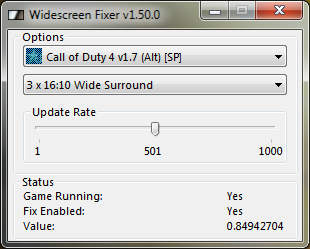
And the Lack of Results: Fixed HUD Wrong FOV

And the Lack of Results: Fixed HUD Wrong FOV
System Core: | Intel Core i5-2500K + ASUS P8Z68-V + 16GB Corsair XMS3 DDR3 1333 MHz | Win7 x64 | MSI R7970 Lightning 3GB [1105/1400] |
Display: | 3 x Dell Ultrasharp 3007WFP-HC @ 7680x1600 | Dell u3011 |
Display: | 3 x Dell Ultrasharp 3007WFP-HC @ 7680x1600 | Dell u3011 |
call of duty 4 probs :(
And the Lack of Results: Fixed HUD Wrong FOV
Here its fine, are you running the widescreen fixer as administrator (right click and choose) ?


Who is online
Users browsing this forum: Semrush [Bot] and 11 guests