Unreal Tournament 3

Detailed breakdowns of how games react to widescreen, ultra-wide, 4k and multi-mon
Th3ProphetMan
Posts: 7
Joined: 22 Feb 2008, 15:48

Unreal Tournament 3

Post by Th3ProphetMan »


Widescreen Grade: A
Ultra-Widescreen Grade: B
Multi-monitor Grade: C
4k Grade: A

Read Full Detailed Report - Unreal Tournament 3

Latest installment of the saga Unreal Tournament, probably the best fast-paced online shooter around.
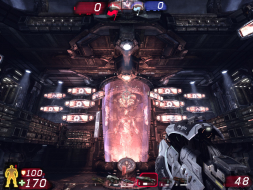

4:3


16:10
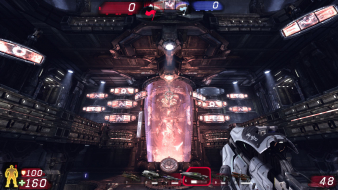

16:9
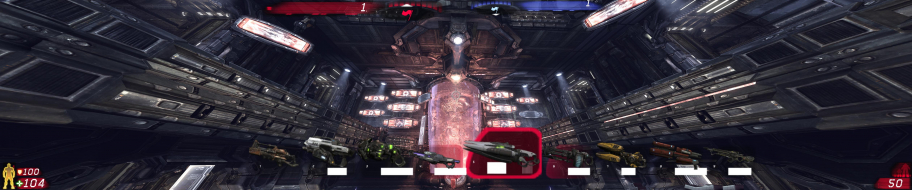

3x1

Last edited by Th3ProphetMan on 08 Jul 2014, 12:55, edited 3 times in total.
Reason: Edit
Th3ProphetMan
Posts: 7
Joined: 22 Feb 2008, 15:48

Unreal Tournament 3: Detailed Report

Post by Th3ProphetMan »

And here's an overlay i photoshoped as acurately as i could, representing the area on the scenery viewable on each resolution, and how the 16:9 gets croped on top and bottom.

click to full view


the 4:3 and 16:10 height difference is for the 16:10 FOV being 100º instead of 100.4º; as you can see, nothing to worry about, you can play with FOV100 and it'll feel exactly the same.
The_cranky_hermit
Insiders
Insiders
Posts: 3010
Joined: 07 Nov 2005, 04:16

Unreal Tournament 3: Detailed Report

Post by The_cranky_hermit »

I have a few questions.

Is the SP mode, in your opinion, worth bothering with? Or at least more worthwhile than the SP modes of previous UTs?

Is there any way to apply the FreeFOV mutator to the SP mode?

How practical is it to join a game which uses the FreeFOV mutator?

Can the FOV be increased beyond 100 through a console?
Th3ProphetMan
Posts: 7
Joined: 22 Feb 2008, 15:48

Unreal Tournament 3: Detailed Report

Post by Th3ProphetMan »

--Is the SP mode, in your opinion, worth bothering with? Or at least more worthwhile than the SP modes of previous UTs?

Not sure what to tell you, i started it but lost interest. It does have a plot so its not just playing matches after matches to win the tournament. Also sometimes you have several matches to choose from and you play them in the order you like. I guess you should try to see if you like it.

it might be better than other UTs, after all i haven't finished it, but it for sure doesnt compare to anything like call of duty and games like that.


--Is there any way to apply the FreeFOV mutator to the SP mode?

If you mean in the Solo campain i think no, unless theres a console command to do it which could be, but i dont know :/

You can play single matches against bots and use the mutator, however.


--How practical is it to join a game which uses the FreeFOV mutator?

You would have to look for people who's server uses the Mutator, i would take a look at the mutator authors page or on epic's forums ans see if there's any comunity of people out there who use this.


--Can the FOV be increased beyond 100 through a console?

Ive tried through console and from .ini files found in my documents/my saved games/unreal tournament 3/... but have had no luck at all.

I could however alter the fov slider in the game's options to slide from 80 to 200, but then selected anything beyond 100, and it wouldn't do anything.
The_cranky_hermit
Insiders
Insiders
Posts: 3010
Joined: 07 Nov 2005, 04:16

Unreal Tournament 3: Detailed Report

Post by The_cranky_hermit »

I guess you should try to see if you like it.

I can't. I don't have the game, or a computer that could run it. I wasn't asking the question for my own benefit - the grading depends on whether the game's SP mode counts or not.

Let me rephrase the question. In previous UT's, the singleplayer mode does not count. In all of the CoD's, the singleplayer mode does count. Should the SP mode count in UT3?

I guess I have one other question. In multiplayer mode, does using the mutator restrict you in any ways? That is, are there any ways you can play UT3 without FreeFOV enabled that you cannot with FreeFOV enabled? Does it conflict with any of the game's built-in or popular gameplay modes or other mutators? Is it friendly with all of them?

Basically, I'm trying to determine whether or not the FreeFOV should be considered the "official" WSGF solution or not. I'm thinking yes, but I can't be 100% sure without playing the game myself. That's why I'm asking a lot of questions to you, who have played it.
Th3ProphetMan
Posts: 7
Joined: 22 Feb 2008, 15:48

Unreal Tournament 3: Detailed Report

Post by Th3ProphetMan »

I dont think so.

As i said it has a more developed plot than previous games in the series but we all know that UT is all about the multiplayer. Also, for unreal single player there's Unreal and Unreal 2 which i loved :P

If single player in previous games wasn't considered, i wouldn't do it for this one either, but i would like to know the opinion of some more people as well. :)

I guess I have one other question. In multiplayer mode, does using the mutator restrict you in any ways? That is, are there any ways you can play UT3 without FreeFOV enabled that you cannot with FreeFOV enabled? Does it conflict with any of the game's built-in or popular gameplay modes or other mutators? Is it friendly with all of them?


There is nothing wrong that i know of, the mutator is limited itself to FOV130 so that camera won't clip through walls and stuff like that.

Also the author doesnt mention bugs or limitations except "a momentary glitch when entering/leaving vehicles".

I will take a closer look since i myself haven't put to much time into trying it out, but it looks pretty solid.

Here's the author's info on how to use the mutator:
Add the mutator when starting a game, as normal. With it running, open the console (press TAB for the quick console or F10 for the full console by default) and type mutate fov 90 (or whatever your desired FOV is in place of the 90) and press return. The value you last set will be saved in the INI file so that it can be appplied next time you run the mutator. The FOV value is a client-side setting, so if you join a server running this mutator, you will get your own chosen FOV. The allowed values for FOV are 70-130o. Values above 130 are disallowed because the camera starts to clip, allowing players to see through walls.
The_cranky_hermit
Insiders
Insiders
Posts: 3010
Joined: 07 Nov 2005, 04:16

Unreal Tournament 3: Detailed Report

Post by The_cranky_hermit »

Ok! I've got the basic info now. The mutator will be our endorsed solution, and I have a grade now. Just two more things:

I'm assuming that if the host is not using the mutator, then it won't work client-side, and you'll be stuck with 100 FOV. Is this correct?

Also, can you make two more screenshots with the mutator enabled? One at 4:3 FOV=90, one at 4:3 FOV=106.3.

Thanks.

And the grade:

Calculated grade: D+

Major unresolved issues: None
Minor unresolved issues: None

Summary of widescreen-related flaws:
Hack solution
Host-reliant solution
Stretched HUD

Cranky's coverage estimate: 98.5%
Th3ProphetMan
Posts: 7
Joined: 22 Feb 2008, 15:48

Unreal Tournament 3: Detailed Report

Post by Th3ProphetMan »

I'm assuming that if the host is not using the mutator, then it won't work client-side, and you'll be stuck with 100 FOV. Is this correct?


That's correct.

Also, can you make two more screenshots with the mutator enabled? One at 4:3 FOV=90, one at 4:3 FOV=106.3.


I've done it, but after looking to it closer i see the console command doesn't read decimals in the FOV, so it's limited to 106 instead of 106,3 :(

For perfect FOVs i've found that editing the FreeFov mutator .ini works.


The pics:

4:3 Fov90


FreeFov for 16:9 (console command) Fov106
The_cranky_hermit
Insiders
Insiders
Posts: 3010
Joined: 07 Nov 2005, 04:16

Unreal Tournament 3: Detailed Report

Post by The_cranky_hermit »

Sorry. I made a typo in my request. I meant "one at 4:3 FOV=90, one at 16:9 FOV=106.3."
Th3ProphetMan
Posts: 7
Joined: 22 Feb 2008, 15:48

Unreal Tournament 3: Detailed Report

Post by Th3ProphetMan »

UPDATE:

I finally found a way to get it perfect!

To get the correct FOV with decimals the file has to be edited, the console command won't recognize decimals. So:

Once Freefov is installed, you have to edit the file UTMutator_FreeFOV.ini in C:Users(yourusername)DocumentsMy GamesUnreal Tournament 3UTGameConfig

For 19:9 last line should be edited to:

Code: Select all

DefaultFOV=106.270273


and for 16:10:

Code: Select all

DefaultFOV=100.394872


New pics:

4:3 FOV 90:


FreeFov (edited ini) for 16:9, FOV 106.270273:


You can now see how the top and bottom borders are exactly the same on both pics.
The_cranky_hermit
Insiders
Insiders
Posts: 3010
Joined: 07 Nov 2005, 04:16

Unreal Tournament 3: Detailed Report

Post by The_cranky_hermit »

That's great news. It's also a more convenient solution, because users can just edit a file once instead of entering a console command constantly. You should update the Method section of your DR to reflect this.

Coverage is now 99.5%.
User avatar
scavvenjahh
Editors
Editors
Posts: 3424
Joined: 06 Mar 2008, 17:20

Re: Unreal Tournament 3: Detailed Report

Post by scavvenjahh »

Important resolutions i couldn't test: 1280x800, 1680x1050, 1920x1080, 1920x1200 & 2560x1600.
If that's all what's needed for 100% coverage, I can confirm all these resolutions to work natively.
The_cranky_hermit
Insiders
Insiders
Posts: 3010
Joined: 07 Nov 2005, 04:16

Unreal Tournament 3: Detailed Report

Post by The_cranky_hermit »

Coverage is 100%.
User avatar
scavvenjahh
Editors
Editors
Posts: 3424
Joined: 06 Mar 2008, 17:20

Unreal Tournament 3: Detailed Report

Post by scavvenjahh »

== Surround Gaming Support ==

FreeFOV helps, but the badly swollen HUD and Vert- weapon models render UT3 still barely playable in Surround. (3rd-person view mods may help a bit at this point, but that's another story.)

Value for 3x 16:10 :
DefaultFOV=148.951778

Don't forget to increase the MaxFOV value to at least 150 as well, since default is 130 only.

5040x1050, FOV 148.951778
PoshPorcupine
Posts: 6
Joined: 07 Apr 2010, 00:58

Re: Unreal Tournament 3: Detailed Report

Post by PoshPorcupine »

I just tried this mod with the Unreal Tournament 3: Black Edition from Steam which is version, which is version 2.1. This mod no longer appears to work so the capped FOV is 100, which is unplayable at 3x16:9... Does anyone know of a solution that works with UT3?
User avatar
ViciousXUSMC
Editors
Editors
Posts: 1497
Joined: 31 Jul 2006, 14:58

Re: Unreal Tournament 3: Detailed Report

Post by ViciousXUSMC »

And here I am looking at my steam games list and see UT3 that I have not played in forever (since before my eyefinity rig) and came to see if it works or not in surround.

Guess not, but in general I know none of the Unreal engine games are friendly with surround.
ViciousXUSMC on the Web - YouTube :: FaceBook :: Website
User avatar
scavvenjahh
Editors
Editors
Posts: 3424
Joined: 06 Mar 2008, 17:20

Re: Unreal Tournament 3: Detailed Report

Post by scavvenjahh »

Looks like this DR needs updating again...
Quick heads-up: WideScreenFixer, dude 8)
It supports v2.1. For some reason it doesn't work on the character customization screen, and it won't help with the HUD and weapons, but hey. Works like a charm and doesn't have the limitations of the FreeFOV mut.
User avatar
GeneralAdmission
Editors
Editors
Posts: 1560
Joined: 12 Sep 2007, 19:14

Re: Unreal Tournament 3: Detailed Report

Post by GeneralAdmission »

Works like a charm and doesn't have the limitations of the FreeFOV mut.

Wait a sec. So with WSF we can get proper FOVs for surround? If so then I might finally pick up this game.
User avatar
dopefish
Insiders
Insiders
Posts: 1514
Joined: 14 Apr 2007, 02:13

Re: Unreal Tournament 3: Detailed Report

Post by dopefish »

It only supports UT3 v1.1.

I haven't quite gotten v2.1 working yet.
Widescreen Fixer - https://www.widescreenfixer.org/

Widescreen Fixer Twitter - https://twitter.com/widescreenfixer
Personal Twitter - https://twitter.com/davidrudie
matrices
Posts: 137
Joined: 20 Jun 2010, 04:19

Re: Unreal Tournament 3: Detailed Report

Post by matrices »

While it'd be nice to have, the reality is that UT3 is all but dead and was dead nearly on arrival since it was such a disappointment compared with UT2K4. Too bad, really, because after some patches and the Titan pack, etc., it's actually pretty fun.
Post Reply

Who is online

Users browsing this forum: No registered users and 6 guests


