


Finally.
Bought a more suitable desk and rearranged everything. The monitor arms have cleared up and insane amount of deskspace. My old keyboard tray was about 75cm deep, but this new one is a measly 25cm... so another custom tray is next.
And a new shelf for the "tower" area to accommodate my DVD books.
But now that I've moved everything, it's all in a bit of a jumble and I find myself searches for items again.
Post your "Command Centre" Pictures Here
Re: Post your "Command Centre" Pictures Here
Last edited by Abram on 20 Jan 2014, 17:12, edited 1 time in total.


Re: Post your "Command Centre" Pictures Here
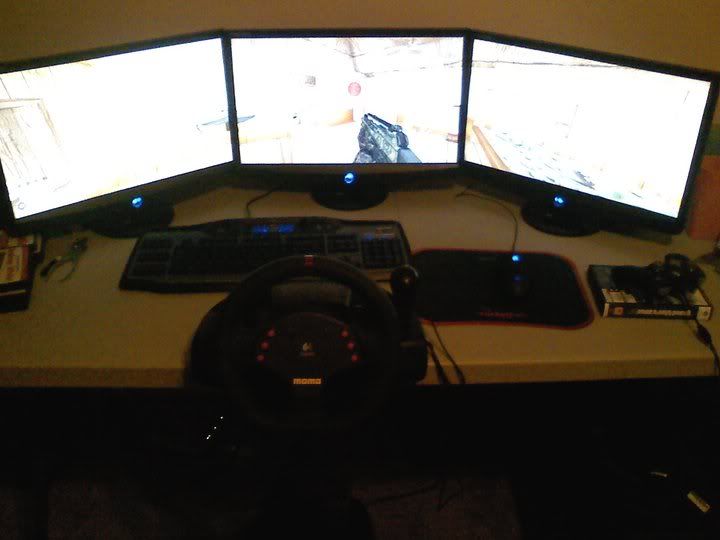
Specs are in my signature.
Sorry for crap image quality, tis my camera-phone.
-
Am2Widescreen
- Posts: 44
- Joined: 28 Sep 2006, 19:06
Re: Post your "Command Centre" Pictures Here
Here is a update to my current system.I have a new case dual video cards 8800gts 640mb version. Plus a new screen and a new desk.
My old picture that got messed up LOL

The new picture

My old picture that got messed up LOL
The new picture
Re: Post your "Command Centre" Pictures Here
Hey, i have that same small fridge. Ooo and a coffee maker on the other side.
..dangerous combo.
..dangerous combo.

Re: Post your "Command Centre" Pictures Here
Finally.
yay welcome to the club :rockout
ToCA EDIT - Over 10 Years of Game Modding and Research

Re: Post your "Command Centre" Pictures Here
Here's mine,

Custom desk I made and stuck all the cords in the wall. Got a few sneaky lights in the set up, will post them soon.
Custom desk I made and stuck all the cords in the wall. Got a few sneaky lights in the set up, will post them soon.
I still visit occasionally.
Re: Post your "Command Centre" Pictures Here
The time has come to post my Eyefinity center ;) Running on Core i5 750 and 5850 CF

Got two 22' and one 24'
Got two 22' and one 24'
-
Paradigm Shifter

- Editors

- Posts: 5706
- Joined: 14 Oct 2003, 13:52
Re: Post your "Command Centre" Pictures Here
Is something amiss, or is AM2Widescreen's picture of a seriously unimpressed looking dog?
Re: Post your "Command Centre" Pictures Here
Is something amiss, or is AM2Widescreen's picture of a seriously unimpressed looking dog?
Funny, He looks like......... WTF!!! not another picture. are you serious ??
-
burritoboy9984
- Posts: 35
- Joined: 15 Feb 2010, 14:57
Re: Post your "Command Centre" Pictures Here
Here is my current setup, nothing fancy. Currently only Dual 9800GT's, but in the future, looking at going with an E6 and doing 5x1P
-Erik

-Erik

Re: Post your "Command Centre" Pictures Here

ASUS P8Z77-V | Intel Core i7-3770 | Alpenföhn K2 | 16GB Patriot Viper 3 Black Mamba DDR3-1866MHz Kit | Intel HD Graphics 4000 | Samsung 830 64GB SSD + 2xWD Blue 500GB + Samsung F4 2TB | LG GH22NS70 + Pioneer DVR-216DBK | ASUS Xonar DX | Genius SP-HF1255A | Logitech G400 + SteelSeries QCK Mass | Dell UltraSharp U2312HM | Cooler Master 690 II Advanced | Corsair TX750W | Win 8.1 x64
-
Headshot_Harry
- Posts: 4
- Joined: 14 Apr 2010, 11:12
Re: Post your "Command Centre" Pictures Here
First post, so thought I'd share here first. finally got my 3rd (and final!) monitor. 2 x 2405FPW's on the side and a U2410 in the middle.
(I hate how cluttered my office looks, despite it actually being "almost" tidy! lol

...and another:

Only games I have at the moment are:
L4D(and2)
Borderlands
Bad Company 2 (and original BF2)
Supreme Commander 2
Didn't like Borderlands with Eyefinity sadly, but BC2 is good - although my frames are suffering in 5760 x 1200...
(I hate how cluttered my office looks, despite it actually being "almost" tidy! lol
...and another:
Only games I have at the moment are:
L4D(and2)
Borderlands
Bad Company 2 (and original BF2)
Supreme Commander 2
Didn't like Borderlands with Eyefinity sadly, but BC2 is good - although my frames are suffering in 5760 x 1200...
Re: Post your "Command Centre" Pictures Here
Here is my setup.

-
Unknownsock
- Posts: 110
- Joined: 01 Jun 2009, 23:36
Re: Post your "Command Centre" Pictures Here

Not the best but all i have atm.
Best desk in the world imo :mrgreen:


Re: Post your "Command Centre" Pictures Here
Here is my setup.
Is that a HP Home server filled with hard disks sat on top of a large electro magnet I spot there??
@Unknownsock - Looks tidy, I like, which pannels are those? :)
| Gigabyte X79S-UP5-WiFi Skt2011 | i7 4820k @4.4GHz Watercooled (Ivy Bridge-E) | Corsair Vengence 32GB @2133MHz 11-11-11-27 2T Quad-Channel (8x4GB) | AMD R9-Fury-X 4GB @1140/505MHz + EKWB Watercooled | 256GB Crucial MX200 SSD | 8x 1TB Samsung F3 SATA-II | Corsair 850W TX PSU | 3x Dell S2209W 22"wide TFT's (5760x1080res) | Logitech Z-5400 5.1ch speakers | Win7 Ultimate x64 |
Re: Post your "Command Centre" Pictures Here
[quote]Here is my setup.
Is that a HP Home server filled with hard disks sat on top of a large electro magnet I spot there??
@Unknownsock - Looks tidy, I like, which pannels are those? :)
Yes it is, but it is not on top of a LARGE electro magnet. It is on top of an enclosure that is very insulated. The magnet on the speaker would have to be siting on the hard drive itself and it would still prolly do nothing. And just to let you know the server has been running fine for about 6 months now so...
Re: Post your "Command Centre" Pictures Here
Yes it is, but it is not on top of a LARGE electro magnet. It is on top of an enclosure that is very insulated. The magnet on the speaker would have to be siting on the hard drive itself and it would still prolly do nothing. And just to let you know the server has been running fine for about 6 months now so...
Fair enough, never been one to trust speakers and drives, been hit before long ago in the past :faceplam:.
I cant say I have ever opened up my speakers (same as yours) to check the insulation on them. Although I think id be worried also about the vibrations form the sub and the heads on the drive.
| Gigabyte X79S-UP5-WiFi Skt2011 | i7 4820k @4.4GHz Watercooled (Ivy Bridge-E) | Corsair Vengence 32GB @2133MHz 11-11-11-27 2T Quad-Channel (8x4GB) | AMD R9-Fury-X 4GB @1140/505MHz + EKWB Watercooled | 256GB Crucial MX200 SSD | 8x 1TB Samsung F3 SATA-II | Corsair 850W TX PSU | 3x Dell S2209W 22"wide TFT's (5760x1080res) | Logitech Z-5400 5.1ch speakers | Win7 Ultimate x64 |
-
Unknownsock
- Posts: 110
- Joined: 01 Jun 2009, 23:36
Re: Post your "Command Centre" Pictures Here
[quote]Here is my setup.
@Unknownsock - Looks tidy, I like, which pannels are those? :)
There Dell P2210's, not great but all i could get at the time :)
Re: Post your "Command Centre" Pictures Here
here is my new setup but i used a dual xeon server with a 5850 and 4350 for tv :wink:


Who is online
Users browsing this forum: No registered users and 0 guests