
How do I "Change all found values - 3FE38E39 to your aspect ratio value" in jackfuste's guide?
I found the value on this table that I've screenshot but if I RMB > Binary > edit, that 3FE38E39 Hex code doesn't appear.
https://puu.sh/D2uIo/f7f5fcf075.jpg
Dead of Alive 6 21:9 Fix Request
Re: Dead of Alive 6 21:9 Fix Request
Thanks a bundle!
Unfortunately they already updated the game so it doesn't work anymore. Anyone working on the update? It looks a little too complicated for cpu-simpletons like me. :p
edit: actually, it would be sweet if someone could do it, but I've seen the release schedule and there's plenty of short patches coming the next weeks apparently. So don't invest too much time in it.
Unfortunately they already updated the game so it doesn't work anymore. Anyone working on the update? It looks a little too complicated for cpu-simpletons like me. :p
edit: actually, it would be sweet if someone could do it, but I've seen the release schedule and there's plenty of short patches coming the next weeks apparently. So don't invest too much time in it.
Re: Dead of Alive 6 21:9 Fix Request
Thank you! The 5120x2160 exe works for me, but as I have three 1920x1080-monitors my widescreen-resolution is 5760x1080 (or 5980x1080 without bezels) and therefore has another ratio and therefore I have big black bars on the left and right side, but at least the picture is already wider than only one 1920x1080-monitor! Thank you!
May I still ask if it would be possible for you to make an exe with an even wider resolution so that the picture would cover my whole three monitors (with one of the two triple-screen-resolutions I mentioned above)?
That would make me happy
May I still ask if it would be possible for you to make an exe with an even wider resolution so that the picture would cover my whole three monitors (with one of the two triple-screen-resolutions I mentioned above)?
That would make me happy
-
Gooseberry
- Posts: 12
- Joined: 16 Mar 2019, 02:24
- Location: Milky Way Galaxy
Re: Dead of Alive 6 21:9 Fix Request
Hey Mike, made a 5760x1080 and a 5980x1080. Not sure which resolution you actually needed. Both seem to work as far as I can tell since I don't have 3x monitors, had to test on a 21:9 but seemed alright. This is for codex version 1.02. I don't own the game and am using the Codex version, so this is the newest version I have.
A few pages back, jackfuste made a guide, that's all I followed. People should use that if they need to apply it to a newer version.
Preview below here:
A few pages back, jackfuste made a guide, that's all I followed. People should use that if they need to apply it to a newer version.
Preview below here:
Spoiler:

Re: Dead of Alive 6 21:9 Fix Request
I don't mind making the patch if someone could help me out with jackfuste's guide, I don't know how to replace 3FE38E39 hex code that I mention in a older post. I would appreciate a hand.
-
Gooseberry
- Posts: 12
- Joined: 16 Mar 2019, 02:24
- Location: Milky Way Galaxy
Re: Dead of Alive 6 21:9 Fix Request
I just double left mouse button on it (i don't right click and edit), then change the value at the end to whatever modified value I want, then press Enter, and then cancel after the next prompt pops up since that value isn't needed to be changed. Gotta do that for all 3 values that come up in the search in the previous Tab named 'References'.
The part he said "Click RMB on jmp rcx and select "Binary - Fill with NOPs"", he missed the first part when you should double left click on search result first which brings you to the next step. Then you do that part he says to fill with NOPs. From what I can tell, just adds 2 blank spots for some reason, no idea what it does or if its really needed, just followed what he said and it works.
One other thing to add, if you are using the Steam version that isn't cracked. You have to do the first step and use Steamless to unpack the exe file before doing the hex edit. If you are using the cracked Codex version, you don't have to use Steamless on it since its already unpacked.
The part he said "Click RMB on jmp rcx and select "Binary - Fill with NOPs"", he missed the first part when you should double left click on search result first which brings you to the next step. Then you do that part he says to fill with NOPs. From what I can tell, just adds 2 blank spots for some reason, no idea what it does or if its really needed, just followed what he said and it works.
One other thing to add, if you are using the Steam version that isn't cracked. You have to do the first step and use Steamless to unpack the exe file before doing the hex edit. If you are using the cracked Codex version, you don't have to use Steamless on it since its already unpacked.
Re: Dead of Alive 6 21:9 Fix Request
Okay I'm a bit stuck still lol,
Click RMB on jmp rcx and select "Binary - Fill with NOPs"
For this part do I just press okay after pressing Binary Fill with NOPs?
Change - 320 and 1C2 to your resolution value (A00 and 438 - for 2560x1080; D70 and 5A0 - for 3440x1440 etc...)
Where do I change the 320 and 1C2 to D70 and 5A0
Thanks.
Click RMB on jmp rcx and select "Binary - Fill with NOPs"
For this part do I just press okay after pressing Binary Fill with NOPs?
Change - 320 and 1C2 to your resolution value (A00 and 438 - for 2560x1080; D70 and 5A0 - for 3440x1440 etc...)
Where do I change the 320 and 1C2 to D70 and 5A0
Thanks.
-
Gooseberry
- Posts: 12
- Joined: 16 Mar 2019, 02:24
- Location: Milky Way Galaxy
Re: Dead of Alive 6 21:9 Fix Request
Okay I'm a bit stuck still lol,
Click RMB on jmp rcx and select "Binary - Fill with NOPs"
For this part do I just press okay after pressing Binary Fill with NOPs?
Change - 320 and 1C2 to your resolution value (A00 and 438 - for 2560x1080; D70 and 5A0 - for 3440x1440 etc...)
Where do I change the 320 and 1C2 to D70 and 5A0
Thanks.[/quote]
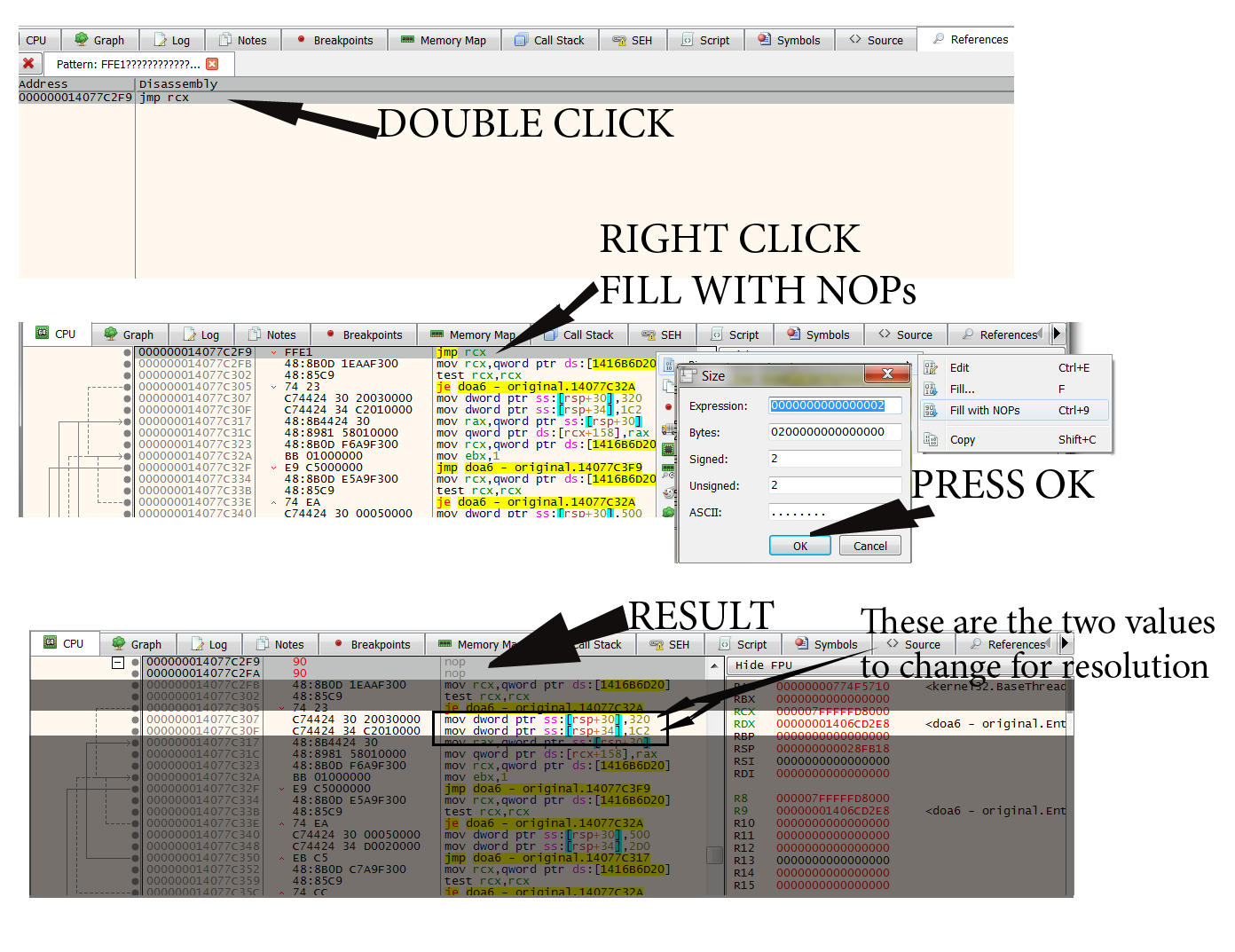
Hard to describe it so I took some screenshots to try to show what I did. Hope it helps you figure it out. Follow what jackfuste did in previous post and do what he said step by step. I assume I'm doing it right, I could be wrong also but the exe files i ran seem to work fine.
Screenshot is below:
Click RMB on jmp rcx and select "Binary - Fill with NOPs"
For this part do I just press okay after pressing Binary Fill with NOPs?
Change - 320 and 1C2 to your resolution value (A00 and 438 - for 2560x1080; D70 and 5A0 - for 3440x1440 etc...)
Where do I change the 320 and 1C2 to D70 and 5A0
Thanks.[/quote]
Hard to describe it so I took some screenshots to try to show what I did. Hope it helps you figure it out. Follow what jackfuste did in previous post and do what he said step by step. I assume I'm doing it right, I could be wrong also but the exe files i ran seem to work fine.
Screenshot is below:
Spoiler:

Re: Dead of Alive 6 21:9 Fix Request
Thanks a ton, I missed that they were a couple lines below there, really appreciate the screenshot guide.
Here's for 3440 x 1440p: (link removed)
Here's for 3440 x 1440p: (link removed)
Re: Dead of Alive 6 21:9 Fix Request
Thank you very much! I think I'm too silly to follow jackfruste guide. 
He wrote for examle "4017B426 - for 2560x1080; 4018E38E - for 3440x1440 etc..." but I don't know how to get my value for my ratio... (But problem must be me as others know what to do...)
He wrote for examle "4017B426 - for 2560x1080; 4018E38E - for 3440x1440 etc..." but I don't know how to get my value for my ratio... (But problem must be me as others know what to do...)
-
Gooseberry
- Posts: 12
- Joined: 16 Mar 2019, 02:24
- Location: Milky Way Galaxy
Re: Dead of Alive 6 21:9 Fix Request
Thank you very much! I think I'm too silly to follow jackfruste guide.
He wrote for examle "4017B426 - for 2560x1080; 4018E38E - for 3440x1440 etc..." but I don't know how to get my value for my ratio... (But problem must be me as others know what to do...)[/quote]
Glad it worked. Actually the way I got the ratio value is just using this guide on the site here.
http://www.wsgf.org/article/common-hex-values
For your 5760x1080 i used the 16:9x3 value "AB AA AA 40" from that chart from that link above there.
And then reversed it to 40 AA AA AB (no spaces though when you are putting the values into the edited file, i just have them to show you what was reversed).
He wrote for examle "4017B426 - for 2560x1080; 4018E38E - for 3440x1440 etc..." but I don't know how to get my value for my ratio... (But problem must be me as others know what to do...)[/quote]
Glad it worked. Actually the way I got the ratio value is just using this guide on the site here.
http://www.wsgf.org/article/common-hex-values
For your 5760x1080 i used the 16:9x3 value "AB AA AA 40" from that chart from that link above there.
And then reversed it to 40 AA AA AB (no spaces though when you are putting the values into the edited file, i just have them to show you what was reversed).
-
Azeemotron
- Posts: 4
- Joined: 21 Oct 2018, 00:53
Re: Dead of Alive 6 21:9 Fix Request
Thanks a lot, made the process a lot more easier for me!
-
Ivory_Soul
- Posts: 13
- Joined: 08 Mar 2019, 07:10
Re: Dead of Alive 6 21:9 Fix Request
The 1.03a update just released today and now the exe is broken again. Anyone know of a fix?
Re: Dead of Alive 6 21:9 Fix Request
[/quote]Gooseberry wrote:Mike1304 wrote:Glad it worked. Actually the way I got the ratio value is just using this guide on the site here.
http://www.wsgf.org/article/common-hex-values
For your 5760x1080 i used the 16:9x3 value "AB AA AA 40" from that chart from that link above there.
And then reversed it to 40 AA AA AB (no spaces though when you are putting the values into the edited file, i just have them to show you what was reversed).
Thank you so much for helping me!
Unfortunately, today Steam updated the games exe again and now I can't use your fixed exe anymore (game says something like "newer version found, you can't use this one anymore").
Grrr, I hate this! Is there a chance that you can relase a new 5980x1080 file for me?
I really tried to make it by myself but it seems I have no chance. I'm not a programmer or something like that, therefore it's really hard to understand the jackfruste guide and the infos you told me.
For example:
1. You told me the value for 5760x1080, but I would need 5980x1080 (without bezels) and there is no value for this resolution in the link you mentioned. Don't know how to "calculate" the correct value...
2. When trying to use the jackfruste guide I'm already lost with the first step: "Unpack DOA6.exe using - https://github.com/atom0s/Steamless". Unfortunately there isn't more info what this means and what I should do exactly. Well, at least I tried and and downloaded the file from the link. Now I have a folder called "Steamless-master" but I don't know what I should do with it. There are no exe-files inside, only ".cs"-files (visual c???). Don't know what "unpack DOA6.exe using Steamless" means. I only find the DOA6.exe-file in my Steam-game-folder. How does this work?
3. You write that you "reversed" the value (so you wrote the numbers from right to left, instead from left to right). Why? Can't find this step in the jackfruste guide. There is nothing written about "reversing" values?
As you can see, I have no idea what to do. I would be very happy if you could tell me what to do and answer my above questions or (even better) give me once again a new fixed DOA6.exe for my 5980x1080-resolution.
I know it's terrible, because what if Steam updates the game again and again, so the file will be broken again and again. It's unbelievable that there is no support for triple/widescreen-resolutions out of the box in the game-menu.
It' so frustrating that I know how good the game looks in widescreen and then (just because of a silly update) I have to play on one single screen again...
Please help me if you want (sorry English is note my mother language).
-
Azeemotron
- Posts: 4
- Joined: 21 Oct 2018, 00:53
Re: Dead of Alive 6 21:9 Fix Request
Mike1304 wrote:When trying to use the jackfruste guide I'm already lost with the first step: "Unpack DOA6.exe using - https://github.com/atom0s/Steamless". Unfortunately there isn't more info what this means and what I should do exactly. Well, at least I tried and and downloaded the file from the link. Now I have a folder called "Steamless-master" but I don't know what I should do with it. There are no exe-files inside, only ".cs"-files (visual c???). Don't know what "unpack DOA6.exe using Steamless" means. I only find the DOA6.exe-file in my Steam-game-folder. How does this work?
Well, in terms of getting Steamless opened from that folder you downloaded, I believe to open it you have to go to Steamless-master\Steamless\bin\x86\Debug and there is an Application Icon for the file that you can open that will open Steamless. Although, I could be wrong, considering how buried this is in the file structure it may be a wrong version or something. The other way is to run it through Visual Studio.
I'm having the same issue that someone else posted an image of early on in this forum. That is, unpacking in Steamless results in '[Steamless] Failed to unpack file.' It's from Steam & not Pirated, not sure what I'm doing wrong.
Edit: Turns out I was downloading the wrong thing. You've got to download Steamless from the 'Release' rather then downloading all the GitHub file stuff. While I can unpack the game fine now, what I can't do is open it in the debugger. Even when unticking the stated boxes, it just says 'Terminated' and doesn't display anything.
Last edited by Azeemotron on 30 Mar 2019, 23:40, edited 1 time in total.
Re: Dead of Alive 6 21:9 Fix Request
Ever since the recent patch for Dead or Alive 6, using the instructions doesn't seem to work for me.
C7 44 24 58 80 07 00 00 C7 44 24 5C 38 04 00 00
Searching for this pattern comes up with nothing
C7 44 24 58 80 07 00 00 C7 44 24 5C 38 04 00 00
Searching for this pattern comes up with nothing
-
ArteSequencia
- Posts: 7
- Joined: 10 Mar 2019, 21:45
Re: Dead of Alive 6 21:9 Fix Request
I tried the Jackfuste tutorial but I still can not do it, it's giving something wrong but I'll keep trying. more for when someone who already has experience could convert to min? I wanted to convert to 5120x2160, but not the original EXE of the game, but what KamiyaKoenji converted to get the feel of the punches on the younger girls: (https://www.deviantart.com/kamiyakoenji/art/Dead-Or -Alive-6-STEAM-Uncensor-Patch-v-1-03a-791659725)
-
Ivory_Soul
- Posts: 13
- Joined: 08 Mar 2019, 07:10
Re: Dead of Alive 6 21:9 Fix Request
Has anyone patched the 1.03a update yet?
Re: Dead of Alive 6 21:9 Fix Request
Hello,
@KOrigin do not search on current module the pattern, search everywhere.
@Azeemotron You need to uncheck the first 3 options, but you need to check the fourth. Stop on DLL I think.
@KOrigin do not search on current module the pattern, search everywhere.
@Azeemotron You need to uncheck the first 3 options, but you need to check the fourth. Stop on DLL I think.
Re: Dead of Alive 6 21:9 Fix Request
Mith wrote:Hello,
@KOrigin do not search on current module the pattern, search everywhere.
@Azeemotron You need to uncheck the first 3 options, but you need to check the fourth. Stop on DLL I think.
Where do I search everywhere?
Like in my attached screenshot? Using that also comes up with blank results
Thanks
- Attachments
-
- 88.PNG (341.94 KiB) Viewed 11008 times
Who is online
Users browsing this forum: Semrush [Bot] and 16 guests