

Assassin's Creed Chronicles: China

Detailed breakdowns of how games react to widescreen, ultra-wide, 4k and multi-mon
Post Reply
User avatar
czarman
Insiders
Insiders
Posts: 685
Joined: 11 Dec 2008, 23:51
Location: Germany

Assassin's Creed Chronicles: China

Post by czarman »


Widescreen Grade: A
Ultra-Widescreen Grade: C
Multi-monitor Grade: C
4k Grade: Incomplete

Read Full Detailed Report - Assassin's Creed Chronicles: China

Assassin's Creed Chronicles: China is the first game of three in the Chronicles spin-off series based on the main Assassin's Creed franchise. It is a 2.5D platform game.


4:3
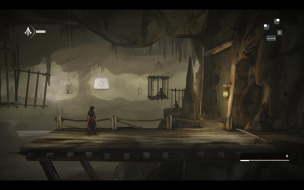

16:10
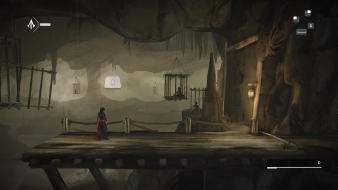

16:9
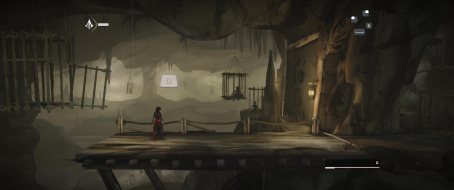

21:9
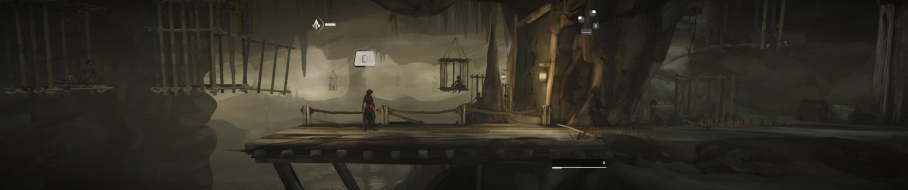

3x1

Last edited by czarman on 25 Mar 2019, 19:49, edited 3 times in total.
Reason: Edit
CZARMAN aka 彼得爸爸
Mark_B
Posts: 8
Joined: 26 Jul 2016, 23:39

Re: Assassin's Creed Chronicles: China

Post by Mark_B »

This fix did not work anymore for 21:9?`

Aspect Ratio: Go to ...\China\ACCGame\CookedPCConsole\ACCGame.upk
Look in Offset E5AE0 for this Hex Code: 4C 8E E3 3F and change it to your Aspect Ratio. for example CD 90 18 40 (21:9)

I go there but i don't found 4C 8E E3 3F at Offset E5AE0...

Please help
User avatar
czarman
Insiders
Insiders
Posts: 685
Joined: 11 Dec 2008, 23:51
Location: Germany

Re: Assassin's Creed Chronicles: China

Post by czarman »

The FIX is still working look for 4C 8E E3 3F in Offset 12B700 and 12B710
CZARMAN aka 彼得爸爸
Mark_B
Posts: 8
Joined: 26 Jul 2016, 23:39

Re: Assassin's Creed Chronicles: China

Post by Mark_B »

Man i find the fault...i become every time a error message with the apk after edit it but i don't read this exactly cause the game starts a second later and the message dissapear.. Now i read the message and it was clear.

i maded a backup folder with the apk in it and the game wrote me that it found an edited one and it tooks the one in the backup folder to play... :doh:

Now after deleting the backup folder all works fine :twothumb:

Thanks :cheers:
imbarnaba
Posts: 4
Joined: 25 Mar 2019, 03:13

Re: Assassin's Creed Chronicles: China

Post by imbarnaba »

FOV: Go to C:\Users\...\Documents\my games\UnrealEngine3\ACCGame\Config\ACCDInput.ini
Add this Lines under [Engine.PlayerInput]
Bindings=(Name="F1",Command="FOV 90",Control=False,Shift=False,Alt=False)
Bindings=(Name="F2",Command="FOV 100",Control=False,Shift=False,Alt=False)
Bindings=(Name="F3",Command="FOV 110",Control=False,Shift=False,Alt=False)

This doesn't work for me.

The name of the input file has changed, I know, but still adding these lines does not fix the FOV.
The aspect ratio is ok (21:9), but the FOV is close up.

Could anyone help please?
User avatar
susahamat
Posts: 530
Joined: 20 Sep 2015, 00:58

Re: Assassin's Creed Chronicles: China

Post by susahamat »

put this lines under [ACCGame.ACCPlayerInput] instead of [Engine.PlayerInput]

ACChina_FOV.jpg
ACChina_FOV.jpg (37.47 KiB) Viewed 9072 times

Bindings=(Name="F1",Command="FOV 90",Control=False,Shift=False,Alt=False)
Bindings=(Name="F2",Command="FOV 100",Control=False,Shift=False,Alt=False)
Bindings=(Name="F3",Command="FOV 117",Control=False,Shift=False,Alt=False)
Attachments
ACCGame-Win32-Shipping_2019_03_25_18_06_28_069.png
ACCGame-Win32-Shipping_2019_03_25_18_06_28_069.png (2.16 MiB) Viewed 9086 times
if you supporting what I do, buy me a coffee here https://ko-fi.com/kevinsesario or instead direct to paypal.me/kevinsesario . EMAIL:mailto:?subject=&body=, Steam: https://steamcommunity.com/id/sesariok
imbarnaba
Posts: 4
Joined: 25 Mar 2019, 03:13

Re: Assassin's Creed Chronicles: China

Post by imbarnaba »

Thank you very much, susahamat! Blessed be the Internet, and its people!

Perhaps the main article should be updated with this info?
I tried to update it but am afraid to wipe the existing information if I do so (I only joined the forum yesterday..).
User avatar
susahamat
Posts: 530
Joined: 20 Sep 2015, 00:58

Re: Assassin's Creed Chronicles: China

Post by susahamat »

your welcome , ok i'll update this info btw its easy to edit hehe. hopefully next time you can contribute information in this site :) tutorial in here https://www.youtube.com/watch?v=HqoeocJ ... 1oikgYJ2p7 .
if you supporting what I do, buy me a coffee here https://ko-fi.com/kevinsesario or instead direct to paypal.me/kevinsesario . EMAIL:mailto:?subject=&body=, Steam: https://steamcommunity.com/id/sesariok
imbarnaba
Posts: 4
Joined: 25 Mar 2019, 03:13

Re: Assassin's Creed Chronicles: China

Post by imbarnaba »

I will, thanks!

Sorry to keep bothering you with this.. but in order to have the FoV working I have to press F1, F2 or F3 manually EVERY time I respawn, or enter the map view. Kinda annoying..
I play with a gamepad, and was trying to assign the FoV command to a gamepad left stick.. but failed again, I feel shit at this config tinkering..
Is there any fix for this, do you know?
User avatar
susahamat
Posts: 530
Joined: 20 Sep 2015, 00:58

Re: Assassin's Creed Chronicles: China

Post by susahamat »

it seems works great here, im using game UPLAY latest version w/ controller too . i've started game tested to respawn and opened map , the fov remain the same. try set the atributes .ini file to "read-only"

UPDATE: i got reset fov too when "restart checkpoint"
Attachments
binari-2019.03.26---07.29.gif
binari-2019.03.26---07.29.gif (4.24 MiB) Viewed 9072 times
if you supporting what I do, buy me a coffee here https://ko-fi.com/kevinsesario or instead direct to paypal.me/kevinsesario . EMAIL:mailto:?subject=&body=, Steam: https://steamcommunity.com/id/sesariok
User avatar
czarman
Insiders
Insiders
Posts: 685
Joined: 11 Dec 2008, 23:51
Location: Germany

Re: Assassin's Creed Chronicles: China

Post by czarman »

For a permanent FOV solution:

Unpack ACCGame-Win32-Shipping.exe using Steamless - https://github.com/atom0s/Steamless/releases/
Using Hex-editor replace the following bytes:
61 0B 36 3B => 61 0B 66 3B
CZARMAN aka 彼得爸爸
imbarnaba
Posts: 4
Joined: 25 Mar 2019, 03:13

Re: Assassin's Creed Chronicles: China

Post by imbarnaba »

Thanks again for patience, looking it up and all the good advice amico! Points of Internet respect towards you, cheers!

I managed to assign my favorite FoV command to left stick button last night.

It's been probably said over and over on these forums, but I wish all the developers respected our Ultra-Wide community!
This website is a great initiative! Thank you for contributing and maintaining it!
Nevertheless I hope that one of these days it's not going to be needed anymore. (Likely a fool's dream..)

Utra-Wide gaming is so much more engaging than regular 16:9!
User avatar
susahamat
Posts: 530
Joined: 20 Sep 2015, 00:58

Re: Assassin's Creed Chronicles: China

Post by susahamat »

ACC_FOVChanger.jpg
ACC_FOVChanger.jpg (32.33 KiB) Viewed 2890 times

DL :
ACC_FOVChanger.7z
(4.03 MiB) Downloaded 477 times
if you supporting what I do, buy me a coffee here https://ko-fi.com/kevinsesario or instead direct to paypal.me/kevinsesario . EMAIL:mailto:?subject=&body=, Steam: https://steamcommunity.com/id/sesariok
Post Reply

Who is online

Users browsing this forum: No registered users and 7 guests