
Anyone with experience able to guide me to the right hex values, or able to make the modification for the game to display correctly in 21:9
Thanks
Ill mention, i tried to hex edit the 16x9 value I found in exe to 21x9, upon launch I just get an error from the game.
exe: https://www.mediafire.com/file/nlrnaydv ... E.exe/file
Tales of Vesperia Definitive Edition Ultrawide

Re: Tales of Vesperia Definitive Edition Ultrawide
21x9
32x9
32x9
- Attachments
-
- TOV_DE_2019_01_11_11_09_12_218.png (1.93 MiB) Viewed 30364 times
-
- TOV_DE_2019_01_11_09_36_16_310.png (1.86 MiB) Viewed 30372 times
if you supporting what I do, buy me a coffee here https://ko-fi.com/kevinsesario or instead direct to paypal.me/kevinsesario . EMAIL:mailto: ? subject= & body=
-
Homer Morisson
- Posts: 15
- Joined: 05 Sep 2018, 14:08
Re: Tales of Vesperia Definitive Edition Ultrawide
susahamat wrote:21x9
Thank you, wonderful that you could help us all so quickly! =)
Have to wonder though what I did wrong, as I ran into the same issue as the OP; "fixed" the HEX value AR, but also only got an application error msg when trying to launch...

Edit:
Sadly it has a very similar visual issue to Dragon Quest XI, as during loading a new scene/room there's the regular non-ultrawide portion of the screen fading to black, while the two former black bars flicker and then load the new scene while the middle part is still black... any chance anyone knows how to fix this?
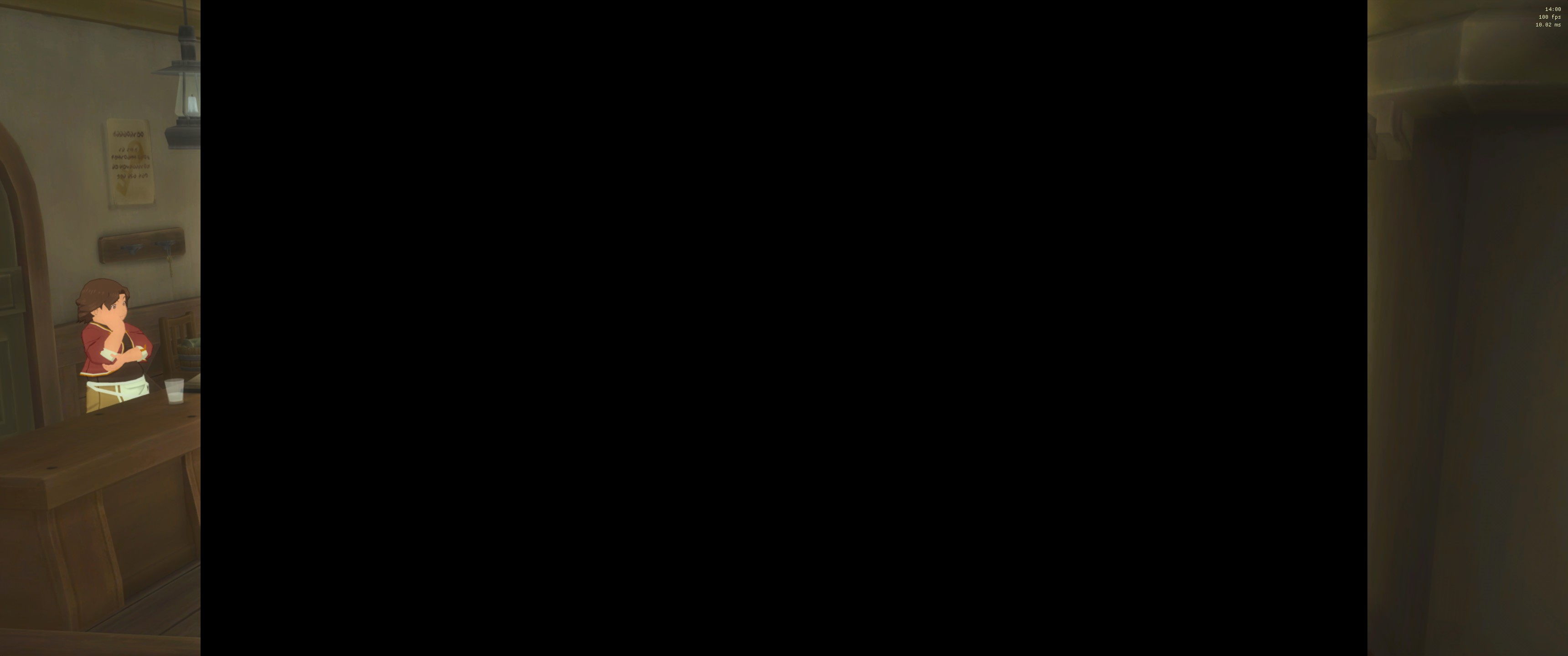
Edit 2:
Has even more issues that sadly won't be fixable, for example characters that are supposed to both spawn in or out offscreen now do so in full view in the enhanced screen area that without the fix would have been the black bars -- you can test this very early on when leaving the Lower Quarter for the World Map the first time (little boy spawning in on the right), as well as in Deidon Hold when
Spoiler:
To me, this is just too much immersion-breaking stuff sadly, but still thanks for the effort, susa... everyone just needs to figure out if it's worth it to them, I guess.
- CPU: Intel Core i7 8700K @ 6x4.7 GHz
- RAM: 32 GB G.Skill RipJawsV DDR4/3200 2x16 GB
- GPU: EVGA RTX 2080 FTW3 ULTRA GAMING @ 2100 Mhz Boost
- Display: Alienware AW3418DW 34" 21:9 IPS@100 Hz native(!) 3440x1440
-
Darkshowdo
- Posts: 3
- Joined: 11 Jan 2019, 00:33
Re: Tales of Vesperia Definitive Edition Ultrawide
@susahamat
Can you let me know what you did to fix this?
I always try my hardest to make the games work for 21:9 but the basic hex editing the aspect ratio broke the game here.
Can you let me know what you did to fix this?
I always try my hardest to make the games work for 21:9 but the basic hex editing the aspect ratio broke the game here.
Re: Tales of Vesperia Definitive Edition Ultrawide
susahamat wrote:21x9
32x9
Please.. can i get 3840x1600 resolution? 38inch monitor resolution
-
Darkshowdo
- Posts: 3
- Joined: 11 Jan 2019, 00:33
Re: Tales of Vesperia Definitive Edition Ultrawide
mtml73 wrote:susahamat wrote:21x9
32x9
Please.. can i get 3840x1600 resolution? 38inch monitor resolution
Here this should work for that
Re: Tales of Vesperia Definitive Edition Ultrawide
Darkshowdo wrote:
Here this should work for that
thank you
 it works well
Re: Tales of Vesperia Definitive Edition Ultrawide
Can you please make a 5160x2160 fix for me?
Re: Tales of Vesperia Definitive Edition Ultrawide
if you supporting what I do, buy me a coffee here https://ko-fi.com/kevinsesario or instead direct to paypal.me/kevinsesario . EMAIL:mailto: ? subject= & body=
Re: Tales of Vesperia Definitive Edition Ultrawide
susahamat wrote:
Thanks!
Re: Tales of Vesperia Definitive Edition Ultrawide
Can you make a 5760x1080 ? please
Re: Tales of Vesperia Definitive Edition Ultrawide
48x9 (4800x900, 5760x1080, etc.)
if you supporting what I do, buy me a coffee here https://ko-fi.com/kevinsesario or instead direct to paypal.me/kevinsesario . EMAIL:mailto: ? subject= & body=
Re: Tales of Vesperia Definitive Edition Ultrawide
susahamat wrote:48x9 (4800x900, 5760x1080, etc.)
Thanks !!!
-
Demi-Fiend
- Posts: 5
- Joined: 07 Mar 2019, 01:14
Re: Tales of Vesperia Definitive Edition Ultrawide
The game updated recently, can you fix the new exe for 2560x1080
https://www.mediafire.com/file/p6zm21zy ... E.exe/file
or can you tell how to do this mysefl, normal hex edit wont work, i really want to learn and not depend on others.
https://www.mediafire.com/file/p6zm21zy ... E.exe/file
or can you tell how to do this mysefl, normal hex edit wont work, i really want to learn and not depend on others.
Re: Tales of Vesperia Definitive Edition Ultrawide
Update v1.2
21x9
32x9
48x9
EDIT : Sorry something wrong with the files . i've repack all of them , should be work now
21x9
32x9
48x9
EDIT : Sorry something wrong with the files . i've repack all of them , should be work now
if you supporting what I do, buy me a coffee here https://ko-fi.com/kevinsesario or instead direct to paypal.me/kevinsesario . EMAIL:mailto: ? subject= & body=
Re: Tales of Vesperia Definitive Edition Ultrawide
Can you please make a 3840x1600 for update v1.2?
Re: Tales of Vesperia Definitive Edition Ultrawide
if you supporting what I do, buy me a coffee here https://ko-fi.com/kevinsesario or instead direct to paypal.me/kevinsesario . EMAIL:mailto: ? subject= & body=
Re: Tales of Vesperia Definitive Edition Ultrawide
susahamat wrote:
Thanks!!
-
Demi-Fiend
- Posts: 5
- Joined: 07 Mar 2019, 01:14
Re: Tales of Vesperia Definitive Edition Ultrawide
Thanks for this
-
Dragons Fear
- Posts: 2
- Joined: 04 Apr 2019, 16:10
Re: Tales of Vesperia Definitive Edition Ultrawide
can you add one please for 3840X1024 , thanks in advance
Who is online
Users browsing this forum: DuckDuckGo [Bot] and 9 guests