
So now that my PC is finally running right (other than this issue) and all my RMAs finally made it back to me, I am now troubleshooting issues with my video. You can see my PC setup in my signature, but as far as my displays go, I have two Acer G245HQ monitors with a PS3 3D display in the middle for my Eyefinity setup. The PS3 display is connected via HDMI, one of the Acer monitors is connected by an DVI cable and the other is connected to a VisionTek 900341 Mini-Display Port to DVI Adapter (using a DVI cable of course). Now the problem I'm having is that most games aren't even playable in Eyefinity mode. Some aren't even playable when I'm not in Eyefinity mode. The frame rates are horrible as you will see from my testing below and this is very frustrating considering the amount of money I spent on the system. For most games, my Core 2 Quad PC with 8GB of RAM will out perform this one which is very sad. I really hope someone can give some insight as to why I may be getting such crappy frame rates and hopefully I will be able to unleash the power of this beast. Anyway, testing is as follows:
All programs were closed during these tests except for Fraps and Steam. I first took an FPS baseline of the games while Eyefinity was disabled and then again in the same games with Eyefinity enabled. Another thing I should mention, is that I have enabled the on board OC Genie on my motherboard and that boosted my CPU up to 4.0Ghz. After testing these games again, there was no increase in frame rate. I attempted an OC of the video card as well using CCC, but my PS3 display started freaking out a bit so I set everything back to default on the GPU. I ran before and after baselines using 3DMark11. Unfortunately it doesn't look like it would have helped much anyway.
Eyefinity Disabled
War Inc Battlezone
High Settings 57-60 FPS
Low Settings 60 FPS
Minecraft (Windowed Mode)
High Settings 56-75 FPS
Low Settings 280 – 350 FPS
Saints Row The Third
1980x720
DX9 Mode
High Settings 17-25
Low Setttings 23-40
DX10/11 Mode
High Settings 5
Low Settings 7-10
Homefront
High Settings 42-53
Low Settings 30
Black Ops
1920x1080
High Settings 33-55
Low Settings 40-75
Eyefinity Enabled
Saints Row The Third
5760x1080
DX9 Mode
High Settings 6-8
Low Setttings 7-9
DX10/11 Mode
High Settings 4
Low Settings 6
Black Ops (w/ Widescreen Fixer
5760x1080
High Settings 15-35
Low Settings 27-35
Minecraft (Windowed Mode)
High settings 66-94
Low Settings 90-200
Homefront (w/ Homefront Widscreen)
High Settings 17-18
Low Settings 23-30
War Inc Battlefield
High Settings 28
Low Settings 60
So based on most of these, you can probably see why I am pretty frustrated with how the video card is acting. I understand that when using Eyefinity you will experience a loss in quality to keep your FPS alive but when you look at the results from testing Saints Row especially, I can barely even run this game on the lowest settings. That seems a little ridiculous to me and I'm pretty sure a 2GB graphics card should be capable of playing a game like that.
Hoping the experts here can help! Let me know if you need any more information or have any suggestions for me to try. Thanks!
Solved - XFX 6970 Runs Like Garbage
-
Duetschbag

- Posts: 18
- Joined: 01 Jun 2012, 04:02
Solved - XFX 6970 Runs Like Garbage
Motherboard: MSI X79A-GD65 (8D)
Memory: G.SKILL Ripjaws Z Series 32GB (8 x 4GB) 240-Pin DDR3 SDRAM DDR3 1600 (PC3 12800) Desktop Memory Model F3-12800CL9Q2-32GBZL
PSU: Rosewill LIGHTNING Series LIGHTNING-1000 1000W ATX12V/EPS12V 80 PLUS GOLD Certified
Memory: G.SKILL Ripjaws Z Series 32GB (8 x 4GB) 240-Pin DDR3 SDRAM DDR3 1600 (PC3 12800) Desktop Memory Model F3-12800CL9Q2-32GBZL
PSU: Rosewill LIGHTNING Series LIGHTNING-1000 1000W ATX12V/EPS12V 80 PLUS GOLD Certified

Hey Duetsch,That is either
Hey Duetsch,
That is either one hell of a play on usernames or you stink at spelling! ;) Duet, Deutsch, and Douchebag all in one, huh? I'm just giving you a hard time 'cause I like linguistics. Don't mind me!
Have you previously had this rig running Eyefinity with high framerates? Or, is it just now that you're going from single-screen to triple-wide that your framerates are dropping so dramatically?
My best guess would be that you're using too much anti-aliasing or post-processing in these games. Rendering three screens compared to one screen is murder on your graphics card anyway. Seeing 1/3 the framerate when rendering three times as many pixels isn't ideal, but it makes sense. Then, adding in any effects that have to be calculated across all three screens makes it even worse. Try completely disabling antialiasing and see if you get back to acceptable framerates. Also try lowering your anisotropic filtering levels or any post-processing effects specific to the games you play like motion-blur, SSAO, or HBAO.
That is either one hell of a play on usernames or you stink at spelling! ;) Duet, Deutsch, and Douchebag all in one, huh? I'm just giving you a hard time 'cause I like linguistics. Don't mind me!
Have you previously had this rig running Eyefinity with high framerates? Or, is it just now that you're going from single-screen to triple-wide that your framerates are dropping so dramatically?
My best guess would be that you're using too much anti-aliasing or post-processing in these games. Rendering three screens compared to one screen is murder on your graphics card anyway. Seeing 1/3 the framerate when rendering three times as many pixels isn't ideal, but it makes sense. Then, adding in any effects that have to be calculated across all three screens makes it even worse. Try completely disabling antialiasing and see if you get back to acceptable framerates. Also try lowering your anisotropic filtering levels or any post-processing effects specific to the games you play like motion-blur, SSAO, or HBAO.
-
Duetschbag
- Posts: 18
- Joined: 01 Jun 2012, 04:02
Thanks for the response.
Thanks for the response. Also, thanks for the username comment, I rarely get those. :)
This is a new rig that I have built and have been having this problem since day one so the frame rates have never been higher than what they are as of my post.
I will try removing those items while playing on high settings to see if this gives me any better results.
The only thing that concerns me is that some games don't play well at all even on low settings. Or in the case of Saints Row, even when playing on a single display, the game isn't even playable on low settings. I mean, sure FRAPS is telling me 23-40 FPS, but it definitely doesn't feel that way.
This is a new rig that I have built and have been having this problem since day one so the frame rates have never been higher than what they are as of my post.
I will try removing those items while playing on high settings to see if this gives me any better results.
The only thing that concerns me is that some games don't play well at all even on low settings. Or in the case of Saints Row, even when playing on a single display, the game isn't even playable on low settings. I mean, sure FRAPS is telling me 23-40 FPS, but it definitely doesn't feel that way.
Motherboard: MSI X79A-GD65 (8D)
Memory: G.SKILL Ripjaws Z Series 32GB (8 x 4GB) 240-Pin DDR3 SDRAM DDR3 1600 (PC3 12800) Desktop Memory Model F3-12800CL9Q2-32GBZL
PSU: Rosewill LIGHTNING Series LIGHTNING-1000 1000W ATX12V/EPS12V 80 PLUS GOLD Certified
Memory: G.SKILL Ripjaws Z Series 32GB (8 x 4GB) 240-Pin DDR3 SDRAM DDR3 1600 (PC3 12800) Desktop Memory Model F3-12800CL9Q2-32GBZL
PSU: Rosewill LIGHTNING Series LIGHTNING-1000 1000W ATX12V/EPS12V 80 PLUS GOLD Certified

I'd say turn of Antialiasing
I'd say turn of Antialiasing and you should be okay in most of the games... Also check settings in AMD VISION Control Center->Games->Application 3d Settings and set everything on controlled by the game or default - and turn off AA here too.
-
Sh4dowking
- Insiders

- Posts: 156
- Joined: 08 Nov 2011, 09:36
- Location: The Netherlands
Hello Duetschbag,I had a
Hello Duetschbag,
I had a single hd7970 a couple of months ago when it just released and i had the same problem as you, Low FPS with some games (Not all games tought). I don't know if you have low fps with all your games or just with the once you show us. I don't know if this will work for you too but make sure that (if you have drivers from nvidia on your pc delete them) and reinstal Net Framework from Microsoft and reinstall all the Microsoft Visual C++ from your computer. I did this and it worked for me for a couple of days but the problem came back. So i switched back to nvidia and nvidia works fine for me in surround.
It could also be that your card is too low, maby you have to buy one more and put them in eyefinity. You can try my solution but i don't know if it will work for you. You can always try.
Sh4dowking
I had a single hd7970 a couple of months ago when it just released and i had the same problem as you, Low FPS with some games (Not all games tought). I don't know if you have low fps with all your games or just with the once you show us. I don't know if this will work for you too but make sure that (if you have drivers from nvidia on your pc delete them) and reinstal Net Framework from Microsoft and reinstall all the Microsoft Visual C++ from your computer. I did this and it worked for me for a couple of days but the problem came back. So i switched back to nvidia and nvidia works fine for me in surround.
It could also be that your card is too low, maby you have to buy one more and put them in eyefinity. You can try my solution but i don't know if it will work for you. You can always try.
Sh4dowking
Asrock Z77 Extreme 4 ----- Intel Core i7 2700K ----- GTX 680 Twinn Frozer III ----- NVIDIA Geforce GT 520 1x Edition
-
Duetschbag
- Posts: 18
- Joined: 01 Jun 2012, 04:02
Here is what I did
Here is what I did tonight:
@Bifurk8 and Blevar
I have included some screen shots in the zip below. Basically I disabled/lowered everything possible in CCC under the 3D Application Settings (prior to this, they were at the defaults). Yet when I was running Saints Row under low settings without Eyefinity, I still was getting terrible frame rates. This occurred for most games, but I think I'm going to stick to troubleshooting this one game on low settings. Mostly because if this card can't play a game on low settings, they can take it back and I'll stick to gaming on my PS3. :P
@Sh4dowking
I uninstalled .NET Framework and the C++ items in Programs. Rebooted. Re-installed .NET Framework and the only C++ that popped up in my Windows updates. After this, I got an additional 5 FPS maybe. But that could just be the game acting up. So this may or may not have helped, but either way I am still having issues.
The files in the zip below are of my CCC settings, SR settings and a screen shot of SR during play.
If anyone has any more suggestions, that is great. Also I am going to start a ticket with XFX tomorrow since I am sick of troubleshooting this. I either want them to tell me whats wrong or take it back. :)
@Bifurk8 and Blevar
I have included some screen shots in the zip below. Basically I disabled/lowered everything possible in CCC under the 3D Application Settings (prior to this, they were at the defaults). Yet when I was running Saints Row under low settings without Eyefinity, I still was getting terrible frame rates. This occurred for most games, but I think I'm going to stick to troubleshooting this one game on low settings. Mostly because if this card can't play a game on low settings, they can take it back and I'll stick to gaming on my PS3. :P
@Sh4dowking
I uninstalled .NET Framework and the C++ items in Programs. Rebooted. Re-installed .NET Framework and the only C++ that popped up in my Windows updates. After this, I got an additional 5 FPS maybe. But that could just be the game acting up. So this may or may not have helped, but either way I am still having issues.
The files in the zip below are of my CCC settings, SR settings and a screen shot of SR during play.
If anyone has any more suggestions, that is great. Also I am going to start a ticket with XFX tomorrow since I am sick of troubleshooting this. I either want them to tell me whats wrong or take it back. :)
Motherboard: MSI X79A-GD65 (8D)
Memory: G.SKILL Ripjaws Z Series 32GB (8 x 4GB) 240-Pin DDR3 SDRAM DDR3 1600 (PC3 12800) Desktop Memory Model F3-12800CL9Q2-32GBZL
PSU: Rosewill LIGHTNING Series LIGHTNING-1000 1000W ATX12V/EPS12V 80 PLUS GOLD Certified
Memory: G.SKILL Ripjaws Z Series 32GB (8 x 4GB) 240-Pin DDR3 SDRAM DDR3 1600 (PC3 12800) Desktop Memory Model F3-12800CL9Q2-32GBZL
PSU: Rosewill LIGHTNING Series LIGHTNING-1000 1000W ATX12V/EPS12V 80 PLUS GOLD Certified
-
Duetschbag
- Posts: 18
- Joined: 01 Jun 2012, 04:02
Sorry to bump this thread,
Sorry to bump this thread, but does anyone else have anymore suggestions? Is anyone else running the XFX 6970 and having any issues similar to this?
Motherboard: MSI X79A-GD65 (8D)
Memory: G.SKILL Ripjaws Z Series 32GB (8 x 4GB) 240-Pin DDR3 SDRAM DDR3 1600 (PC3 12800) Desktop Memory Model F3-12800CL9Q2-32GBZL
PSU: Rosewill LIGHTNING Series LIGHTNING-1000 1000W ATX12V/EPS12V 80 PLUS GOLD Certified
Memory: G.SKILL Ripjaws Z Series 32GB (8 x 4GB) 240-Pin DDR3 SDRAM DDR3 1600 (PC3 12800) Desktop Memory Model F3-12800CL9Q2-32GBZL
PSU: Rosewill LIGHTNING Series LIGHTNING-1000 1000W ATX12V/EPS12V 80 PLUS GOLD Certified
Sorry to hear you haven't
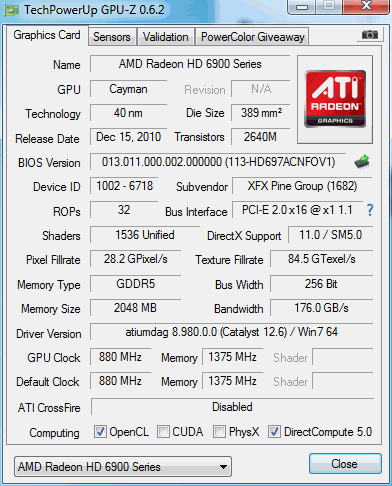
Sorry to hear you haven't found a solution. Your system is a beast and It's pretty mind-boggling that you'd be getting 23 FPS on a 6970 on the lowest settings at 1280x720 in Saints Row 3. Which drivers are you running for the 6970 and what OS are you using? I don't know if it'll provide any clues or not, but try running GPU-Z and posting a screenshot of the info on the Graphics Card tab. It might also be a good idea to go to the Sensors tab in GPU-Z and check the box labeled "Log to file." Then, play a few minutes in SR3 and see what kind of GPU clock speeds, memory usage, and temps you're getting while playing.
*Edit: For single-display testing at 1280x720, have you tried using both the PS3 3D display and one of the Acer G245HQs? It really shouldn't make a difference. But, honestly, this is the first time I've heard of the PS3 3D display and I'd test both monitors individually just to be on the safe side.
*Edit: For single-display testing at 1280x720, have you tried using both the PS3 3D display and one of the Acer G245HQs? It really shouldn't make a difference. But, honestly, this is the first time I've heard of the PS3 3D display and I'd test both monitors individually just to be on the safe side.
For comparison I ran SR3 with
For comparison I ran SR3 with similar settings (everything turned off or on it's lowest setting at 1280x720) on my PC with 2x 5870s in Crossfire and here's what I got:
Under Direct X 10 and 11
Min FPS = 0
Max FPS = 107
Average FPS = 47.5
Under Direct X 9
Min FPS = 37
Max FPS = 131
Average FPS = 71.2
I also did a couple benchmarks at 1920x1080 with the lowest settings:
Under Direct X 10 and 11
Min FPS = 33
Max FPS = 114
Average FPS = 63.6
Under Direct X 9
Min FPS = 38
Max FPS = 138
Average FPS = 68.5
And finally, under Eyefinity at 5760x1080 with the lowest settings:
Under Direct X 10 and 11
Min FPS = 26
Max FPS = 77
Average FPS = 43.7
Under Direct X 9
Min FPS = 30
Max FPS = 79
Average FPS = 52.0
Under Direct X 10 and 11
Min FPS = 0
Max FPS = 107
Average FPS = 47.5
Under Direct X 9
Min FPS = 37
Max FPS = 131
Average FPS = 71.2
I also did a couple benchmarks at 1920x1080 with the lowest settings:
Under Direct X 10 and 11
Min FPS = 33
Max FPS = 114
Average FPS = 63.6
Under Direct X 9
Min FPS = 38
Max FPS = 138
Average FPS = 68.5
And finally, under Eyefinity at 5760x1080 with the lowest settings:
Under Direct X 10 and 11
Min FPS = 26
Max FPS = 77
Average FPS = 43.7
Under Direct X 9
Min FPS = 30
Max FPS = 79
Average FPS = 52.0

Things that come to mind, are
Things that come to mind, are use CPU-Z to check that the CPU is clocking properly, and use maybe afterburner or something to check that the video card is doing the same. If they are, I would try installing the latest version of DirectX, and you can do a lot worse than use the 12.6 beta cats, they seem to work fine for me!
P8Z68-V Pro | 2600K | HR02 | HD5850 | 2x4GB Vengeance LP | 128GB M4 + 6TB | X-Fi > HD595 | AX850 | Tai Chi | PB278Q | G110 + Deathadder 2013
P8Z77-V | 3570K | Mugen 2 | HD5850 | 2x4GB Vengeance LP | 500GB | X-750 | Fractal R3 | U2212HM | G110 + G400
P8H77-I | G860 | 4650 | 2x2GB XMS | 320GB | CX500 | Prodigy | T22B350EW | MX518
DC3217IYE | 1x4GB Vengeance | 64GB M4 | TX-42VT20E
P8Z77-V | 3570K | Mugen 2 | HD5850 | 2x4GB Vengeance LP | 500GB | X-750 | Fractal R3 | U2212HM | G110 + G400
P8H77-I | G860 | 4650 | 2x2GB XMS | 320GB | CX500 | Prodigy | T22B350EW | MX518
DC3217IYE | 1x4GB Vengeance | 64GB M4 | TX-42VT20E
-
Duetschbag
- Posts: 18
- Joined: 01 Jun 2012, 04:02
I am running Catalyst 12.4
I am running Catalyst 12.4 with driver package 8.961-120405a-137224C-ATI. OS is Windows 7 Pro x64.
I tested again using only one of the Acer monitors but that did not seem to help.
I installed GPU-Z and grabbed the log file as well as a screen shot of the application itself.
I got the latest version of DX installed and also tried installing the Catalyst 12.6 beta drivers. The new drivers did seem to help a little bit, but not enough that it resolved the problem. Graphics are still pretty choppy and frame rates still tend to be all over the place.
On a side note, I ran SR3 on my Core 2 Quad, 8GB RAM and 1GB GeForce [insert model here] and the game ran fine. This really boggles my mind that my older PC is able to out perform my new one on some of these games. lol
Anyway, have a look through the files I attached and let me know if they were helpful. Thanks!
Edit: For some reason, I am unable to attach files. I will try again later.
I tested again using only one of the Acer monitors but that did not seem to help.
I installed GPU-Z and grabbed the log file as well as a screen shot of the application itself.
I got the latest version of DX installed and also tried installing the Catalyst 12.6 beta drivers. The new drivers did seem to help a little bit, but not enough that it resolved the problem. Graphics are still pretty choppy and frame rates still tend to be all over the place.
On a side note, I ran SR3 on my Core 2 Quad, 8GB RAM and 1GB GeForce [insert model here] and the game ran fine. This really boggles my mind that my older PC is able to out perform my new one on some of these games. lol
Anyway, have a look through the files I attached and let me know if they were helpful. Thanks!
Edit: For some reason, I am unable to attach files. I will try again later.
Motherboard: MSI X79A-GD65 (8D)
Memory: G.SKILL Ripjaws Z Series 32GB (8 x 4GB) 240-Pin DDR3 SDRAM DDR3 1600 (PC3 12800) Desktop Memory Model F3-12800CL9Q2-32GBZL
PSU: Rosewill LIGHTNING Series LIGHTNING-1000 1000W ATX12V/EPS12V 80 PLUS GOLD Certified
Memory: G.SKILL Ripjaws Z Series 32GB (8 x 4GB) 240-Pin DDR3 SDRAM DDR3 1600 (PC3 12800) Desktop Memory Model F3-12800CL9Q2-32GBZL
PSU: Rosewill LIGHTNING Series LIGHTNING-1000 1000W ATX12V/EPS12V 80 PLUS GOLD Certified
-
Sh4dowking
- Insiders
- Posts: 156
- Joined: 08 Nov 2011, 09:36
- Location: The Netherlands
Ever considered to return the
Ever considered to return the card when you still have the chance??
Maybe you have a bad card...
Maybe you have a bad card...
Asrock Z77 Extreme 4 ----- Intel Core i7 2700K ----- GTX 680 Twinn Frozer III ----- NVIDIA Geforce GT 520 1x Edition
-
Duetschbag
- Posts: 18
- Joined: 01 Jun 2012, 04:02
Due to other issues with the
Due to other issues with the build I was unable to test the card before the return time.
I put in a support ticket with XFX the day after I started this thread and still have no response on it. I plan on calling and chewing them out for that... I just need to find the time to do it. :)
Is anyone else having troubles trying to upload file? For some reason I still can't do it. When trying to upload my .zip file I get no error message and the files don't attach, but when I attach my .txt file I get the following error message:
The page at www.wsgf.org says:
An HTTP error 0 occcurred.
/comment-upload/js
I put in a support ticket with XFX the day after I started this thread and still have no response on it. I plan on calling and chewing them out for that... I just need to find the time to do it. :)
Is anyone else having troubles trying to upload file? For some reason I still can't do it. When trying to upload my .zip file I get no error message and the files don't attach, but when I attach my .txt file I get the following error message:
The page at www.wsgf.org says:
An HTTP error 0 occcurred.
/comment-upload/js
Motherboard: MSI X79A-GD65 (8D)
Memory: G.SKILL Ripjaws Z Series 32GB (8 x 4GB) 240-Pin DDR3 SDRAM DDR3 1600 (PC3 12800) Desktop Memory Model F3-12800CL9Q2-32GBZL
PSU: Rosewill LIGHTNING Series LIGHTNING-1000 1000W ATX12V/EPS12V 80 PLUS GOLD Certified
Memory: G.SKILL Ripjaws Z Series 32GB (8 x 4GB) 240-Pin DDR3 SDRAM DDR3 1600 (PC3 12800) Desktop Memory Model F3-12800CL9Q2-32GBZL
PSU: Rosewill LIGHTNING Series LIGHTNING-1000 1000W ATX12V/EPS12V 80 PLUS GOLD Certified
-
Duetschbag
- Posts: 18
- Joined: 01 Jun 2012, 04:02
Since I am having problems
Since I am having problems with the upload...
GPU-Z Sensor Log Hint: click the toggle text wrapping button to fix the ugliness. :)
GPU-Z Screen Shot
GPU-Z Sensor Log Hint: click the toggle text wrapping button to fix the ugliness. :)
GPU-Z Screen Shot
Motherboard: MSI X79A-GD65 (8D)
Memory: G.SKILL Ripjaws Z Series 32GB (8 x 4GB) 240-Pin DDR3 SDRAM DDR3 1600 (PC3 12800) Desktop Memory Model F3-12800CL9Q2-32GBZL
PSU: Rosewill LIGHTNING Series LIGHTNING-1000 1000W ATX12V/EPS12V 80 PLUS GOLD Certified
Memory: G.SKILL Ripjaws Z Series 32GB (8 x 4GB) 240-Pin DDR3 SDRAM DDR3 1600 (PC3 12800) Desktop Memory Model F3-12800CL9Q2-32GBZL
PSU: Rosewill LIGHTNING Series LIGHTNING-1000 1000W ATX12V/EPS12V 80 PLUS GOLD Certified
-
CrackerJackMack

- Administrators

- Posts: 475
- Joined: 01 May 2006, 02:02
- Location: USA, Texas
Both attach fine for me
Both attach fine for me
Well, I don't see anything
Well, I don't see anything wrong on your GPU-Z logs or screenshot. I was hoping something obvious might be wrong like your PCI-Express lane running too slow, your GPU clocks not scaling up properly, or your card massively overheating. But, those all look fine. It may be a pain in the ass, but at this point I'd uninstall your 6970, reboot in to safe mode, run driver sweeper to clear all the ATI/AMD related files out, shut down, put your old Geforce card from your other PC in, and try benchmarking with it. If you want to be really thorough, swap the cards and benchmark your old PC with the 6970 in it too.
That should give you a pretty solid clue as to whether the 6970 is defective or if you've got some other culprit in the system causing low FPS.
That should give you a pretty solid clue as to whether the 6970 is defective or if you've got some other culprit in the system causing low FPS.
-
Duetschbag
- Posts: 18
- Joined: 01 Jun 2012, 04:02
That was one of my next steps
That was one of my next steps only because I assume XFX would most likely ask me to do the same thing to verify that there isn't a problem with the PCIe slot or the machine itself. Two problems though. :) First, is that a while back I was troubleshooting another issue I thought to be video related. I used driver sweeper to remove the drivers and then wanted to re-install. I was able to re-install but with errors and was never able to get the Catalyst Control panel to work. I needed to re-format anyway so it wasn't a big deal. Was it possible that I did something wrong in that process that would have cause and issue with CCP being installed again? Second is that the XFX card won't fit in my old PC, so that is a no go. :P
I will be on vacation for the rest of this week but when I get back, I will try the following:
1. Re-arrange the cables in my case so I can try another PCIe slot and see if that helps anything.
2. Install the GeForce card and see what I get.
Even though I haven't been able to diagnose the problem yet, I want to thank everyone for taking the time to help me out and for sharing their ideas! So thanks!
I will be on vacation for the rest of this week but when I get back, I will try the following:
1. Re-arrange the cables in my case so I can try another PCIe slot and see if that helps anything.
2. Install the GeForce card and see what I get.
Even though I haven't been able to diagnose the problem yet, I want to thank everyone for taking the time to help me out and for sharing their ideas! So thanks!
Motherboard: MSI X79A-GD65 (8D)
Memory: G.SKILL Ripjaws Z Series 32GB (8 x 4GB) 240-Pin DDR3 SDRAM DDR3 1600 (PC3 12800) Desktop Memory Model F3-12800CL9Q2-32GBZL
PSU: Rosewill LIGHTNING Series LIGHTNING-1000 1000W ATX12V/EPS12V 80 PLUS GOLD Certified
Memory: G.SKILL Ripjaws Z Series 32GB (8 x 4GB) 240-Pin DDR3 SDRAM DDR3 1600 (PC3 12800) Desktop Memory Model F3-12800CL9Q2-32GBZL
PSU: Rosewill LIGHTNING Series LIGHTNING-1000 1000W ATX12V/EPS12V 80 PLUS GOLD Certified
The one issue I've
The one issue I've consistently had with AMD is their driver uninstall/update process.
In a perfect world, you'd just leave your existing drivers in place and apply the update on top of them. Or, at the most, use the Windows Control Panel->Programs and Features menu to uninstall the old drivers before updating to the newest ones, which is all that should be required. But, after doing this several times with my old 4870s and 5870s, I have frequently found that the install of the newest Catalyst Control Center will cause a BSoD if you haven't cleaned things up first.
Here are the steps I use each time I want to update my AMD drivers. It's a pain and I don't know if they're all necessary, but following them has always left me in good shape:
1. Go to Control Panel->Program and Features function.
2. Right-click on AMD Catalyst Install Manager and click Change.
3. Follow the prompts to uninstall all AMD-related programs/drivers/files.
4. Open the Device Manager (Control Panel->System->Device Manager).
5. Expand your Display Adapters.
6. Right-click on the ATI Radeon HD 6900 Series.
7. Uninstall. If prompted, choose to delete the drivers.
8. Reboot in Safe Mode.
9. Run Driver Sweeper and clean all the AMD entries.
10. Reboot into normal Windows.
11. Run the latest Catalyst Control Center installer and follow the prompts to install. Reboot when prompted at the end.
I'm pretty sure the latest Catalyst Control Center has some sort of automated update feature these days and I know Steam has started prompting me when updates are available, but I've gotten gun shy about updating any way other than this.
*Edit: Or, in your testing case, for step 10 you'd remove the 6970, install the old Geforce, Reboot into normal Windows, and then install the Geforce drivers.
In a perfect world, you'd just leave your existing drivers in place and apply the update on top of them. Or, at the most, use the Windows Control Panel->Programs and Features menu to uninstall the old drivers before updating to the newest ones, which is all that should be required. But, after doing this several times with my old 4870s and 5870s, I have frequently found that the install of the newest Catalyst Control Center will cause a BSoD if you haven't cleaned things up first.
Here are the steps I use each time I want to update my AMD drivers. It's a pain and I don't know if they're all necessary, but following them has always left me in good shape:
1. Go to Control Panel->Program and Features function.
2. Right-click on AMD Catalyst Install Manager and click Change.
3. Follow the prompts to uninstall all AMD-related programs/drivers/files.
4. Open the Device Manager (Control Panel->System->Device Manager).
5. Expand your Display Adapters.
6. Right-click on the ATI Radeon HD 6900 Series.
7. Uninstall. If prompted, choose to delete the drivers.
8. Reboot in Safe Mode.
9. Run Driver Sweeper and clean all the AMD entries.
10. Reboot into normal Windows.
11. Run the latest Catalyst Control Center installer and follow the prompts to install. Reboot when prompted at the end.
I'm pretty sure the latest Catalyst Control Center has some sort of automated update feature these days and I know Steam has started prompting me when updates are available, but I've gotten gun shy about updating any way other than this.
*Edit: Or, in your testing case, for step 10 you'd remove the 6970, install the old Geforce, Reboot into normal Windows, and then install the Geforce drivers.
-
Duetschbag
- Posts: 18
- Joined: 01 Jun 2012, 04:02
OMG! It's fixed!I don't
OMG! It's fixed!
I don't know why I didn't bother with this sooner, I guess I just figured it wouldn't make a difference.
After looking at the manual for my mobo, it states to use the first PCIe slot (which is PCIe 3.0 ). Since my card isn't 3.0 I originally installed it in the next one down. After moving it to the PCIe 3.0 slot, the graphics card runs extremely great!
Since I don't work with video cards or PCIe anything for that matter very often, I didn't realize that PCIe 3.0 was backwards compatible. At least that's what the most accurate source of information on the web (Wikipedia) tells me. (Hopefully you got the sarcasm there :))
http://en.wikipedia.org/wiki/PCI_Express#PCI_Express_3.0
Anyway, CoD runs at 60 FPS on high settings and SR3 runs smooth in both DX9 and DX10/11 on high settings and all the other games I tested run flawlessly! The only thing I couldn't test was Eyefinity since my PS3 Display decided to take a crap on me again. On that note, I don't recommend buying the display. Buy a TV or 3D monitor and spend the extra money.
Last but not least, thanks to everyone for the troubleshooting help! It is very much appreciated. I now remember what it's like to play my games at the correct frame-rates.
I don't know why I didn't bother with this sooner, I guess I just figured it wouldn't make a difference.
After looking at the manual for my mobo, it states to use the first PCIe slot (which is PCIe 3.0 ). Since my card isn't 3.0 I originally installed it in the next one down. After moving it to the PCIe 3.0 slot, the graphics card runs extremely great!
Since I don't work with video cards or PCIe anything for that matter very often, I didn't realize that PCIe 3.0 was backwards compatible. At least that's what the most accurate source of information on the web (Wikipedia) tells me. (Hopefully you got the sarcasm there :))
http://en.wikipedia.org/wiki/PCI_Express#PCI_Express_3.0
Anyway, CoD runs at 60 FPS on high settings and SR3 runs smooth in both DX9 and DX10/11 on high settings and all the other games I tested run flawlessly! The only thing I couldn't test was Eyefinity since my PS3 Display decided to take a crap on me again. On that note, I don't recommend buying the display. Buy a TV or 3D monitor and spend the extra money.
Last but not least, thanks to everyone for the troubleshooting help! It is very much appreciated. I now remember what it's like to play my games at the correct frame-rates.
Motherboard: MSI X79A-GD65 (8D)
Memory: G.SKILL Ripjaws Z Series 32GB (8 x 4GB) 240-Pin DDR3 SDRAM DDR3 1600 (PC3 12800) Desktop Memory Model F3-12800CL9Q2-32GBZL
PSU: Rosewill LIGHTNING Series LIGHTNING-1000 1000W ATX12V/EPS12V 80 PLUS GOLD Certified
Memory: G.SKILL Ripjaws Z Series 32GB (8 x 4GB) 240-Pin DDR3 SDRAM DDR3 1600 (PC3 12800) Desktop Memory Model F3-12800CL9Q2-32GBZL
PSU: Rosewill LIGHTNING Series LIGHTNING-1000 1000W ATX12V/EPS12V 80 PLUS GOLD Certified
I wouldn't have thought to
I wouldn't have thought to try that, either. Congrats!
*Edit: Hindsight is 20/20. I looked back up at your GPU-Z screenshot and it clearly shows PCI-E 2.0 x 16, which is all I had paid attention to. But, it then indicates it was only running @ PCI-E 1.1 x 1. I should've caught that. Glad you got it sorted out!
*Edit: Hindsight is 20/20. I looked back up at your GPU-Z screenshot and it clearly shows PCI-E 2.0 x 16, which is all I had paid attention to. But, it then indicates it was only running @ PCI-E 1.1 x 1. I should've caught that. Glad you got it sorted out!
Who is online
Users browsing this forum: No registered users and 8 guests