
Lo all.
has anyone got a fix to run bf1942 in eyefinity or nvidia surround?
i know there was a matroxfixfor triplehead and i've tried that but it dosent work as it used customdrivers for older cards.
It will run at 6081x1200 but is just stretched accross the 3 monitors,
bf1942 eyefinity/surround
-
tepescovir
- Posts: 293
- Joined: 14 Apr 2006, 19:06
bf1942 eyefinity/surround
intel x79
2 way 780ti's under water
Intel 4760 extreme @ 4GHz
3 x 42 inch screens @5860x1080
16 gigs xmp ram @2200
2 way 780ti's under water
Intel 4760 extreme @ 4GHz
3 x 42 inch screens @5860x1080
16 gigs xmp ram @2200
Re: bf1942 eyefinity/surround
I would like to second this request.
Thanks
Thanks
Re: bf1942 eyefinity/surround
I just found this on youtube:
http://www.youtube.com/watch?v=NXVsy9TM_FU&playnext=1&list=PL83E235058B16443C
So did this work in the past?
http://www.youtube.com/watch?v=NXVsy9TM_FU&playnext=1&list=PL83E235058B16443C
So did this work in the past?
-
tepescovir
- Posts: 293
- Joined: 14 Apr 2006, 19:06
Re: bf1942 eyefinity/surround
looks like it worked in th2go but i never managed to get it working with ati eyefinity. it would do the 6000x1200 but was simply stretched.
i couldnt get the fov anywhere near so was unplayable.
might give it another go on nvidia when i get chance. but it looks like we need dopefish to add bf42 to the widescreen fixer
i couldnt get the fov anywhere near so was unplayable.
might give it another go on nvidia when i get chance. but it looks like we need dopefish to add bf42 to the widescreen fixer
intel x79
2 way 780ti's under water
Intel 4760 extreme @ 4GHz
3 x 42 inch screens @5860x1080
16 gigs xmp ram @2200
2 way 780ti's under water
Intel 4760 extreme @ 4GHz
3 x 42 inch screens @5860x1080
16 gigs xmp ram @2200
Re: bf1942 eyefinity/surround
I just spent the weekend playing 1942, still the best of the battlefield series in my opinion. I can only hope someone with the skills to make a fix gets the urge to play again :)
also looking for a fix for
also looking for a fix for this....still best in series so far,still loads of full servers.
Anyone try and look into this.....i have to run it in windowed mode and its a pain in the ass.
Plz someone look into this
Anyone try and look into this.....i have to run it in windowed mode and its a pain in the ass.
Plz someone look into this
-
psychoticus
- Posts: 24
- Joined: 13 Jul 2006, 10:53
Only work in SP now.
since the last entry I made here , I have noticed that when using those widscreen hacks or other nocd cracks, I get "data differs from server" all the time.
I have an old XP computer and a new with windows 7 in it. The only way to play multiplayer in LAN is to have original bf1942 on both computers. I have tried all ways of finding a solution, that people shared on internet.
Installed both computers with the same game disc, and with different original discs.
Turned of all firewalls and anti virus.
Turned of MSN.
Used the same patches exactly on both computers.
Tried all patches from 1.5 and abowe.
The thing is that two years ago we had a retroLAN and it worked perfectly playing bf1942 with the widescreenhack (not on a dedicated server though).
Is it windows 7 that causing this now?
Would be happy for any answers, since we having a new retroLAN very soon. And it sucks to play without the widescreen hack.
I have an old XP computer and a new with windows 7 in it. The only way to play multiplayer in LAN is to have original bf1942 on both computers. I have tried all ways of finding a solution, that people shared on internet.
Installed both computers with the same game disc, and with different original discs.
Turned of all firewalls and anti virus.
Turned of MSN.
Used the same patches exactly on both computers.
Tried all patches from 1.5 and abowe.
The thing is that two years ago we had a retroLAN and it worked perfectly playing bf1942 with the widescreenhack (not on a dedicated server though).
Is it windows 7 that causing this now?
Would be happy for any answers, since we having a new retroLAN very soon. And it sucks to play without the widescreen hack.
-
tepescovir
- Posts: 293
- Joined: 14 Apr 2006, 19:06
i did get it working, but not
i did get it working, but not properly as the sky and ground were constantly turning off/ on every second or 2. So not playable. That was with nvidia cards this time instead of ati.
i think part of the issues is that drivers have changed so much since the thgo fix.
I might try it again now that i have recently done a clean install
i think part of the issues is that drivers have changed so much since the thgo fix.
I might try it again now that i have recently done a clean install
intel x79
2 way 780ti's under water
Intel 4760 extreme @ 4GHz
3 x 42 inch screens @5860x1080
16 gigs xmp ram @2200
2 way 780ti's under water
Intel 4760 extreme @ 4GHz
3 x 42 inch screens @5860x1080
16 gigs xmp ram @2200
-
psychoticus
- Posts: 24
- Joined: 13 Jul 2006, 10:53
this works for me, just copy
this works for me, just copy the file to the right place, start the game and select resolution. Menues look normal and the fov ingame is correct. running it in nvidia surround with 3x4:3 lcd. Running 1.61 btw.
Here is the files: the link
Here is the files: the link
-
BladeParker
- Posts: 7
- Joined: 01 Apr 2012, 05:01
Thanks psychoticus!This is
Thanks psychoticus!
This is a classic game and I still play it regularly. Hopefully we can get a fix put into widescreen fixer.
That link works for me. It only allows me to use 2400 x 600 and there are no other options. I have tried to manually enter a higher resolution in the video.con files, but i didn't have any luck with that.
Is there any way to fix this to run at a higher res?
This is a classic game and I still play it regularly. Hopefully we can get a fix put into widescreen fixer.
That link works for me. It only allows me to use 2400 x 600 and there are no other options. I have tried to manually enter a higher resolution in the video.con files, but i didn't have any luck with that.
Is there any way to fix this to run at a higher res?
Bump for a game that I think
Bump for a game that I think deserves the extra resolution :)
-
BladeParker
- Posts: 7
- Joined: 01 Apr 2012, 05:01
Re: bf1942 eyefinity/surround
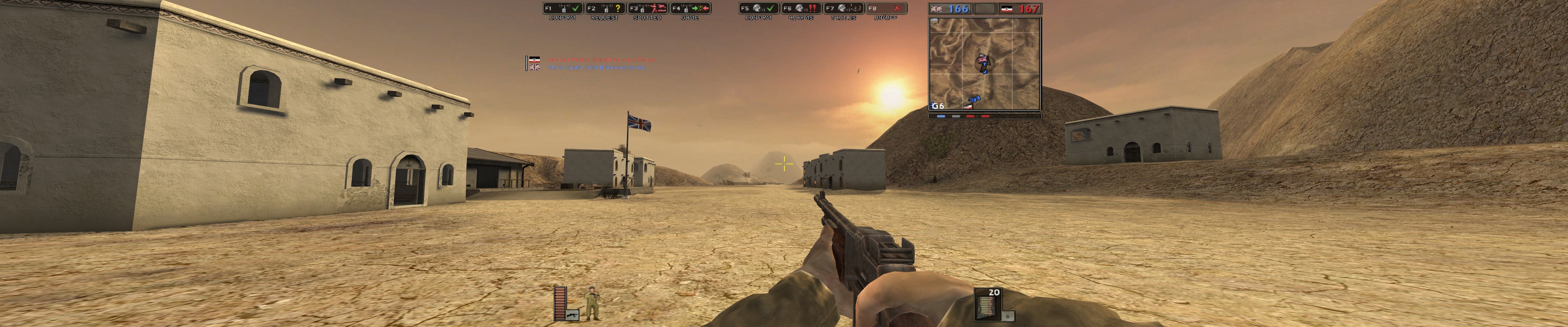
First off, BF1942 DOES work with eyefinity properly with the right exe file. (see link below)
I have recently been playing around with this again. I still can't get it any higher than 2400x600... I did find the original forums where the eyefinity bf1942.exe file came from. http://www.forums.murc.ws/showthread.php?t=46013
When I run the game, it has a video option for 2400x600 in the selection. I have tried to override it by editing the video.con, but it always seems to default to 2400x600. FOV is correct, but I know that there is a way to have this running at a higher resolution.
If there's anyone out there with the knowledge on how to edit the resolution or the exe file as chr_79 did, please let me know. I have played around a bit with hex editors, but that stuff is beyond me.
I have recently been playing around with this again. I still can't get it any higher than 2400x600... I did find the original forums where the eyefinity bf1942.exe file came from. http://www.forums.murc.ws/showthread.php?t=46013
When I run the game, it has a video option for 2400x600 in the selection. I have tried to override it by editing the video.con, but it always seems to default to 2400x600. FOV is correct, but I know that there is a way to have this running at a higher resolution.
If there's anyone out there with the knowledge on how to edit the resolution or the exe file as chr_79 did, please let me know. I have played around a bit with hex editors, but that stuff is beyond me.


Re: bf1942 eyefinity/surround
BladeParker wrote:Is there any way to fix this to run at a higher res?
Game can be run at a higher resolution. What resolution you needed?
-
BladeParker
- Posts: 7
- Joined: 01 Apr 2012, 05:01
Re: bf1942 eyefinity/surround
jackfuste wrote:BladeParker wrote:Is there any way to fix this to run at a higher res?
Game can be run at a higher resolution. What resolution you needed?
I'm trying to run it at 5760 x 1080 if that will work.
Thanks.
Re: bf1942 eyefinity/surround
BladeParker wrote:I'm trying to run it at 5760 x 1080 if that will work.
Thanks.
Fix for Battlefield 1942 v.1.61b
- All supported resolutions are available in the game menu
For 16:10/16:9 - available from the PC Gaming Wiki Community Files (search there)
For 48:10/48:9 - available from the PC Gaming Wiki Community Files (search there)
Last edited by jackfuste on 20 Jul 2015, 12:08, edited 1 time in total.
-
AussieTimmeh

- Editors

- Posts: 1441
- Joined: 14 Oct 2009, 03:11
Re: bf1942 eyefinity/surround
Oh nice one! I might even have to crack this old gem out for a re-run. My brother and I were playing BF Vietnam only the other day!
i5-2500K @ 4Ghz ° Asus P8Z68 ° GTX670 Windforce OC ° 8GB DDR3 RipjawsX ° 4x Viewsonic VA2703 ° Logitech G15 / G5 / G27 ° Razer Vespula ° TrackIR 5 ° Thrustmaster Warthog HOTAS
-
BladeParker
- Posts: 7
- Joined: 01 Apr 2012, 05:01
Re: bf1942 eyefinity/surround
You have brought a tear to my eye... Thank you!
Why are these not available or mentioned on the WSGF wiki?
[edit]
This works great but there is a pop in effect in flight with trees and buildings. Some land textures drop out as well. Is there a fix for that? I have searched online and not had much luck. The view distance doesn't fix it (over 100%) and the init.con file doesn't contain the distance info for terrain rendering. Everything seems ok on land. These are minor but let me know if there's a fix for it.
Thanks again for the links!
Why are these not available or mentioned on the WSGF wiki?
[edit]
This works great but there is a pop in effect in flight with trees and buildings. Some land textures drop out as well. Is there a fix for that? I have searched online and not had much luck. The view distance doesn't fix it (over 100%) and the init.con file doesn't contain the distance info for terrain rendering. Everything seems ok on land. These are minor but let me know if there's a fix for it.
Thanks again for the links!
-
BladeParker
- Posts: 7
- Joined: 01 Apr 2012, 05:01
Re: bf1942 eyefinity/surround
jackfuste wrote:BladeParker wrote:This works great but there is a pop in effect in flight with trees and buildings. Some land textures drop out as well. Is there a fix for that? I have searched online and not had much luck. The view distance doesn't fix it (over 100%) and the init.con file doesn't contain the distance info for terrain rendering. Everything seems ok on land. These are minor but let me know if there's a fix for it.
I added additional fixes for objects clipping. Test please - Object_clipping_test_BF1942.exe
[Edit*]
This mod was crashing to desktop for me. I tested both the clipping error exe and the new one. I had originally put the 3 mod.dll files in the correct folders as per the archive file. After some more testing, I replaced all the original files to test again, but now it was not working at all.
I have now been using ONLY the exe file with the clipping fixed with original install mod.dll files and it seems to be working well now without crashing. I should have tried that to start perhaps?
I will keep you posted. Thanks!!
Re: bf1942 eyefinity/surround
BladeParker wrote:This mod was crashing to desktop for me. I tested both the clipping error exe and the new one. I had originally put the 3 mod.dll files in the correct folders as per the archive file. After some more testing, I replaced all the original files to test again, but now it was not working at all.
I have now been using ONLY the exe file with the clipping fixed with original install mod.dll files and it seems to be working well now without crashing. I should have tried that to start perhaps?
I will keep you posted. Thanks!!
Check windows event log for fault offset. If "Fault offset: 0x002016fb", then it's a 100% game bug, and not caused by widescreen fix.
The best advice I can give, run game game in Windows XP SP2 compatibility mode, this should help to minimize crashes.
BladeParker wrote:thanks for your help Jackfuste. Can you let me know what program you used on the exe file? I would love to learn more about this.
Thanks.
OllyDbg
To learn how to use a debugger, I recommend to explore - http://ricardonarvaja.info/
These guides are specific to cracking programs, but they provide a good knowledge base that is needed to create a widescreen fixes.
-
BladeParker
- Posts: 7
- Joined: 01 Apr 2012, 05:01
Re: bf1942 eyefinity/surround
Thanks Jack.
This is on a clean install and I updated my CCC video drivers. There's nothing else on my PC but the bare minimum. I just found out that the new video drivers are causing issues for many people, so it was a mistake on my part to test this way. I think I have a backup of some old drivers around so I will give them a go.
Thanks!
This is on a clean install and I updated my CCC video drivers. There's nothing else on my PC but the bare minimum. I just found out that the new video drivers are causing issues for many people, so it was a mistake on my part to test this way. I think I have a backup of some old drivers around so I will give them a go.
Thanks!
Who is online
Users browsing this forum: No registered users and 10 guests