
Best way to watch TV from a Satellite Receiver on my comp?

Video cards, monitors, CPUs and the like
Post Reply
nickf829
Posts: 10
Joined: 20 May 2010, 05:00

Best way to watch TV from a Satellite Receiver on my comp?

Post by nickf829 »

So I've realized now that I have my home office officially finished, my computer "finished" and all 3 of my monitors up and running, I am spending almost all my time in the office and missing out on my DVR'd tv shows and just TV in general. Since I can't afford another 2k TV just for my office, I was wondering what the best way to route the TV signal from the receiver(in other room) into my office (roughly 30' away). I have Dish Network and have the ViP whatever series that allows a 2nd feed, however only the main box gets HD and the other feed runs off standard coax and is of sub par quality.

I am using LG w2361vg monitors with NO built in speakers, so running a feed directly into my monitor is not an option. I am running dual 5770's connected to my 3 monitors via DVI cables. I have HDMI outlets on either 5770 gpu, but I think this is only an "out" signal, not an "input", so running a HDMI cable from the Satellite receiver to the computer isn't possible with this configuration.

My questions:

What is the best way to get the signal from the receiver to my computer and be able to watch it on my monitor of choice, while still being able to utilize the satellite on the tv it is hooked up to(I do NOT have to be able to watch the satellite on the TV and on the computer at the same time, so if there is some type of splitter that would allow only one or the other to view the signal, that is fine)

Should I just install a standard TV tuner and get a non-hd signal via coax? I would prefer not to do this seeing as I spent all this money building a computer and all this money on 1080p monitors, I'd at least like something that looks halfway decent playing on one of my monitors.

Is there a "tv tuner" that has an HDMI input or some other input that would allow an HD quality input from a Satellite receiver?

Any other options that I am missing or just don't knwo about?

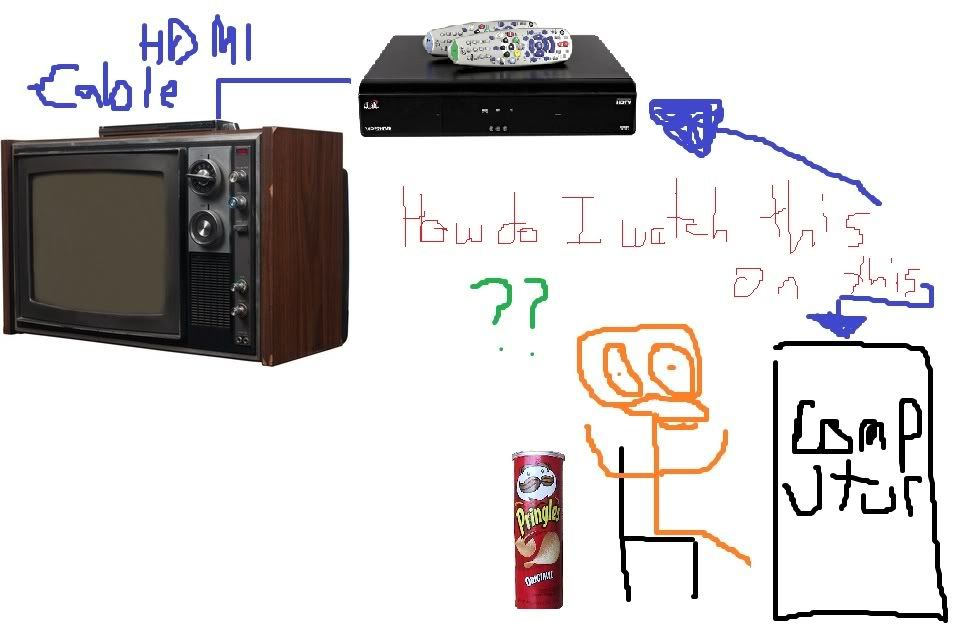
I've worked 16 hours today and I'm a little fried, so I drew a pic to illustrate what I am asking, since it probably isn't the clearest question it could be. Say hello to my digital mona lisa:
User avatar
Tamlin
Editors
Editors
Posts: 1371
Joined: 10 Jun 2005, 21:24

Re: Best way to watch TV from a Satellite Receiver on my comp?

Post by Tamlin »

The obvious/cheapest choice would be to feed it directly to your screen via hdmi, while feeding the sound through your soundcard (most receivers have a seperate sound output).
User avatar
Delphium
Administrators
Administrators
Posts: 1789
Joined: 27 Dec 2009, 14:27

Re: Best way to watch TV from a Satellite Receiver on my comp?

Post by Delphium »

The obvious/cheapest choice would be to feed it directly to your screen via hdmi, while feeding the sound through your soundcard (most receivers have a seperate sound output).

+1

What is the model of your satalite box?
As I am wondering what audio outputs it has, you could run a HDMI to DVI adaptor form the satalite box to the monitor then if it has extra audio output sockets on the rear other than using just HDMI, then you could potentialy hook up your speakers this way?
| Gigabyte X79S-UP5-WiFi Skt2011 | i7 4820k @4.4GHz Watercooled (Ivy Bridge-E) | Corsair Vengence 32GB @2133MHz 11-11-11-27 2T Quad-Channel (8x4GB) | AMD R9-Fury-X 4GB @1140/505MHz + EKWB Watercooled | 256GB Crucial MX200 SSD | 8x 1TB Samsung F3 SATA-II | Corsair 850W TX PSU | 3x Dell S2209W 22"wide TFT's (5760x1080res) | Logitech Z-5400 5.1ch speakers | Win7 Ultimate x64 |
nickf829
Posts: 10
Joined: 20 May 2010, 05:00

Re: Best way to watch TV from a Satellite Receiver on my comp?

Post by nickf829 »

I hadn't even thought of that. Would it be possible to put some sort of HDMI switch after the "output" of the satellite receiver so that I could just switch between the TV and the Computer, since the Satellite box only has 1 hdmi output.

I have the VIP 722 Duo satellite receiver.
User avatar
Delphium
Administrators
Administrators
Posts: 1789
Joined: 27 Dec 2009, 14:27

Re: Best way to watch TV from a Satellite Receiver on my comp?

Post by Delphium »


Looks like it has a whole host of audio outputs on the rear, connect your speakers to these, and yes you can install a switch box however I dont have any experience with any so as to recommend one to you, other than to say, yes you can get a switcher.
| Gigabyte X79S-UP5-WiFi Skt2011 | i7 4820k @4.4GHz Watercooled (Ivy Bridge-E) | Corsair Vengence 32GB @2133MHz 11-11-11-27 2T Quad-Channel (8x4GB) | AMD R9-Fury-X 4GB @1140/505MHz + EKWB Watercooled | 256GB Crucial MX200 SSD | 8x 1TB Samsung F3 SATA-II | Corsair 850W TX PSU | 3x Dell S2209W 22"wide TFT's (5760x1080res) | Logitech Z-5400 5.1ch speakers | Win7 Ultimate x64 |
User avatar
Abram
Insiders
Insiders
Posts: 1993
Joined: 21 Mar 2006, 05:01

Re: Best way to watch TV from a Satellite Receiver on my comp?

Post by Abram »

I like your pic, nick.
User avatar
Delphium
Administrators
Administrators
Posts: 1789
Joined: 27 Dec 2009, 14:27

Re: Best way to watch TV from a Satellite Receiver on my comp?

Post by Delphium »

I like your pic, nick.

+1 the old shcool tv made me lol :D
| Gigabyte X79S-UP5-WiFi Skt2011 | i7 4820k @4.4GHz Watercooled (Ivy Bridge-E) | Corsair Vengence 32GB @2133MHz 11-11-11-27 2T Quad-Channel (8x4GB) | AMD R9-Fury-X 4GB @1140/505MHz + EKWB Watercooled | 256GB Crucial MX200 SSD | 8x 1TB Samsung F3 SATA-II | Corsair 850W TX PSU | 3x Dell S2209W 22"wide TFT's (5760x1080res) | Logitech Z-5400 5.1ch speakers | Win7 Ultimate x64 |
nickf829
Posts: 10
Joined: 20 May 2010, 05:00

Re: Best way to watch TV from a Satellite Receiver on my comp?

Post by nickf829 »

Thanks, I was quite proud of that "art" after a long day.

I think I'd prefer the signal to go from the satellite receiver into my PC and not directly into the monitor, only because I'd like to be able to still use the monitor while working and having a tv station playing in the background if needed. How can I get my PC to receive an HDMI INPUT? Is there an HDMI TV tuner available? All the TV tuners I've seen only have RCA or S-Video inputs.
Tanuki
Posts: 2866
Joined: 07 Jul 2007, 23:55

Re: Best way to watch TV from a Satellite Receiver on my comp?

Post by Tanuki »

Is there an HDMI TV tuner available? All the TV tuners I've seen only have RCA or S-Video inputs.


There are capture cards that can be used for that.

But HDCP will probably eat your brain.

Unless you are not using any HDCP signals.
nickf829
Posts: 10
Joined: 20 May 2010, 05:00

Re: Best way to watch TV from a Satellite Receiver on my comp?

Post by nickf829 »

In regards to the HDCP, does that mean I would have to find some sort of capture card that was HDCP compliant? Is that possible? I hadn't thought of licensing issues being a factor. If its that much of a pain, maybe I will just have to suck it up and lose a monitor by routing the satellite signal directly into the monitor when I want to watch TV.

ORRRR

Any input on the new Slingloaded VIP922 DVR's LINK ? Seems like a possible solution.. it broadcasts all DVR'd stuff to some online service so that I can watch it on my phone, my computer, really anywhere I can get the internet.. Seems like a good idea, but its also $500+ now and I'm unsure how the quality/speed will be since its new. I love my netflix on demand which is similar, but honestly unless its broadcast in HD, it looks like poo in full screen format, so it makes watching some movies painful.

Jeez.. the stuff I go thru to be lazy.
User avatar
Tamlin
Editors
Editors
Posts: 1371
Joined: 10 Jun 2005, 21:24

Re: Best way to watch TV from a Satellite Receiver on my comp?

Post by Tamlin »

In regards to the HDCP, does that mean I would have to find some sort of capture card that was HDCP compliant? Is that possible? I hadn't thought of licensing issues being a factor. If its that much of a pain, maybe I will just have to suck it up and lose a monitor by routing the satellite signal directly into the monitor when I want to watch TV.


For HDCP to work, the whole path must be protected and it needs to be digital. The card, OS, and screen needs to be HDCP capable and can passthrough the handshake.

Why not only connect it to one of your screens? Its much easier that way. You can use the input button to switch signal between work and viewing, and since the audio is on regardless if the screen is, you can still listen to radio while working on that screen.
Post Reply

Who is online

Users browsing this forum: No registered users and 2 guests




