EYEFINITY 9 - 9x1 portrait/landscape and 3x3 monitor setup

Hardware discussions about AMD Eyefinity
User avatar
duniek
Insiders
Insiders
Posts: 241
Joined: 29 Jan 2010, 03:57

EYEFINITY 9 - 9x1 portrait/landscape and 3x3 monitor setup

Post by duniek »

specs:
amd phenom x4 925
asrock 890gx3 extreme3
2x2gb elpida ram 1066 @ 1333
hd5870 + 5770 + 5450


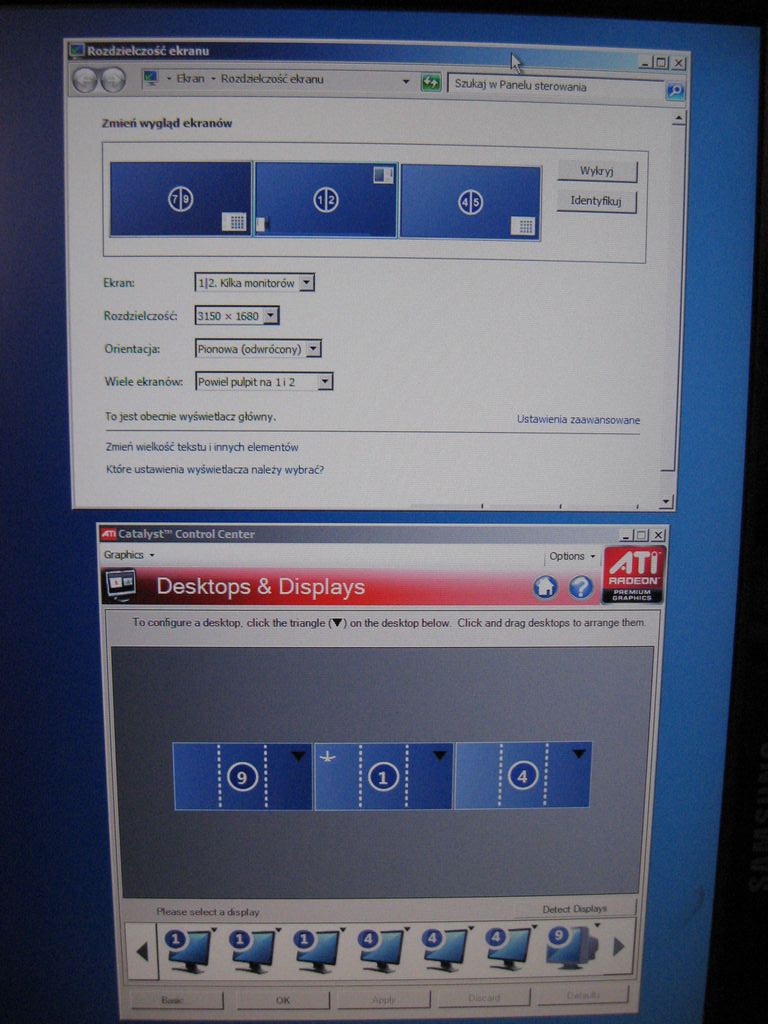


http://www.youtube.com/watch?v=QiYDbdHB548

Phoenixdancer
Posts: 122
Joined: 13 Jan 2010, 14:25

Re: 9x1 portrait mode on

Post by Phoenixdancer »

how the hell are you running all those?
User avatar
duniek
Insiders
Insiders
Posts: 241
Joined: 29 Jan 2010, 03:57

Re: 9x1 portrait mode on

Post by duniek »

post edited :D
User avatar
suiken_2mieu
Insiders
Insiders
Posts: 2351
Joined: 20 Aug 2009, 04:20
Location: Virginia
Contact:

Re: 9x1 portrait mode on

Post by suiken_2mieu »

You sir are a maniac, i love it.
System Core: | Intel Core i5-2500K + ASUS P8Z68-V + 16GB Corsair XMS3 DDR3 1333 MHz | Win7 x64 | MSI R7970 Lightning 3GB [1105/1400] |
Display: | 3 x Dell Ultrasharp 3007WFP-HC @ 7680x1600 | Dell u3011 |
User avatar
duniek
Insiders
Insiders
Posts: 241
Joined: 29 Jan 2010, 03:57

Re: 9x1 portrait mode on

Post by duniek »

You sir are a maniac, i love it.

i really want make 5x2 mode
but nobody have 5870 e6 over here, who can borrow to me for week :(
User avatar
Dem Pyros
Posts: 1060
Joined: 08 Dec 2006, 06:01

Re: 9x1 portrait mode on

Post by Dem Pyros »

[quote]You sir are a maniac, i love it.

i really want make 5x2 mode
but nobody have 5870 e6 over here, who can borrow to me for week :(
Eh...at that point the bezels cut directly through the screen, so no one likes that...

But 9x1 portrait? You sir, are a maniac. :rockout
User avatar
duniek
Insiders
Insiders
Posts: 241
Joined: 29 Jan 2010, 03:57

Re: 9x1 portrait mode on

Post by duniek »

[quote][quote]You sir are a maniac, i love it.

i really want make 5x2 mode
but nobody have 5870 e6 over here, who can borrow to me for week :(
Eh...at that point the bezels cut directly through the screen, so no one likes that...

But 9x1 portrait? You sir, are a maniac. :rockout
9x1 landscape is possible too, just i have too short room LOL
User avatar
Dem Pyros
Posts: 1060
Joined: 08 Dec 2006, 06:01

Re: 9x1 portrait mode on

Post by Dem Pyros »

9x1 landscape is possible too, just i have too short room LOL

This is why extension cords and backyards were invented ;).
User avatar
Abram
Insiders
Insiders
Posts: 1993
Joined: 21 Mar 2006, 05:01

Re: 9x1 portrait mode on

Post by Abram »

I can appreciate insane stuff like that but... that's just stupid. But hey, someone had to do it.
User avatar
suiken_2mieu
Insiders
Insiders
Posts: 2351
Joined: 20 Aug 2009, 04:20
Location: Virginia
Contact:

Re: 9x1 portrait mode on

Post by suiken_2mieu »

I wonder how wide you would have to make something to get a 360 view.

The FOV Calculator only Calculates up to 180 Degrees
System Core: | Intel Core i5-2500K + ASUS P8Z68-V + 16GB Corsair XMS3 DDR3 1333 MHz | Win7 x64 | MSI R7970 Lightning 3GB [1105/1400] |
Display: | 3 x Dell Ultrasharp 3007WFP-HC @ 7680x1600 | Dell u3011 |
User avatar
duniek
Insiders
Insiders
Posts: 241
Joined: 29 Jan 2010, 03:57

Re: 9x1 portrait mode on

Post by duniek »

I wonder how wide you would have to make something to get a 360 view.

The FOV Calculator only Calculates up to 180 Degrees

I wondering about that from begining of the universe lol

tommorow maybe I will try 9x1 landscape so will see how wide is fov on 14,4:1 ratio :D
User avatar
r3v3nant
Posts: 90
Joined: 09 Jan 2010, 00:50

Re: 9x1 portrait mode on

Post by r3v3nant »

crazy dude.. and full of awesome.
noquarter
Posts: 45
Joined: 03 Feb 2010, 17:56

Re: 9x1 portrait mode on

Post by noquarter »

So if you had one of these 7 PCI-e slot mobos and 7 5870 E6 cards you could have 42 monitors.. uhm. 7x5 setup would be the best? (35 monitors)
User avatar
duniek
Insiders
Insiders
Posts: 241
Joined: 29 Jan 2010, 03:57

Re: 9x1 portrait mode on

Post by duniek »

So if you had one of these 7 PCI-e slot mobos and 7 5870 E6 cards you could have 42 monitors.. uhm. 7x5 setup would be the best? (35 monitors)

nope

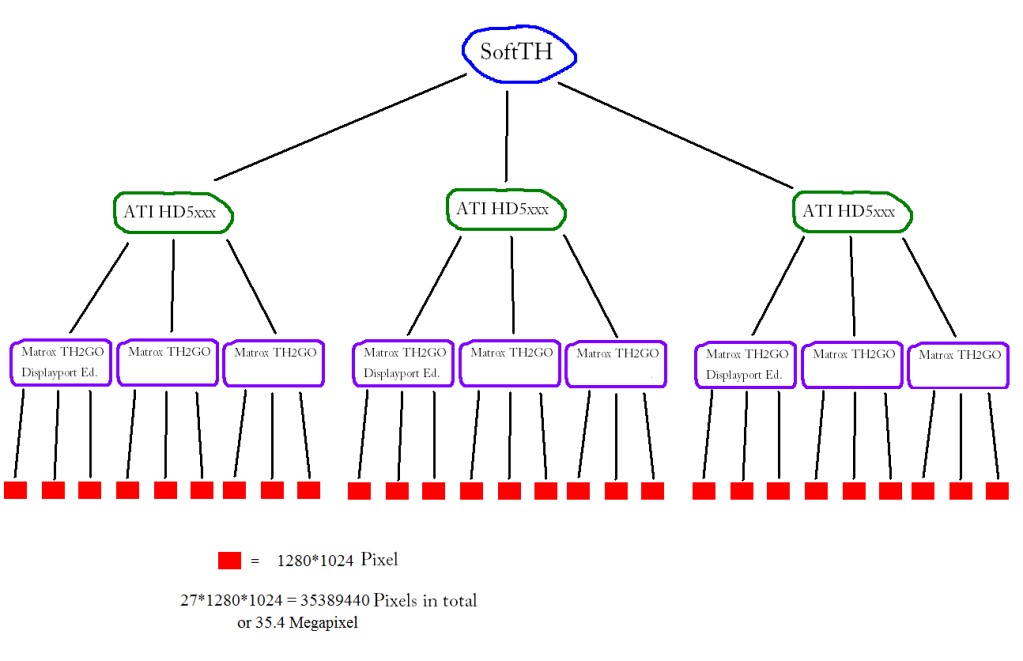
SoftTH can run only 3 monitors max (3 groups) so 3x hd5870 e6 cards and I can run 9x2 setup
or 15x1 portrait (but after ATI release their drivers which can support 5x1 mode)
Lebedev
Posts: 57
Joined: 11 Oct 2009, 16:28

Re: 9x1 portrait mode on

Post by Lebedev »

I wonder what's the maximum?

User avatar
Delphium
Administrators
Administrators
Posts: 1789
Joined: 27 Dec 2009, 14:27

Re: 9x1 portrait mode on

Post by Delphium »

Close, however unfortunately we all know that the TH2G will only output 5040x1050 (a max of 1680x1050 per screen).
As such you may be able to get...

Landscape:
27x 1680 = 45,360 pixels wide by 1050 pixels tall
With an aspect ratio of 216:5

or

Portrait:
27x 1050 = 28,350 pixels wide by 1680 pixels tall
With an aspect ratio of 135:8

Still thats pritty danm wide.
It may be possible to expand on this using 3x E6 cards with a TH2G on each port, bringing the total number of monitors to 54.
| Gigabyte X79S-UP5-WiFi Skt2011 | i7 4820k @4.4GHz Watercooled (Ivy Bridge-E) | Corsair Vengence 32GB @2133MHz 11-11-11-27 2T Quad-Channel (8x4GB) | AMD R9-Fury-X 4GB @1140/505MHz + EKWB Watercooled | 256GB Crucial MX200 SSD | 8x 1TB Samsung F3 SATA-II | Corsair 850W TX PSU | 3x Dell S2209W 22"wide TFT's (5760x1080res) | Logitech Z-5400 5.1ch speakers | Win7 Ultimate x64 |
Lebedev
Posts: 57
Joined: 11 Oct 2009, 16:28

Re: 9x1 portrait mode on

Post by Lebedev »

Close, however unfortunately we all know that the TH2G will only output 5050x1050 (a max of 1680x1050 per screen).

uhm, yeah i forgot...

but this resolution-limit should (theoretically) be abandoned with displayport :(
User avatar
suiken_2mieu
Insiders
Insiders
Posts: 2351
Joined: 20 Aug 2009, 04:20
Location: Virginia
Contact:

Re: 9x1 portrait mode on

Post by suiken_2mieu »

[quote]Close, however unfortunately we all know that the TH2G will only output 5050x1050 (a max of 1680x1050 per screen).


uhm, yeah i forgot...

but this resolution-limit should (theoretically) be abandoned with displayport :(

Actually with a 5000 series card, the max output with a TH2Go is 3840x1024. Sucks don't it? Also, DP1.1 doesn't allow for much more bandwidth for higher resolutions. 1.2 is where we can do interesting stuff. You can run 3x2560x1440 displays at 60Hz and 3x2560x1600 displays at 58Hz with DP1.2 and


Resolution Bandwidth Calculator
System Core: | Intel Core i5-2500K + ASUS P8Z68-V + 16GB Corsair XMS3 DDR3 1333 MHz | Win7 x64 | MSI R7970 Lightning 3GB [1105/1400] |
Display: | 3 x Dell Ultrasharp 3007WFP-HC @ 7680x1600 | Dell u3011 |
User avatar
duniek
Insiders
Insiders
Posts: 241
Joined: 29 Jan 2010, 03:57

Re: 9x1 portrait mode on

Post by duniek »

theoretically

3x 5870 e6 = 18 video outputs + each th2go = 54 monitors in 27x2 mode

so 45360x2100 res = 95mln pixel

and I will get 0,0001FPS in dirt2
User avatar
suiken_2mieu
Insiders
Insiders
Posts: 2351
Joined: 20 Aug 2009, 04:20
Location: Virginia
Contact:

Re: 9x1 portrait mode on

Post by suiken_2mieu »

theoretically

3x 5870 e6 = 18 video outputs + each th2go = 54 monitors in 27x2 mode

so 45360x2100 res = 95mln pixel

and I will get 0,0001FPS in dirt2


Actually, because of the the limitation of the ATI driver:

3x 5870 e6 = 18 video outputs + each th2go = 54 monitors in 27x2 mode

so 34560x2048 res = 71mln pixel

This is completely ridiculous, but awesome, now who want to tally up how much all that display hardware would cost?

Also Duniek, update your sig. You're doing amazing things here.
System Core: | Intel Core i5-2500K + ASUS P8Z68-V + 16GB Corsair XMS3 DDR3 1333 MHz | Win7 x64 | MSI R7970 Lightning 3GB [1105/1400] |
Display: | 3 x Dell Ultrasharp 3007WFP-HC @ 7680x1600 | Dell u3011 |
Post Reply

Who is online

Users browsing this forum: No registered users and 11 guests



