Widescreen Gaming Forum

[-noun] Web community dedicated to ensuring PC games run properly on your tablet, netbook, personal computer, HDTV and multi-monitor gaming rig.
It is currently 12 Jul 2026, 10:35

All times are UTC [ DST ]


Post new topic Reply to topic  [ 235 posts ]  Go to page Previous  1 ... 56, 57, 58, 59, 60, 61, 62 ... 235  Next
Author Message
PostPosted: 18 Apr 2016, 14:04 
Offline
User avatar

Joined: 03 Sep 2015, 14:03
Posts: 42
Location: Slovakia
Just write the sequence on keyboard when you have the 80 selected. What program are you using for editing?

_________________
LG 29UB67 => AOC AG352UCG6


Top
 Profile  
Reply with quote  
PostPosted: 18 Apr 2016, 14:10 
Offline

Joined: 18 Apr 2016, 14:01
Posts: 5
Martan wrote:
Just write the sequence on keyboard when you have the 80 selected. What program are you using for editing?


This: "Hex Workshop Hex Editor (64 bit)", but i seen now that i need this for 3440x1440 and not for 2560x1080, there is a string for 3440?


Top
 Profile  
Reply with quote  
PostPosted: 18 Apr 2016, 14:38 
Offline
Insiders
Insiders
User avatar

Joined: 11 Dec 2008, 23:51
Posts: 685
Location: Germany
i belive its 70 0D 00 00 A0 05

_________________
CZARMAN aka 彼得爸爸


Top
 Profile  
Reply with quote  
PostPosted: 18 Apr 2016, 14:52 
Offline

Joined: 18 Apr 2016, 14:01
Posts: 5
czarman wrote:
i belive its 70 0D 00 00 A0 05


It work, i got 3440x1440 in windows mode too, but i got black screen bars with BORDELESS GAMING. :( why?


Top
 Profile  
Reply with quote  
PostPosted: 18 Apr 2016, 14:53 
Offline
User avatar

Joined: 03 Sep 2015, 14:03
Posts: 42
Location: Slovakia
Yes, you're right. Now I understand it completely finally :D :D

1920x1080
Image

2560x1080
Image

3440x1440
Image

_________________
LG 29UB67 => AOC AG352UCG6


Top
 Profile  
Reply with quote  
PostPosted: 18 Apr 2016, 15:08 
Offline

Joined: 18 Apr 2016, 14:01
Posts: 5
Works, but i got black bars again :(


Top
 Profile  
Reply with quote  
PostPosted: 18 Apr 2016, 15:21 
Offline

Joined: 13 Jun 2008, 08:36
Posts: 46
after find this......
personnal tips for nvdia surround and eyefinity :

1: lock your "GraphicsConfig.xml" windowed and select same resolution win /full put the file read only !
2: edit DarkSoulsIII.exe change only value 1920::1080 "hexa 800700003804 to your resolution..ex 5760::1080 " 801600003804 "
3: launch game.....is windowed but 5760:1080 run match and in game go to option select fullscreen ! is work but....
the external screens are not completely filled a black gray halo ...do you have an idea why ? the effect corresponds to the option "vignette" in sweetfx........
dont use reshade or sweetfx..may be that activation of this allows to remove it, but I doubt it
re help !!!!!!

despite all this is much better no ? ;)


Top
 Profile  
Reply with quote  
PostPosted: 18 Apr 2016, 15:27 
Offline

Joined: 13 Jun 2008, 08:36
Posts: 46
I precise this is not the famous black bands


Top
 Profile  
Reply with quote  
PostPosted: 18 Apr 2016, 16:05 
Offline

Joined: 10 Apr 2016, 23:56
Posts: 20
Thank you Martan & Armin1702

it works's perfectly!

Image

Used HxD's replace function using hex-values and replaced 800700003804 with 000A00003804

I actually recommend going back to fullscreen once you have it "glitched", it will most likely improve performance and it will stay glitched until you restart the game.


Top
 Profile  
Reply with quote  
PostPosted: 18 Apr 2016, 16:07 
Offline
Insiders
Insiders
User avatar

Joined: 21 May 2011, 14:18
Posts: 1232
chichi007 wrote:
after find this......
personnal tips for nvdia surround and eyefinity :

1: lock your "GraphicsConfig.xml" windowed and select same resolution win /full put the file read only !
2: edit DarkSoulsIII.exe change only value 1920::1080 "hexa 800700003804 to your resolution..ex 5760::1080 " 801600003804 "
3: launch game.....is windowed but 5760:1080 run match and in game go to option select fullscreen ! is work but....
the external screens are not completely filled a black gray halo ...do you have an idea why ? the effect corresponds to the option "vignette" in sweetfx........
dont use reshade or sweetfx..may be that activation of this allows to remove it, but I doubt it
re help !!!!!!

despite all this is much better no ? ;)


Can you post a screenshot related to this issue?
It's funny I tried this among the first things;) but it never worked. I never thought of making it work in Window Mode and that it will "STICK" in fullscreen afterwards;)

Awesome job nevertheless;)

_________________
WideScreen Fixer... Fixes your Surround problems to give a gorgeous 3D Surround Experience!
WideScreen Fixer

Only website to show TRUE 3D Vision Surround Gaming Videos(viewable by anyone) only at
3D Vision Surround Gallery

E-mail and Paypal (for people who wants it): [email protected]


Top
 Profile  
Reply with quote  
PostPosted: 18 Apr 2016, 16:26 
Offline

Joined: 08 Apr 2016, 19:29
Posts: 3
OK from following the tips here I have it working on my acer 3440 x 1440 Predator, thank you!!!!. Im not sure if i was reading a step incorrectly but i had to do one last thing to get it to work. From the beginning: I used the hex editor to change the value to 70 0D 00 00 A0 05 for 3440x1440. In app data i changed the line to WINDOW and set the resolution to 3440 x 1440.
Once i had done that I saved the file and ticked read only, launched Windowed Borderless gaming, then started Dark Souls 3. It starts in windowed mode, I go to options and check the resolution is correct, drop out of the menu and continue a game. Once in game still windowed I click on Windowed Borderless Gaming and selected add window, click on the dark souls window and press f3.

At this point it's still in windowed but squashed even more and I go into the options in game and select FULLSCREEN, once done i'm at my bonfire in glorious ultrawide!. I know it's been said already and your wondering why im posting the exact same thing but im doing it as much for myself to refer to later if i cant replicate it! i'm just really glad it's done. Thanks again guys.


Top
 Profile  
Reply with quote  
PostPosted: 18 Apr 2016, 16:34 
Offline
User avatar

Joined: 24 Dec 2015, 10:46
Posts: 5
YOU ARE ALL GODS TY YOU ALL,1) HEX change, then go window mode then full and im 21:9 full screen no black bars fuck yea boys, also
config><
ScreenMode>FULLSCREEN</ScreenMode>
<Resolution-WindowScreenWidth>2560</Resolution-WindowScreenWidth>
<Resolution-WindowScreenHeight>1080</Resolution-WindowScreenHeight>
<Resolution-FullScreenWidth>2560</Resolution-FullScreenWidth>
<Resolution-FullScreenHeight>1080</Resolution-FullScreenHeight>
<Auto-detectBestRenderingSettings>OFF</Auto-detectBestRenderingSettings>
change them 2


Top
 Profile  
Reply with quote  
PostPosted: 18 Apr 2016, 16:39 
Offline

Joined: 18 Apr 2016, 16:28
Posts: 2
Awesome work guys! By following the instructions posted here, I got it working aswell :D

https://i.imgur.com/3rumuEt.jpg


Top
 Profile  
Reply with quote  
PostPosted: 18 Apr 2016, 16:47 
Offline

Joined: 14 Apr 2016, 15:29
Posts: 2
Thank you so much for thes fix , Armin1702 have you gone to reddit whit thes? I am shure som on the Dark souls 3 sub is interested in thes


Top
 Profile  
Reply with quote  
PostPosted: 18 Apr 2016, 17:43 
Offline

Joined: 13 Jun 2008, 08:36
Posts: 46
helifax wrote:
chichi007 wrote:
after find this......
personnal tips for nvdia surround and eyefinity :

1: lock your "GraphicsConfig.xml" windowed and select same resolution win /full put the file read only !
2: edit DarkSoulsIII.exe change only value 1920::1080 "hexa 800700003804 to your resolution..ex 5760::1080 " 801600003804 "
3: launch game.....is windowed but 5760:1080 run match and in game go to option select fullscreen ! is work but....
the external screens are not completely filled a black gray halo ...do you have an idea why ? the effect corresponds to the option "vignette" in sweetfx........
dont use reshade or sweetfx..may be that activation of this allows to remove it, but I doubt it
re help !!!!!!

despite all this is much better no ? ;)


Can you post a screenshot related to this issue?
It's funny I tried this among the first things;) but it never worked. I never thought of making it work in Window Mode and that it will "STICK" in fullscreen afterwards;)

Awesome job nevertheless;)


:twothumb: honor for me Helifax :cheers:
screens after loading windowed 5760:1080

you see black halo.... one idea ? is fullscreen of course ! please help help...........

thanks ..


Attachments:
DarkSoulsIII 2016-04-18 18-31-41-56.jpg
DarkSoulsIII 2016-04-18 18-31-41-56.jpg [ 437.8 KiB | Viewed 6203 times ]
DarkSoulsIII 2016-04-18 18-31-27-15.jpg
DarkSoulsIII 2016-04-18 18-31-27-15.jpg [ 287.21 KiB | Viewed 6275 times ]
Top
 Profile  
Reply with quote  
PostPosted: 18 Apr 2016, 17:56 
Offline
Insiders
Insiders
User avatar

Joined: 21 May 2011, 14:18
Posts: 1232
Thanks for the screenshot;) Now that is actually a pretty cool effect:)) I quite like it:)
I haven't tried it yet as I am still at work;) but it might be possible to do something about it;)

_________________
WideScreen Fixer... Fixes your Surround problems to give a gorgeous 3D Surround Experience!
WideScreen Fixer

Only website to show TRUE 3D Vision Surround Gaming Videos(viewable by anyone) only at
3D Vision Surround Gallery

E-mail and Paypal (for people who wants it): [email protected]


Top
 Profile  
Reply with quote  
PostPosted: 18 Apr 2016, 19:31 
Offline

Joined: 11 Nov 2015, 17:12
Posts: 12
THANK YOU GUYS! This fix worked great for me in 3440x1440. Only quirk is that you have to reset to fullscreen in the options every time you restart the game, but a small price to pay for getting it to work properly.


Top
 Profile  
Reply with quote  
PostPosted: 18 Apr 2016, 20:00 
Offline

Joined: 18 Apr 2016, 14:01
Posts: 5
Same! Works perfectly with 3440x1440.


Top
 Profile  
Reply with quote  
PostPosted: 18 Apr 2016, 20:04 
Offline

Joined: 15 Jan 2016, 21:01
Posts: 15
And now the big question: Do we dare use this while playing online?


Top
 Profile  
Reply with quote  
PostPosted: 18 Apr 2016, 20:05 
Offline

Joined: 18 Apr 2016, 19:56
Posts: 1
Sorry guys Hex editor noob here when I try to change 800700003804 to 700D0000A005 for 3440x1440 in Hex Workshop I use Find to find the first value and then change it to the new value? Am I doing this correctly? Also when I change the .xml file do I need to input everything with spaces in between each letter like it is listed in the file?

Nvm I got it working. Thanks guys


Last edited by dankestgerm on 18 Apr 2016, 22:06, edited 1 time in total.

Top
 Profile  
Reply with quote  
PostPosted: 18 Apr 2016, 20:10 
Offline

Joined: 04 Apr 2016, 11:02
Posts: 6
I adjusted the executable file. I changed the configuration and set read-only mode. I run the game in windowed mode, and then turned on the full screen, and here and there were bands. download exe and cfg file here


Top
 Profile  
Reply with quote  
PostPosted: 18 Apr 2016, 20:55 
Offline

Joined: 13 Apr 2016, 15:39
Posts: 2
So excited to here that a fix for Ds3 to 21:9 is working well- When will there be something available for us Non-Savvy users IE - ME ha ha.
I have a Acer Predator X34 running at 3440x1440 playing Ds3 with bars in full screen mode ! PLZ - Anybody 8)


Top
 Profile  
Reply with quote  
PostPosted: 18 Apr 2016, 21:11 
Offline

Joined: 13 Jun 2008, 08:36
Posts: 46
helifax wrote:
Thanks for the screenshot;) Now that is actually a pretty cool effect:)) I quite like it:)
I haven't tried it yet as I am still at work;) but it might be possible to do something about it;)


yes... the effect is not too bad ! but prefer find good way for entire screen............ :triplewide:


Top
 Profile  
Reply with quote  
PostPosted: 18 Apr 2016, 21:14 
Offline

Joined: 03 Aug 2005, 22:05
Posts: 18
ThirdRevolt wrote:
And now the big question: Do we dare use this while playing online?


I wouldn't use it online, but I'd rather be on the safe side.


Top
 Profile  
Reply with quote  
PostPosted: 18 Apr 2016, 23:53 
Offline

Joined: 18 Apr 2016, 23:05
Posts: 1
chichi007 wrote:
yes... the effect is not too bad ! but prefer find good way for entire screen............ :triplewide:


thanks to you I've got it too, a mighty :triplewide: .
with a little bit of difference - i have 5760*1200 and that was correspondingly counted in ResHex and successfully applied into HxD.
my number for resolution is " 80 16 00 00 B0 04 " - as for 5760*1200
also while starting in window mode game looks compressed and narrow but fullscreening it gives us complete eyefinity look.
and now for the beauty:

Attachment:
DarkSoulsIII 2016-04-19 00-50-14-22.jpg
DarkSoulsIII 2016-04-19 00-50-14-22.jpg [ 727.11 KiB | Viewed 8035 times ]

Attachment:
DarkSoulsIII 2016-04-19 00-49-16-48.jpg
DarkSoulsIII 2016-04-19 00-49-16-48.jpg [ 646.18 KiB | Viewed 8022 times ]


compressed window mode at start

Attachment:
Capture2.JPG
Capture2.JPG [ 303.32 KiB | Viewed 8025 times ]


Top
 Profile  
Reply with quote  
PostPosted: 19 Apr 2016, 00:06 
Offline

Joined: 03 Aug 2005, 22:05
Posts: 18
The baked in vignetting you can only see in super ultrawide makes me think they wanted to support wider ratios. I don't know why else that would be there. It looks pretty cool.


Top
 Profile  
Reply with quote  
PostPosted: 19 Apr 2016, 02:13 
Offline
I Donated
I Donated
User avatar

Joined: 28 Feb 2014, 21:02
Posts: 58
Martan wrote:
You can try this for 2560 x 1080:

-SNIP-

OK it's strange, first I found out when I ported to Farron Keep Perimeter, there is a sequence when two Darkwraiths are coming to fight the other enemies near entrance to the Abyss Watchers. And for these enemies I've seen the stutter animations, out of the 1920x1080 frame. So I start to look for other things, but so far no problems with other creatures, npc, world animations.


Armin1702 wrote:
EDIT: Too slow, but don't want to delete the whole text. took me some time :think:

Okay here we go. In the comment section under Souls Unsqueezed in steam forum someone explained in pieces how to get rid of the black bars. This method worked now 3 times in a row for me (load game, close game, start again, and so on)

-SNIP-

EDIT: DSR works as well. When you set your GraphicsConfig.xml to read only and don't use "windowed borderless gaming" to "force" fullscreen you can set your game to fullscreen in options an choose whatever resolution you want to. If the game is started without the black bars, the bars won't come back until you restart it, independent which resolution you are choose


Coming back to this thread after a full week and I couldn't be happier. Thank you for the fix Martan and Armin1702, it works great and isn't too complicated. Let me know if you guys use Paypal because I think a donation is deserved. I hope others agree with me here.

I'm still looking forward to a much more official fix from Kaldaien and anyone that he is working with. You all have my full support.

On another note, do any of you see an Ultrawide HUD fix being possible or would it be too difficult to find and implement?

PS: Screenshot in 2560x1080 with SweetFX/Reshade (works just fine!)

Image

_________________
Steam Profile | ReShade/SweetFX Presets | YouTube


Top
 Profile  
Reply with quote  
PostPosted: 19 Apr 2016, 02:36 
Offline
User avatar

Joined: 12 Nov 2014, 20:30
Posts: 45
are you guys playing online with these changes?
I'm afraid to get banned, but i really want to play without letterboxes


Top
 Profile  
Reply with quote  
PostPosted: 19 Apr 2016, 03:04 
Offline

Joined: 16 Oct 2013, 07:28
Posts: 48
I'm debating if i want to play online with it too.
I really think someone needs to contact From Software and get a stance on this.

It should be noted that playing offline may not even save people from soft-bans should they deem this ban-worthy. DS3 has a built-in anticheat that runs even when in offline mode.


Top
 Profile  
Reply with quote  
PostPosted: 19 Apr 2016, 03:14 
Offline
Insiders
Insiders
User avatar

Joined: 21 May 2011, 14:18
Posts: 1232
I've played the whole evening online and everything is fine:)

I also played a lot of DS1 with WidescreenFixer and here I am still...
I also played a lot of DS2 with Flawless Widescreen and here I am still...

People don't understand that a modification like this that handles the RENDERER will never ever get flagged up. Now, if you use a trainer to get more souls or be invincible...that is another matter completely....

It's like you are asking: "Will I get banned cause I am using 800x600 and not 1920x1080 ?!?!" type of questions... I've never seen anyone getting banned for using ANY of the Widescreen Fixes found here! EVER!

There was one guy who said it was our fix that got him into trouble...in the end it proved he had a bit coin "farmer" running on his machine that was flagged up:))

Seriously people.... do some reading and learn a bit more! You are on the PC FOR F@ SAKE not some console crap where you don't care, just wanna play that game... ^_^

_________________
WideScreen Fixer... Fixes your Surround problems to give a gorgeous 3D Surround Experience!
WideScreen Fixer

Only website to show TRUE 3D Vision Surround Gaming Videos(viewable by anyone) only at
3D Vision Surround Gallery

E-mail and Paypal (for people who wants it): [email protected]


Top
 Profile  
Reply with quote  
PostPosted: 19 Apr 2016, 03:20 
Offline

Joined: 16 Oct 2013, 07:28
Posts: 48
Helixfax, while I too have had 0 issues with widescreenfixer or flawless widescreen in the past, I've heard cases of DS2FIX resulting in quite a few people being put into the cheater-pool via softbans.

Now it could be that quite a few people were in fact cheating and decided to blame DS2Fix, I don't know. What I do know is FromSoftware never refuted the claim and did state that DS2fix was not an approved file.

The only issue with this current fix I can see is the fact that it requires editing the exe and therefore could easily be detected from a simple checksum. But hey, hopefully From Software isn't overly zealous.


Top
 Profile  
Reply with quote  
PostPosted: 19 Apr 2016, 03:35 
Offline

Joined: 03 Aug 2005, 22:05
Posts: 18
Helifax, It's too soon to say if you'll be banned for using the .exe edit or not, and it doesn't matter if the hack only affects the renderer, either. If they can hash check the .exe and see that it's any different from the unmodified one, they'll have reason enough to do something about it. They're not going to pick and choose based on what people are modifying via hex editors, they won't be able to know that anyway, they'll just go by the fact it's modded at all.


Top
 Profile  
Reply with quote  
PostPosted: 19 Apr 2016, 03:46 
Offline

Joined: 16 Oct 2013, 07:28
Posts: 48
Something else to consider is that due to the nature of soft-bans, it's pretty hard to know at an instant if you've been banned or not. Heck, I'd imagine some go their entire time with a game without realizing that they're being penalized.


Top
 Profile  
Reply with quote  
PostPosted: 19 Apr 2016, 05:27 
Offline

Joined: 23 Oct 2015, 23:17
Posts: 7
The guide that Martin and Armin posted does not work for me, however I did realise there was an update, does this still work for everyone? Or did I manage to mess up?


Top
 Profile  
Reply with quote  
PostPosted: 19 Apr 2016, 05:36 
Offline

Joined: 16 Oct 2013, 07:28
Posts: 48
Solkrieg, it worked for me. I'd check to make sure you're using the correct values.


Top
 Profile  
Reply with quote  
PostPosted: 19 Apr 2016, 05:57 
Offline

Joined: 23 Oct 2015, 23:17
Posts: 7
ColdSun wrote:
Solkrieg, it worked for me. I'd check to make sure you're using the correct values.


Well, I did a refresh reboot and did everything I did before and now it works. Thanks for your help for making me go back and do it all again heh (was going to post pictures to make sure I did everything correctly because I've never hex-edited anything before).


Top
 Profile  
Reply with quote  
PostPosted: 19 Apr 2016, 06:21 
Offline

Joined: 04 Apr 2013, 14:04
Posts: 4
Martan wrote:
You can try this for 2560 x 1080:

1) HEX
Find this HEX string:
Code:
800700003804

Change it to:
Code:
000A00003804


Ok, so I don't like stuffing around with more than i have to so i did this step and launched the game and 2560x1080p in borderless mode was now selectable. Chose that and restarted. 21:9 was working. Switched to fullscreen and 21:9 still works.

After repeated testing all you have to do is make the change above once ever and make sure you select window mode 2560x1080p borderless mode before closing the game so next time it launches in borderless mode 2560x1080p then just switch to full screen and done... Or you can just make the above change and set the games config file in app data to read only and not have to worry about exiting the game in bordered mode ever again.

Cheers for figuring this stuff out to everyone that contributed. Much more enjoyable game now.


Image


https://www.dropbox.com/s/69aqkhk2peajc ... 9.bmp?dl=0


Top
 Profile  
Reply with quote  
PostPosted: 19 Apr 2016, 10:37 
Offline
User avatar

Joined: 03 Sep 2015, 14:03
Posts: 42
Location: Slovakia
mick50008, If you prefer to play in FULLSCREEN your best shot is to.

Find your GraphicsConfig.xml (C:\Users\UserName\AppData\Roaming\DarkSoulsIII)
Make it launch in WINDOW screenmode and also enter your prefered UWD resolution:
Code:
<config><ScreenMode>WINDOW</ScreenMode>
<Resolution-WindowScreenWidth>2560</Resolution-WindowScreenWidth>
<Resolution-WindowScreenHeight>1080</Resolution-WindowScreenHeight>
<Resolution-FullScreenWidth>2560</Resolution-FullScreenWidth>
<Resolution-FullScreenHeight>1080</Resolution-FullScreenHeight>

'Lock' the file using ReadOnly parameter.

Every time you launch the game just go to in-game settings and change to Fullscreen :)


All the credit goes to someone named prouha from Steam. He initially posted what should we look for ;) I just test it for 2560x1080 and posted here, later we find out that it works with this FULLSCREEN trick switch ;)

_________________
LG 29UB67 => AOC AG352UCG6


Top
 Profile  
Reply with quote  
PostPosted: 19 Apr 2016, 10:51 
Offline
Insiders
Insiders
User avatar

Joined: 21 May 2011, 14:18
Posts: 1232
ColdSun wrote:
Helixfax, while I too have had 0 issues with widescreenfixer or flawless widescreen in the past, I've heard cases of DS2FIX resulting in quite a few people being put into the cheater-pool via softbans.

Now it could be that quite a few people were in fact cheating and decided to blame DS2Fix, I don't know. What I do know is FromSoftware never refuted the claim and did state that DS2fix was not an approved file.

The only issue with this current fix I can see is the fact that it requires editing the exe and therefore could easily be detected from a simple checksum. But hey, hopefully From Software isn't overly zealous.


https://www.reddit.com/r/DarkSouls2/com ... important/

This is what I found about DS2 and soft-bans. Now, modifying your stats and such is considered a CHEAT and I can understand that. Not a big problem for me actually as I hate being invaded over and over again;)) For example last night when I was invaded by 3 guys in the same time around the Cathedral of the Deep;)
I also think that soft-bans are related to your character/save-file and not account-wise. (although people say is account based...)

In any case, as with all MODS, they are and never will be officially supported. But, I've never ever seen a company to ban you for mods that are handling only the renderer (post-processing, rendering details, etc).

It is debatable, but from what I saw so far, there isn't anything to worry about if you play CLEAN and Fair-Play;) Of course this is open for debate;)
I just wanted to share my experience with this:)

_________________
WideScreen Fixer... Fixes your Surround problems to give a gorgeous 3D Surround Experience!
WideScreen Fixer

Only website to show TRUE 3D Vision Surround Gaming Videos(viewable by anyone) only at
3D Vision Surround Gallery

E-mail and Paypal (for people who wants it): [email protected]


Top
 Profile  
Reply with quote  
PostPosted: 19 Apr 2016, 11:56 
Offline

Joined: 18 Apr 2016, 23:40
Posts: 6
I'm with Helifax, just play online and viva la vida loca


Top
 Profile  
Reply with quote  
PostPosted: 19 Apr 2016, 13:38 
Offline
User avatar

Joined: 19 Apr 2016, 13:30
Posts: 12
I am little capable, someone who is able may publish a guide with pictures and links used program of how to make a video would be nice, thank you to all m i apologize for my lack of ability

or the already modified executable files


Top
 Profile  
Reply with quote  
PostPosted: 19 Apr 2016, 13:47 
Offline

Joined: 18 Apr 2016, 23:40
Posts: 6
stra1 wrote:
I am little capable, someone who is able may publish a guide with pictures and links used program of how to make a video would be nice, thank you to all m i apologize for my lack of ability

or the already modified executable files


What's your problem ?


Top
 Profile  
Reply with quote  
PostPosted: 19 Apr 2016, 14:20 
Offline

Joined: 19 Apr 2016, 14:13
Posts: 1
For some reason nothing works for me. I've used hex editor and modded ds3.exe which allows for 3440x1440 to show up in the windowed res options in dark souls resolution options , I've edited the file in appdata to window , I use window borderless gaming and add window using F3 . Whenever ds3 starts it always starts in full screen and not windowed even tho I've set the config to window....... And whenever I put it to window mode it goes to a crazy res of 1680x945 ??? Where is that coming from ??


Top
 Profile  
Reply with quote  
PostPosted: 19 Apr 2016, 14:27 
Offline
User avatar

Joined: 19 Apr 2016, 13:30
Posts: 12
mvfcarvalho wrote:
stra1 wrote:
I am little capable, someone who is able may publish a guide with pictures and links used program of how to make a video would be nice, thank you to all m i apologize for my lack of ability

or the already modified executable files


What's your problem ?


the program used to modify executable, and how it works, where to find it.


Top
 Profile  
Reply with quote  
PostPosted: 19 Apr 2016, 15:24 
Offline

Joined: 01 Sep 2015, 18:28
Posts: 5
I know this is an odd request, but is there any way to stretch the hud for 21:9? I got the hex edit patch working, but now I want the hud to span the screen even if it's stretched.


Top
 Profile  
Reply with quote  
PostPosted: 19 Apr 2016, 15:59 
Offline

Joined: 17 Jan 2016, 22:11
Posts: 5
Im with you stra1, im terrible at modifying this kind of stuff.


Top
 Profile  
Reply with quote  
PostPosted: 19 Apr 2016, 16:06 
Offline

Joined: 16 Apr 2008, 17:16
Posts: 273
Regarding the softbans, I played all of Dark Souls 2 with Flawless widescreen and got softbanned not for using it but because I have 2 computers, and the game doesnt support cloud saves, I forgot to copy my save one time and opened the game in my second computer which had a ton of levels less than my main save, and they banned me for that for a couple of weeks.


Top
 Profile  
Reply with quote  
PostPosted: 19 Apr 2016, 16:16 
Offline

Joined: 19 Apr 2016, 16:13
Posts: 1
CY:G wrote:
Regarding the softbans, I played all of Dark Souls 2 with Flawless widescreen and got softbanned not for using it but because I have 2 computers, and the game doesnt support cloud saves, I forgot to copy my save one time and opened the game in my second computer which had a ton of levels less than my main save, and they banned me for that for a couple of weeks.


May I ask how you can be sure that it was the saves that got you soft-banned? I used a shoddy 3rd party cloud save program for DkS2 and I don't think I ever got soft-banned for it. Also, I wasn't aware the bans could be temporary.. How did you know it was lifted? My understanding is that once you're soft-banned, you're placed in a pool with other folks who've been soft-banned and can only match with them.


Top
 Profile  
Reply with quote  
PostPosted: 19 Apr 2016, 16:21 
Offline
User avatar

Joined: 03 Sep 2015, 14:03
Posts: 42
Location: Slovakia
Here are the modified DS3.exe's

DarkSoulsIII_2560x1080_v_1.03.1
Code:
https://mega.nz/#!m04CDD6b!GWu4qu-ypPpZEtKSVSC-RI43yVMR3JeC1d6X9ECAGDk


DarkSoulsIII_3440x1440_v_1.03.1
Code:
https://mega.nz/#!O8gWUAaD!aFYCQQwiJTyCCvhgwjxXR3cCI3zTd4DP0CyiY1mI2HY

_________________
LG 29UB67 => AOC AG352UCG6


Top
 Profile  
Reply with quote  
PostPosted: 19 Apr 2016, 16:33 
Offline
User avatar

Joined: 19 Apr 2016, 13:30
Posts: 12
Thanks you are very kind I love you brother


Top
 Profile  
Reply with quote  
PostPosted: 19 Apr 2016, 16:39 
Offline
User avatar

Joined: 19 Apr 2016, 13:30
Posts: 12
I hope not to catch vac ban for this cross our fingers, absurd that Namco Bandai Entertainment not support 21: 9


Top
 Profile  
Reply with quote  
PostPosted: 19 Apr 2016, 16:53 
Offline

Joined: 17 Jan 2016, 22:11
Posts: 5
You are my goddamn hero! Thank you dude!


Top
 Profile  
Reply with quote  
PostPosted: 19 Apr 2016, 17:10 
Offline
User avatar

Joined: 19 Apr 2016, 13:30
Posts: 12
I tried to not work remain blacks edges, intended to's like playing 16: 9 accursed Namco Bandai Entertainment


Top
 Profile  
Reply with quote  
PostPosted: 19 Apr 2016, 17:47 
Offline

Joined: 18 Apr 2016, 23:40
Posts: 6
stra1 wrote:
I tried to not work remain blacks edges, intended to's like playing 16: 9 accursed Namco Bandai Entertainment


- modify your GraphicsConfig.xml (user/name/appdata/roaming/dark souls III) to:

<config><ScreenMode>WINDOW</ScreenMode>
<Resolution-WindowScreenWidth>2560</Resolution-WindowScreenWidth>
<Resolution-WindowScreenHeight>1080</Resolution-WindowScreenHeight>

Mark the xml as "Read Only"


Top
 Profile  
Reply with quote  
PostPosted: 19 Apr 2016, 19:20 
Offline

Joined: 19 Apr 2016, 19:18
Posts: 1
Hi guys, I can't seem to find the GraphicsConfig.xml file.

The appdata folder does not appear under user/name. Instead, it appears under user/default.migrated/appdata, but there's no Dark Souls III folder there. Does anyone know where else I could find the folder and file?


Top
 Profile  
Reply with quote  
PostPosted: 19 Apr 2016, 19:41 
Offline
User avatar

Joined: 03 Sep 2015, 14:03
Posts: 42
Location: Slovakia
Either activate "Show hidden files and folders"
http://www.howtogeek.com/howto/windows- ... ows-vista/

or

Type/paste "AppData\Roaming\DarkSoulsIII" when you select the address bar in Explorer, enter it after your name:
Image

_________________
LG 29UB67 => AOC AG352UCG6


Top
 Profile  
Reply with quote  
PostPosted: 19 Apr 2016, 20:54 
Offline
User avatar

Joined: 19 Apr 2016, 13:30
Posts: 12
I tried to not work remain blacks edges

Namco Bandai Entertainment fuck

This does not work I have predator x 34 3440x1440 gtx 980ti g1

<?xml version="1.0" encoding="UTF-16" ?>
<config><ScreenMode>FULLSCREEN</ScreenMode>
<Resolution-WindowScreenWidth>3440</Resolution-WindowScreenWidth>
<Resolution-WindowScreenHeight>1440</Resolution-WindowScreenHeight>
<Resolution-FullScreenWidth>3440</Resolution-FullScreenWidth>
<Resolution-FullScreenHeight>1440</Resolution-FullScreenHeight>
<Auto-detectBestRenderingSettings>OFF</Auto-detectBestRenderingSettings>
<QualitySetting>MAX</QualitySetting>
<TextureQuality>MAX</TextureQuality>
<Antialiasing>ON</Antialiasing>
<SSAO>HIGH</SSAO>
<DepthOfField>MAX</DepthOfField>
<MotionBlur>HIGH</MotionBlur>
<ShadowQuality>MAX</ShadowQuality>
<LightingQuality>MAX</LightingQuality>
<EffectsQuality>MAX</EffectsQuality>
<ReflectionQuality>MAX</ReflectionQuality>
<WaterSurfaceQuality>HIGH</WaterSurfaceQuality>
<ShadeQuality>MAX</ShadeQuality>
</config>


Top
 Profile  
Reply with quote  
PostPosted: 19 Apr 2016, 21:01 
Offline

Joined: 25 Jun 2015, 05:52
Posts: 5
Possible solution with 1680x1050 resolution (16:10) ?


Top
 Profile  
Reply with quote  
PostPosted: 19 Apr 2016, 21:17 
Offline

Joined: 19 Apr 2016, 21:13
Posts: 3
Here for 3440x1440 21:9

0) Open your hex editor i use xvi32 and locate dark souls 3 exe (backup first before modifying)

1) HEX
Find this HEX string:
80 07 00 00 38 04

Change it to:
70 0D 00 00 A0 05

2) WINDOW mode
Make the game run in windowed mode, either going in game settings or change the GraphicsConfig.xml (C:\Users\YourNAME\AppData\Roaming\DarkSoulsIII) This folder might be hidden.
Set the .xml file to read only after modifying

<?xml version="1.0" encoding="UTF-16" ?>
<config><ScreenMode>WINDOW</ScreenMode>
<Resolution-WindowScreenWidth>3440</Resolution-WindowScreenWidth>
<Resolution-WindowScreenHeight>1440</Resolution-WindowScreenHeight>
<Resolution-FullScreenWidth>3440</Resolution-FullScreenWidth>
<Resolution-FullScreenHeight>1440</Resolution-FullScreenHeight>
<Auto-detectBestRenderingSettings>ON</Auto-detectBestRenderingSettings>
<QualitySetting>HIGH</QualitySetting>
<TextureQuality>HIGH</TextureQuality>
<Antialiasing>ON</Antialiasing>
<SSAO>HIGH</SSAO>
<DepthOfField>HIGH</DepthOfField>
<MotionBlur>HIGH</MotionBlur>
<ShadowQuality>HIGH</ShadowQuality>
<LightingQuality>HIGH</LightingQuality>
<EffectsQuality>HIGH</EffectsQuality>
<ReflectionQuality>HIGH</ReflectionQuality>
<WaterSurfaceQuality>HIGH</WaterSurfaceQuality>
<ShadeQuality>HIGH</ShadeQuality>
</config>

3) Start game Go options --> select fullscreen (you need to do this thing every time you restart the game)

Also thanks for making this possible :)


Last edited by LordTohjo on 19 Apr 2016, 21:43, edited 4 times in total.

Top
 Profile  
Reply with quote  
PostPosted: 19 Apr 2016, 21:24 
Offline
User avatar

Joined: 03 Sep 2015, 14:03
Posts: 42
Location: Slovakia
Remember you must launch it everytime in Windowed mode, so in your config there must be:
<config><ScreenMode>WINDOW</ScreenMode>

When the game has launched in Window, you can press ALT+ENTER to get it easily to Fullscreen (without the need to go to menu and setting it there manually everytime)

Also you must check that the config file - GraphicsConfig.xml is set to be ReadOnly, in it's file properties (right click that file, tick ReadOnly, press OK)
This is because it will not get modified by any action in-game, so it would break the first launch in Windowed mode.


Lynko
For the 1680x1050 you can try the same procedure.

You need to swap any resolution HEX string existing for Windowed mode, with this HEX string which represents 1680x1050:
Code:
90 06 00 00 1A 04

_________________
LG 29UB67 => AOC AG352UCG6


Top
 Profile  
Reply with quote  
PostPosted: 19 Apr 2016, 22:09 
Offline

Joined: 12 Oct 2015, 20:58
Posts: 5
nice job, very nice ;)

send me your paypal, i would like donate $ for this work.
Image


Top
 Profile  
Reply with quote  
PostPosted: 19 Apr 2016, 23:26 
Offline
User avatar

Joined: 19 Apr 2016, 13:30
Posts: 12
I managed with only fear and ban vac hopefully good

thank you all for your patience and help


Top
 Profile  
Reply with quote  
PostPosted: 20 Apr 2016, 01:08 
Offline

Joined: 17 Jan 2016, 12:48
Posts: 6
The vignetting/blackening in nvidia surround 5760 by 1080 is driving me insane. I tried using a few reshade presets offline to get rid of this but to no avail, although I have not used reshade before and I may be missing something. Anyone have any solution for surround users please?


Top
 Profile  
Reply with quote  
PostPosted: 20 Apr 2016, 06:24 
Offline

Joined: 13 Jun 2008, 08:36
Posts: 46
Martan wrote:
mick50008, If you prefer to play in FULLSCREEN your best shot is to.

Find your GraphicsConfig.xml (C:\Users\UserName\AppData\Roaming\DarkSoulsIII)
Make it launch in WINDOW screenmode and also enter your prefered UWD resolution:
Code:
<config><ScreenMode>WINDOW</ScreenMode>
<Resolution-WindowScreenWidth>2560</Resolution-WindowScreenWidth>
<Resolution-WindowScreenHeight>1080</Resolution-WindowScreenHeight>
<Resolution-FullScreenWidth>2560</Resolution-FullScreenWidth>
<Resolution-FullScreenHeight>1080</Resolution-FullScreenHeight>

'Lock' the file using ReadOnly parameter.

Every time you launch the game just go to in-game settings and change to Fullscreen :)


All the credit goes to someone named prouha from Steam. He initially posted what should we look for ;) I just test it for 2560x1080 and posted here, later we find out that it works with this FULLSCREEN trick switch ;)


thank you for gratitude :
"All the credit goes to someone named prouha from Steam. He initially posted what should we look for ;) I just test it for 2560x1080 and posted here, later we find out that it works with this FULLSCREEN trick switch ;)[/quote]

prouha in steam...chichi007 in widescreen :twothumb:


Top
 Profile  
Reply with quote  
PostPosted: 20 Apr 2016, 06:44 
Offline
I Donated
I Donated

Joined: 18 Jul 2007, 04:19
Posts: 513
Vinny wrote:
The vignetting/blackening in nvidia surround 5760 by 1080 is driving me insane. I tried using a few reshade presets offline to get rid of this but to no avail, although I have not used reshade before and I may be missing something. Anyone have any solution for surround users please?


How bad is the vignetting? No way to remove it?


Top
 Profile  
Reply with quote  
PostPosted: 20 Apr 2016, 07:56 
Offline

Joined: 24 Oct 2015, 04:09
Posts: 14
How exactly can I get this to run in 5:4 aspect ratio? (1280x1024)


Top
 Profile  
Reply with quote  
PostPosted: 20 Apr 2016, 08:25 
Offline

Joined: 17 Jan 2016, 11:56
Posts: 8
hello I have done everything you said , and change the .exe file in the config window mode, but the game goes into full screen alone when I click on the main screen and starts 1920/1080 when I put the game returns to 3440x1440 16/9 :(
I play on Windows 10 on an acer predator x 34


Top
 Profile  
Reply with quote  
PostPosted: 20 Apr 2016, 11:31 
Offline
Insiders
Insiders
User avatar

Joined: 11 Dec 2008, 23:51
Posts: 685
Location: Germany
Hex edit: Go to --> ...\steamapps\common\DARK SOULS III\Game\DarkSoulsIII.exe
Look for 800700003804 and change it to 000A00003804 (2560x1080) or to 700D0000A005 (3440x1440)

INI edit: Go to --> C:\Users\...\AppData\Roaming\DarkSoulsIII\GraphicsConfig.xml
Change to this Values for 3440x1440
<config><ScreenMode>WINDOW</ScreenMode>
<Resolution-WindowScreenWidth>3440</Resolution-WindowScreenWidth>
<Resolution-WindowScreenHeight>1440</Resolution-WindowScreenHeight>
<Resolution-FullScreenWidth>3440</Resolution-FullScreenWidth>
<Resolution-FullScreenHeight>1440</Resolution-FullScreenHeight>

Make the File under Properties READ-ONLY

Start the Game and in the Menu press ALT + RETURN (makes the Game Fullscreen and HOR+)

http://www.wsgf.org/dr/dark-souls-iii/en

_________________
CZARMAN aka 彼得爸爸


Top
 Profile  
Reply with quote  
PostPosted: 20 Apr 2016, 13:02 
Offline
User avatar

Joined: 19 Apr 2016, 13:30
Posts: 12
czarman wrote:
Hex edit: Go to --> ...\steamapps\common\DARK SOULS III\Game\DarkSoulsIII.exe
Look for 800700003804 and change it to 000A00003804 (2560x1080) or to 700D0000A005 (3440x1440)

INI edit: Go to --> C:\Users\...\AppData\Roaming\DarkSoulsIII\GraphicsConfig.xml
Change to this Values for 3440x1440
<config><ScreenMode>WINDOW</ScreenMode>
<Resolution-WindowScreenWidth>3440</Resolution-WindowScreenWidth>
<Resolution-WindowScreenHeight>1440</Resolution-WindowScreenHeight>
<Resolution-FullScreenWidth>3440</Resolution-FullScreenWidth>
<Resolution-FullScreenHeight>1440</Resolution-FullScreenHeight>

Make the File under Properties READ-ONLY

Start the Game and in the Menu press ALT + RETURN (makes the Game Fullscreen and HOR+)

http://www.wsgf.org/dr/dark-souls-iii/en


excuse the trouble, but you're playing online or offline, in your opinion and securely online, you do not risk vac ban?


Top
 Profile  
Reply with quote  
PostPosted: 20 Apr 2016, 14:57 
Offline
Insiders
Insiders
User avatar

Joined: 11 Dec 2008, 23:51
Posts: 685
Location: Germany
I don't think there will be any bans - helifax tried to explain see Page 10 http://www.wsgf.org/forums/viewtopic.ph ... 4&start=90

_________________
CZARMAN aka 彼得爸爸


Top
 Profile  
Reply with quote  
PostPosted: 20 Apr 2016, 18:11 
Offline
User avatar

Joined: 12 Nov 2014, 20:30
Posts: 45
czarman wrote:
I don't think there will be any bans - helifax tried to explain see Page 10 http://www.wsgf.org/forums/viewtopic.ph ... 4&start=90


Well, I just saw this:
http://steamcommunity.com/app/374320/di ... 783582436/ and I was even more afraid. :(

I'll wait.
I think now, only time can tell us whether someone will be banned or not.


Top
 Profile  
Reply with quote  
PostPosted: 20 Apr 2016, 19:03 
Offline
User avatar

Joined: 19 Apr 2016, 13:30
Posts: 12
Blood101 wrote:
czarman wrote:
I don't think there will be any bans - helifax tried to explain see Page 10 http://www.wsgf.org/forums/viewtopic.ph ... 4&start=90


Well, I just saw this:
http://steamcommunity.com/app/374320/di ... 783582436/ and I was even more afraid. :(

I'll wait.
I think now, only time can tell us whether someone will be banned or not.


I've only tried it offline, now I can not risk, I more than 70 titles, would be a tragedy for me, too bad now that I managed to get it going I was happy like a child on Christmas morning, damn FromSoftware what it cost them to support 21:9


Last edited by stra1 on 20 Apr 2016, 20:04, edited 1 time in total.

Top
 Profile  
Reply with quote  
PostPosted: 20 Apr 2016, 19:55 
Offline

Joined: 16 Apr 2008, 17:16
Posts: 273
welp that was scary.

I just played with the modded exe for 21:9 and I couldnt connect to the servers at all, I thought I was softbanned for sure.

Recovered my original exe and Im online again, maybe it was just bad luck but Im too scared to try again, what a shame that they might banning for this, I played 3 hours in 21:9 and it was glorious :(

Maybe if someone releases a fix that actually works in memory injection after the CRC checks at the beginning, instead of outright changing the exe.

oh well.


Top
 Profile  
Reply with quote  
PostPosted: 20 Apr 2016, 20:08 
Offline

Joined: 12 Apr 2016, 08:37
Posts: 1
CY:G wrote:
welp that was scary.

I just played with the modded exe for 21:9 and I couldnt connect to the servers at all, I thought I was softbanned for sure.

Recovered my original exe and Im online again, maybe it was just bad luck but Im too scared to try again, what a shame that they might banning for this, I played 3 hours in 21:9 and it was glorious :(

Maybe if someone releases a fix that actually works in memory injection after the CRC checks at the beginning, instead of outright changing the exe.

oh well.


Is that even possible? Anyway, guess i won't be playing Dark Souls III in UWS, at least not in the first weeks when they're out on the hunt for anyone not using the vanilla. I even saw reports of People getting banned for using NVIDIA Shadowplay... Srsly, don't the guys at FROM have someting better to do???


Top
 Profile  
Reply with quote  
PostPosted: 20 Apr 2016, 20:19 
Offline

Joined: 16 Apr 2008, 17:16
Posts: 273
Snap Dragon wrote:
CY:G wrote:
welp that was scary.

I just played with the modded exe for 21:9 and I couldnt connect to the servers at all, I thought I was softbanned for sure.

Recovered my original exe and Im online again, maybe it was just bad luck but Im too scared to try again, what a shame that they might banning for this, I played 3 hours in 21:9 and it was glorious :(

Maybe if someone releases a fix that actually works in memory injection after the CRC checks at the beginning, instead of outright changing the exe.

oh well.


Is that even possible? Anyway, guess i won't be playing Dark Souls III in UWS, at least not in the first weeks when they're out on the hunt for anyone not using the vanilla. I even saw reports of People getting banned for using NVIDIA Shadowplay... Srsly, don't the guys at FROM have someting better to do???


Honestly Im not too versed in programming but over the years there have been fixes that you can toggle on and off and some of them even required being toggled on after a certain period of time. Not sure if that would be possible though.

All the reports are really scaring me though, they seem to be banning people for modded exes but not people who modify stats in memory using Cheat Engine, what a joke.


Top
 Profile  
Reply with quote  
PostPosted: 20 Apr 2016, 20:53 
Offline
User avatar

Joined: 12 Nov 2014, 20:30
Posts: 45
All of this reminds me Grand Theft Auto V Online.
You can not use anything there ...


Top
 Profile  
Reply with quote  
PostPosted: 20 Apr 2016, 21:26 
Offline

Joined: 12 Oct 2015, 20:58
Posts: 5
play offline in 21:9 is very very safe, I play 5-6 hours pvp in 21:9.. no problems for me.


Top
 Profile  
Reply with quote  
PostPosted: 20 Apr 2016, 23:19 
Offline

Joined: 24 Sep 2015, 05:22
Posts: 34
CY:G wrote:
welp that was scary.

I just played with the modded exe for 21:9 and I couldnt connect to the servers at all, I thought I was softbanned for sure.

Recovered my original exe and Im online again, maybe it was just bad luck but Im too scared to try again, what a shame that they might banning for this, I played 3 hours in 21:9 and it was glorious :(

Maybe if someone releases a fix that actually works in memory injection after the CRC checks at the beginning, instead of outright changing the exe.

oh well.


I saw that there was some routine steam maintenance that kicked a bunch of people offline earlier, maybe you just got caught up in that. If you were banned I doubt it would allow you to just jump back on online after switching back to the original .exe.


Top
 Profile  
Reply with quote  
PostPosted: 21 Apr 2016, 00:42 
Offline

Joined: 23 Oct 2015, 23:17
Posts: 7
If anyone is scared, I've been using the modified exe for two days now with plenty of online interaction (invasion, etc) and nothing has happened.


Top
 Profile  
Reply with quote  
PostPosted: 21 Apr 2016, 00:47 
Offline

Joined: 21 Apr 2016, 00:41
Posts: 2
CY:G wrote:
welp that was scary.

I just played with the modded exe for 21:9 and I couldnt connect to the servers at all, I thought I was softbanned for sure.

Recovered my original exe and Im online again, maybe it was just bad luck but Im too scared to try again, what a shame that they might banning for this, I played 3 hours in 21:9 and it was glorious :(

Maybe if someone releases a fix that actually works in memory injection after the CRC checks at the beginning, instead of outright changing the exe.

oh well.


The ban is attached to your steam ID and it pops up a message if you've been banned. That sounds like just a random connection issue.

Has anyone using the fix been banned? From what people are saying in the reddit thread it sounds like it's looking at save data and maybe Borderless Widescreen Gaming, both of which seem plausible from the way their anti-cheat worked in DS2.


Top
 Profile  
Reply with quote  
PostPosted: 21 Apr 2016, 02:50 
Offline

Joined: 15 Sep 2015, 11:14
Posts: 5
I'll be the guinea pig for anyone that is worried about playing online. I'm running the .exe that Martan posted earlier (Thank you very much by the way) and I'm also running a Reshade to go with it. Been running the reshade online since day one and haven't had any problems.

So i'll check back here every couple of sessions and we'll see what happens. Maybe some others that have been running the .exe can check up as well to put some at ease.

Maybe I'll see you online


Top
 Profile  
Reply with quote  
PostPosted: 21 Apr 2016, 03:48 
Offline

Joined: 04 Apr 2013, 14:04
Posts: 4
How insulting is it that they release a game with no 21:9 support when it was such a simple line of code they could have altered to get it working, then someone figures it out for them and we start playing it.. in the correct aspect ratio *shock horror, we can't have people using correct aspect ratio's* so they start banning us for it? Get outta here.

Not that I endorse it, But basically they are saying if you want to play dark souls 3 in wide screen you are better off torrenting it so you have no chance of getting a vac ban.


Top
 Profile  
Reply with quote  
PostPosted: 21 Apr 2016, 05:08 
Offline

Joined: 16 Oct 2013, 07:28
Posts: 48
mick50008 wrote:
How insulting is it that they release a game with no 21:9 support when it was such a simple line of code they could have altered to get it working, then someone figures it out for them and we start playing it.. in the correct aspect ratio *shock horror, we can't have people using correct aspect ratio's* so they start banning us for it? Get outta here.

Not that I endorse it, But basically they are saying if you want to play dark souls 3 in wide screen you are better off torrenting it so you have no chance of getting a vac ban.


Let's not start confusing and confounding VAC bans with From Software's anticheat.
You can not. no matter what. get VAC banned from it. DS3 does not use VAC.


Top
 Profile  
Reply with quote  
PostPosted: 21 Apr 2016, 06:01 
Offline
User avatar

Joined: 04 Oct 2014, 15:31
Posts: 25
Still using this fix as well. At the rate that these 'softbans' are being reported (corrupted save, cheat engine, controller software, borderless gaming) it seems that the softban server might end up being bigger than the non softban.

Looking through all 2000 posts on reddit, there doesnt seem to be a reported softban for the 21:9 fix, but this might be because the fix is only about half a week old, and perhaps they sifted through their server data somewhere between 1.03 and 1.04 when this fix wasnt available? I dont know, I may be just shooting crap.

With alot of these things, time will tell, I have weighed it up though on the basis that I do get softbanned. The pros of playing in 21:9 quite simply outweigh the negatives of losing access to the 'legit' side of the DS3 servers. I simply cannot stand the black borders.

Hell I have played through DS2 and DS2 SOTFS using FW and a number of other graphical mods and I might have been softbanned but did not know it. Did it impact my gaming experience? I dont think so.....ignorance was bliss.


Top
 Profile  
Reply with quote  
PostPosted: 21 Apr 2016, 07:48 
Offline

Joined: 15 Sep 2015, 11:14
Posts: 5
Just played several hours with the .exe with no issues. Played PvP for several hours, even fought a few streamers.
I've been using a reshade since day one and I've got 50 hours on my character so i'm guessing those are ok.


Top
 Profile  
Reply with quote  
PostPosted: 21 Apr 2016, 13:39 
Offline

Joined: 19 Apr 2016, 21:13
Posts: 3
Been playing the game normally online after the widescreen fix was discovered. Played PVP, Summoned randoms, Got summoned by randoms. No bans or any other problems and the game looks glorious.
Perhaps its the same as DS2 SOTFS i always used flawless widescreen to get rid of the black bars and never got banned.

I only got one concern tho.. What happens when the game updates? Does the update fail because of modified ds3.exe or do we just apply the fix again?


Top
 Profile  
Reply with quote  
PostPosted: 21 Apr 2016, 23:25 
Offline

Joined: 15 Sep 2015, 11:14
Posts: 5
LordTohjo wrote:
Been playing the game normally online after the widescreen fix was discovered. Played PVP, Summoned randoms, Got summoned by randoms. No bans or any other problems and the game looks glorious.
Perhaps its the same as DS2 SOTFS i always used flawless widescreen to get rid of the black bars and never got banned.

I only got one concern tho.. What happens when the game updates? Does the update fail because of modified ds3.exe or do we just apply the fix again?


I've been using a modified .exe for The Witcher 3 so I can get cutscenes in 21:9 using this same hex edit method and for every update the .exe needs to be remade. Maybe it's different here but presumably it's the same.


Top
 Profile  
Reply with quote  
PostPosted: 22 Apr 2016, 01:14 
Offline

Joined: 16 Apr 2008, 17:16
Posts: 273
What would be the hex value for triple screens??? can someone share the number or better yet how to calculate myself???

thanks


Top
 Profile  
Reply with quote  
PostPosted: 22 Apr 2016, 01:37 
Offline

Joined: 15 Jan 2014, 09:03
Posts: 2
Image


Top
 Profile  
Reply with quote  
PostPosted: 22 Apr 2016, 01:58 
Offline

Joined: 22 Apr 2016, 01:52
Posts: 1
Also using the modified .exe fix since it was posted and haven't been banned, or warned. Someone on the bandai forum was able to test and reportedly prove that bans happen if you play offline, progress, then go online.. which is truly a hilarious cheat detection engine, if true.

If anything changes and I get a warning, I'll followup and post again but this feels like coincidental timing not related to the fix found here.


Top
 Profile  
Reply with quote  
PostPosted: 22 Apr 2016, 03:03 
Offline

Joined: 22 Apr 2016, 03:01
Posts: 6
Martan wrote:
You can try this for 2560 x 1080:

1) HEX
Find this HEX string:
Code:
800700003804

Change it to:
Code:
000A00003804


I have a question about this. Where does that string come from that you replace the original with?

I'm trying to figure out how to apply it to other resolutions\aspect ratios but I'm not sure how to generate the string for them.


Top
 Profile  
Reply with quote  
PostPosted: 22 Apr 2016, 05:44 
Offline
I Donated
I Donated

Joined: 18 Jul 2007, 04:19
Posts: 513
All softbans regarding Dark Soul II and SOTFS where reported regarding manipuilating the savefile, or using cheat engine. Just don't use cheat engine or mess with the save file.

Thanks to the community for figuring out a fix for Surround/Eyefinity and 21:9 users.


Top
 Profile  
Reply with quote  
PostPosted: 22 Apr 2016, 07:34 
Offline

Joined: 18 Apr 2016, 05:39
Posts: 2
guys can someone tell how how you get the hexadecimal number for the different resolution? I want to run at 6400x1080 but i dont know how to calculate the hex number to add to the exe


Top
 Profile  
Reply with quote  
PostPosted: 22 Apr 2016, 09:47 
Offline
Insiders
Insiders
User avatar

Joined: 11 Dec 2008, 23:51
Posts: 685
Location: Germany
The most common Values are here: http://www.wsgf.org/forums/viewtopic.php?f=64&t=19462

You can use the ResHex Calculator to get you des. resolution if it is not listed there:

http://www.wsgf.org/forums/viewtopic.php?f=63&t=30484

_________________
CZARMAN aka 彼得爸爸


Top
 Profile  
Reply with quote  
PostPosted: 22 Apr 2016, 11:19 
Offline

Joined: 22 Apr 2016, 11:14
Posts: 2
Thanx for making this possible, works great on my 3440x1440 screen.
Hopefully we do not get banned for using this "fix".

An interesting observation is that the game does not update the game world as often at the edge of the screen the same as those within 16:9 part of screen.
You can see this if you have mobs wandering and have them visible at the edge of the screen. The mob stops moving and is teleported around now and then :) at least I could see this on some mobs that were some distance away.


Top
 Profile  
Reply with quote  
PostPosted: 22 Apr 2016, 13:06 
Offline

Joined: 23 Oct 2015, 23:17
Posts: 7
Just checking in here again, it's now been 4 days (15ish hours of play over those days) ever since I started using the fix, still no bans.


Top
 Profile  
Reply with quote  
PostPosted: 22 Apr 2016, 13:12 
Offline

Joined: 22 Apr 2016, 12:33
Posts: 1
v1.03.1
2560*1080
exe to pirate

https://yadi.sk/d/TSuClLQNrCuba

i use HxD hext


Top
 Profile  
Reply with quote  
PostPosted: 22 Apr 2016, 14:22 
Offline

Joined: 17 Jan 2016, 12:48
Posts: 6
km2 wrote:
Image


How did not get rid of the triple monitor vignetting I am plagued with? Edges of both peripheral screens are very dark in first area. Seems to be better in the Undead settlement but that is where I am at the moment. Many thanks


Top
 Profile  
Reply with quote  
PostPosted: 22 Apr 2016, 14:52 
Offline

Joined: 16 Apr 2008, 17:16
Posts: 273
Thank you for linking to the hex calculator, it worked really well.

km2 wrote:
Image


How do get the black borders to go away, mine looks like this, its really annoying....

Image


Top
 Profile  
Reply with quote  
PostPosted: 22 Apr 2016, 18:27 
Offline

Joined: 22 Apr 2016, 18:19
Posts: 1
Attachment:
20160422113322_1.jpg
20160422113322_1.jpg [ 833.97 KiB | Viewed 5908 times ]

I have the black stuff too.


Attachment:
20160422113140_1.jpg
20160422113140_1.jpg [ 1.08 MiB | Viewed 5890 times ]

but not here. Seems that in some parts of the game there is no black border.


Top
 Profile  
Reply with quote  
PostPosted: 22 Apr 2016, 19:01 
Offline

Joined: 16 Apr 2008, 17:16
Posts: 273
magister94 wrote:
Attachment:
20160422113322_1.jpg

I have the black stuff too.


Attachment:
20160422113140_1.jpg

but not here. Seems that in some parts of the game there is no black border.


I see, its very annoying, hopefully someone can figure it out, maybe its just a texture that can be deleted or replaced with a transparent one.


Top
 Profile  
Reply with quote  
PostPosted: 22 Apr 2016, 22:20 
Offline

Joined: 17 Jan 2016, 11:56
Posts: 8
Don't work for me :( the game launch 1920*1080 and i Edit in 3440*1440


Top
 Profile  
Reply with quote  
PostPosted: 23 Apr 2016, 02:06 
Offline

Joined: 16 Oct 2013, 07:28
Posts: 48
Did you hex edit it FFguigui?


Top
 Profile  
Reply with quote  
PostPosted: 23 Apr 2016, 02:46 
Offline
I Donated
I Donated

Joined: 18 Jul 2007, 04:19
Posts: 513
It looks like the fix isn't working for me. The game runs in 5760x1200, but there are letter boxes on the side screens and I am being forced to play on 16:9 aspect ratio. I hex edited the .exe file, but it didn't work.

Anyone?


Top
 Profile  
Reply with quote  
PostPosted: 23 Apr 2016, 03:17 
Offline
I Donated
I Donated

Joined: 18 Jul 2007, 04:19
Posts: 513
I also first ran it in windowed mode, but the black bars still appear! Can someone help out?


Top
 Profile  
Reply with quote  
PostPosted: 23 Apr 2016, 03:45 
Offline
I Donated
I Donated

Joined: 18 Jul 2007, 04:19
Posts: 513
FFguigui wrote:
Don't work for me :( the game launch 1920*1080 and i Edit in 3440*1440


I'm having this same issue. The game launches in fullscreen 1920x1080 instead of windowed mode. Even when it set it to windowed mode at 5760x1200 there are still black bars present.


EDIT: It seems that no matter what setting I have, as long as the GraphicsConfig file is set to read-only, the game will refuse to use the config file and WILL revert back to default settings (1920x1080 fullscreen and HIGH graphics settings). So I'm not sure how everyone else was able to use the black bars fix considering the game won't use the config file once it's set to read-only...

EDIT 2: Well, I had spaces in between every letter and < > / in the config file for some weird reason, that was the problem and I got it working. Thanks to the community for the fix!

Minor little detail when running the game in nVidia Surround: in the beggining area, the FPS dips down to about 33 FPS when you walk on the shallow little river, then when you get back on land it goes back up to 60 FPS.


Top
 Profile  
Reply with quote  
PostPosted: 23 Apr 2016, 14:39 
Offline

Joined: 23 Apr 2016, 14:37
Posts: 1
Amon Amarth wrote:
FFguigui wrote:
Don't work for me :( the game launch 1920*1080 and i Edit in 3440*1440


EDIT 2: Well, I had spaces in between every letter and < > / in the config file for some weird reason, that was the problem and I got it working. Thanks to the community for the fix!


Same issue here. Did you manually remove all the spaces? I'm not sure why the formatting is the way it is.


Top
 Profile  
Reply with quote  
PostPosted: 23 Apr 2016, 14:43 
Offline

Joined: 23 Apr 2016, 14:39
Posts: 2
So..when trying to calculate the number for my resolution using ResHex it gives me information but what do I do with it? None of these numbers are in the same format as the 800700003804 that I'm replacing? I get http://i.imgur.com/whzSN5C.png I had no issue using the 801600003804 number that was provided for 5760x1080, but this calculator isn't giving me a number I can use?


Top
 Profile  
Reply with quote  
PostPosted: 23 Apr 2016, 17:16 
Offline
User avatar

Joined: 11 Jun 2014, 02:54
Posts: 76
I wonder why the gentleman who posted the screenshot of surround without the vignette effect didn't type a single word or respond to anyone? I actually looks like he found a way to just force all the post effects off, which some will prefer I guess. I actually am not even bothered by the vignette in the slightest; it kind of matches the dark look I imagine when I think about the game. Still it would be better without it perhaps, and if even not for myself I'm sure most people don't love having so much screen real estate just unused. Not at the cost of all the post processing though. It can't be that difficult to dig into the archives to find a way to tweak some settings. It looks like the .BDT files are the assets, and the .BHD files are the config/index files. Just the same as before. So perhaps offzip then?


Top
 Profile  
Reply with quote  
PostPosted: 23 Apr 2016, 17:54 
Offline
I Donated
I Donated

Joined: 18 Jul 2007, 04:19
Posts: 513
Xendrus wrote:
So..when trying to calculate the number for my resolution using ResHex it gives me information but what do I do with it? None of these numbers are in the same format as the 800700003804 that I'm replacing? I get http://i.imgur.com/whzSN5C.png I had no issue using the 801600003804 number that was provided for 5760x1080, but this calculator isn't giving me a number I can use?


The 8016 needs to be replaced with 0C17. Everything else in that hex string should just be left alone.

Peer_Review wrote:
It can't be that difficult to dig into the archives to find a way to tweak some settings. It looks like the .BDT files are the assets, and the .BHD files are the config/index files. Just the same as before. So perhaps offzip then?


Yeah hopefully someone can find a way to remove that effect, FromSoft over did that one.


Top
 Profile  
Reply with quote  
PostPosted: 24 Apr 2016, 01:10 
Offline

Joined: 15 Sep 2015, 11:14
Posts: 5
Just checking back. Been playing non-stop since last post and no ban yet. Also, Fromsoft just went through and did a big ban wave. They even, accidentally, banned a few people using things like Shadowplay and other overlays. I guess we can conclude this is, more than likely, okay for now. I'm also using a ReShade, so presumable those are okay too.


Top
 Profile  
Reply with quote  
PostPosted: 24 Apr 2016, 01:17 
Offline

Joined: 16 Apr 2008, 17:16
Posts: 273
Between the performance and the horrible Vignetting, I think im going back to playing on a single 21:9 screen instead of triple screen, Im barely able to keep constant 30fps with a AMD 290x/i5 3570k.

If it wasnt for the Vignetting I would put up with the performance but as it is, its not worth it.


Top
 Profile  
Reply with quote  
PostPosted: 24 Apr 2016, 04:05 
Offline
I Donated
I Donated

Joined: 18 Jul 2007, 04:19
Posts: 513
Is there an enterprising individual who can figure a way to remove the vignetting?


Top
 Profile  
Reply with quote  
PostPosted: 24 Apr 2016, 05:46 
Offline

Joined: 24 Apr 2016, 05:41
Posts: 1
JustaPlacebo wrote:
Amon Amarth wrote:
FFguigui wrote:
Don't work for me :( the game launch 1920*1080 and i Edit in 3440*1440


EDIT 2: Well, I had spaces in between every letter and < > / in the config file for some weird reason, that was the problem and I got it working. Thanks to the community for the fix!


Same issue here. Did you manually remove all the spaces? I'm not sure why the formatting is the way it is.


I too had this issue - but I opened it in Wordpad first - closed it and tried using notepad instead and had no spaces etc :}

Had to finally join to say thanks for the work with the hex edit folks - even with the black fog on the sides its soooo much better :}


Top
 Profile  
Reply with quote  
PostPosted: 24 Apr 2016, 22:17 
Offline

Joined: 17 Jan 2016, 12:48
Posts: 6
Amon Amarth wrote:
Is there an enterprising individual who can figure a way to remove the vignetting?


Do you notice how the vignetting disappears for a moment when you quit the game or fast travel from a bonfire. It is rather annoying that there is no disable vignette menu option. This shows that the game can render without this.

At the start of Undead settlement you can see the vignetting is gone/much better and you can enjoy glorious triple screen as it is meant to be.

However in most other areas the black shadowing on 1/2 of the peripheral screens are terrible...

Anyone has any ideas to resolve this issue please?


Top
 Profile  
Reply with quote  
PostPosted: 25 Apr 2016, 11:00 
Offline

Joined: 25 Apr 2016, 10:45
Posts: 2
Is there a way to push the HUD to the sides of the screen?

Edit: Not sure if that matters, but I'm on 2560x1080.


Attachments:
File comment: Kinda like this.
Unbenannt.PNG
Unbenannt.PNG [ 1.24 MiB | Viewed 5272 times ]
Top
 Profile  
Reply with quote  
PostPosted: 25 Apr 2016, 15:06 
Offline

Joined: 16 Apr 2008, 17:16
Posts: 273
Vinny wrote:
Amon Amarth wrote:
Is there an enterprising individual who can figure a way to remove the vignetting?


Do you notice how the vignetting disappears for a moment when you quit the game or fast travel from a bonfire. It is rather annoying that there is no disable vignette menu option. This shows that the game can render without this.

At the start of Undead settlement you can see the vignetting is gone/much better and you can enjoy glorious triple screen as it is meant to be.

However in most other areas the black shadowing on 1/2 of the peripheral screens are terrible...

Anyone has any ideas to resolve this issue please?


As noted before, the Vignetting is some kind of "effect" they use in most of the game but its not there always.

I just made it to an area that doesnt have it AT ALL, and the game looks glorious, what a shame.


Top
 Profile  
Reply with quote  
PostPosted: 25 Apr 2016, 15:09 
Offline

Joined: 16 Apr 2008, 17:16
Posts: 273
ccv123 wrote:
Is there a way to push the HUD to the sides of the screen?

Edit: Not sure if that matters, but I'm on 2560x1080.


I think this might be able to do it but im not sure:

http://steamcommunity.com/sharedfiles/f ... =663922936

Need to set:
HUDResX
HudResY
HUDOffsetX
HUDOffsetY

Accordingly. I have not tried, not sure if it works...


Top
 Profile  
Reply with quote  
PostPosted: 25 Apr 2016, 15:41 
Offline

Joined: 25 Apr 2016, 10:45
Posts: 2
I already tried that fix from steam and it worked, but here is the issue:
I use Reshade / Sweetfx in all of my games to change their look and this fix requires me to overrite some of the files from Reshade.
And for me Reshade >> HUD Fix


Top
 Profile  
Reply with quote  
PostPosted: 25 Apr 2016, 16:13 
Offline
I Donated
I Donated

Joined: 18 Jul 2007, 04:19
Posts: 513
CY:G wrote:
Vinny wrote:
Amon Amarth wrote:
Is there an enterprising individual who can figure a way to remove the vignetting?


Do you notice how the vignetting disappears for a moment when you quit the game or fast travel from a bonfire. It is rather annoying that there is no disable vignette menu option. This shows that the game can render without this.

At the start of Undead settlement you can see the vignetting is gone/much better and you can enjoy glorious triple screen as it is meant to be.

However in most other areas the black shadowing on 1/2 of the peripheral screens are terrible...

Anyone has any ideas to resolve this issue please?


As noted before, the Vignetting is some kind of "effect" they use in most of the game but its not there always.

I just made it to an area that doesnt have it AT ALL, and the game looks glorious, what a shame.


Yeah, it makes the game look like a 21:9 monitor as times, with cutting off almost 1/2 of my side screens like mentioned.

I'm not an expert on editing game files, but it was mentioned that the effect is probably being controlled by a shader. Maybe someone would have to find exactly how the game's shaders are managed, and then remove it from there?

Here's hoping. :nudgenudge:


Top
 Profile  
Reply with quote  
PostPosted: 25 Apr 2016, 21:09 
Offline

Joined: 03 Apr 2016, 23:07
Posts: 7
I just tried the fix for 21:9/3440x1440 posted on page 12, launched the game, and everything worked perfectly. Such a simple solution, such heartening results. I am even more excited to continue to play this game now. Thanks to all those who put forth effort in finding a workaround! I really appreciate it. Now, on to more Souls...


Top
 Profile  
Reply with quote  
PostPosted: 26 Apr 2016, 05:04 
Offline

Joined: 06 Nov 2015, 20:24
Posts: 7
ccv123 wrote:
I already tried that fix from steam and it worked, but here is the issue:
I use Reshade / Sweetfx in all of my games to change their look and this fix requires me to overrite some of the files from Reshade.
And for me Reshade >> HUD Fix


That should be a non-issue. As with all my mods, you can chain multiple DLLs. Newer versions of Special K allow up to 16 custom DLLs.

Add this to dxgi.ini

Code:
[Import.ReShade64]
Architecture=x64
Filename=ReShade64.dll
Role=dxgi
When=Early


And rename ReShade's DLL to ReShade64.dll.

You could just as easily rename its DLL to d3d11.dll, but what's the fun in that? You don't get to edit any config files that way :lol:


Top
 Profile  
Reply with quote  
PostPosted: 26 Apr 2016, 05:08 
Offline

Joined: 06 Nov 2015, 20:24
Posts: 7
Incidentally, this hex editing people are doing isn't exactly necessary. If you hook GetSystemMetrics (...) and change a few values, you can make the game happy enough to create a window that wouldn't normally fit on screen.

Resolutions like 3440x1440 are greyed-out because the game requests the monitor's working area (sans taskbar), subtracts space for the border and title and then if it thinks the window will fit on screen, offers it in the list.

It uses the same set of resolutions for fullscreen, just adds that secondary test condition to widdle the list down. Spoofing certain metrics fixes both HUD scaling and the number of resolutions available in windowed mode.


    I don't expect many to understand what I just wrote, but I'll put it this way ... I can do the same thing without editing any game memory and that should keep anti-cheat systems very happy :)


Top
 Profile  
Reply with quote  
PostPosted: 26 Apr 2016, 14:30 
Offline

Joined: 16 Apr 2008, 17:16
Posts: 273
Kaldaien, are you the same one working on the Steam fix (Souls unsquezzed)???

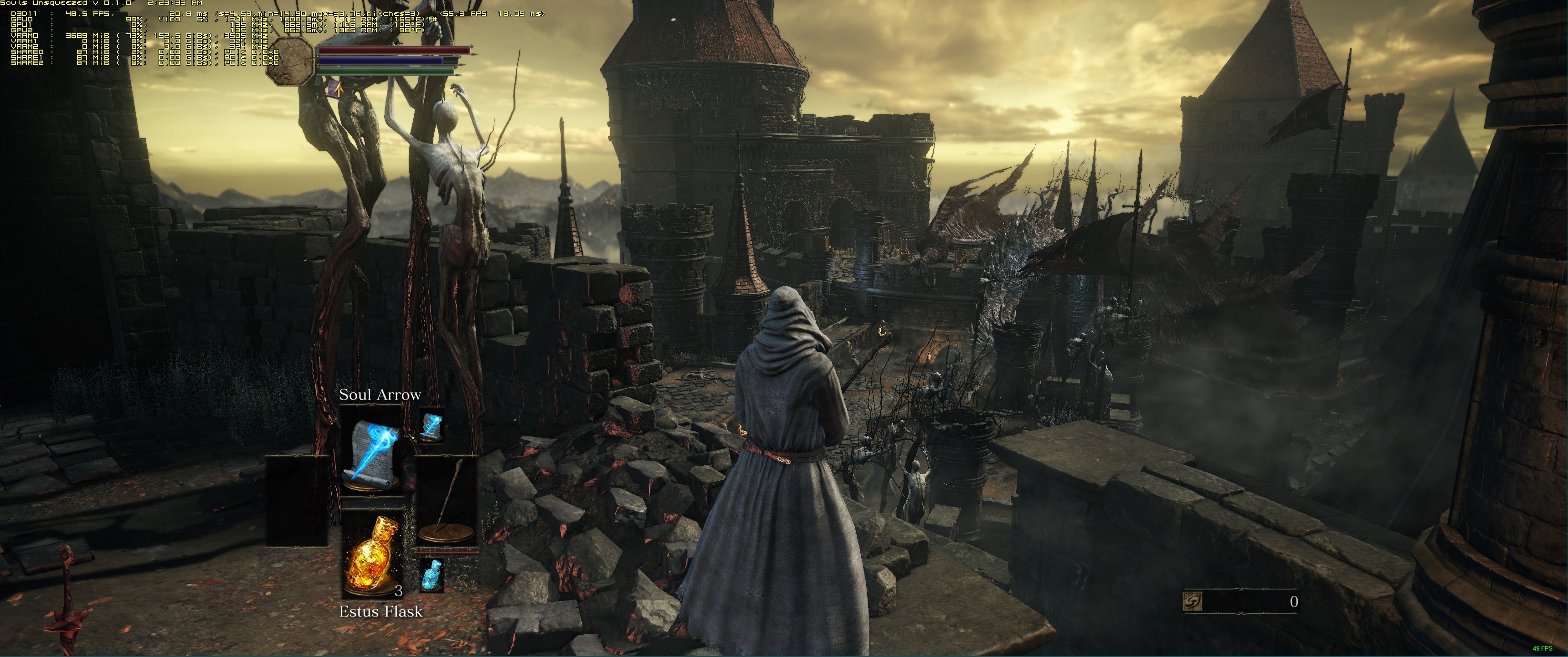
It seems like you figured out how to remove the black vignetting, praise the sun, thank you so very much. cant wait for release of V0.1.0 Please let me know once you setup some donation links.

Image

Above picture is from Kaldaien, from here:

http://steamcommunity.com/sharedfiles/f ... =663922936


Top
 Profile  
Reply with quote  
PostPosted: 26 Apr 2016, 17:59 
Offline
I Donated
I Donated

Joined: 18 Jul 2007, 04:19
Posts: 513
CY:G wrote:
It seems like you figured out how to remove the black vignetting, praise the sun, thank you so very much.


Could either you or Kaldaien let us know how to remove the vignetting?


Top
 Profile  
Reply with quote  
PostPosted: 27 Apr 2016, 16:20 
Offline

Joined: 18 Oct 2012, 09:33
Posts: 25
Is there a way to play DS3 in 1280x1024 without black bars?


Top
 Profile  
Reply with quote  
PostPosted: 27 Apr 2016, 16:25 
Offline

Joined: 17 Jan 2016, 22:11
Posts: 5
Im just checking in, i've been playing with full 21:9 resolution (modified exe) for like 40+ hours, online all the time, pvp and coop pretty much all the time as well, and even after the wave of bans im still fine.


Top
 Profile  
Reply with quote  
PostPosted: 27 Apr 2016, 18:41 
Offline
User avatar

Joined: 14 Mar 2016, 17:42
Posts: 10
Polito wrote:
Im just checking in, i've been playing with full 21:9 resolution (modified exe) for like 40+ hours, online all the time, pvp and coop pretty much all the time as well, and even after the wave of bans im still fine.


How did you get 21:9 to work?


Top
 Profile  
Reply with quote  
PostPosted: 27 Apr 2016, 22:00 
Offline
User avatar

Joined: 10 Nov 2015, 10:33
Posts: 6
Deh wrote:
Polito wrote:
Im just checking in, i've been playing with full 21:9 resolution (modified exe) for like 40+ hours, online all the time, pvp and coop pretty much all the time as well, and even after the wave of bans im still fine.


How did you get 21:9 to work?


Look earlier in the thread.


Top
 Profile  
Reply with quote  
PostPosted: 28 Apr 2016, 02:52 
Offline
I Donated
I Donated
User avatar

Joined: 28 Feb 2014, 21:02
Posts: 58
ccv123 wrote:
I already tried that fix from steam and it worked, but here is the issue:
I use Reshade / Sweetfx in all of my games to change their look and this fix requires me to overrite some of the files from Reshade.
And for me Reshade >> HUD Fix


Can you share your .ini settings for the 21:9 HUD fix? I can't get the HUD offset fix to work and would like to know what I am doing wrong. I'm running in 21:9 but using Nvidia DSR to run at 3840x1620, which is why I set the values to that. The HUD is still centered as if I am on a 1920x1080 resolution.

Here is what I have right now:

Code:
SoulsUnsqueezed.ini

[SUS.Window]
Borderless=false
Fullscreen=true
Center=true

[SUS.Display]
HUDResX=3840
HUDResY=1620
HUDOffsetX=480
HUDOffsetY=
StretchHUD=false

[SUS.Render]
DefaultResX=3840
DefaultResY=1620
FlipMode=false

_________________
Steam Profile | ReShade/SweetFX Presets | YouTube


Top
 Profile  
Reply with quote  
PostPosted: 28 Apr 2016, 03:38 
Offline

Joined: 28 Apr 2016, 03:37
Posts: 1
OMG - this forum is too awesome! Thanks for the help getting me to 21 x 9.


Top
 Profile  
Reply with quote  
PostPosted: 28 Apr 2016, 10:25 
Offline

Joined: 01 Nov 2012, 11:20
Posts: 25
Thanks to evertbody contributing.

I am starting to get bored of doing lots of things to be able to play properly (21:9 aspect ratio, FoV fixes, etc)


Last edited by zorranco on 28 Apr 2016, 12:59, edited 3 times in total.

Top
 Profile  
Reply with quote  
PostPosted: 28 Apr 2016, 11:11 
Offline

Joined: 28 Apr 2016, 11:09
Posts: 5
Someone has the new modified .exe upgrade? The old that posting here will not work.


Top
 Profile  
Reply with quote  
PostPosted: 28 Apr 2016, 13:23 
Offline
User avatar

Joined: 14 Mar 2016, 17:42
Posts: 10
Volkov wrote:
Deh wrote:
Polito wrote:
Im just checking in, i've been playing with full 21:9 resolution (modified exe) for like 40+ hours, online all the time, pvp and coop pretty much all the time as well, and even after the wave of bans im still fine.


How did you get 21:9 to work?


Look earlier in the thread.


I tried SoulsUnsqueezed and the exe edit, nothing works.


Top
 Profile  
Reply with quote  
PostPosted: 28 Apr 2016, 14:18 
Offline

Joined: 08 Jan 2015, 15:03
Posts: 13
Something did indeed break the hex edit fix, however SUS is working for me right now.


Top
 Profile  
Reply with quote  
PostPosted: 28 Apr 2016, 16:24 
Offline

Joined: 19 Apr 2016, 21:13
Posts: 3
Latest update messed up the fix if you want widescreen support you need to modify the ds3.exe again. I just did and everything looks nice again :)


Top
 Profile  
Reply with quote  
PostPosted: 28 Apr 2016, 17:42 
Offline

Joined: 28 Apr 2016, 17:39
Posts: 1
I wish i was skilled enough to do so. I just have to wait until one of you awesome guys uploads the new modified .exe

I registered though to just say thank you guys for all your hard work. I thought all was lost. But thanks, i love to enjoy my games in 21:9.


Top
 Profile  
Reply with quote  
PostPosted: 28 Apr 2016, 20:10 
Offline

Joined: 28 Apr 2016, 20:04
Posts: 5
How do you guys find the code to hex edit? Theres a mountain of numbers!


Top
 Profile  
Reply with quote  
PostPosted: 28 Apr 2016, 20:40 
Offline
User avatar

Joined: 11 Jun 2014, 02:54
Posts: 76
oldestgregg wrote:
How do you guys find the code to hex edit? Theres a mountain of numbers!


1) Just copy the hex string for 1920x1080: 800700003804

2) Make sure you have it on 64bit up in the top menu bar, it will most likely start on 16bit

3)Hit ctrl+f so the search dialogue pops up; alternatively you can go to the top bar and hit edit, and click on find or search. It will be different depending on what Hex editor you use.Hitting Ctrl+F is the easiest way. That is the search shortcut for almost every word processor, text editor, web browser......... and so on.

4 Make sure you pick Hex string on the search pop up other wise it won't be looking for it. It will be right there under the blank that you paste 800700003804 into.

5) when it brings you to the string put the cursor in front of the first number and just type the new one you need for your resolution. There is no need to delete the string of old numbers, as you type it will replace them. If you delete it you can actually mess up the executable if your not being careful. So again just type and it will replace the numbers .

6) Hit Ctrl+S or go up to the menu and hit save. Bam you're done. Easy peazy lemon squeezy about 30 seconds to have it done.

Correct Hex Strings.
2560x1080: 000A00003804

3440x1440: 700D0000A005

5760x1080: 801600003804

I hope this is clear enough. I just got home after a 16 hour day so I'm a little out of it. It looks clear to me but that might not mean anything.
Hope that does it for you.


Top
 Profile  
Reply with quote  
PostPosted: 28 Apr 2016, 20:53 
Offline

Joined: 28 Apr 2016, 20:04
Posts: 5
Thank you. I will give it a go now and see if I understand it!


Top
 Profile  
Reply with quote  
PostPosted: 28 Apr 2016, 20:54 
Offline

Joined: 28 Apr 2016, 20:04
Posts: 5
Sorry but one more question...what hex editor do you use? I'm using hex workshop hex editor and some of the options you say to pick are not there or maybe listed as something else? Sorry again


Top
 Profile  
Reply with quote  
PostPosted: 28 Apr 2016, 21:46 
Offline

Joined: 28 Apr 2016, 20:04
Posts: 5
Shame its not 3440x1440 Adriano or I would be straight on that


Top
 Profile  
Reply with quote  
PostPosted: 28 Apr 2016, 23:02 
Offline

Joined: 28 Apr 2016, 20:04
Posts: 5
Thank you. That works perfectly!


Top
 Profile  
Reply with quote  
PostPosted: 28 Apr 2016, 23:12 
Offline

Joined: 18 Jul 2015, 20:39
Posts: 10
Agreed! 3440X1440 works perfectly!

Thank you!!!


Top
 Profile  
Reply with quote  
PostPosted: 29 Apr 2016, 05:58 
Offline

Joined: 22 Apr 2016, 11:14
Posts: 2
Yep, can also confirm that reapplying the fix for 3440x1440 works great for me :)


Top
 Profile  
Reply with quote  
PostPosted: 29 Apr 2016, 11:54 
Offline

Joined: 18 Oct 2012, 09:33
Posts: 25
Hi, can you fix in 1280x1024 (5:4) to remove black bars?


Top
 Profile  
Reply with quote  
PostPosted: 29 Apr 2016, 13:46 
Offline

Joined: 29 Apr 2016, 13:28
Posts: 1
Hello guys I'd like some help with this. Basically 21:9 works. I boot in windowed mode BUT when I switch to fullscreen ingame it minimizes the game. After clicking it a few times it opens it again, back in windowed mode. Any idea what's causing this? Such a shame, cause it's running very smoothly at 2560x1080.
I have a gtx 970, maybe something with nvidia settings?

Thanks for your hard work so far!


Top
 Profile  
Reply with quote  
PostPosted: 29 Apr 2016, 16:10 
Offline

Joined: 28 Apr 2016, 11:09
Posts: 5
Sorry i dont know the code of that resolution.


Top
 Profile  
Reply with quote  
PostPosted: 29 Apr 2016, 21:12 
Offline
User avatar

Joined: 14 Mar 2016, 17:42
Posts: 10
Thanks, it's working now!


Top
 Profile  
Reply with quote  
PostPosted: 29 Apr 2016, 22:19 
Offline

Joined: 08 Jan 2015, 15:03
Posts: 13
ccv123 wrote:
Is there a way to push the HUD to the sides of the screen?

Edit: Not sure if that matters, but I'm on 2560x1080.


If you use SUS & set "stretch HUD" to "true," it'll move the HUD elements closer to the screen edges, but it does stretch them out a bit. Worth the tradeoff imo.


Top
 Profile  
Reply with quote  
PostPosted: 30 Apr 2016, 02:51 
Offline

Joined: 21 Apr 2016, 00:41
Posts: 2
Is there any way to get the game to run in a borderless window with the 21:9 fix? Or stop it from setting my display to 60hz when it goes into fullscreen mode?

I know the game is locked to 60fps, but right now if I disable vsync I'm getting some tearing.


Top
 Profile  
Reply with quote  
PostPosted: 30 Apr 2016, 04:01 
Offline
Insiders
Insiders

Joined: 01 Sep 2010, 11:38
Posts: 516
Has anyone started a thread somewhere on an official forum requesting a fix for these problems? I realise all the other games didn't have support, but it seems like they've ramped up their Port qaulity and there may be a better chance to get official fixes :)

_________________
起死回生 (kishi kaisei) Wake from death and return to life..


Top
 Profile  
Reply with quote  
PostPosted: 30 Apr 2016, 04:40 
Offline
User avatar

Joined: 12 Nov 2014, 20:30
Posts: 45
Toothless Spoon wrote:
Has anyone started a thread somewhere on an official forum requesting a fix for these problems? I realise all the other games didn't have support, but it seems like they've ramped up their Port qaulity and there may be a better chance to get official fixes :)


I have sent an email to Nanco Bandai ([email protected]) and i asked about this.
Still waiting an answer.

We should put all our complaints somewhere, i don't know, or send multiple emails...
Maybe if each person sends an email, they may notice us.


Top
 Profile  
Reply with quote  
PostPosted: 30 Apr 2016, 05:47 
Offline
I Donated
I Donated

Joined: 18 Jul 2007, 04:19
Posts: 513
Has anyone found a way to remove the vignetting?


Top
 Profile  
Reply with quote  
PostPosted: 30 Apr 2016, 16:49 
Offline

Joined: 24 Sep 2015, 05:22
Posts: 34
clemfandango wrote:
Is there any way to get the game to run in a borderless window with the 21:9 fix? Or stop it from setting my display to 60hz when it goes into fullscreen mode?

I know the game is locked to 60fps, but right now if I disable vsync I'm getting some tearing.


Try using this: http://steamcommunity.com/sharedfiles/f ... =663922936

No need for to hex edit the exe with this either.


Top
 Profile  
Reply with quote  
PostPosted: 30 Apr 2016, 18:07 
Offline
Insiders
Insiders
User avatar

Joined: 11 Dec 2008, 23:51
Posts: 685
Location: Germany
I tried out Kaldaiens Souls "Unsqueezed" 0.1.0 - it works but i cannot get rid of my Task-bar - its always there - ALT TAB doesn't work - maybe his next release.

_________________
CZARMAN aka 彼得爸爸


Top
 Profile  
Reply with quote  
PostPosted: 01 May 2016, 11:55 
Offline

Joined: 08 Jan 2015, 15:03
Posts: 13
czarman wrote:
I tried out Kaldaiens Souls "Unsqueezed" 0.1.0 - it works but i cannot get rid of my Task-bar - its always there - ALT TAB doesn't work - maybe his next release.


autohide


Top
 Profile  
Reply with quote  
PostPosted: 01 May 2016, 19:50 
Offline

Joined: 01 May 2016, 19:39
Posts: 1
I can confirm that Soul Unsqueezed 0.1.0(http://steamcommunity.com/sharedfiles/f ... =663922936) works perfectly for 21:9 without black borders!
So i think this is the better alternative to the hex-edit of the .exe, cause far less risk of getting banned.


czarman wrote:
I tried out Kaldaiens Souls "Unsqueezed" 0.1.0 - it works but i cannot get rid of my Task-bar - its always there - ALT TAB doesn't work - maybe his next release.


Try "Borderless=false" in the soulsunsqueezed.ini.

For everyone, whose game is crashing when starting ds3 with soulsunsqueezed, try FlipMode=false in the soulsunsqueezed.ini. I got that problem, i think it's exclusive to Windows 7.

By the way - did someone get the "HUDOffsetX=" to work properly? On my side it didn't change anything, no matter what number im using...


Top
 Profile  
Reply with quote  
PostPosted: 02 May 2016, 11:48 
Offline

Joined: 02 May 2016, 11:16
Posts: 1
Hi, guys. Thanks for the effort everyone.

I have a question: when using the Souls Unsqueezed, the screen is filled (3440x1440), but it's actually stretched. It doesn't look the same as the unstretched editing of the .exe.

Am I doing something wrong?


Top
 Profile  
Reply with quote  
PostPosted: 03 May 2016, 11:49 
Offline

Joined: 08 Jan 2015, 15:03
Posts: 13
FierrotLePou wrote:
Hi, guys. Thanks for the effort everyone.

I have a question: when using the Souls Unsqueezed, the screen is filled (3440x1440), but it's actually stretched. It doesn't look the same as the unstretched editing of the .exe.

Am I doing something wrong?


Yes, something is wrong. I'm using SUS at that res. and it looks perfect. Did you look into the configuration notes on the Steam page?

https://steamcommunity.com/sharedfiles/filedetails/?id=663922936

Additionally, you need to do this:

When you install the mod for the first time, it is suggested that you set the resolution in %AppData%/DarkSoulsIII/GraphicsConfig.xml to match your desktop.


Top
 Profile  
Reply with quote  
PostPosted: 03 May 2016, 14:13 
Has anyone tried using Souls Unsqueezed for higher resolutions?

I'm interested in getting the game to run at 5760 * 1080 but haven't given the software a try yet. Any help would be greatly appreciated.


Top
  
Reply with quote  
PostPosted: 05 May 2016, 04:54 
Offline

Joined: 05 May 2016, 04:45
Posts: 3
I had to download the 0.2.0 test dll to get Souls Unsqueezed to work without showing the Windows taskbar, but seems to be working now for 21:9 fullscreen+borderless=false. Windowed+borderless=true still shows the taskbar on top, as does fullscreen+borderless=true. The hack could definitely use some work.

The HUD is either stuck in the middle of the screen or scaled in an ugly way, but can't have everything I guess.

EDIT: 0.2.1 works windowed+borderless.


Last edited by cdr on 12 May 2016, 06:07, edited 1 time in total.

Top
 Profile  
Reply with quote  
PostPosted: 05 May 2016, 11:41 
Offline
Insiders
Insiders

Joined: 01 Sep 2010, 11:38
Posts: 516
Amon also started a thread on the official forums here:

http://forums.bandainamcogames.com/show ... ls-III-(PC)-Vignetting&highlight=vignetting

Everyone head over there and smash it.

_________________
起死回生 (kishi kaisei) Wake from death and return to life..


Top
 Profile  
Reply with quote  
PostPosted: 06 May 2016, 14:40 
Offline

Joined: 16 Apr 2008, 17:16
Posts: 273
The souls Unsqueezed steam page no longer exists :( Wonder whats going on, regardless, the github page is still up:

https://github.com/Kaldaien/SoulsUnsqueezed


Top
 Profile  
Reply with quote  
PostPosted: 08 May 2016, 00:29 
Offline

Joined: 05 May 2016, 04:45
Posts: 3
CY:G wrote:
The souls Unsqueezed steam page no longer exists :( Wonder whats going on, regardless, the github page is still up:

https://github.com/Kaldaien/SoulsUnsqueezed


Idiots were trolling the author on Steam, so he quit. No good deed goes unpunished. Hopefully he reconsiders or someone else picks it up.


Top
 Profile  
Reply with quote  
PostPosted: 10 May 2016, 21:22 
Offline

Joined: 06 Nov 2015, 20:24
Posts: 7
Apologies to those having taskbar problems, it is related to the window centering code.

It takes the screen real-estate minus the task bar, to compute the offset for window centering. If your selected windowed resolution is the same as desktop, go ahead and turn that feature off.

    The official release of 0.2.0 will fix this.

For now, I would suggest using the dxgi.dll from here and the tweak tool from here. Go to the Graphics tab and make sure Center Window is unchecked, also turn Aspect Ratio Correction to On.

The HUD Stretch feature is not something you are locked into, by the way. The INI setting is just how it will start, you can always press Ctrl + Alt + Shift + . to toggle it in game, I find this necessary to hid visual artifacts on the sides of the screen (will be fixed in a later version).

---

I do not monitor these forums often, so it is easiest for me if you could post anything on the Steam forum post for the project.


Top
 Profile  
Reply with quote  
PostPosted: 11 May 2016, 05:55 
Offline
I Donated
I Donated

Joined: 18 Jul 2007, 04:19
Posts: 513
Kaldaien wrote:
Apologies to those having taskbar problems, it is related to the window centering code.

It takes the screen real-estate minus the task bar, to compute the offset for window centering. If your selected windowed resolution is the same as desktop, go ahead and turn that feature off.

    The official release of 0.2.0 will fix this.

For now, I would suggest using the dxgi.dll from here and the tweak tool from here. Go to the Graphics tab and make sure Center Window is unchecked, also turn Aspect Ratio Correction to On.

The HUD Stretch feature is not something you are locked into, by the way. The INI setting is just how it will start, you can always press Ctrl + Alt + Shift + . to toggle it in game, I find this necessary to hid visual artifacts on the sides of the screen (will be fixed in a later version).

---

I do not monitor these forums often, so it is easiest for me if you could post anything on the Steam forum post for the project.


Hey Kaldaien, do you have any plans to look at a possible fix to remove the vignetting?


Top
 Profile  
Reply with quote  
PostPosted: 12 May 2016, 06:05 
Offline

Joined: 05 May 2016, 04:45
Posts: 3
Borderless windowed now works great in the 0.2.1 version.


Top
 Profile  
Reply with quote  
PostPosted: 12 May 2016, 10:23 
Offline

Joined: 18 Oct 2012, 09:33
Posts: 25
With soulsqueeze fix the game not start in 1280x1024. And 'everything configured according to the instructions, I click launcher but nothing happens.

EDIT: Now with 0.2.1 version works good! Great! :twothumb: :rockout:


Top
 Profile  
Reply with quote  
PostPosted: 13 May 2016, 15:39 
Offline
User avatar

Joined: 13 May 2016, 15:38
Posts: 1
Location: Namek
New update butt-fucked 21:9 boyzzzz


Top
 Profile  
Reply with quote  
PostPosted: 13 May 2016, 20:40 
Offline

Joined: 16 Nov 2013, 12:33
Posts: 22
Why should it. Just re-edit the new .exe.

Image


Top
 Profile  
Reply with quote  
PostPosted: 14 May 2016, 08:44 
Offline

Joined: 11 Nov 2015, 17:12
Posts: 12
QwobVN wrote:
New update butt-fucked 21:9 boyzzzz


Every new patch will screw up the 21:9 fix, because it overwrites the hexedit of the .exe. Just make the change again, takes about 30 seconds, and boom ready to go.


Top
 Profile  
Reply with quote  
PostPosted: 17 Jul 2016, 20:54 
Offline

Joined: 05 Oct 2013, 13:41
Posts: 9
Have I gone brain dead again ? I been using the Hex editor method to allow game play at 5760x1080 since it was published. And every time the lads over From Software introduced new versions I just went in and re-edited the DS3.exe "from 800700003804 (1920x1080) to 801600003804 (5760x1080) and I'd be back in full screen. Also kept " game save file" in read only mode. Now all of a sudden only my center monitor is showing the game even though the left and right screens are alive. Anybody got any suggestions short of replacing my rig?


Top
 Profile  
Reply with quote  
PostPosted: 29 Jul 2016, 16:28 
Offline

Joined: 01 Dec 2013, 08:55
Posts: 23
upgraded from 2560x1080 to a 3440x1440 and it seems like the old method of replacing the hex values no longer works.

replaced all instances of 398EE33F with 8EE31840, config file is set to 3440x1440 windowed as well. But the highest res available in windowed mode in the game is 2560x1440.

oops, nvm, replaced the wrong value. all good now.


Top
 Profile  
Reply with quote  
PostPosted: 10 Nov 2016, 21:08 
Offline

Joined: 10 Nov 2016, 21:03
Posts: 1
Hi all - wow this is a long thread...

I just bought a new computer, with dual titan x pascals, 6859 hz, m.2 hard disk, etc.

I know its supposed to be strong, but I am not good with technical stuff. I read the replies again and again but I really couldn't understand how to do this.

I have 3 144hz screens 27' each Benq - my current bezel correction resolution is 7956 * 1440

I am hoping I can run this game ion three screen with highest settings, but the comments are too difficult.

Can someone please explaing to me what I need to do in simple steps??

Forgive my ignorance,.,,


Top
 Profile  
Reply with quote  
PostPosted: 04 Jan 2017, 11:14 
Offline
I Donated
I Donated

Joined: 18 Jul 2007, 04:19
Posts: 513
Amon Amarth wrote:
Has anyone found a way to remove the vignetting?


I don't suppose we can expect to see a fix from someone at least this year?


Top
 Profile  
Reply with quote  
PostPosted: 04 Jan 2017, 17:17 
Offline
User avatar

Joined: 11 Jun 2014, 02:54
Posts: 76
Amon Amarth wrote:
Amon Amarth wrote:
Has anyone found a way to remove the vignetting?


I don't suppose we can expect to see a fix from someone at least this year?


Well, it must be a simple HLSL Post shader; almost certainly in a .fx/.h(etc..), file. It might be by itself, or in a shader file with some of the other post effects. So identifying it should be extremely straightforward. Then all that needs to be done is: 1)Find a way to unpack From Software's .bdt asset archives (the .bhd's are almost certainly the indexes accompanying said archives. so no need to mess with those. 2) locate the shader files. 3)find the vignette code (Which should be very few lines) 4)Altering the vignette code.
[edit: I forgot #5]-- 5) Repack said archive with modified file and place back in game directory.

It should usually have the word Vignette actually in the syntax and be accompanied by some values correlating to screen edges (+x,-x,+y-y,)or (+pixel.x,-pixel.x,+pixel.y,-pixel.y) or (+tex.x,-tex.x,+tex.y,-tex.y,) something of that nature. It should also contain a colorInput texture of some sort, and end in something along the lines of: return colorinput;

Code:
for example The common TV style one found in certain certain shader suites (This one is from an ENB) (-x*x+x) * (-y*y+y):

                tex = -tex * tex + tex;
      colorInput.rgb = saturate(tex.x * tex.y * 100.0) * colorInput.rgb

or a round formula: (-x*x+x) * (-y*y+y)

             float tex_xy = dot( float4(tex,tex) , float4(-tex,1.0,1.0) );
        colorInput.rgb = saturate(tex_xy * 4.0) * colorInput.rgb;


Then just playing with the values until it gets to an acceptable level, Flat out removing it, or leaving an empty file might also work just fine (empty if it is the only shader present.) Although coming a cross a null value or not finding the file at all may bug something out if anything else depends on its output or it is supposed to point to another shader, or....

Since there are texture mods available for DS3 on the Nexus. There is almost certainly a utility there as well for opening the archives. I'm on a business trip currently but get back Friday night so if no one has looked at it yet. I'll try and work it out. However, I am sure anyone can do it as long as they just aren't intimidated by the shader code. It is really very simple to follow and edit/write very basic shaders like vignette, sepia, basic sharpening, and (some types of) tonemapping. Besides it is a fun little project to engross ones self in if you want to learn about these types of things, and a great place to start. :twothumb: :twothumb:


Top
 Profile  
Reply with quote  
Display posts from previous:  Sort by  
Post new topic Reply to topic  [ 235 posts ]  Go to page Previous  1 ... 56, 57, 58, 59, 60, 61, 62 ... 235  Next

All times are UTC [ DST ]


Who is online

Users browsing this forum: No registered users and 2 guests


You cannot post new topics in this forum
You cannot reply to topics in this forum
You cannot edit your posts in this forum
You cannot delete your posts in this forum
You cannot post attachments in this forum

Search for:
Jump to:  
cron


Powered by phpBB® Forum Software © phpBB Group