Widescreen Gaming Forum

[-noun] Web community dedicated to ensuring PC games run properly on your tablet, netbook, personal computer, HDTV and multi-monitor gaming rig.
It is currently 12 Jul 2026, 13:37

All times are UTC [ DST ]


Post new topic Reply to topic  [ 39 posts ]  Go to page Previous  1 ... 14, 15, 16, 17, 18, 19, 20 ... 39  Next
Author Message
PostPosted: 25 Feb 2014, 14:07 
Offline
Insiders
Insiders
User avatar

Joined: 19 Dec 2011, 16:03
Posts: 521
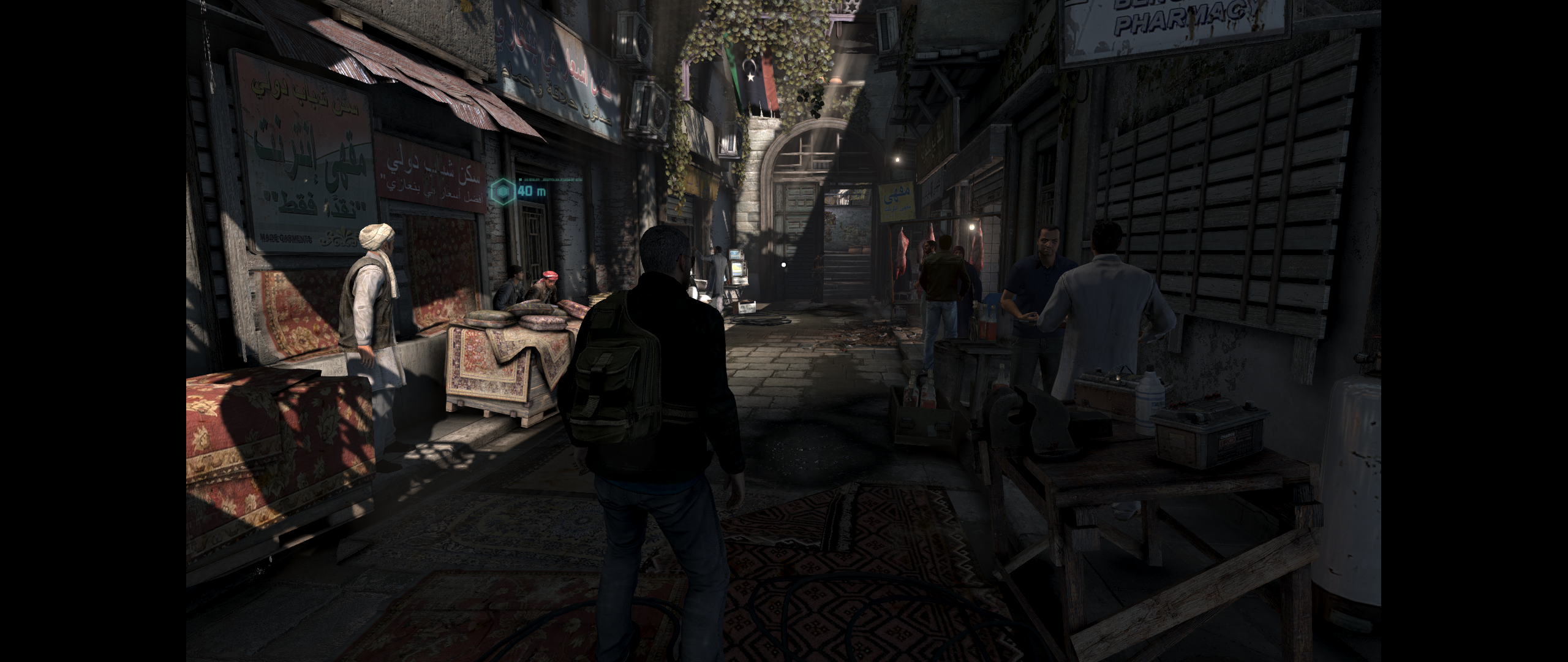
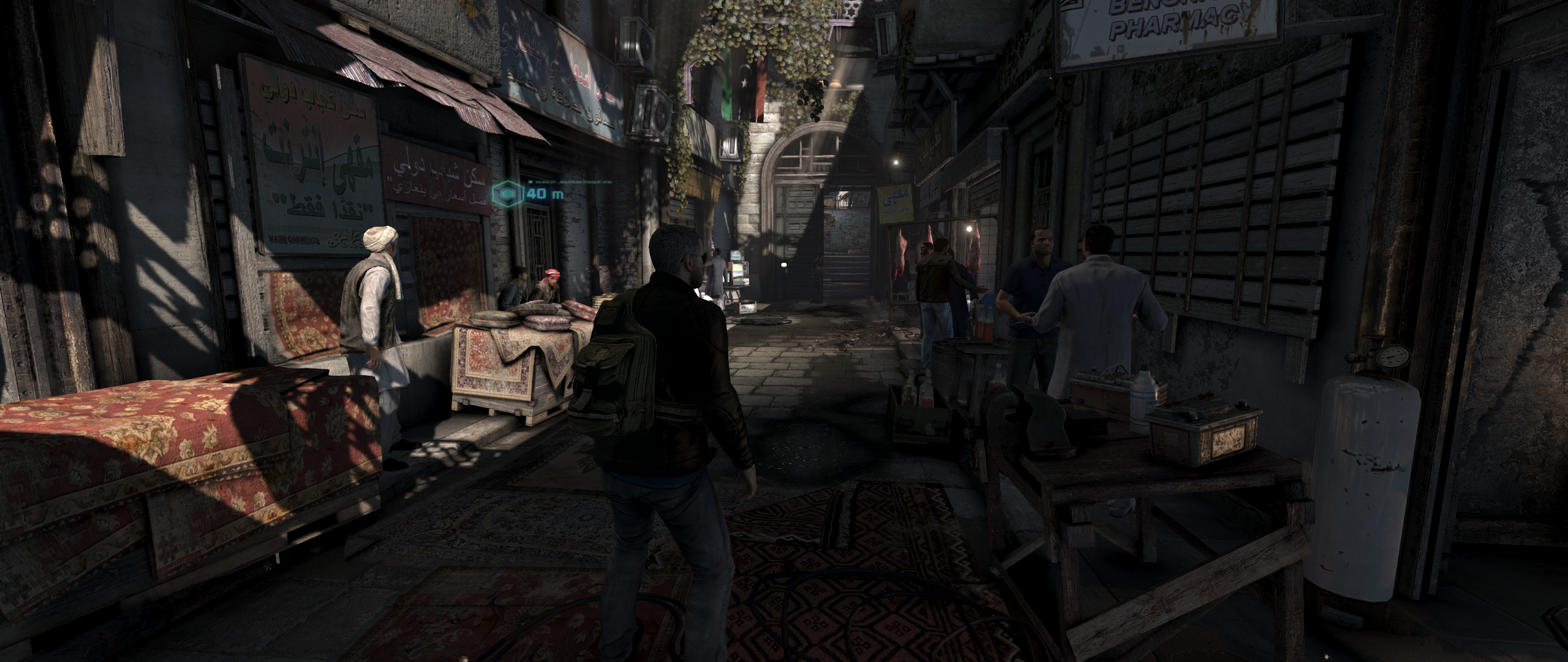
Copy the loader in src\SYSTEM\ and run game from it.

Fix available from the PC Gaming Wiki Community Files (search there)

Image
Image


Last edited by jackfuste on 20 Jul 2015, 10:28, edited 1 time in total.

Top
 Profile  
Reply with quote  
PostPosted: 25 Feb 2014, 18:52 
Offline

Joined: 07 Jun 2013, 12:25
Posts: 116
thanks jackfust for your work but don't work for me.

i launch the loader in src/system, it launch uplay alone, and when i click play game in UPLAY, it launch the game from steam.

At final the game il still 16/9. Have got idea ?


Top
 Profile  
Reply with quote  
PostPosted: 06 Mar 2014, 18:00 
Offline

Joined: 06 Mar 2014, 17:50
Posts: 10
is it working already with a 21:9 aspect ratio? i have a free code for this game but just waiting for the fix so i can play it in ultrawide goodness :rockout:


Top
 Profile  
Reply with quote  
PostPosted: 06 Mar 2014, 19:04 
Offline

Joined: 07 Jun 2013, 12:25
Posts: 116
yes it s patch for 21:9 but work only with cracked version of the game


Top
 Profile  
Reply with quote  
PostPosted: 30 Apr 2014, 06:20 
Offline

Joined: 30 Apr 2014, 06:09
Posts: 1
Good day. Prompt friends. Do not like do not poluchaetsya 21:9 format. all along kroyam cut strip (black). Even when I replace the exe file


Top
 Profile  
Reply with quote  
PostPosted: 20 Jun 2014, 19:28 
Offline

Joined: 20 Jun 2014, 19:08
Posts: 1
Hi all

Fix : http://www.mediafire.com/download/xt1up ... cklist.rar

Dosn't Work for me i get an Error Message with Error Code 0x0000142 when ill try to Run Blacklist_DX11_game.exe or Blacklist_game.exe
but prodigalson1 said it works but how

TP555


Top
 Profile  
Reply with quote  
PostPosted: 20 Oct 2015, 15:14 
Offline

Joined: 20 Oct 2015, 15:09
Posts: 10
Heijass !

I dont know whats wrong with these 2 EXE files, but i would not use them ! Please explain jackfuste.


Attachments:
2015-10-20 16_13_00-Program Manager.png
2015-10-20 16_13_00-Program Manager.png [ 50.8 KiB | Viewed 6856 times ]
Top
 Profile  
Reply with quote  
PostPosted: 03 Dec 2015, 01:46 
Offline

Joined: 25 Oct 2008, 11:13
Posts: 6
Does anyone know a workaround to the issue that if you crack the game, you can't access uplay and therefore your DLC?


Top
 Profile  
Reply with quote  
PostPosted: 25 Feb 2016, 18:44 
Offline

Joined: 04 Feb 2016, 20:31
Posts: 8
Hi, could you please provide Ultrawide FIX file again? It's all offline.

:TrueWS:


Top
 Profile  
Reply with quote  
PostPosted: 05 Mar 2016, 00:07 
Offline

Joined: 16 Aug 2006, 16:58
Posts: 7
Jack's been offline since Jan 6th, I've reuploaded the legit v1.03 .exe's here (link removed), if Jack or someone with HEX knowledge can patch it please. I can create a game section for Splinter Cell Blacklist with the patched .exe once tested and confirmed here first.


Top
 Profile  
Reply with quote  
PostPosted: 05 Mar 2016, 03:33 
Offline
User avatar

Joined: 07 Jan 2016, 18:39
Posts: 3
Hi, does that patch work for licensed game? (not cracked)


Top
 Profile  
Reply with quote  
PostPosted: 05 Mar 2016, 16:39 
Offline

Joined: 16 Aug 2006, 16:58
Posts: 7
It's unpatched, the .exe jackfuste patched was of an older version which was a cracked .exe.


Top
 Profile  
Reply with quote  
PostPosted: 24 Mar 2016, 03:06 
Offline

Joined: 19 Dec 2015, 21:20
Posts: 6
Location: Canada
Hey guys.. trying to play this game on my 3440x1440 monitor... Is there any fixes available for this game? i own a legit uplay copy.


Top
 Profile  
Reply with quote  
PostPosted: 24 Mar 2016, 13:07 
Offline
Insiders
Insiders
User avatar

Joined: 11 Dec 2008, 23:51
Posts: 685
Location: Germany
So far there is only a working HOR+ Solution from Jackfuste - but works only on a CR Version.
I found a Solution but its VERT- so we still need to find the FOV to make a STEAM/UPlay Version proper HOR+
If anybody has a FOV Solution...until then....

_________________
CZARMAN aka 彼得爸爸


Top
 Profile  
Reply with quote  
PostPosted: 07 Apr 2016, 00:55 
Offline

Joined: 03 Apr 2016, 23:07
Posts: 7
I just got the urge to boot this game up, though I would be doing so for the first time on my 21:9 monitor... hence, me coming here to check out the support beforehand. Disappointing, though not unexpected, to find out there's no viable option to enjoying this great game in true widescreen glory! Damn. I also own a fully-legit Uplay copy, for the common knowledge. Up.


Top
 Profile  
Reply with quote  
PostPosted: 09 Apr 2016, 17:17 
Offline

Joined: 09 Apr 2016, 17:15
Posts: 2
Up from me too.
Splinter Cell Blacklist was one of the game I really wanted to replay since I got a 21:9 monitor, but I can't stand playing with those horrible black bars.
I raise the game by placing in a reward :)


Top
 Profile  
Reply with quote  
PostPosted: 10 Apr 2016, 12:10 
Offline
Insiders
Insiders
User avatar

Joined: 12 Mar 2013, 23:18
Posts: 366
czarman wrote:
I found a Solution but its VERT- so we still need to find the FOV to make a STEAM/UPlay Version proper HOR+
If anybody has a FOV Solution...until then....

There is apparently a DesiredFOV value in the executable. This topic is long after the release of the final patch, so it should still be applicable to the current version (I don't have this game to check it myself).


Top
 Profile  
Reply with quote  
PostPosted: 10 Apr 2016, 15:14 
Offline
Insiders
Insiders
User avatar

Joined: 11 Dec 2008, 23:51
Posts: 685
Location: Germany
Yes i am aware of that FOV Entry in the EXE but changing the Value does do nothing......

_________________
CZARMAN aka 彼得爸爸


Top
 Profile  
Reply with quote  
PostPosted: 10 May 2016, 13:29 
Offline

Joined: 10 May 2016, 13:19
Posts: 27
wanted to try this game, never really got into it, but the lack of 21:9 support makes me not want to play this game at the moment :p Their is a support ticket coming in for the developers. Ticket submitted with Ubi support, after two weeks nothing I chatted with someone today and she made a ticket with the developers. She warned me not to get my hopes up though, as it is a relative old game, and I see that more people opened tickets for this problem but got negative feedback. I will let you guys know.


Top
 Profile  
Reply with quote  
PostPosted: 30 May 2016, 14:38 
Offline

Joined: 30 May 2016, 14:29
Posts: 4
So..., i got it but only for offline gaming;(.....

I have the game original in Uplay, download the noCD Files for Version 1.03. Copy them to the Game Folder and start the Game with the Tool "loader_blacklist_dx11_game.exe" from user jackfuste. So this loader works for Version 1.03;)

Perfect the game is now in 21:9 ;)

Now my problem; with the noCD i can't play online because there is a extra uplay_r1_loader.dll there and i have to overwrite my original one.
When i use my original uplay_r1_loader.dll with the noCD files and "loader_blacklist_dx11_game.exe", the game starts (online) but not with 21:9 format.

So i think there must be a entry in this original dll file to deaktivate the black bars on 21:9.
I try to search it with a hex editor but i cant find a entry, maybe another one here got this skills??


Top
 Profile  
Reply with quote  
PostPosted: 14 Jun 2016, 12:24 
Offline

Joined: 10 May 2016, 13:19
Posts: 27
Sub200 wrote:
So..., i got it but only for offline gaming;(.....

I have the game original in Uplay, download the noCD Files for Version 1.03. Copy them to the Game Folder and start the Game with the Tool "loader_blacklist_dx11_game.exe" from user jackfuste. So this loader works for Version 1.03;)

Perfect the game is now in 21:9 ;)

Now my problem; with the noCD i can't play online because there is a extra uplay_r1_loader.dll there and i have to overwrite my original one.
When i use my original uplay_r1_loader.dll with the noCD files and "loader_blacklist_dx11_game.exe", the game starts (online) but not with 21:9 format.

So i think there must be a entry in this original dll file to deaktivate the black bars on 21:9.
I try to search it with a hex editor but i cant find a entry, maybe another one here got this skills??


It would be great if you found a solution to get the legal game working with widescreen! I think I will just spring for a crack for the moment, as the developers cant/wont fix it themselves... It is not ideal, but so is gaming in 16:9 on a 21:9 monitor! :mrgreen:


Top
 Profile  
Reply with quote  
PostPosted: 13 Jul 2016, 21:58 
Offline

Joined: 12 Jul 2016, 18:46
Posts: 3
Can anyone re-upload the fix by Jack (Thank you for finding a fix) ?

Someone must have downloaded it.

Its driving me nuts trying to find a solution.

Thanks,

TMB


Top
 Profile  
Reply with quote  
PostPosted: 15 Jul 2016, 13:27 
Offline

Joined: 15 Mar 2015, 19:34
Posts: 10
Must be simply a false positive, since jackfuste's fixes always work correctly and haven't done anything malicious as far as I know.


Top
 Profile  
Reply with quote  
Display posts from previous:  Sort by  
Post new topic Reply to topic  [ 39 posts ]  Go to page Previous  1 ... 14, 15, 16, 17, 18, 19, 20 ... 39  Next

All times are UTC [ DST ]


Who is online

Users browsing this forum: Bing [Bot] and 8 guests


You cannot post new topics in this forum
You cannot reply to topics in this forum
You cannot edit your posts in this forum
You cannot delete your posts in this forum
You cannot post attachments in this forum

Search for:
Jump to:  
cron


Powered by phpBB® Forum Software © phpBB Group