Widescreen Gaming Forum

[-noun] Web community dedicated to ensuring PC games run properly on your tablet, netbook, personal computer, HDTV and multi-monitor gaming rig.
It is currently 12 Jul 2026, 08:40

All times are UTC [ DST ]


Post new topic Reply to topic  [ 20 posts ]  Go to page 1, 2, 3, 4, 5 ... 20  Next
Author Message
PostPosted: 22 Dec 2016, 22:50 
Offline

Joined: 16 Nov 2013, 12:33
Posts: 22
Heyho,

I played a bit around with the .exe of the game, but the common methods doesn't seem to work. Changing "39 8E E3 3F" into "26 B4 17 40" (most common method) -> no effekt. Changing "800700003804" into "000A00003804" (Dark Souls 3 Method) -> no effect.

Then i gave Cheat Engine a try. So... (original method from fifa 2016, last post first page)

- launch your game and start an episode (important to be in an episode)

- open cheat engine and add the game.exe (little pc icon top left corner -> select the game process)

- check the box behind "hex", because we wanna search for an hex value

- put "3FE38E39" into the value field and click first scan. you will get a lot of addresses in the left area

- scroll down to the bottom where you see 3 green marked addresses.

- mark all 3 of them, right click and select "change value of selected addresses".

- in the new window replace "3FE38E39" with "4017b426" and click ok. should look like this now

- switch back in the game and switch between windowed and fullscreen two time -> alt + enter (from fullscreen to windowed to fullscreen) or change the resolution to 1920 x 1080 (it will switch it back to 2560 x 1080 on his own because of the changed values)

- enjoy

(i just played for around 10 min, but for that it feels good. mouse cursor is still on point. annotations (person x y will remember that) and subtitel, clickable options are still in the 16:9 area).

Attachment:
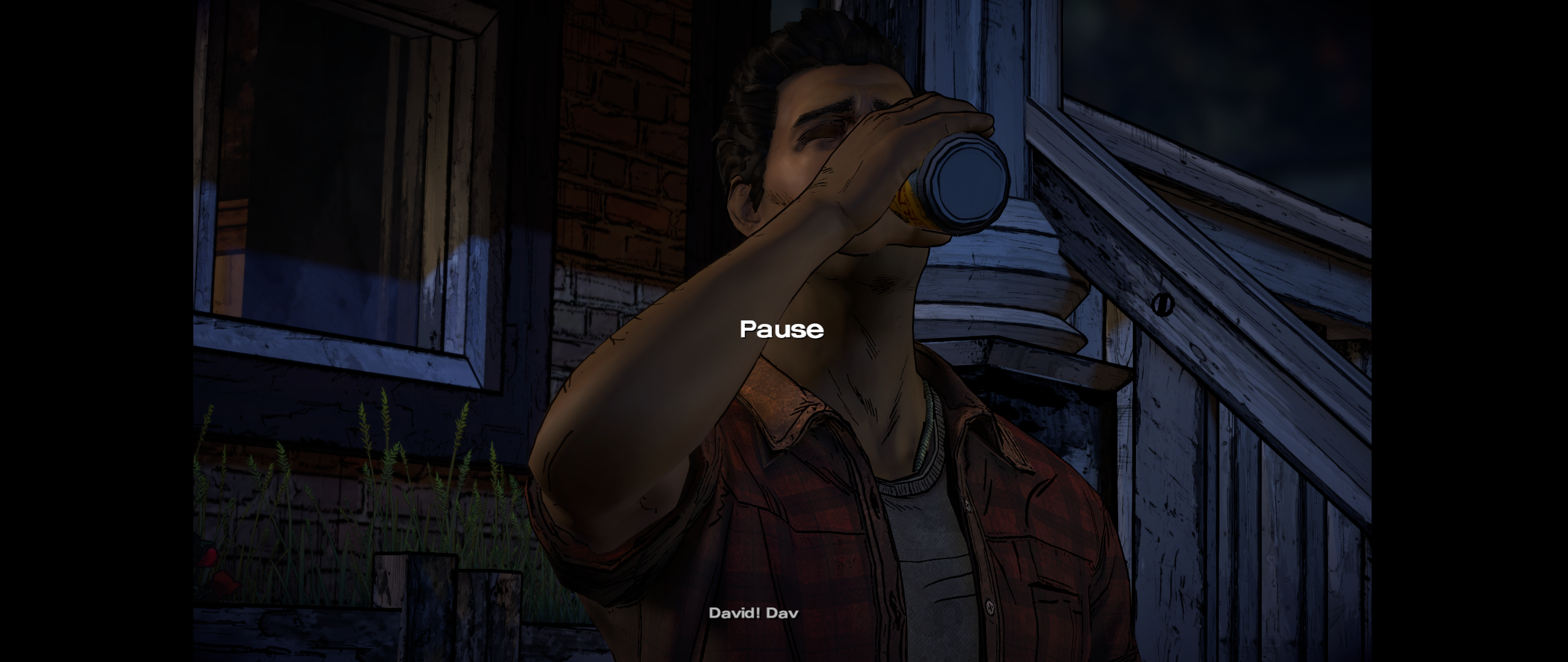
16.png
16.png [ 2.35 MiB | Viewed 23555 times ]

Attachment:
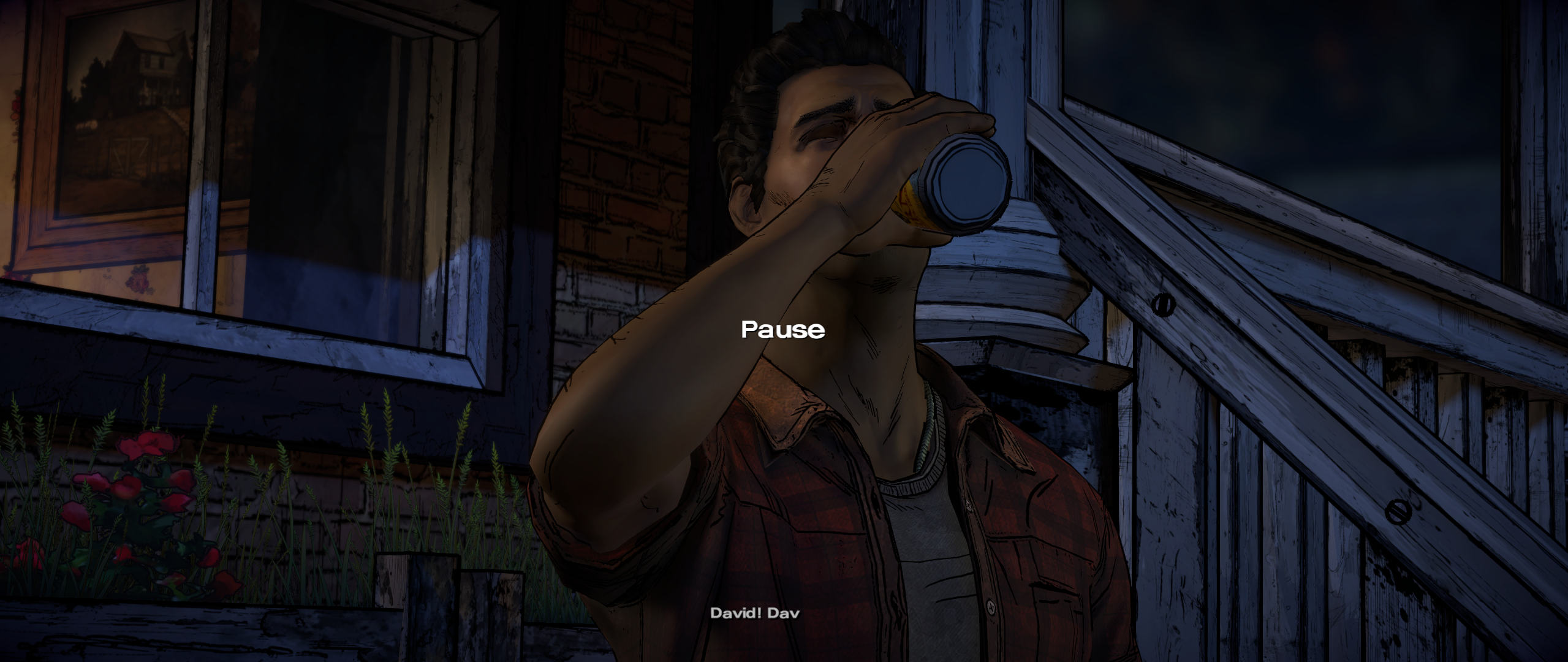
21.png
21.png [ 3.15 MiB | Viewed 23555 times ]


yea not the best solution, but if you play a episode in one session its not that bad... :D


Top
 Profile  
Reply with quote  
PostPosted: 26 Dec 2016, 11:41 
Offline
User avatar

Joined: 26 Feb 2016, 07:54
Posts: 25
Looking good man, I might actually buy into this if this doesn't get patched in newer episodes.

My thanks for letting the community know about this.


Top
 Profile  
Reply with quote  
PostPosted: 26 Dec 2016, 16:26 
Offline

Joined: 18 Nov 2014, 09:23
Posts: 10
thanks a lot for a little bit of hope, but this crashes the game for me within a few minutes. :(


Top
 Profile  
Reply with quote  
PostPosted: 27 Dec 2016, 11:15 
Offline

Joined: 18 Nov 2014, 09:23
Posts: 10
by the way, if you guys want official 21:9 support - i could use a little help on the TT forum. i get the feeling i am the only one asking for this. if we want them to support our displays, we need to be loud about it. so maybe consider posting there. thanks.

https://telltale.com/community/discussi ... r-season-3


Top
 Profile  
Reply with quote  
PostPosted: 04 Jun 2017, 04:58 
Offline
User avatar

Joined: 26 Feb 2016, 07:54
Posts: 25
I can confirm it still works for 5th episode patch of The Walking Dead: A New Frontier for Steam version. Not sure about gog/reloaded version. You need to use 64bit version of Cheat Engine or else it won't find the code. For 3440x1440 users, you would want to replace from 3FE38E39 to 4018E38E to fill the entire screen correctly

It works for The Walking Dead: Michonne Steam version but I had no luck for Batman - The Telltale Series steam demo version as I didn't know until now I had to use 64bit version.

I suggest people run this with 60hz as it now as it now caps fps via the highest refresh rate instead of unlocked one via windowed mode/default 60fps cap on fullscreen mode. The engine they used for this is has optimization issues & I had stuttering/fps issues in some areas with my 1080 at 3440x1440


Top
 Profile  
Reply with quote  
PostPosted: 12 Jun 2017, 21:49 
Offline

Joined: 12 Jun 2017, 21:47
Posts: 2
The problem with this fix is that everytime the game changes from play to cutscene the aspect ratio resets and you have to look up the values again to change them...

Why on earth we still need these sad workarounds to enjoy UW resolutions is beyhond me :/


Top
 Profile  
Reply with quote  
PostPosted: 20 Jun 2017, 13:44 
Offline
User avatar

Joined: 26 Feb 2016, 07:54
Posts: 25
I forgot to mention this, as I found out about this near the end of episode 4

You can lock the values in CE so you can easily switch to 21:9/unlocked aspect ratio with alt/enter hotkey. If that's too much of problem I guess someone could easily make a trainer for it


Top
 Profile  
Reply with quote  
PostPosted: 01 Aug 2017, 03:36 
Offline

Joined: 06 May 2017, 16:40
Posts: 4
Ok,
i did a trainer, not thaaaaaaaaaaaaaat good.
Anyway
i did one for twd michonne
http://www.wsgf.org/forums/viewtopic.php?f=68&t=30827

here it is for twd a new frontier

----------------------------------------------------------------
TUTORIAL:
Enter in one episode
alt+tab
Open the .exe
press f5
alt+tab again
Enjoy : )

*sometimes the game will stop working on 21:9, just alt+tab, f5 again, and alt+tab.

--------------------------------------------------------------

links:
windows 8+version -> https://files.fm/u/gxhp7frg
windows 8+version -> https://ufile.io/4nc5d

Working in my windows 10


Top
 Profile  
Reply with quote  
PostPosted: 24 Jun 2018, 21:20 
Offline

Joined: 27 Apr 2013, 05:16
Posts: 21
Crow wrote:
Ok,
i did a trainer, not thaaaaaaaaaaaaaat good.
Anyway
i did one for twd michonne
http://www.wsgf.org/forums/viewtopic.php?f=68&t=30827

here it is for twd a new frontier

----------------------------------------------------------------
TUTORIAL:
Enter in one episode
alt+tab
Open the .exe
press f5
alt+tab again
Enjoy : )

*sometimes the game will stop working on 21:9, just alt+tab, f5 again, and alt+tab.

--------------------------------------------------------------

links:
windows 8+version -> https://files.fm/u/gxhp7frg
windows 8+version -> https://ufile.io/4nc5d

Working in my windows 10


the file is missing from the link. Does it work with 3840: 1080 32: 9 ?


Top
 Profile  
Reply with quote  
PostPosted: 13 Jul 2018, 22:51 
Offline
Administrators
Administrators
User avatar

Joined: 05 Jun 2018, 05:10
Posts: 112
The trainer was unavailable, so I made my own that does exactly the same.

The instructions are as follows:
Quote:
1. Launch the game.
2. Choose an episode and wait for it to load.
3. Press Space to pause it.
4. Switch the game to windowed by pressing Alt+Enter.
5. Launch Frontier.exe
6. Press F5.
7. Switch back to the game window.
8. Press Alt+Enter to maximize the window.

Follow steps 3, 4, 6 and 8 again when the black bars reappear at the next chapter.

Attachment:
Frontier Ultrawide.zip [4 MiB]
Downloaded 713 times

Some AV software naturally see it as a hacktool, injector and so on, because it obviously involves memory hacking.

I played the game from start to finish and restarted between each episode to test it at 2560x1080, but let me know how it works for you.
Attachment:
20180714032438_1.jpg
20180714032438_1.jpg [ 229.4 KiB | Viewed 21480 times ]

_________________
you can buy me a coffee at ko-fi.com/rozziroxx


Top
 Profile  
Reply with quote  
PostPosted: 23 Jul 2018, 01:25 
Offline

Joined: 23 Jul 2018, 01:23
Posts: 2
@Rose: It doesn't work for me :'(


Top
 Profile  
Reply with quote  
PostPosted: 26 Jul 2018, 08:12 
Offline
Administrators
Administrators
User avatar

Joined: 05 Jun 2018, 05:10
Posts: 112
Are you on Windows 10? Did you follow the instructions step by step? You can try again maintaining the order or just resort to the solution described in the first post here and it should work until you close the game.

_________________
you can buy me a coffee at ko-fi.com/rozziroxx


Top
 Profile  
Reply with quote  
PostPosted: 26 Jul 2018, 12:45 
Offline
User avatar

Joined: 20 Sep 2015, 00:58
Posts: 530
maybe different version DRM (GOG or STEAM)

_________________
if you supporting what I do, buy me a coffee here https://ko-fi.com/kevinsesario or instead direct to paypal.me/kevinsesario . EMAIL:[email protected], Steam: https://steamcommunity.com/id/sesariok


Top
 Profile  
Reply with quote  
PostPosted: 27 Jul 2018, 00:17 
Offline

Joined: 23 Jul 2018, 01:23
Posts: 2
Rose wrote:
Are you on Windows 10? Did you follow the instructions step by step? You can try again maintaining the order or just resort to the solution described in the first post here and it should work until you close the game.

I am on Windows 10 and I've followed the instructions step by step. The solution with Cheat Engine work.


Top
 Profile  
Reply with quote  
PostPosted: 28 Sep 2018, 19:38 
Offline

Joined: 28 Sep 2018, 00:47
Posts: 6
I made a patcher to patch the EXE so you don't have to run a trainer each time or constantly have to reapply it. Just confirmed that it works on this game.

Latest version can be downloaded here, along with a list of games I've tested in the README.

And I've posted a tutorial on how to do this by hand in the Final Season thread.

I've only tested it on the GOG version so please let me know if it works on the Steam version if anyone has it.


Top
 Profile  
Reply with quote  
PostPosted: 29 Sep 2018, 10:29 
Offline
User avatar

Joined: 20 Sep 2015, 00:58
Posts: 530
nice bruuuh :onethumb:

_________________
if you supporting what I do, buy me a coffee here https://ko-fi.com/kevinsesario or instead direct to paypal.me/kevinsesario . EMAIL:[email protected], Steam: https://steamcommunity.com/id/sesariok


Top
 Profile  
Reply with quote  
PostPosted: 29 Sep 2018, 12:50 
Offline

Joined: 13 Jan 2018, 15:34
Posts: 20
@PhantomGamers
The patcher does not work on the Steam version. I have the message "Error: Ratio pattern not found. Executable is not supported". I tested it on 3 exe files (WalkingDead3.exe, WalkingDead3_win7.exe, WalkingDead3_win8.exe).


Top
 Profile  
Reply with quote  
PostPosted: 29 Sep 2018, 19:53 
Offline

Joined: 28 Sep 2018, 00:47
Posts: 6
Chachardus wrote:
@PhantomGamers
The patcher does not work on the Steam version. I have the message "Error: Ratio pattern not found. Executable is not supported". I tested it on 3 exe files (WalkingDead3.exe, WalkingDead3_win7.exe, WalkingDead3_win8.exe).


Can you confirm that the trainer/instructions in the OP work on that version? Only TellTale game I have access to on Steam, or well the only one I've tried (not sure if there are other demos), is the Batman 1 demo, and searching for "3FE38E39" comes up with no results for me. Searching the hex string in the exe does, but attempting to modify it results in the game refusing to launch.

EDIT: Managed to get it working, not sure why it wasn't working before, also found the function that overrides the aspect ratio and it can be patched in memory fine, included instructions in the final season thread if anyone wants to make a trainer with that feature. Can't seem to patch the exes though because modifying them results in a Steam launch error, will keep trying but I'm not optimistic I'll be able to figure out a solution.


Last edited by PhantomGamers on 30 Sep 2018, 01:41, edited 1 time in total.

Top
 Profile  
Reply with quote  
PostPosted: 29 Sep 2018, 21:23 
Offline
Administrators
Administrators
User avatar

Joined: 05 Jun 2018, 05:10
Posts: 112
I don't think your patcher works with any Steam games. I reported the same issue regarding The Final Season via the github page.

_________________
you can buy me a coffee at ko-fi.com/rozziroxx


Top
 Profile  
Reply with quote  
PostPosted: 30 Sep 2018, 01:37 
Offline

Joined: 28 Sep 2018, 00:47
Posts: 6
Rose wrote:
I don't think your patcher works with any Steam games. I reported the same issue regarding The Final Season via the github page.


Yeah seems Steam's DRM is a bit excessive with this these games, even patching them manually results in launch errors ("Application load error 3:0000065432") so I'm not sure if it's possible to fix it.

Not sure why they bothered protecting a single play game that has a DRM free version so much. Just screws us over...

EDIT: Just released a new version, should now work with the Steam versions!


Top
 Profile  
Reply with quote  
Display posts from previous:  Sort by  
Post new topic Reply to topic  [ 20 posts ]  Go to page 1, 2, 3, 4, 5 ... 20  Next

All times are UTC [ DST ]


Who is online

Users browsing this forum: No registered users and 7 guests


You cannot post new topics in this forum
You cannot reply to topics in this forum
You cannot edit your posts in this forum
You cannot delete your posts in this forum
You cannot post attachments in this forum

Search for:
Jump to:  
cron


Powered by phpBB® Forum Software © phpBB Group