Game's hor+ & looks great, marred by minor ugliness (not a problem). FOV varies from dead-proper to near-proper-FOV+ (details *), looks great. HUD mostly proper (& mostly on center), with some bigger elements ** (looks fine). Menus & text appear on center & are usually proper (see non-proper elements below). Rendered cutscenes full hor+, FMVs (rare) pillarboxed to center. Loading screens proper.

(PLP screenshot with bezel effect. Common stationary view distance)

(uncommon view distance, non-combat during a quest)


(assault rifle)

(shotgun)

(beautiful sniper scope)
1. In-game settings: Aspect Ratio = Auto, Window Mode = Borderless, Widescreen Letterbox = Off. Quit.
2. Find %USERPROFILE%\Documents\My Games\Watch_Dogs\(user-id)\GamerProfile.xml.
3. Under section RenderProfile, edit (Notepad) ResolutionX & ResolutionY (your fullscreen).
4. Flawless Widescreen (FWS; recommended *):
A. Load game plugin, checkmark all (enable & FOV Fix). Leave FOV slider=0.0 (it's offset).
B. Go to menu Settings, Configuration, Display Detection. Checkmark Enable Detection Override; enter Width & Height (fullscreen PLP), HUD W&H (center's size), HUDX (side width), HUDY zero. Save Changes.
5. Start game, ShiftWindow (fullscreen = borderless).

(hacked street-camera view)

(hacked web-cam)

(hacking system security)

(drug-induced mini-game example)

(motorbike 3rd-person. Two other views available)

(car 1st-person grill-cam)

(car 1st-person cab-cam)

(car 3rd-person trail-cam)

(fire-truck, using Focus Skill. 3rd-person distant)

(drunk-driving, motorbike. Good fun, by glitching Drinking Game. Leaves you drunk, forever. Not sure procedure...)
NOTES:
1. Ugliness:
A. ** These are 75% bigger: mini-map's-icons, & all popups:
i. Hacked-NPC notification-popups (looks fine).
ii. Weapon wheel & tutorial-type popups (looks fine).
iii. Character-menu's-TOC (looks like a phone), wardrobe & store popups. These work, but bit cropped vertical.
B. Bed-resting "wake-up time selector" (military-time) is bigger & cropped significantly:
i. Often readable enough to know alarm-time (unless abnormally wide aspect).
ii. Default alarm-time is six hours later, Enter to activate. Or adjust with keyboard-Up/Down-Arrows (one-click = one-hour).
iii. If can't see alarm-time, still works alright blind, but won't be accurate.
2. Recommended settings for beautiful quality with good-FPS:
A. Shortcut/launcher argument -disablepagefilecheck.
B. Set in-game "GPU Max Buffered Frames" to one.
C. Textures = Ultra, Anti-Aliasing = SMAA. Graphics Overall Quality = High, Level Of Detail = Ultra.
D. Ambient Occlusion = HBAO+High (maxed, looks great & not heavy; or MHBAO if too heavy), Motion Blur = Off.
E. Optional small boost (recommend): DOF = Off.
F. NOT recommended (big ugly boost): Textures = Medium, Level Of Detail = High, Ambient Occlusion = Off.
G. Optional: close Uplay after loading game (online is still available).
3. In-game settings changes do not overwrite your resolution edit.
4. * FWS & FOV details:
A. Overall FOV is near-proper when slider=0.0:
i. Dead-proper: "contemplation-type closer-up-view", rendered cutscenes, sniper-scope & most vehicle-views (i.e. third-persons & first-person-grill-cam are dead-proper).
ii. Non-proper: common-pedestrian-view is hint FOV+ (with character-distance dead-proper). Gun-aimed views (all except sniper scope) are hint FOV+. Vehicle-interior-cam bit FOV+ (both road & car-interior).
B. If FWS is not used, then game-view is partial vert- & hor+. Very likely playable if FWS fails you.

(boat, 1st-person cab-cam)

(boat, 3rd-person distant. Boats have four total views)

(rendered cutscene)

(rendered cutscene)

(FMV cutscene)

(mini-game loading screen)

(map)

(character menu example, Skills tree)

(character-menu's-TOC, big ugly cropped popup, works fine)
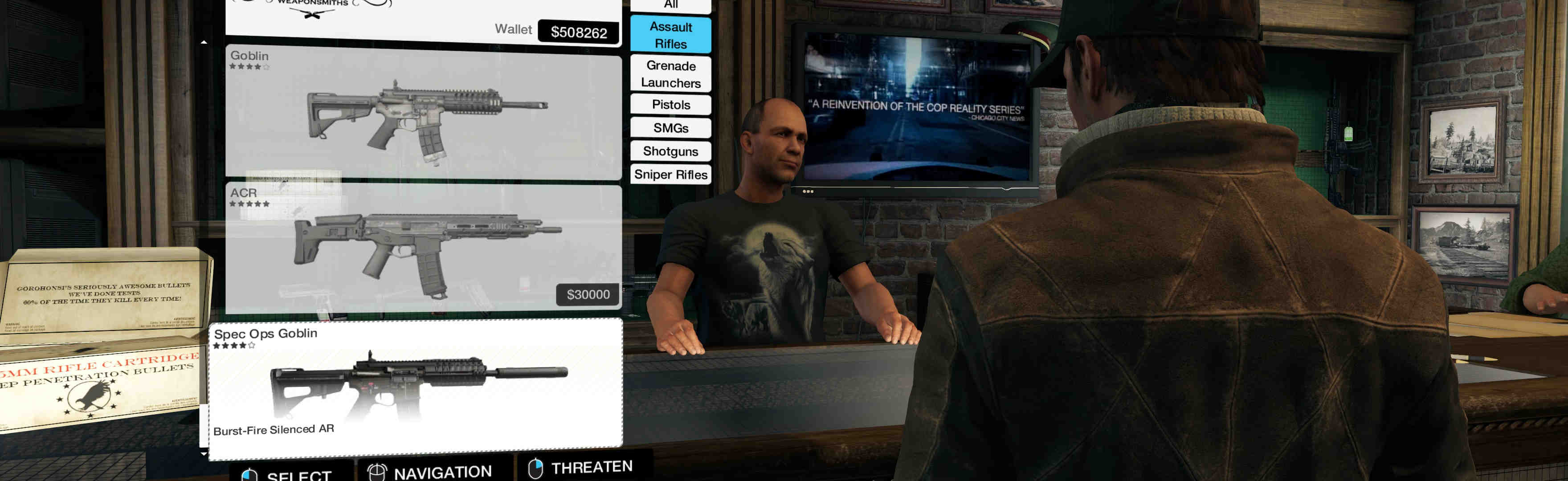
(store example, big ugly cropped popup, works fine)

(alarm-clock time is hard to read or impossible, but still works alright)
View guide for general help with the instructions.