| Widescreen Gaming Forum https://www.wsgf.org/phpBB3/ |
|
| "HTPC" Cordless KB & Mouse https://www.wsgf.org/phpBB3/viewtopic.php?f=72&t=23348 |
Page 1 of 1 |
| Author: | Gilly [ 01 Jan 2012, 19:24 ] |
| Post subject: | "HTPC" Cordless KB & Mouse |
I remember back in the day I had a MX700 logitech mouse, and it was great within range, whcih was about 1-2 meters. And the GF's mum has a cheapish Microsoft KB and mouse, I think it is this one http://www.microsoft.com/hardware/en-gb/p/wireless-media-desktop-1000/ZHA-00007, and its range is apauling. I want a KB mouse combo that will reliably work at around 3 to 4 meters from the desktop (PC sits off to the side of the TV, and we sit on the back wall, so to speak), am I really into blutooth teritory? Thinking maybe this: http://www.logitech.com/en-gb/keyboards/keyboard-mice-combos/devices/6232 would fit the bill? Or this one? http://www.logitech.com/en-gb/keyboards/keyboard-mice-combos/devices/7305 I can trade in my old MX700 for 25% discount at logitech, so I was looking at them primarily, although I would go to antoher manufacturer if the performance would be better. Many thanks! |
|
| Author: | Abram [ 01 Jan 2012, 20:58 ] |
| Post subject: | Although i have a wireless |
Although i have a wireless keyboard and a trackpad-equiped remote, i use this for my HTPC:
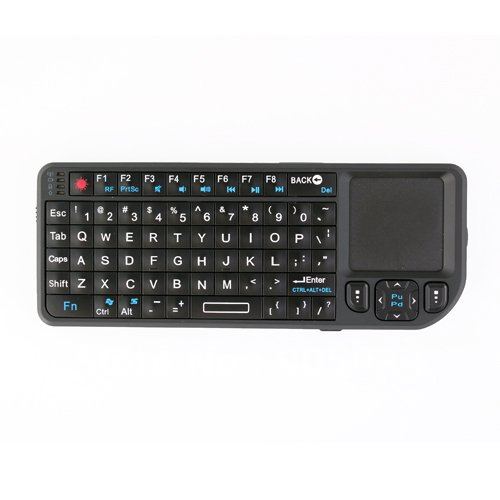
"Rii 2.4ghz RF mini-keyboard". Also sold under 'Magic-Touch' and 'Pro-mini' brands About 30 bucks total, shipping across border. it's about 2.5 x 6 inches. About as long as my girly hands. Far easier than handling a full KB+ mouse, as it's remote-sized. THough If you do a lot of typing, it's not ideal, obviously. RF connects instantly and works in BIOS . Is driver-less adn comes with a receiver. Charge time is tiny, battery life is amazing. I charge it about once a month but use it every day (takes about 20-30 minutes to charge, and you can use whiel charging.) Trakpad is good, but it only has one Shift key and no F9-F12 keys. Though There is a 2nd generation that DOES have 2 shitf and all Function keys. I also have the Bluetooth version, but it's finicky about connecting, has less range, and does not work outside of an OS. I got them from Amazon. |
|
| Author: | Gilly [ 02 Jan 2012, 19:34 ] |
| Post subject: | I will check this out. The |
I will check this out. The other option is to get a cordless gaming mouse, and swap my deathadder for that. Not sure I want to go this route :P Many thanks! |
|
| Author: | stickygreen [ 02 Jan 2012, 21:41 ] |
| Post subject: | thanks for the review Ab, I'm |
thanks for the review Ab, I'm looking for the same thing.. |
|
| Author: | Abram [ 02 Jan 2012, 22:04 ] |
| Post subject: | Well I'd 100% recommend the |
Well I'd 100% recommend the RF version, as well as the 2nd generation version. Plus with all those available keys I was able to bind an insane amount of quick keys for XBMC. The second gens also have teh mouse button on the left side, which makes click-and-drag easier. I just enable click-lock on my HTPC. One thing I didn't mention is that my particular version does not have scroll support, though some first gen one do. But then, it has the cursor keys and pageup/down, so.. |
|
| Author: | jeffmd [ 03 Jan 2012, 22:54 ] |
| Post subject: | I finally got an HD TV and |
I finally got an HD TV and its plugged into my desktop pc.. to handle controlling the playback of movies I have actually been using Mobile mouse pro, formally air mouse. http://mobilemouse.com/ It allows you to use any iOS device or any android phone as a touchpad/keyboard, and using wifi it has no range issues. |
|
| Author: | Abram [ 04 Jan 2012, 08:14 ] |
| Post subject: | Cool. |
Cool. |
|
| Author: | Gilly [ 08 Jan 2012, 10:55 ] |
| Post subject: | Actually. Logitech make one |
Actually. Logitech make one of those things you said Abram but with a more normal size, they are both very cheap (around £30 for the logitech) http://www.logitech.com/en-sg/keyboards/keyboard/devices/wireless-touch-keyboard-k400 Just noticed it doesn't have a play/ pause etc button, but you would be able to control that with the trackpad, only thing is, if I am sat infront of the TV or whatever, reading or whatever, and want to change music tracks, I can't without going to the PC (don't need TV on to play music). |
|
| Author: | Abram [ 08 Jan 2012, 14:20 ] |
| Post subject: | That tiny keyboard i yapped |
That tiny keyboard i yapped about has media keys as Fn+Function strokes. Though most media players allow you to use them without the use of the Fn key. I also love it because it can fit in a pocket. Oh and it has a laser pointer, in case you need to entertain a cat, dog, or toddler. And it requires no drivers at all. Though it's not detected as a separate mouse device, so your general mouse settings will carry over to teh device. No a problem for me, as it's the only input deivce i use on my HTPC, other than my Harmony 650. Which is also awesome. There's a beefy thread at the XBMC forums about this topic, and it has many models listed, along with opinions: http://forum.xbmc.org/showthread.php?t=117231&highlight=rii |
|
| Page 1 of 1 | All times are UTC [ DST ] |
| Powered by phpBB® Forum Software © phpBB Group https://www.phpbb.com/ |
|