Widescreen Gaming Forum

[-noun] Web community dedicated to ensuring PC games run properly on your tablet, netbook, personal computer, HDTV and multi-monitor gaming rig.
It is currently 12 Jul 2026, 20:25

All times are UTC [ DST ]


Post new topic Reply to topic  [ 83 posts ]  Go to page Previous  1 ... 32, 33, 34, 35, 36, 37, 38 ... 83  Next
Author Message
PostPosted: 31 Aug 2010, 19:51 
Offline

Joined: 22 Feb 2010, 09:04
Posts: 191
Kill them bezels---->>>!!!!!!!!!!!!!

(mine will be next!)


Top
 Profile  
Reply with quote  
PostPosted: 01 Sep 2010, 13:45 
Offline
Insiders
Insiders
User avatar

Joined: 15 Apr 2005, 23:27
Posts: 1172
I would like to be able to get into my screen, let alone run it bezel less. I think it uses those "once only" plastic clips, and there is like a front rim, side rim around the display and a back. The only screws hold the stand on, and the buttons. There is dust stuck in my screen and I want to clean it out!

_________________
P8Z68-V Pro | 2600K | HR02 | HD5850 | 2x4GB Vengeance LP | 128GB M4 + 6TB | X-Fi > HD595 | AX850 | Tai Chi | PB278Q | G110 + Deathadder 2013
P8Z77-V | 3570K | Mugen 2 | HD5850 | 2x4GB Vengeance LP | 500GB | X-750 | Fractal R3 | U2212HM | G110 + G400
P8H77-I | G860 | 4650 | 2x2GB XMS | 320GB | CX500 | Prodigy | T22B350EW | MX518
DC3217IYE | 1x4GB Vengeance | 64GB M4 | TX-42VT20E


Top
 Profile  
Reply with quote  
PostPosted: 14 Oct 2010, 10:11 
Offline

Joined: 27 Jul 2008, 09:11
Posts: 8
Isn't it possible to remove the LCD out of the metal case as well, removing the bezel entirely?


Top
 Profile  
Reply with quote  
PostPosted: 14 Oct 2010, 20:37 
Offline
Insiders
Insiders
User avatar

Joined: 26 Jan 2010, 01:51
Posts: 354
Isn't it possible to remove the LCD out of the metal case as well, removing the bezel entirely?

Id say no.


Top
 Profile  
Reply with quote  
PostPosted: 14 Oct 2010, 21:13 
Offline

Joined: 05 Oct 2006, 23:18
Posts: 102
maybe it would be possible, but the different layers of the screen would fall apart, there will be major background light leakage and behind the metal casing there is still screenspace, just no active pixels, so you would not win much without actually cutting your screen and modifying the background lightning.


Top
 Profile  
Reply with quote  
PostPosted: 15 Oct 2010, 01:55 
Offline
Insiders
Insiders
User avatar

Joined: 21 Mar 2006, 05:01
Posts: 1993
That is my assumption. IF you want your screen components flopping around, then go nuts.


Top
 Profile  
Reply with quote  
PostPosted: 26 Oct 2010, 04:40 
Offline

Joined: 17 Mar 2008, 22:17
Posts: 72
Just did my first strip down of a monitor - took my Hanns G 28" ($249.99 at tiger direct right now). Bought wife a desk and she is gonna us it (until i can get 2 more) and the damn monitor was like 1/2 inch to big on both sides - so 5-6 screws on the outside, 2 screws on the inside and disconnecting the craptacular internal speakers and PoW - 1/2 in bezels on a 28" LCD


@ 250 a pop and @ 1920x1200 thats a pretty nice set with native HDMI support


Top
 Profile  
Reply with quote  
PostPosted: 13 Jan 2011, 19:58 
Offline

Joined: 13 Jan 2011, 19:52
Posts: 1
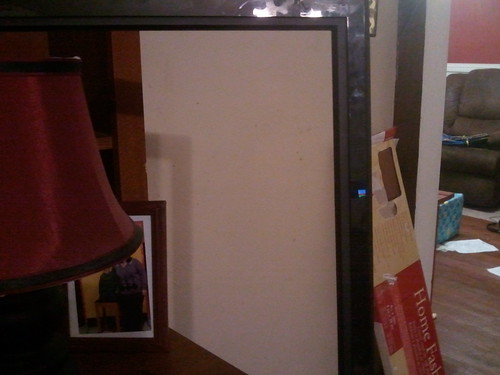
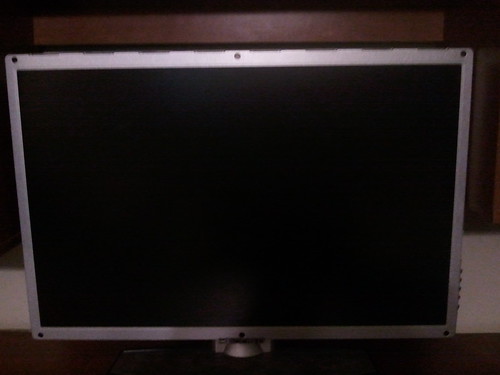
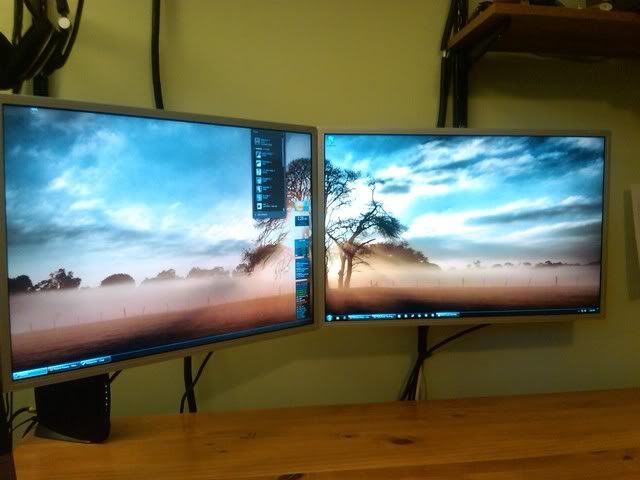
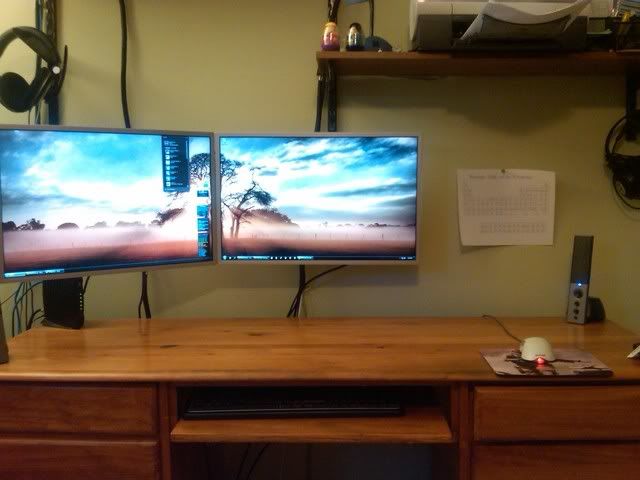
just joined WSGF after a long time of just browsing. After hours of searching and trying to figure out how to remove the bezel of my two w2408h's, I finally was able to. I had a monitor with some vertical lines on it, so I figured why not. If I was able to do it without breaking it, I was going to buy a third one from a guy on craigslist for $200. Here's how it turned out:
Before:


After


Not too shabby coming from almost 3" of bezel to just under a 1/2" Ignore the periodic table of elements haha, I am a Chem major and it comes in handy.


Top
 Profile  
Reply with quote  
PostPosted: 05 Feb 2011, 03:55 
Offline

Joined: 22 Oct 2010, 04:23
Posts: 115
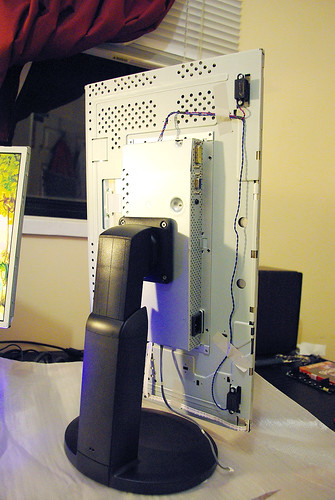
Bought 3 new NEC 19" monitors today. Native resolution 1280x1024.
I bought these completely with the intent to tear them apart and strip them down to only the thinnest bezel possible.
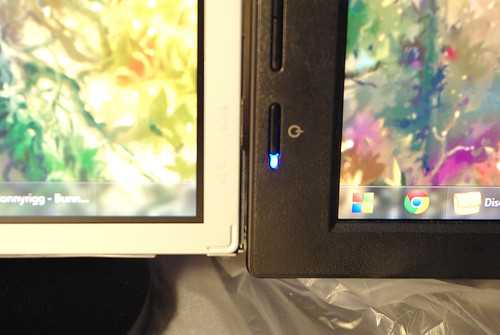
Here are a couple photos so far for the 1st monitor in the set.
Before:
http://www.flickr.com/photos/59153151@N02/5416923423/in/set-72157625978708576/
After:
http://www.flickr.com/photos/59153151@N02/5416925015/in/set-72157625978708576/

Reduced the bezel size from 1.5 cm to .5 cm on each side.

Project log and slide show over at my blog.
http://electricteardown.blogspot.com/


Top
 Profile  
Reply with quote  
PostPosted: 15 Mar 2011, 22:37 
Offline

Joined: 15 Mar 2010, 18:57
Posts: 98
More de-bezel setup pics please :D


Top
 Profile  
Reply with quote  
PostPosted: 25 Mar 2011, 18:34 
Offline

Joined: 15 Mar 2010, 18:57
Posts: 98
Well, I have stripped one of my Benq G2420HD, looks perfect with very thin metal bezel, I was very excited and.... FAIL :( There is no way to fix it with the my vesa wall mount since its attaching to plastic body of the monitor.

I'm not sure how this guy attached this monitor like this


Any suggestions from you guys? I believe I need to do some custom welding mounts like this one


Top
 Profile  
Reply with quote  
PostPosted: 01 May 2011, 18:21 
Offline

Joined: 01 May 2011, 17:59
Posts: 16
Well, I have stripped one of my Benq G2420HD, looks perfect with very thin metal bezel, I was very excited and.... FAIL :( There is no way to fix it with the my vesa wall mount since its attaching to plastic body of the monitor.


Any suggestions from you guys? I believe I need to do some custom welding mounts like this one


My benq XL2410T's are the same for anyone wondering. No vesa holes. :(

The plastic did pop off dead easy though.


Top
 Profile  
Reply with quote  
PostPosted: 14 May 2011, 06:32 
Offline

Joined: 13 May 2011, 19:58
Posts: 3
Anyone know if my Acer S231HL's can have the cover and bezels removed to make a thinner bezel setup like the OP? I dont want to tear it apart and risk damaging the cover if it is a waste of time. I may take them back for a set of ASUS VE248H's if those work better for bezel modding.


Top
 Profile  
Reply with quote  
PostPosted: 04 Jul 2011, 06:59 
Offline

Joined: 15 Mar 2010, 18:57
Posts: 98
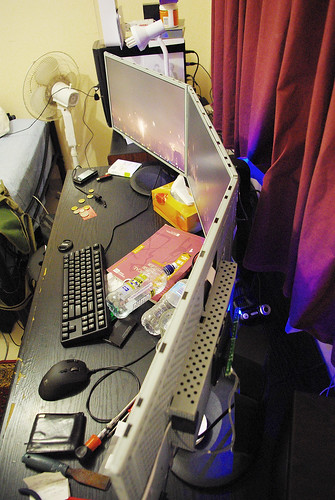
Finally I did it.
Complete debezel + custom wall mount (black painted wood)
Was:

Now:
First photo after job done, no cable management yet. Also need to tight some screws updown to have straight angles for 100% neat looking


Top
 Profile  
Reply with quote  
PostPosted: 05 Jul 2011, 14:35 
Offline

Joined: 15 Mar 2010, 18:57
Posts: 98
Quick setup review, sorry for my english http://www.youtube.com/watch?v=nTHcop4ybio


Top
 Profile  
Reply with quote  
PostPosted: 05 Aug 2011, 23:36 
Offline

Joined: 10 Mar 2011, 02:55
Posts: 15
So I've got these 3 great Asus monitors. model VW246H. I took one apart to see what it looked like and brainstorm options for mounting it. It seems the VESA mounting is built into the outer shell, not the panel housing itself.

Pics here:


I was planning to get an Ergotech Triple Monitor Stand (100-D16-B03) to mount these puppies on after I removed the casing, is this possible? I don't see any screw holes. O_o
Would I need to buy VESA mounting brackets and gorilla glue them on?

Any ideas or suggestions would be greatly appreciated. Removing the outer casing cuts the bezel size in half, so I'd really like to be able to do it.

Thanks in advance!


Top
 Profile  
Reply with quote  
PostPosted: 11 Aug 2011, 22:12 
Offline

Joined: 15 Mar 2010, 18:57
Posts: 98
I had the same problem, I wonder have you read previous few posts?


Top
 Profile  
Reply with quote  
PostPosted: 13 Aug 2011, 03:26 
Offline

Joined: 23 Apr 2011, 19:00
Posts: 18
Had thoughts of doing this for my FW900's. I have never thought to run all three of them but if I did 5 inches of bezel would be annoying.


Top
 Profile  
Reply with quote  
 Post subject: (No subject)
PostPosted: 17 Aug 2011, 17:02 
Offline

Joined: 15 Mar 2010, 18:57
Posts: 98


Top
 Profile  
Reply with quote  
 Post subject: Hi guys! First post~ I
PostPosted: 31 Aug 2011, 20:14 
Offline

Joined: 31 Aug 2011, 11:09
Posts: 2
Hi guys! First post~

I purchased 3 x LG IPS231P-BN's last week, and decided to tinker with them a little bit yesterday :)

Before I stripped them down, I tried searching around to see if debezel-ing an LED monitor would be any different to CCFL backlit monitors (was worried that perhaps the LED's might shine through). However, I could not for the life of me find any cases of debezel-ed LED monitors! Being the brave and courageous soul that I am (you can tell by my profile picture), I took the plunge anyway.

I stripped down the monitor (scuffing up the cases quite severely), only to find that the VESA mounting holes did not penetrate the inner casing. Instead, I found four depressions in the metal, where I would liked to have seen four holes.

Now, I'm really not the great handyman I'd like to be, but I knew that I wanted holes there, and I can't think of a better way to make a hole in metal than with a drill. I separated the large metal bracket/case/thing-with-lots-of-holes from the bare LCD panel. Stuck to this metal bracket was the power supply, and the board that gets all the inputs. The power supply was right beneath where the VESA mount needed to be, and it wouldn't budge - now I was playing a dangerous game. I went to the garage, dug through all the tools and found the power drill and the right drill bit. Rolled up my sleeves, plugged in the drill, took a deep breath.. at which point I passed the drill to my Dad :). Now I have holes in my monitors! yay

As you can see, it all went relatively smoothly, so now I have three bezel-free LED monitors sitting on my desk.

TL;DR: Took off the casing, drilled holes for VESA mount, less distracting bezels now


LG IPS231P-BN - Debezel 1 by J Setiawan, on Flickr


LG IPS231P-BN - Debezel 2 by J Setiawan, on Flickr


LG IPS231P-BN - Debezel 3 by J Setiawan, on Flickr


LG IPS231P-BN - Debezel 4 by J Setiawan, on Flickr


LG IPS231P-BN - Debezel 5 by J Setiawan, on Flickr


LG IPS231P-BN - Debezel 6 by J Setiawan, on Flickr


BTW, are magnets harmful to LCD displays? I'm thinking of buying black flexible magnetic strips and lining them up with whats left of the bezels.

_________________
lololoooool


Top
 Profile  
Reply with quote  
PostPosted: 17 Sep 2011, 07:41 
Offline

Joined: 17 Sep 2011, 07:03
Posts: 3
Hi all. Sometimes lurker, first time poster.

I decided to take the plunge and attempt to remove the cases off my three Dell U2311H.
Cases removed easily enough.
Then I came to a screaming halt.
The part of the monitor with the Vesa mount is not connected firmly to the panel.
It easily moves a few millimeters and no way in hell was I going to test if it was actually strong enough.


I was severely disappointed with that as I measured the panel bezel as 10mm compared to the cases 18mm.
While it was apart I decided to remove the usb ports on the side and cut the mounting area.
I will use this as the center monitor so both side monitors can now be flush against the middle one.


If anyone has any mounting ideas I'm all ears.


Top
 Profile  
Reply with quote  
PostPosted: 17 Sep 2011, 14:05 
Offline

Joined: 15 Mar 2010, 18:57
Posts: 98
OMG. Guys, you even can't load few previous pages to read? When I disassebled my monitors I did read every post from this topic. ADSTA, see the previous pages and my thoughts regarding mounting even with the youtube link. Also you can drill the holes as did previous lucky eyefinity guy.


Top
 Profile  
Reply with quote  
 Post subject: Stripped XL2410T
PostPosted: 05 Oct 2011, 15:38 
Offline

Joined: 03 Nov 2010, 23:30
Posts: 47
Those are some nice Benq Monitors; same shell design as my XL2410T.

Here are some shots of my mod I am doing to one monitor first.

I reused some hardware from the shell. The threaded fasteners on the back of the cover came in handy for adhering them to the panel using some 3200 PSI Locktight adhesive.
Just had to drill some holes in the PCB case and fix some 4mm .70 x 20mm bolts for the vesa mounts. Used the shell as a guide to make the fasteners perfectly lined up on the pannel.
Will post more pictures soon, but right now the adhesive is drying for 24 hours.

Will get 2 more soon for eyefinity.

Attached files

_________________
Intel Q9550s @ 4.0 GHz Watercooled (Modified Corsair H50) * ASUS Rampage Formula * Sapphire AMD Radeon 6990 4GB + XFX AMD Radeon 6970 2GB
G.Skill 8 GB DDR2 1100 5-5-5-15 * 50GB OCZ Vertex 2 SSD (OS), 200GB Vertex 2 SSD (Games/Apps)
Windows 7 64 Ultimate * Mountain Mods Montical 18 Midtower - Annodized Black * 3 x 120Hz Benq XL2410T
SteelSeries Xai * SteelSeries 9HD * Logitech Ultra Thin * Logitech G13 * Klipsch Promedia THX 2.1 * CreativeLabs Tactic Alpha 3D & Astro A40 Mixamp


Top
 Profile  
Reply with quote  
PostPosted: 06 Oct 2011, 03:21 
Offline

Joined: 03 Nov 2010, 23:30
Posts: 47
It is COMPLETE! Wow!!! I am going to order 2 more of these from newegg when they get in stock. I might have to pick up a 6990 and a nice triple monitor stand.

Attached files

_________________
Intel Q9550s @ 4.0 GHz Watercooled (Modified Corsair H50) * ASUS Rampage Formula * Sapphire AMD Radeon 6990 4GB + XFX AMD Radeon 6970 2GB
G.Skill 8 GB DDR2 1100 5-5-5-15 * 50GB OCZ Vertex 2 SSD (OS), 200GB Vertex 2 SSD (Games/Apps)
Windows 7 64 Ultimate * Mountain Mods Montical 18 Midtower - Annodized Black * 3 x 120Hz Benq XL2410T
SteelSeries Xai * SteelSeries 9HD * Logitech Ultra Thin * Logitech G13 * Klipsch Promedia THX 2.1 * CreativeLabs Tactic Alpha 3D & Astro A40 Mixamp


Top
 Profile  
Reply with quote  
PostPosted: 06 Oct 2011, 05:02 
Offline

Joined: 15 Mar 2010, 18:57
Posts: 98
Nice. Mine Benq 2420HDs have the same bodies


Top
 Profile  
Reply with quote  
 Post subject: Here is two more pics. I
PostPosted: 06 Oct 2011, 05:42 
Offline

Joined: 03 Nov 2010, 23:30
Posts: 47
Here is two more pics. I added a little bit extra support; purely based on paranoia reasonings, none founded in logic at all. But... It sure was fun. LMAO.

Attached files

_________________
Intel Q9550s @ 4.0 GHz Watercooled (Modified Corsair H50) * ASUS Rampage Formula * Sapphire AMD Radeon 6990 4GB + XFX AMD Radeon 6970 2GB
G.Skill 8 GB DDR2 1100 5-5-5-15 * 50GB OCZ Vertex 2 SSD (OS), 200GB Vertex 2 SSD (Games/Apps)
Windows 7 64 Ultimate * Mountain Mods Montical 18 Midtower - Annodized Black * 3 x 120Hz Benq XL2410T
SteelSeries Xai * SteelSeries 9HD * Logitech Ultra Thin * Logitech G13 * Klipsch Promedia THX 2.1 * CreativeLabs Tactic Alpha 3D & Astro A40 Mixamp


Top
 Profile  
Reply with quote  
PostPosted: 06 Oct 2011, 05:46 
Offline

Joined: 03 Nov 2010, 23:30
Posts: 47
Nice. Mine Benq 2420HDs have the same bodies


Yeah, It was actually your modification which inspired me to do mine. I saw that and was like: "Holy Shit; thats the same design as my monitor, I could do something like that!". Now I have some reason to do 3x120Hz XL2410T Eyefinity. Already got the adapters being sent my way.

_________________
Intel Q9550s @ 4.0 GHz Watercooled (Modified Corsair H50) * ASUS Rampage Formula * Sapphire AMD Radeon 6990 4GB + XFX AMD Radeon 6970 2GB
G.Skill 8 GB DDR2 1100 5-5-5-15 * 50GB OCZ Vertex 2 SSD (OS), 200GB Vertex 2 SSD (Games/Apps)
Windows 7 64 Ultimate * Mountain Mods Montical 18 Midtower - Annodized Black * 3 x 120Hz Benq XL2410T
SteelSeries Xai * SteelSeries 9HD * Logitech Ultra Thin * Logitech G13 * Klipsch Promedia THX 2.1 * CreativeLabs Tactic Alpha 3D & Astro A40 Mixamp


Top
 Profile  
Reply with quote  
PostPosted: 07 Oct 2011, 23:08 
Offline

Joined: 03 Nov 2010, 23:30
Posts: 47
Here is a link to my build log under the AMD Eyefinity Section.

http://widescreengamingforum.com/forum/forums/multi-monitor-gaming/amd-eyefinity-discussions/17699/3-x-120hz-eyefinity-build-log-benq

_________________
Intel Q9550s @ 4.0 GHz Watercooled (Modified Corsair H50) * ASUS Rampage Formula * Sapphire AMD Radeon 6990 4GB + XFX AMD Radeon 6970 2GB
G.Skill 8 GB DDR2 1100 5-5-5-15 * 50GB OCZ Vertex 2 SSD (OS), 200GB Vertex 2 SSD (Games/Apps)
Windows 7 64 Ultimate * Mountain Mods Montical 18 Midtower - Annodized Black * 3 x 120Hz Benq XL2410T
SteelSeries Xai * SteelSeries 9HD * Logitech Ultra Thin * Logitech G13 * Klipsch Promedia THX 2.1 * CreativeLabs Tactic Alpha 3D & Astro A40 Mixamp


Top
 Profile  
Reply with quote  
PostPosted: 08 Oct 2011, 22:18 
Offline
Insiders
Insiders
User avatar

Joined: 12 Dec 2006, 20:37
Posts: 170
Seraph,

I have 3x Asus VW266H (not 246) and the VESA posts are welded on where you have 4 oval divets... curious.

_________________
i7 sandy 4.4ghz with a snorkel
1080gtx
8gb RAM
Gigabyte P67-UD7 rev. B3
OS -Samsung 840pro 256GB ssd
Games -Samsung 840pro 500GB ssd
Pagefile -crucial 60GB ssd
Storage -2x 4TB WD
PWS -Seasonic Prime 1k Titanium


Top
 Profile  
Reply with quote  
 Post subject: Setiawan wrote:LG
PostPosted: 24 Oct 2011, 02:42 
Offline

Joined: 24 Oct 2011, 01:34
Posts: 3


LG IPS231P-BN - Debezel 3 by J Setiawan, on Flickr

LG IPS231P-BN - Debezel 6 by J Setiawan, on Flickr


Thanks! You have same monitors I got, but now I thinking it's not worth all the effort for 2-3mm bezel width reduction in portrait mode.

do you use them in portrait or land?


Top
 Profile  
Reply with quote  
PostPosted: 30 Oct 2011, 14:46 
Offline
Insiders
Insiders
User avatar

Joined: 06 Sep 2011, 09:29
Posts: 552
Location: Haarlem, the Netherlands
I decided to take the plunge and attempt to remove the cases off my three Dell U2311H.
Cases removed easily enough.
Then I came to a screaming halt.


I am having the same problem as you have. Removing the plastic cover of my U2311H's is not a problem, but mounting them is, since you need the back cover for that. Rebelstar said a possible solution was on a previous page of this thread, but I don't believe there is. Does anyone figured out how to solve this problem using the original stand for mounting?

_________________
Philips BDM4065UC(3840x2160) Acer Z35(2560x1080@200hz); 980 Ti Hybrid @stock ; 6700K 4.6ghz (1.35v)/D15; 16GB 3200mhz; Asus Maximus Ranger VIII; AX860; 1TB 960 EVO; 750GB 840 EVO; Teufel Concept D 500; Sennheiser HD6XX; Windows 10 (latest build)


Top
 Profile  
Reply with quote  
PostPosted: 30 Oct 2011, 18:45 
Offline
Founder
Founder
User avatar

Joined: 13 Oct 2003, 05:00
Posts: 7358
Why is it a problem with the 2311H? The screw hole for the VESA mount is in the underlying metal, isn't it?


Top
 Profile  
Reply with quote  
 Post subject: Ibrin wrote:Why is it a
PostPosted: 30 Oct 2011, 19:18 
Offline
Insiders
Insiders
User avatar

Joined: 06 Sep 2011, 09:29
Posts: 552
Location: Haarlem, the Netherlands
Why is it a problem with the 2311H? The screw hole for the VESA mount is in the underlying metal, isn't it?


The standard mount does't use the VESA mount screwes if I am not mistaking, so if you remove the back cover you also remove holes that you need for connecting the monitor to the standard mount.

_________________
Philips BDM4065UC(3840x2160) Acer Z35(2560x1080@200hz); 980 Ti Hybrid @stock ; 6700K 4.6ghz (1.35v)/D15; 16GB 3200mhz; Asus Maximus Ranger VIII; AX860; 1TB 960 EVO; 750GB 840 EVO; Teufel Concept D 500; Sennheiser HD6XX; Windows 10 (latest build)


Top
 Profile  
Reply with quote  
PostPosted: 30 Oct 2011, 21:30 
Offline
Editors
Editors
User avatar

Joined: 08 May 2011, 18:58
Posts: 2286
Oh... Ibrin made a Video of how he stripped a Dell.

But the Case isn't just for Optic... its also protectiv! Or not ? Any problems with dust or anything on a stripped monitor?

i want to try it.... but if i do i cant mount them on standard base. Well, not a problem, i can make a Mount myself quite easy...

Not sure if i should.... i think would be a big difference... but is so much work.

_________________
We gonna send it to outa space!


Top
 Profile  
Reply with quote  
PostPosted: 05 Nov 2011, 04:06 
Offline

Joined: 17 Sep 2011, 07:03
Posts: 3
There is no problem with the VESA mounting.
You don't need the plastic case to mount with VESA on the Dell U23
You do ( I reckon) need the plastic case to keep everything together.
The way the monitor panel is connected to the mounting box is the problem.
They are not pop riveted together.
They are held together by tabs which I fear would not support the weight.

And yes Rebel, I had seen your solution.
It might work for you but no good for me.


Top
 Profile  
Reply with quote  
PostPosted: 14 Dec 2011, 02:09 
Offline

Joined: 31 Jul 2011, 22:44
Posts: 31
Has any one bezel stripped a Dell U2312?

I have two arriving any day now and will give it a crack.

I am hoping to do 3 x portrait.

EDIT: just found the awesome guide by 3lfk1ng where he details the bezel strip of a Dell U2312.

_________________
Intel 3930k (stock speed), Asus P9X79 LE, 16GB of some ram. 240gb SSD and 1TB Raid 0. Silverstone Fortress FT02 case.

2 x Sapphire 7970 Dual-X OC/Boost

3 x Dell 2412 in 3P 3600x1920 (3880x1920 bezel corrected)


Top
 Profile  
Reply with quote  
PostPosted: 16 Dec 2011, 14:41 
Offline

Joined: 05 Dec 2011, 23:40
Posts: 6
nice thanks for the tip i stripped my monitors yesterday and this is the result now when watching a movie

http://www.youtube.com/watch?v=ezSCr9KqxgY


Top
 Profile  
Reply with quote  
 Post subject: wow very nice.
PostPosted: 17 Dec 2011, 08:11 
Offline
Insiders
Insiders
User avatar

Joined: 20 Aug 2009, 04:20
Posts: 2351
Location: Virginia
wow very nice.

_________________
System Core: | Intel Core i5-2500K + ASUS P8Z68-V + 16GB Corsair XMS3 DDR3 1333 MHz | Win7 x64 | MSI R7970 Lightning 3GB [1105/1400] |
Display: | 3 x Dell Ultrasharp 3007WFP-HC @ 7680x1600 | Dell u3011 |


Top
 Profile  
Reply with quote  
PostPosted: 17 Apr 2012, 11:08 
Offline

Joined: 17 Apr 2012, 11:03
Posts: 1


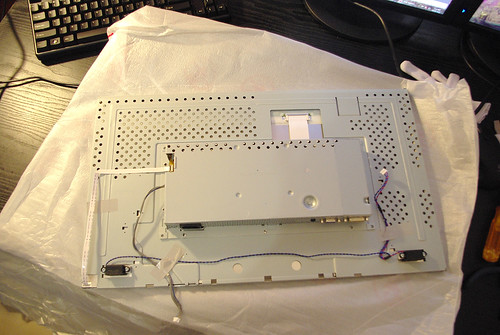
I'm looking at this image from an LCD projector build-log and contemplating Eyefinity. Once rectified and scaled, Photoshop tells me that this 17" stripped laptop monitor appears to have internal bezels of 0.19" on the right, 0.10" on the top, 0.11" on the left, and 0.21" on the bottom of the screen. This represents a third of an inch black gap from one screen to the next. It's about an equivalent gap to holding a Bic pen between the adjacent pixels. The steel casing that supports the actual panel is intact, one only needs to exercise common sense in not bending/cracking the thin panel and be careful with the thin ribbon cables, which are nearly impossible to fix. The other boards need to be supported as well.

But this is a hobby that has extreme case-modders hanging around welding automotive radiators to their WW2-era ammo boxes. Surely we can replace a piece of injection-molded plastic.

As far as I can tell, a third of an inch combined is far better than any retail consumer monitor, but not quite a match for "seamless" professional-level multi-panel monitors, which run about 10x the cost for an equivalent product.

Independant resale value and warranty coverage are probably not going to survive this step (assuming that the panel itself does), but there's gotta be some people who would pay a mint for a 3-panel frame - if you succeed, you'll be able to unload it.

So is LCD stripping going to come into vogue?


Top
 Profile  
Reply with quote  
PostPosted: 10 Jun 2012, 14:53 
Offline

Joined: 02 Jun 2012, 19:53
Posts: 4
........................


Top
 Profile  
Reply with quote  
PostPosted: 10 Jun 2012, 14:57 
Offline

Joined: 02 Jun 2012, 19:53
Posts: 4
I've debezelled 6 dell 17'' monitors.

How do you avoid getting an electric shock when plugging them in and turning them on?

I haven't tried yet but..... do I need shock proof tape to tape the green chip panel and the rubber keypad or do I try and ouch the tape on just the rubber part?


The dells im using are prety identical to those on page three of this thread either the 1707fp or 1708fp's .

When debezelled a strip of rubber with the buttons falls out the case the same size as the green strip of buttons. If I was to actually press the metal on the green chip when power lead is plugged in and on at the wall would I effetcively electricute myself?

cheers


Top
 Profile  
Reply with quote  
 Post subject: bump
PostPosted: 10 Jun 2012, 14:57 
Offline

Joined: 02 Jun 2012, 19:53
Posts: 4
bump


Top
 Profile  
Reply with quote  
PostPosted: 25 Nov 2012, 23:48 
Offline

Joined: 01 Nov 2012, 16:49
Posts: 22
Just some input for GL2450 users

I debezzeled my 3x
Monitor Model: BenQ GL2450
Monitor Id: BNQ78A5

All of them had floating box, not attached to screen 1 monitor had different model of floating box and stand. Taped it to screen with tape recommended from hardware store.
Also the vesa mounts is on the outer plastic bezel so by removing bezel the mounts is removed. Read that some users drilled (with crossed fingers hoping not to damage anything) holes in floating box with success


Top
 Profile  
Reply with quote  
PostPosted: 09 Apr 2013, 05:02 
Offline

Joined: 01 Apr 2013, 19:39
Posts: 27
Gunja wrote:
http://www.youtube.com/watch?v=r2LRhE1ACsQ video

This video contains content from UMPG Publishing, Sony ATV Publishing and EMI, one or more of whom have blocked it in your country on copyright grounds.

Your video must of has music in it :(


Top
 Profile  
Reply with quote  
PostPosted: 29 May 2013, 19:00 
Offline

Joined: 29 Aug 2009, 00:23
Posts: 30
Now it has some youtube offered melody and it should work fine world wide.


Top
 Profile  
Reply with quote  
PostPosted: 27 Jul 2013, 15:17 
Offline

Joined: 04 Aug 2012, 11:53
Posts: 14
Warning for LG E2351 users.

I de-bezzled mine this morning easily enough (took 15 minutes for all three) however if you debezzel this monitor you will lose your VESA mounts. Luckily I'm using a cobbled together stand so I don't need them yet but just a warning if you are planning to do this and have a monitor stand. You will also lose the ability to use the stand that came with the monitor as this is screwed into a mounting on the plastic case, not the monitor.


Top
 Profile  
Reply with quote  
PostPosted: 06 Jan 2014, 06:45 
Offline
User avatar

Joined: 10 Jul 2005, 18:27
Posts: 92
Location: Madison, WI
rebelstar wrote:
Now:
Image


Streamlined like a feline. :thumbup:

_________________
\Project\ Triple Surround Fury
•Mountain Mods Ascension case•
•i7 920 D0 @ 4.0GHz•
•ASUS Rampage III Extreme•
•Mushkin Enhanced Ridgeback 3 x 2GB DDR3 1600MHz (6-8-6-24-1T)•
•PNY GTX 670 3-Way SLI•
•Crucial M4 256GB•
•Windows 7 Home Premium 64•
•(2)Corsair HX1000 1000W PSUs•
•(3)ASUS VW266H 25.5" 1920 x 1200 monitors in Nvidia Surround•

YouTubeGoogle PlusFacebookBlogger


Top
 Profile  
Reply with quote  
PostPosted: 06 Jan 2014, 08:01 
Offline

Joined: 06 Oct 2011, 04:10
Posts: 16
Nice.. The smaller the bezel the better...


Attachments:
Medusa.jpg
Medusa.jpg [ 486.22 KiB | Viewed 5898 times ]
Top
 Profile  
Reply with quote  
PostPosted: 05 Nov 2014, 11:40 
Offline
I Donated
I Donated

Joined: 19 Aug 2014, 22:46
Posts: 24
Location: N.Y., U.S.
My 5x1 setup


Attachments:
File comment: "The Forest" Early Access Game
IMAG1606.jpg
IMAG1606.jpg [ 875.05 KiB | Viewed 4819 times ]
Top
 Profile  
Reply with quote  
Display posts from previous:  Sort by  
Post new topic Reply to topic  [ 83 posts ]  Go to page Previous  1 ... 32, 33, 34, 35, 36, 37, 38 ... 83  Next

All times are UTC [ DST ]


Who is online

Users browsing this forum: No registered users and 5 guests


You cannot post new topics in this forum
You cannot reply to topics in this forum
You cannot edit your posts in this forum
You cannot delete your posts in this forum
You cannot post attachments in this forum

Search for:
Jump to:  
cron


Powered by phpBB® Forum Software © phpBB Group