| Widescreen Gaming Forum https://www.wsgf.org/phpBB3/ |
|
| Can I use one gpu in sli witr surround? https://www.wsgf.org/phpBB3/viewtopic.php?f=70&t=31449 |
Page 1 of 1 |
| Author: | stangflyer [ 04 Sep 2016, 19:12 ] |
| Post subject: | Can I use one gpu in sli witr surround? |
Hi everyone! I picked up a 980ti hybrid brand new for $325 to match my other one that I got last year. I am not a fan of sli as I have had it and crossfire since the 7950gx2 but the price was great. My questions is: For the games that do NOT use sli or have worse performance using SLI can I turn off SLI while playing at 7680x1440 surround ? When I use a single screen I can use an nvidia profile and select single card. Or I can disable SLI. But when I play on surround it forces me to SLI in nvidia control panel. I do not like this. When using one screen you get the option (SLI rendering mode) but you do not get this option in surround. Is everyone else seeing this also? For example on Borderlands 2 I get at least 10 fps more on a single card at 7680x1440 then I do in sli. At that res I need those 10 fps -60 vs 50. Driver 372.70. I checked before I installed second card and have a number of hours in game so I remember pre sli performance. Not the only game but one I tested last night. I know sli is going down hill but I got the card for a good price and I can use it in my other pc and sell the 780 that is in that one if it is to much a pain in the ass. I had 970's in sli before and got rid of them for the 980ti to get rid of the sli headache. Thanks for reading and replying! |

|
| Author: | b0n3z [ 04 Sep 2016, 21:33 ] |
| Post subject: | Re: Can I use one gpu in sli witr surround? |
Hello stangflyer, Like you I also have 2 nVidia cards in SLI with a nVidia Surround. I believe you already figured this out. I also don't know of any way to turn off SLI while in nVidia Surround. You might try running "Activate all displays" with borderless window and see if that helps... The only other option I know of is to physically remove the bridge from the cards. But that seems rather extreme and would be nice if there was a registry setting or a DirectX DLL that could be dropped into the game directory. Good luck and post back if you find anything and I'll do the same. -b0n3z |
|
| Author: | b0n3z [ 04 Sep 2016, 21:40 ] |
| Post subject: | Re: Can I use one gpu in sli witr surround? |
Just thought about this idea... What about selecting "Dedicate to PhysX" on your 2nd video card. Then it can't be used for SLI? You would obviously have to connect all 3 displays to your primary video card instead of using one of these configurations: http://www.geforce.com/hardware/technology/surround/system-requirements -b0n3z |
|
| Author: | Peer_Review [ 06 Sep 2016, 10:18 ] |
| Post subject: | Re: Can I use one gpu in sli witr surround? |
stangflyer wrote: Hi everyone! I picked up a 980ti hybrid brand new for $325 to match my other one that I got last year. I am not a fan of sli as I have had it and crossfire since the 7950gx2 but the price was great. My questions is: For the games that do NOT use sli or have worse performance using SLI can I turn off SLI while playing at 7680x1440 surround ? When I use a single screen I can use an nvidia profile and select single card. Or I can disable SLI. But when I play on surround it forces me to SLI in nvidia control panel. I do not like this. When using one screen you get the option (SLI rendering mode) but you do not get this option in surround. Is everyone else seeing this also? For example on Borderlands 2 I get at least 10 fps more on a single card at 7680x1440 then I do in sli. At that res I need those 10 fps -60 vs 50. Driver 372.70. I checked before I installed second card and have a number of hours in game so I remember pre sli performance. Not the only game but one I tested last night. I know sli is going down hill but I got the card for a good price and I can use it in my other pc and sell the 780 that is in that one if it is to much a pain in the ass. I had 970's in sli before and got rid of them for the 980ti to get rid of the sli headache. Thanks for reading and replying! It's as easy an pie chief. All you need to do is download Nvidia inspector which is a fleshed out Nvidia control panel. Any game you want to turn SLI off on you just pick that game from the list just like you would do if you were using Nvidia control panel. Then go down until you see the SLI section and select disable SLI explicitly through NVAPI and hit apply.. This is the best tool you can have for any Nvidia card. It's super simple and lets you control all manner of things. Like forcing HBAO+ or specific AA in games with support. Here is a cheat sheet with all available HBAO+ settings http://forums.guru3d.com/showthread.php?t=387114 and for Antialiasing. http://forums.guru3d.com/showthread.php ... 3&t=357956 Also it has many other benifits. SLI always defaults to a setting of four cards even if you only have two. This is the correct setting for most games. However in Bethesda first party games like Fallout or the Elder Scrolls SLI and ENB's famously cause weird stutter. If you go down the the SLI section towards the bottom in Nvidia inspector and set it to two cards that goes away and it scales perfectly without problems. In Skyrim at the top under SLI bits if you pick (Fallout New Vegas, Fallout 3) which is the fifth setting above Skyrim's in the drop down box. (Don't worry their all labeled.) Then set the number of cards to 2 like I described just before. You will be able to use SLI +ENB in Skyrim in surround without issue. Fallout 3,4, and New Vegas+ Oblivion only need to have the number of cards set to 2 and all the stutter will go away. Also with the recent drivers release Nvidia inspector is the only way to turn on Fast Sync which is the new type of Vsync buffer Nvidia created for games that need high FPS like twitch shhoters. However many people are also claiming that it can give you several extra frames in certain games. Sorry if this post is kind of cobbled together and full of broken sentences. It's 4AM here and I am beat. Here is the Section of the Nvidia Keynote explaining FastSync https://www.youtube.com/watch?v=WpUX8ZNkn2U Hope this helps. |
|
| Author: | anteronoid [ 06 Sep 2016, 12:22 ] |
| Post subject: | Re: Can I use one gpu in sli witr surround? |
Peer_Review wrote: stangflyer wrote: Hi everyone! I picked up a 980ti hybrid brand new for $325 to match my other one that I got last year. I am not a fan of sli as I have had it and crossfire since the 7950gx2 but the price was great. My questions is: For the games that do NOT use sli or have worse performance using SLI can I turn off SLI while playing at 7680x1440 surround ? When I use a single screen I can use an nvidia profile and select single card. Or I can disable SLI. But when I play on surround it forces me to SLI in nvidia control panel. I do not like this. When using one screen you get the option (SLI rendering mode) but you do not get this option in surround. Is everyone else seeing this also? For example on Borderlands 2 I get at least 10 fps more on a single card at 7680x1440 then I do in sli. At that res I need those 10 fps -60 vs 50. Driver 372.70. I checked before I installed second card and have a number of hours in game so I remember pre sli performance. Not the only game but one I tested last night. I know sli is going down hill but I got the card for a good price and I can use it in my other pc and sell the 780 that is in that one if it is to much a pain in the ass. I had 970's in sli before and got rid of them for the 980ti to get rid of the sli headache. Thanks for reading and replying! It's as easy an pie chief. All you need to do is download Nvidia inspector which is a fleshed out Nvidia control panel. Any game you want to turn SLI off on you just pick that game from the list just like you would do if you were using Nvidia control panel. Then go down until you see the SLI section and select disable SLI explicitly through NVAPI and hit apply.. This is the best tool you can have for any Nvidia card. It's super simple and lets you control all manner of things. Like forcing HBAO+ or specific AA in games with support. Here is a cheat sheet with all available HBAO+ settings http://forums.guru3d.com/showthread.php?t=387114 and for Antialiasing. http://forums.guru3d.com/showthread.php ... 3&t=357956 Also it has many other benifits. SLI always defaults to a setting of four cards even if you only have two. This is the correct setting for most games. However in Bethesda first party games like Fallout or the Elder Scrolls SLI and ENB's famously cause weird stutter. If you go down the the SLI section towards the bottom in Nvidia inspector and set it to two cards that goes away and it scales perfectly without problems. In Skyrim at the top under SLI bits if you pick (Fallout New Vegas, Fallout 3) which is the fifth setting above Skyrim's in the drop down box. (Don't worry their all labeled.) Then set the number of cards to 2 like I described just before. You will be able to use SLI +ENB in Skyrim in surround without issue. Fallout 3,4, and New Vegas+ Oblivion only need to have the number of cards set to 2 and all the stutter will go away. Also with the recent drivers release Nvidia inspector is the only way to turn on Fast Sync which is the new type of Vsync buffer Nvidia created for games that need high FPS like twitch shhoters. However many people are also claiming that it can give you several extra frames in certain games. Sorry if this post is kind of cobbled together and full of broken sentences. It's 4AM here and I am beat. Here is the Section of the Nvidia Keynote explaining FastSync https://www.youtube.com/watch?v=WpUX8ZNkn2U Hope this helps. Thank you! Didnt know about the FastSync, will play around with it! |
|
| Author: | stangflyer [ 06 Sep 2016, 21:26 ] |
| Post subject: | Re: Can I use one gpu in sli witr surround? |
Peer_Review wrote: stangflyer wrote: Hi everyone! I picked up a 980ti hybrid brand new for $325 to match my other one that I got last year. I am not a fan of sli as I have had it and crossfire since the 7950gx2 but the price was great. My questions is: For the games that do NOT use sli or have worse performance using SLI can I turn off SLI while playing at 7680x1440 surround ? When I use a single screen I can use an nvidia profile and select single card. Or I can disable SLI. But when I play on surround it forces me to SLI in nvidia control panel. I do not like this. When using one screen you get the option (SLI rendering mode) but you do not get this option in surround. Is everyone else seeing this also? For example on Borderlands 2 I get at least 10 fps more on a single card at 7680x1440 then I do in sli. At that res I need those 10 fps -60 vs 50. Driver 372.70. I checked before I installed second card and have a number of hours in game so I remember pre sli performance. Not the only game but one I tested last night. I know sli is going down hill but I got the card for a good price and I can use it in my other pc and sell the 780 that is in that one if it is to much a pain in the ass. I had 970's in sli before and got rid of them for the 980ti to get rid of the sli headache. Thanks for reading and replying! It's as easy an pie chief. All you need to do is download Nvidia inspector which is a fleshed out Nvidia control panel. Any game you want to turn SLI off on you just pick that game from the list just like you would do if you were using Nvidia control panel. Then go down until you see the SLI section and select disable SLI explicitly through NVAPI and hit apply.. This is the best tool you can have for any Nvidia card. It's super simple and lets you control all manner of things. Like forcing HBAO+ or specific AA in games with support. Here is a cheat sheet with all available HBAO+ settings http://forums.guru3d.com/showthread.php?t=387114 and for Antialiasing. http://forums.guru3d.com/showthread.php ... 3&t=357956 Also it has many other benifits. SLI always defaults to a setting of four cards even if you only have two. This is the correct setting for most games. However in Bethesda first party games like Fallout or the Elder Scrolls SLI and ENB's famously cause weird stutter. If you go down the the SLI section towards the bottom in Nvidia inspector and set it to two cards that goes away and it scales perfectly without problems. In Skyrim at the top under SLI bits if you pick (Fallout New Vegas, Fallout 3) which is the fifth setting above Skyrim's in the drop down box. (Don't worry their all labeled.) Then set the number of cards to 2 like I described just before. You will be able to use SLI +ENB in Skyrim in surround without issue. Fallout 3,4, and New Vegas+ Oblivion only need to have the number of cards set to 2 and all the stutter will go away. Also with the recent drivers release Nvidia inspector is the only way to turn on Fast Sync which is the new type of Vsync buffer Nvidia created for games that need high FPS like twitch shhoters. However many people are also claiming that it can give you several extra frames in certain games. Sorry if this post is kind of cobbled together and full of broken sentences. It's 4AM here and I am beat. Here is the Section of the Nvidia Keynote explaining FastSync https://www.youtube.com/watch?v=WpUX8ZNkn2U Hope this helps. Will try it tonight! If this works correctly I am going to be one happy gamer!! Thanks for taking the time to respond. I really do appreciate it! |
|
| Author: | b0n3z [ 08 Sep 2016, 05:33 ] |
| Post subject: | Re: Can I use one gpu in sli witr surround? |
Peer_Review - seriously thank you for the awesome lesson. -b0n3z |
|
| Author: | Peer_Review [ 08 Sep 2016, 21:05 ] |
| Post subject: | Re: Can I use one gpu in sli witr surround? |
b0n3z wrote: Peer_Review - seriously thank you for the awesome lesson. -b0n3z Not that I can think of. The most efficient way I can think of is to use the shortcut keys you can set on the surround configuration menu. There are three shortcuts. Bezel Peeking, Disable/Enable Surround, and turn off side displays.However it will still blink anytime you change resolution or turn off/on surround. I'm not sure there will ever be a way; it has to do with Nvidia's implementation of outputting images using Windows' WDDM. Nvidia has never been very open or forthcoming with their driver code. So I can only speculate, but I don't think there is any way around it. |
|
| Author: | b0n3z [ 09 Sep 2016, 03:50 ] |
| Post subject: | Re: Can I use one gpu in sli witr surround? |
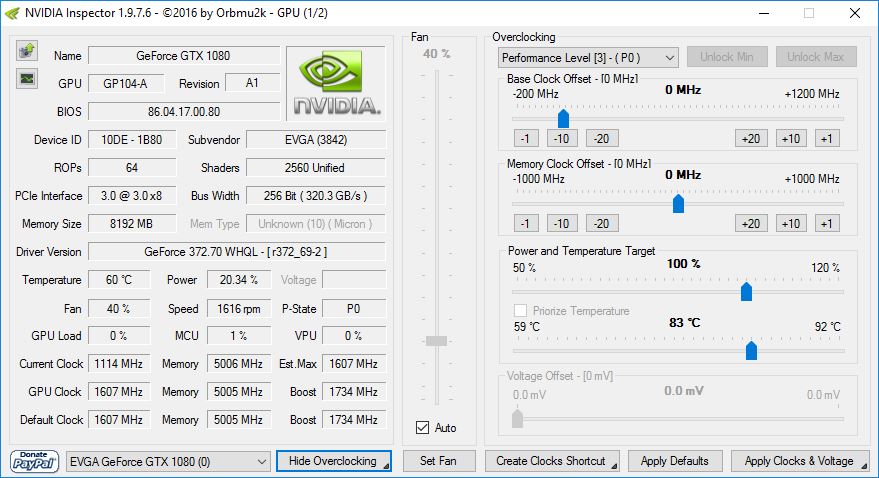
So I tried Nvidia inspector and it doesn't seem to have the profile button. When I run the "nvidiaProfileInspector.exe" it errors out. So I wonder if this may not be compatible with Pascal GPUs. There is a now a GitHub project on this which might be compatible, but they don't have any compiled downloads that I could find. https://github.com/Orbmu2k/nvidiaProfileInspector ![]() -b0n3z |
|
| Page 1 of 1 | All times are UTC [ DST ] |
| Powered by phpBB® Forum Software © phpBB Group https://www.phpbb.com/ |
|