| Widescreen Gaming Forum https://www.wsgf.org/phpBB3/ |
|
| Question about 2D Surround + Extra monitor https://www.wsgf.org/phpBB3/viewtopic.php?f=70&t=20794 |
Page 1 of 1 |
| Author: | MrCrowley [ 01 Nov 2010, 22:06 ] |
| Post subject: | Question about 2D Surround + Extra monitor |
I'm interested in a triple surround configuration + extra touch monitor for sim purposes. Any potential problem?. I´m asking because SLI is new for me, so I want to be sure about the steps to follow. I suppose the touch monitor output wouldn´t be in SLI, if so, ¿can be that a problem for gaming? Thanks in advance. |
|
| Author: | fuzioninfinity [ 02 Nov 2010, 02:18 ] |
| Post subject: | Re: Question about 2D Surround + Extra monitor |
If your asking if you can have 3 monitors in surround + an extra screen displaying some other part of the game your playing (like flight controls, etc), then no, I don't believe thats possible. 3 monitors in surround plus an extended monitor is possible, but I don't think you can game on the extended desktop as a part of the surround configuration. I may be entirely wrong though, if the game has some sort of specific multi-monitor setting, like Supreme Commander 1/2 and it's secondary display option, where my I had 3 monitors acting as one view, and a 4th monitor acting as a giant minimap. Then again, I was only able to get that to work while using the Triplehead2Go, not NV Surround, but my setup isn't capable of 3 monitors + 1 extended desktop under NVIDIA surround. In short - as far as I know - you cannot game on any more, or less, than 3 displays using NVIDIA surround. The extended desktop can not be used for gaming. |
|
| Author: | MrCrowley [ 02 Nov 2010, 02:43 ] |
| Post subject: | Re: Question about 2D Surround + Extra monitor |
What I need to know is if at all effects, the virtual surround monitor doesn´t interferes with the extra monitor. If I can have a 3D (no stereo) accelerated application in the three main monitors, and any 2D application in the extra monitor (wich would be used to show game data information). I know it works with Eyefinity, but because of SLI (and my lack of experience with), I´m not sure if that is correct. And yes, the game in question (Black Shark) has certain multimonitor specific settings. The extra monitor would show something like this: http://www.youtube.com/watch?v=6DmHCrLckKY would it possible to work with five monitors, por example? (using nvidia surround + SoftTh) |
|
| Author: | fuzioninfinity [ 02 Nov 2010, 04:12 ] |
| Post subject: | Re: Question about 2D Surround + Extra monitor |
What I need to know is if at all effects, the virtual surround monitor doesn´t interferes with the extra monitor. If I can have a 3D (no stereo) accelerated application in the three main monitors, and any 2D application in the extra monitor (wich would be used to show game data information). I think you'll be just fine then. If anyone has any experience with the NVIDIA Surround 3+1 extended configuration, feel free to confirm this. If no one can, I'll see what I can do about testing this out for you when I get some free time. |
|
| Author: | MrCrowley [ 02 Nov 2010, 04:57 ] |
| Post subject: | Re: Question about 2D Surround + Extra monitor |
I have no experience using SoftTH but I know some people have pulled off some very crazy stuff with SoftTH and Eyefinity - so I'll leave that question to some of those people. That's exactly the kind of things I would like to confirm for nvidia surround. The fact nvidia surround needs SLI mode to work is what it make me to hesitate. And I would like to confirm that before I make any investment. I don't see why this wouldn't work - but as I said; I've never used NVIDIA Surround with an extended desktop, as my configuration doesn't support it (2x GTX 295 in Quad SLI). I might be able to test it out for you if there is absolutely no one else here on the forum using NV Surround with a 3+1 setup, but it would require me going out a purchasing an HDMI cable a HDMI female to DVI male adapter to test it, by using this setup to gain an accessory display. Or I guess I could buy an HDMI male to DVI female and just use my DVI cable... oh, the world of cable adapters boggles my mind... For what I´m seeing, It seems I would need an additional graphic card (If I pretend to SLI with 2x480GTX) to work with additional displays. I´m not sure if you really cannot use the fourth output, or it´s only a recomendation (relative to performance), as it says above.
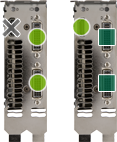
but it would require me going out a purchasing an HDMI cable and HDMI->DVI adapter to test it, by using this setup to gain an accessory display. Don´t bother if you have to spend some cash for it. Eventually I´ll get an answer here or a sim dedicated forum, also, according to nvidia, with your configuration you shouldn´t have any problem, because is not the same case I pretend to do (SLI with two monogpu). Thanks anyway |
|
| Author: | fuzioninfinity [ 02 Nov 2010, 06:25 ] |
| Post subject: | Re: Question about 2D Surround + Extra monitor |
I´m not sure if you really cannot use the fourth output, or it´s only a recomendation (relative to performance), as it says above. I know that It wont let you use that last output with surround enabled. Unless you had 295s, you'd have to 3-way SLI no matter what to get the setup your going after. The Quad-SLI 295 setup is unique in that aspect, as it has an extra GPU that can be utilized for either an extra display or dedicated PhysX, or additional performance. |
|
| Author: | MrCrowley [ 02 Nov 2010, 15:02 ] |
| Post subject: | Re: Question about 2D Surround + Extra monitor |
[I know that It wont let you use that last output with surround enabled. Are you sure?, because above says ´Connector Recommendations The following table illustrates a recommended connector diagram. Your individual system configuration may vary depending upon your PC, GPU, and Surround mode.´ I think maybe it works, but with less performance, don´t you think? Unless you had 295s, you'd have to 3-way SLI no matter what to get the setup your going after The 3-way SLI should work the same as 2-way SLI, because of the need of an extra card for the additional monitors. |
|
| Author: | fuzioninfinity [ 03 Nov 2010, 02:57 ] |
| Post subject: | Re: Question about 2D Surround + Extra monitor |
[I know that It wont let you use that last output with surround enabled. I'm positive. It doesn't work. When you go to enable surround, it will choose the 3 outputs that the diagram has indicated you should use, and any other screen, will not be activated. When it says "The following table illustrates a recommended connector diagram. Your individual system configuration may vary depending upon your PC, GPU, and Surround mode." all that means is the 3 outputs you use may vary from this configuration, not that you will be able to hook up additional monitors at your whim. If you only had 2-way SLI, and had 4 monitors hooked up, you'd get a screen looking something like this when you went to enable surround:
The only case where it says you CAN hook up an additional monitor at the cost of performance is in the case of the Quad-SLI 295 configuration: You can reconfigure the display connections to get an Accessory Display on this Quad SLI group, but it will result in lower 3D performance than adding an additional GPU. A connector diagram above. You will notice at the top of the column it says "Accessory Display* Using Additional GPU" Because surround requires at least 2 GPUs (2-way SLI) to function, you cannot dedicate the second GPU from a 2-way SLI setup to an extra display, as it is needed to power your surround setup. If you have a 3-way SLI setup, you can dedicate all 3 cards to your surround configuration, or you can dedicate only 2, and use the 3rd card for an accessory display. It should be noted though, that I was partially wrong in my last post - you DON'T need 3-way SLI to get an accessory display, but you DO need a 3rd video card to power your accessory display. Only two of the cards need to be the same; as the last card wont be used in the SLI configuration, it could be a much cheaper, less powerful card, that powers your accessory display. I hope that clears up any questions you had on that particular part of the subject. |
|
| Author: | stangflyer [ 05 Nov 2010, 06:52 ] |
| Post subject: | Re: Question about 2D Surround + Extra monitor |
You could do what I do on my eyefinity. Get a tritton usb to vga adapter. I use it for my forth monitor. The triuv-150 model goes to 1600x1200. It does widescreen also. I use for my 4th monitor to monitor temps and have teamspeak window up and my steam friends list up. It is not the best for video etc but it is perfect for pics and regular screen stuff. The triuv-250 does 1920x1200. You can get at newegg or best buy. I use mine at 16 bit as the performance is much better with very little in color loss. I have had mine for a year now since I went eyefinity and it works great. Just make sure you get latest driver and install driver b4 inserting into pc. It also has nothing to do with the windows display properties stuff so it does not mess with eyefinity at all. Very low memory and cpu usage. Right now you CANNOT use windows aero with it. It just disables aero when in use. Great and compact device without having to add another gpu. |
|
| Author: | LightPhoenix [ 05 Nov 2010, 08:34 ] |
| Post subject: | Re: Question about 2D Surround + Extra monitor |
Just buy an extra cheap graphics card and install tje 4th nonitor on that card. When it's out of the SLI configuration it will not interfere with you're surround setup. |
|
| Page 1 of 1 | All times are UTC [ DST ] |
| Powered by phpBB® Forum Software © phpBB Group https://www.phpbb.com/ |
|