Widescreen Gaming Forum

[-noun] Web community dedicated to ensuring PC games run properly on your tablet, netbook, personal computer, HDTV and multi-monitor gaming rig.
It is currently 12 Jul 2026, 10:32

All times are UTC [ DST ]


Post new topic Reply to topic  [ 11 posts ]  Go to page Previous  1 ... 3, 4, 5, 6, 7, 8, 9 ... 11  Next
Author Message
PostPosted: 09 May 2014, 12:11 
Offline

Joined: 07 Jun 2013, 12:25
Posts: 116
dell u2414h is new a monitor. (novembre 2013) review are very great

http://www.tftcentral.co.uk/reviews/dell_u2414h.htm


colour are amazing, it's the best monitor with this bezel.

i play with 3 x gtx 780 and i7 4770k.

All games run at 60 fps.

In my opinion If you want to play with 3 monitors , you must go buy a second 780.


Top
 Profile  
Reply with quote  
PostPosted: 09 May 2014, 17:33 
Offline

Joined: 08 May 2014, 16:14
Posts: 16
Im afraid i dont have the funds for 3x 780's let alone Sli 780 ti at the moment i will probably go Sli 780 Ti in the future to meet the needs of new games but i will have to settle with a single 780 Ti at the moment.

Did you compare the U2414H to other ips monitors before the purchase and what should i be looking when researching ips other than a low response time, i noticed the U2414H has 8ms. thnx


Top
 Profile  
Reply with quote  
PostPosted: 10 May 2014, 13:32 
Offline
Editors
Editors
User avatar

Joined: 08 May 2011, 18:58
Posts: 2286
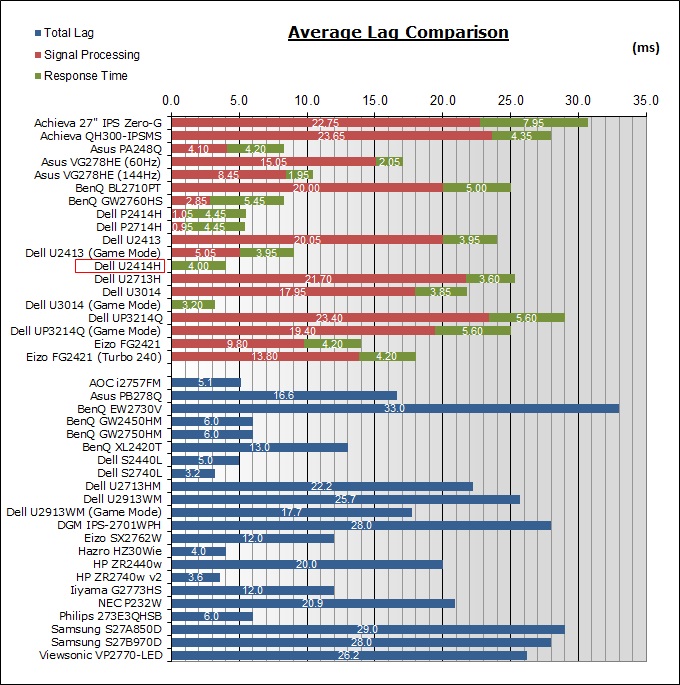
If you take a good look at the "Lag" section of the TFT Central review, you'll see that the 2414H has an awesome reaction time!
http://www.tftcentral.co.uk/images/dell_u2414h/lag2.jpg
Official Data Manufactures write in their spec sheet cannot B's trusted!

The Problem with Monitors is that most people just have one type/model of monitor and keep that for a few years. So comparisons between different monitors are difficult for normal users. Therefore most advice you'll get will be ft review sites.

For the question of switching from 5760x1080 to 1920x1080, if you're not in game that's a simple key press, windows +P and you can toggle the mode in 3 seconds.

As for performance, I'd recommend a 780 SLI over a 780Ti, price/performance point of view.
TriSLI is a bad idea! When you get +90-100% performance from 1 to 2 cards you get around +8-20% performance plus from 2-3 cards and not the expected +50%.
Crappy drivers FTL

_________________
We gonna send it to outa space!


Top
 Profile  
Reply with quote  
PostPosted: 10 May 2014, 17:06 
Offline

Joined: 08 May 2014, 16:14
Posts: 16
Yeh ive read that particular review and it shows very promising results and praises this particular monitor in many areas, i think its the perfect monitor for Nvidia Surround or Eyefinity at this very moment, until we see something new and improved in the future.

Im afaraid 780 Sli isnt in my budget at the moment either, i would prefer to add an extra £250 to the 780 sli and get 780 ti sli instead of 780 sli.

ill go with the 1 graphics card and upgrade to a 780 sli in a year or so when i have some more funds saved up.
ive read many places that crossfire 290's or 290x's give off a lot of sound and a lot of heat which would mean extra costs for cooling and i might run into other issues with 2 cards and ofc i would have to upgrade both where as i would only have to upgrade a 780 Ti with a 2nd to surpass the performance of crossfire 290's.
By the way when i do add an extra 780 Ti to make Sli, what would i have to do after connecting all the wires ?


Top
 Profile  
Reply with quote  
PostPosted: 11 May 2014, 12:41 
Offline

Joined: 09 Feb 2010, 20:11
Posts: 131


http://www.youtube.com/watch?v=_SdhzcmgC5E

Loving my XL2720Z's :) Good riddance to motion blur!

_________________
Cooler Master Cosmos II | ASUS X99-Deluxe | Thermaltake Water 3.0 Extreme S | 5930k @ 4.5GHz | 32GB G.Skill Ripjaws V 3200MHz | SLI GTX 1080 Ti's | Samsung 960 Pro NVMe M.2 SSD | Corsair AX1500i | 3DMark Fire Strike Ultra - 13,780 | Windows 10 Pro 64-bit | Nvidia Surround® 3 x BenQ XL2735 | Samsung CHG90 Auxiliary Monitor


Top
 Profile  
Reply with quote  
PostPosted: 11 May 2014, 13:30 
Offline
Editors
Editors
User avatar

Joined: 08 May 2011, 18:58
Posts: 2286
prochaos wrote:
By the way when i do add an extra 780 Ti to make Sli, what would i have to do after connecting all the wires ?


I see I see, no half things! Good choice if you can afford it!

What you do? You turn on the Computer and activate SLI in the Nvidia drivers, if it's not activated by defaut.
P.s don't forget the SLI bridge when connecting power cables.

_________________
We gonna send it to outa space!


Top
 Profile  
Reply with quote  
Display posts from previous:  Sort by  
Post new topic Reply to topic  [ 11 posts ]  Go to page Previous  1 ... 3, 4, 5, 6, 7, 8, 9 ... 11  Next

All times are UTC [ DST ]


Who is online

Users browsing this forum: No registered users and 2 guests


You cannot post new topics in this forum
You cannot reply to topics in this forum
You cannot edit your posts in this forum
You cannot delete your posts in this forum
You cannot post attachments in this forum

Search for:
Jump to:  
cron


Powered by phpBB® Forum Software © phpBB Group